






Windows Update How to Change Computer Name in Windows 10
Windows Update How to Change Computer Name in Windows 10. Have you seen the new option to change the computer name in Windows 10? This option could give you a universal app appeal.
What is a universal application in Windows 10? Universal Windows apps and the ability to leverage the same code to deliver appropriately tailored experiences to multiple device types were the centerpieces of that announcement.
The easiest way to change the computer name is explained at the bottom of this post!
Here is the new way of changing the computer name in Windows 10 machines. We can also use our old methods to rename the computer(PC). The following process may give you an appeal towards the “universal app” approach from Microsoft.

| Index |
|---|
| Windows Update How to Change Computer Name in Windows 10 |
- Best Guide to Remove Windows Update Features Access with Intune
- Manage Automatic Drivers Installation with Windows Updates in Windows 11
- Enable Disable Windows Update Delivery Optimization in Windows 11
Windows Update How to Change Computer Name in Windows 10
Here’s how to change the computer name in Windows 10 using Windows Update settings. The screenshot below provides more details.
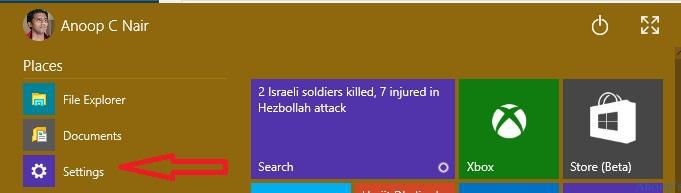
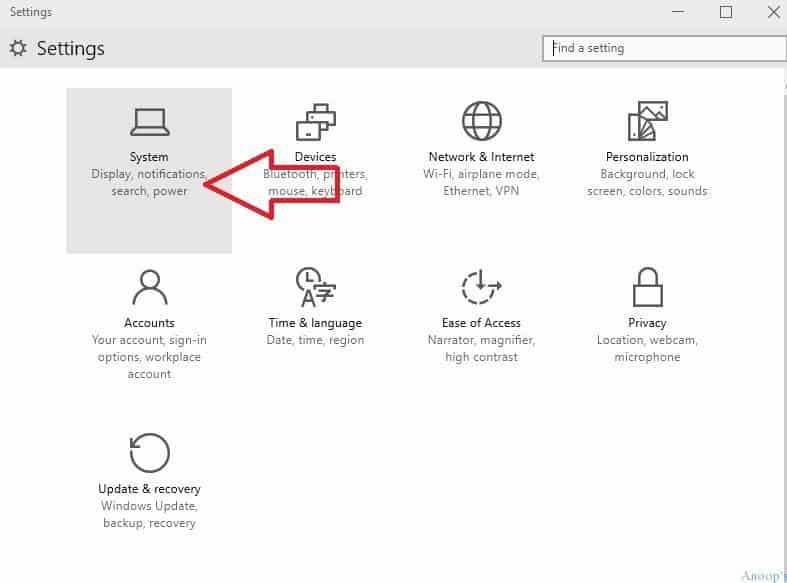
1) Click “settings” and click the System icon on the settings page.
| System |
|---|
| Display, Notifications search power |
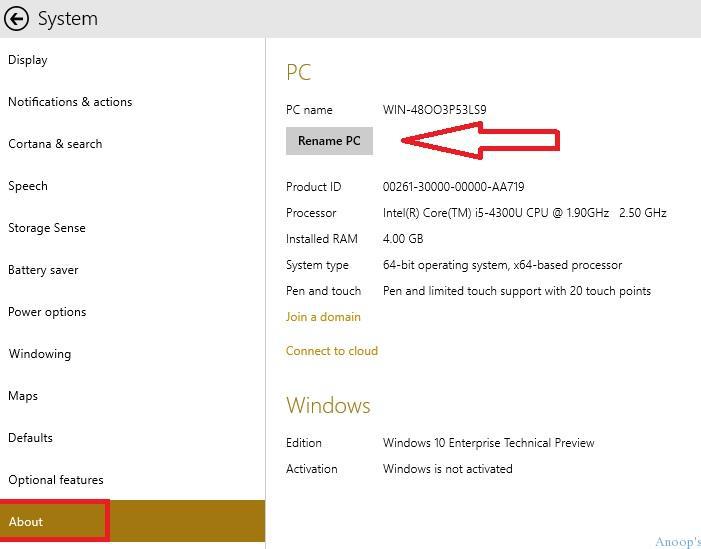
2) Click on “About” and then click on Rename PC to change the name of the Windows 10 machine.
3) Enter the new PC name in the pop-up window and click Next.
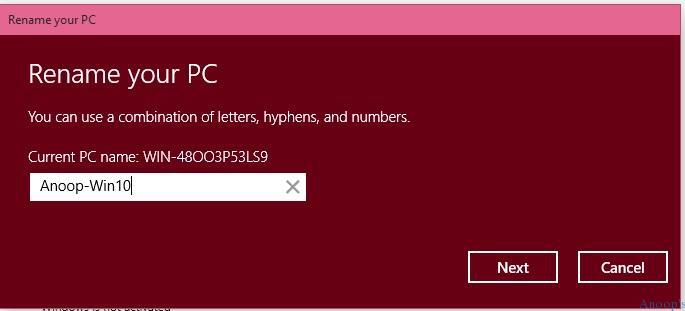
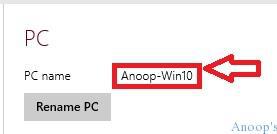
4) To complete the “PC rename” process, restart the machine. After restart, the computer will be named “Anoop-Win10.”
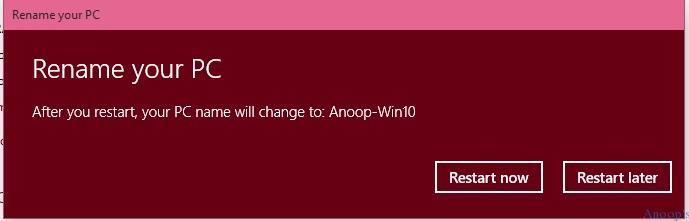
5) So you’ve completed the rename of the computer/machine.
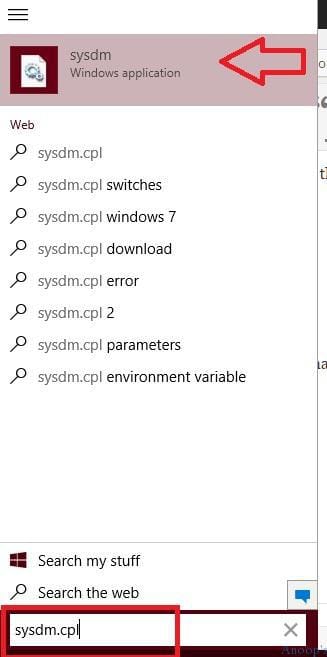
Bonus P.S:- The easiest way to change the computer name is to run the command “SysDM.cpl” and Click on the System Windows application to change the computer name.
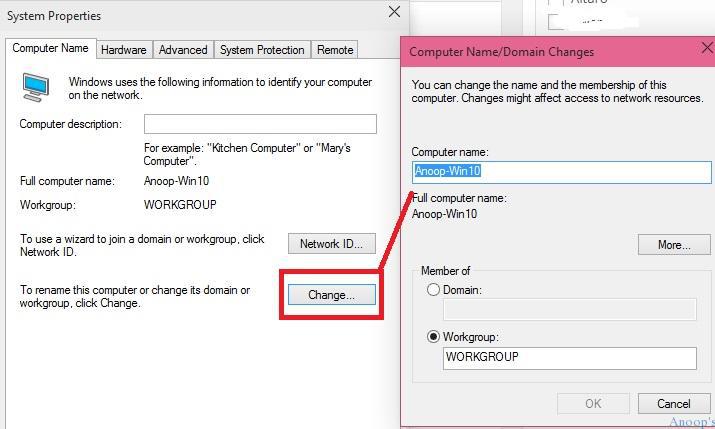
Click on the change button, and you can directly rename the computer!
Resources
Windows 10 Latest Version Of Client Operating System From Microsoft (anoopcnair.com)
We are on WhatsApp now. To get the latest step-by-step guides, news, and updates, Join our Channel. Click here. HTMD WhatsApp.
Author
Anoop C Nair is Microsoft MVP! He is a Device Management Admin with more than 20 years of experience (calculation done in 2021) in IT. He is a Blogger, Speaker, and Local User Group HTMD Community leader. His primary focus is Device Management technologies like SCCM 2012, Current Branch, and Intune. He writes about ConfigMgr, Windows 11, Windows 10, Azure AD, Microsoft Intune, Windows 365, AVD, etc.



i am not able to see the images in many of your articles.
StaffOn which browser? Are you behind cooperate proxy ?
Thanks a lot for nice share. It helps me a lot.
I recently purchased a new laptop for my child which ran windows 7. I ran windows update to bring the system up to date before upgrading to windows 10 but there was a problem and I had to take the machine back to the store. They did a system restore and renamed the computer incorrectly. I’ve managed to change the name of the computer using the above but when I log into my Microsoft account and look at family devices, the name of that device is still coming up with the old computer name. How can I fix this? I’d really rather not have to restore the computer yet again to set the name to what I want. Is there another way? Many thanks?
I getting an error and the prompt to enter a domain username and password – but I’m logged as a local administrator only 🙁
Great article indeed, it really works for me, since many day i unable to change my name in windows. i read so many site but no where found proper solution.
thanks a lot.