






SCCM Requires a Reboot to Complete the Installation
SCCM Requires a Reboot to Complete the Installation. I never missed installing any of the Cumulative Updates of SCCM 2012 R2. It’s a routine that I install all the SCCM 2012 R2 CUs in at least 4-5 different environments.
SCCM Requires a Reboot to Complete the Installation – For me, it’s very normal to restart the server before starting the SCCM /ConfigMgr 2012 R2 CU installation (whenever the wizard prompts me to do so).
But today, it was something different. During the ‘Prerequisite Check’, SCCM 2012 R2 CU4 didn’t ask me to restart the server. Download SCCM 2012 R2 CU4 from here (kb/3026739).
To my surprise, SCCM / ConfigMgr 2012 R2 CU4 asked for a reboot at the end of the installation wizard. The MSI log file (cm12-r2cu4-kb3026739-x64-enu.msi.log) provided some more details.

| Index |
|---|
| Entries of cm12-r2cu4-kb3026739-x64-enu.log File |
| Entries of cm12-r2cu4-kb3026739-x64-enu.msi.log |

- Is SCCM Dying?
- Download SCCM 2309 Early Ring Version Using PowerShell Script
- Download Latest SCCM Installation Media | Baseline Version
- SCCM Slow Ring Vs Fast Ring Details | Opt-in Vs Generally Available | Early Update Ring
Entries of cm12-r2cu4-kb3026739-x64-enu.log File
The reason for the restart mentioned in the SCCM ConfigMgr 2012 R2 CU4 MSI log file is “Reason for Restart: 1”. As per the MSI logging, If this property is present with a value of 1, then the Installer will require a reboot because it overwrote an in-use file.
<![LOG[    Starting task 'Verifying restart is not required.'.]LOG]!><time="21:46:40.913+330" date="02-07-2015" component="Update Setup" context="" type="0" thread="4380" file="">
<![LOG[Task 'Verifying restart is not required.' completed, state is 'passed']LOG]!><time="21:46:41.038+330" date="02-07-2015" component="Update Setup" context="" type="0" thread="4528" file="">
..
..
<![LOG[Installation tasks completed, with at least one task pending a reboot.]LOG]!><time="21:58:53.002+330" date="02-07-2015" component="Update Setup" context="" type="0" thread="4528" file="">
<![LOG[Update Setup has completed successfully.]LOG]!><time="21:58:53.017+330" date="02-07-2015" component="Update Setup" context="" type="0" thread="4528" file="">
<![LOG[Displaying wizard page: 'Installation Complete'.]LOG]!><time="22:00:25.676+330" date="02-07-2015" component="Update Setup" context="" type="0" thread="4528" file="">
<![LOG[To complete the installation, close this wizard and restart the computer.]LOG]!><time="22:00:25.692+330" date="02-07-2015" component="Update Setup" context="" type="0" thread="4528" file="">
<![LOG[COMPLETE PAGE: View release notes requested.]LOG]!><time="22:01:58.544+330" date="02-07-2015" component="Update Setup" context="" type="0" thread="4528" file="">
| Entries of cm12-r2cu4-kb3026739-x64-enu.log file |
|---|
| Starting task verifying restart is not required |
| Task verifying restart is not required completed state is paused |
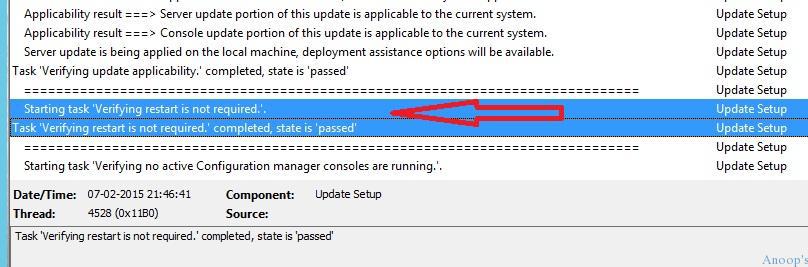
Entries of cm12-r2cu4-kb3026739-x64-enu.msi.log
So, there’s no need to worry if you’re getting the restart for the first time after any of the SCCM 2012 Cumulative Update installations !! SCCM Requires a Reboot to Complete the Installation.
MSI (s) (C4:08) [21:52:39:716]: Windows Installer installed the product. Product Name: Cumulative Update 4 for Configuration Manager R2 (KB3026739). Product Version: 5.0.7958.1501. Product Language: 0. Manufacturer: Microsoft Corporation. Installation success or error status: 0.
MSI (s) (C4:08) [21:52:39:756]: Value of RebootAction property is
MSI (s) (C4:08) [21:52:39:790]: Windows Installer requires a system restart. Product Name: Cumulative Update 4 for Configuration Manager R2 (KB3026739). Product Version: 5.0.7958.1501. Product Language: 0. Manufacturer: Microsoft Corporation. Type of System Restart: 2. Reason for Restart: 1.
MSI (s) (C4:08) [21:52:39:822]: Product: Cumulative Update 4 for Configuration Manager R2 (KB3026739). Restart required. The installation or update for the product required a restart for all changes to take effect.  The restart was deferred to a later time.
Resources
Windows 10 Latest Version Of Client Operating System From Microsoft
We are on WhatsApp now. To get the latest step-by-step guides, news, and updates, Join our Channel. Click here. HTMD WhatsApp.
Author
Anoop C Nair is Microsoft MVP! He is a Device Management Admin with more than 20 years of experience (calculation done in 2021) in IT. He is a Blogger, Speaker, and Local User Group HTMD Community leader. His main focus is on Device Management technologies like SCCM 2012, Current Branch, and Intune. He writes about ConfigMgr, Windows 11, Windows 10, Azure AD, Microsoft Intune, Windows 365, AVD, etc.




Upgraded to R2 CU4 last week, and it hosed my MP, having to uninstall/reinstall my MP 🙁
StaffOh, ok. Probably site reset didn’t go well with reinstall of SCCM 2012 R2 CU4 MP component.
I tested the installation of CU4 in my lab, it didn’t prompt me for reboot.
StaffI’ve updated 4 of my servers and only 1 prompted for reboot. So we can’t expect reboot every time after installing SCCM 2012 R2 CU4 on your SCCM site Servers.
It should be recommended to update all servers that receive a CU or SP update.
StaffWas that a question or statement. If question then as per my experience I would update all the site servers and site DB. All the site systems will get automatically updated to SCCM 2012 R2 CU4 once you install this on site server.
Regards
Anoop
Hi,
was SCCM console opened during CU installation?
C/P from: http://support.microsoft.com/kb/3026739
Restart information
You do not have to restart the computer after you apply this update.
Note We recommend that you close the Configuration Manager Administrator Console and any associated applications such as the Remote Control Viewer or Status Message viewer before you install this update.
You may be prompted to restart the computer that the Administrator Console update is being applied to if the Remote Control Viewer (CmRCViewer.exe) is being used during the update process.
You can avoid restarting by closing the Remote Control Viewer before you install the update, or by adding the REBOOT=ReallySuppress parameter to the update installation properties. Be aware that this parameter is automatically added to packages that are created by the Cumulative Update installation.
StaffNope. It was not open.
Regards
Anoop