






FIX SCCM Update Not Available Issue Error 2146233079
Let’s try to fix SCCM update not available issue with error 2146233079. If you cannot see the latest SCCM updates in the console, this is the post for you! Failed to call AdminUIContentDownload error = Error – 2146233079.
This post explains my experience with SCCM Updates. Failed to download Admin UI content payload with exception issue. It’s time for another troubleshooting blog post. The SCCM update download issue with Error – 2146233079.
Let’s check what the options are to FIX ConfigMgr Upgrade Download Error. The SCCM 2207 has released by Microsoft on August 13, 2022. This issue could also happen with the latest versions of SCCM update downloads.
The SCCM Version 2207 includes all the previously released hotfixes and out-of-band updates, and When you upgrade to SCCM 2207, you don’t need to install any of these updates before upgrading it. You can directly jump to 2207.

Related Issue – Fix SCCM Updates and Servicing Issue with CMUpdateReset Tool, Fix to SCCM CB Redist Download Issue & CM Update Reset Tool Fixes SCCM CB Update Download Issue.
Related Blogs: SCCM 2207 Upgrade Step-by-Step Guide | New Features https://www.anoopcnair.com/sccm-2207-upgrade-guide-new-features-configmgr/ By Jitesh
Error 2146233079 | FIX SCCM Update Not Available Issue
Microsoft released the latest SCCM update, and it’s generally available; hence there is no need to use a PowerShell script to make it appear on the console. However, this update did not appear in the SCCM console (SCCM Update Not Available Issue) even though the SCCM has an online connection.
- Read more on the online SCCM Service Connection Point.
The first thing I noticed was that there is no “Configuration Manage 2207” version in my console. It’s very Strange. I clicked “Check For Updates” under Administration – Updates and Servicing a couple of times but still the same.
Found the below error in DMPDOWNLOADER.log. More details about SCCM Logs are available in our detailed blog post. But the following error didn’t give any points for SCCM Update not Available Issue with error 2146233079.
Download manifest.cab SMS_DMP_DOWNLOADER
Redirected to URL https://configmgrbits.azureedge.net/adminuicontent/ConfigMgr.AdminUIContent.cab
Error Failed to download Admin UI content payload with exception: The underlying connection was closed
Failed to call AdminUIContentDownload error = Error - 2146233079
So started searching and found one blog by Anoop about the same issue. The reset tool helps to reset the download and start again – FIX SCCM Update Download Issue With Update Reset Tool.
I followed the steps, but still the same issue the latest SCCM update was not appearing in the console. The SCCM update not available issue fix is given below.
I thought of taking it with MS but got some free time over the weekend, so I decided to identify the root cause. Since this was a test site, I was completely free to get my hands dirty.
The error relates to TLS and SSL a lot. Several other blogs talk about enabling SCHANNEL\Protocols. https://support.citrix.com/article/CTX245765/error-the-underlying-connection-was-closed-an-unexpected-error-occurred-on-a-send-when-querying-monitoring-services-odata-endpoint
Resolution – FIX SCCM Update Not Available Issue Error 2146233079
Some of the posts suggested executing the following command to FIX SCCM Update Failed to download Admin UI content payload with exception Error 2146233079 issue. This didn’t fix “SCCM Update Not Available Issue Error 2146233079.”
- ServicePointManager.SecurityProtocol = (SecurityProtocolType)768 | (SecurityProtocolType)3072;
Finally, I reached this blog https://sccmnotes.wordpress.com/2020/12/02/failed-to-call-adminuicontentdownload-error-error-2146233079-in-dmpdownloader-log-due-to-non-default-ssl-cipher-suite-order/
The blog above talks about the working and not working sites which was already done by me but not at this depth. Before checking the above blog post, I had already compared the working and non-working server settings.
NOTE: – The following URL that comes into the picture (https://configmgrbits.azureedge.net/adminuicontent/ConfigMgr.AdminUIContent.cab) was working fine on the primary site, which is already showing the update status “Ready To Install.”
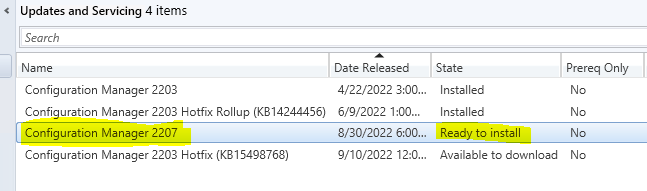
So followed the above blog and rebooted the server. After that, I could see that the “Updates and Servicing” page already showed that MECM 2207 was “Ready To Install.” I rebooted the primary site several times before applying the fix, and the update was not downloading.
So basically, the issue was caused by different cipher suites or settings.” More details are available in the following blog post – How to Update Your Windows Server Cipher Suite for Better Security (howtogeek.com).
There is a utility to check the cipher suite https://www.nartac.com/Products/IISCrypto/Download. Use the utility and compare the server that worked against the server that didn’t, and you will notice they were different: The working server had the default settings.
How to enable TLS 1.2 for SCCM
On a related topic, let’s see how to enable TLS 1.2 for SCCM. We have discussed this in our HTMD Forum thread. You will need to follow the steps explained below:
- Enable TLS 1.2 for clients
- Ensure that TLS 1.2 is enabled as a protocol for SChannel at the operating system level
- Update and configure the .NET Framework to support TLS 1.2
- Update SQL Server and client components
- Update Windows Server Update Services (WSUS)
More details https://docs.microsoft.com/en-us/mem/configmgr/core/plan-design/security/enable-tls-1-2-server.
The following are the few other articles I came across while troubleshooting this content download issue.
- https://github.com/MicrosoftDocs/SupportArticles-docs/blob/main/support/mem/configmgr/service-connection-tool-not-download-updates.md
- https://learn.microsoft.com/en-us/answers/questions/470007/error-34the-underlying-connection-was-closed-an-un.html
- https://learn.microsoft.com/en-us/answers/questions/362284/error-the-underlying-connection-was-closed-an-unex.html
- https://www.linkedin.com/pulse/error-systemnetwebexception-underlying-connection-send-chima-duru/?trk=articles_directory
Disclaimer – The information provided on the site is for general informational purposes only. All information on the site is provided in good faith. However, we make no representation or warranty of any kind, express or implied, regarding the accuracy, adequacy, validity, reliability, availability, or completeness of any information on the website.
Resources
- SCCM Server Upgrade to 2010 | ConfigMgr | Guide | Step by Step
- Known Issues with SCCM 2006
- Possible Issues with SCCM 2012 to CB Current Branch Upgrade
Author
My name is Deepak Rai, and I am a Technical Lead on SCCM and Intune with more than 14 years of experience in IT. My main domain is SCCM (AKA ConfigMgr, CB, MECM, etc.), Intune, and Azure (Runbooks). I have worked on several platforms (Active Directory, Exchange, Veritas NETBACKUP, Symantec Backup Exec, NDMP devices Like Netapp, EMC Data Domain, Quantum using Backup Exec 2010 and 2012, HP storage works 4048 MSL G3, Data Deduplication related troubleshooting.) in these 13 years but at last ended up to the technology from which I started as IT Engineer (SCCM).




Discussion