






Accidental Listing of C Release to WSUS Made Current Months CUs as Superseded in SCCM and WSUS
Microsoft confirmed that Accidental Listing of C Release to WSUS or SCCM made Current Months CUs superseded in SCCM and WSUS. This happened with September CUs for Windows 10 and Windows 11. This issue is not limited to Windows 10/11; more patches are impacted with this release.
Microsoft already released advisory #WI437182 on the September 2022 preview release is listed in Windows Server Update Services(WSUS). The preview releases (C for this time) are available only via the Microsoft Update Catalog website.
The ‘C’ release is listed among the updates available from WSUS. Microsoft also confirmed that this is a listing error from their side. The Preview updates are generally available for manual importing via the Microsoft Update Catalog and Windows Updates.
This wrong listing issue of C releases caused confusion between SCCM admins who perform monthly patching. This caused problems with Automatic Deployment Rules (ADR) within SCCM. The September 2022 patches automatically started showing as superseded patches (Windows 10 KB5017308 Windows 11 KB5017328).

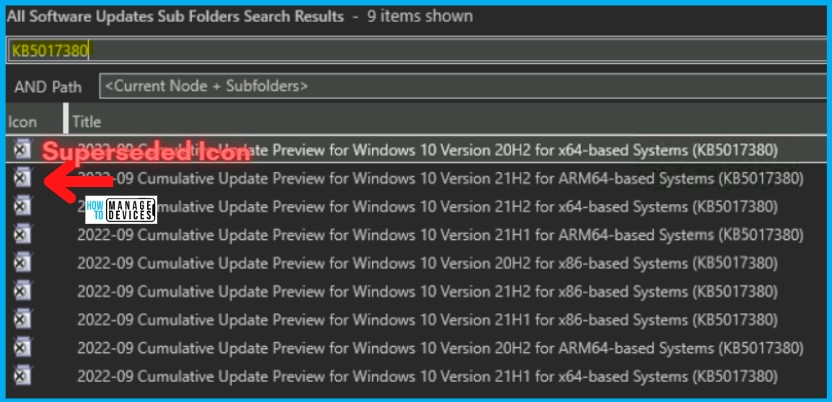
The issue with Accidental Listing of C Release to WSUS
Let’s check the impact of an accidental listing of C release to WSUS. The Accidental Listing of C Release cycle patches to WSUS caused the current month’s CUs to get Superseded in SCCM & WSUS. Hence the ADR and other monthly patching mechanisms stopped working for admins.
As per Microsoft, IT administrators who utilize Windows Server Update Services (WSUS) might notice that the Windows September 2022 preview update, known as the ‘C’ release, is listed among the updates available from WSUS. This listing is an error.
NOTE! – Preview updates are generally available for manual importing via the Microsoft Update Catalog and Windows Updates. The following table shows how the preview releases are managed.
| Release Channel | Available | How to Get the Preview Release Updates |
|---|---|---|
| Windows Update or Microsoft Update | Yes | Go to Settings > Update & Security > Windows Update. In the Optional updates available area, you’ll find the link to download and install the update. |
| Windows Update for Business | No | None. These changes will be included in the next security update to this channel. |
| Microsoft Update Catalog | Yes | To get the standalone package for this update, go to the Microsoft Update Catalog website. |
| Windows Server Update Services (WSUS) | No | You can import this update into WSUS manually. |
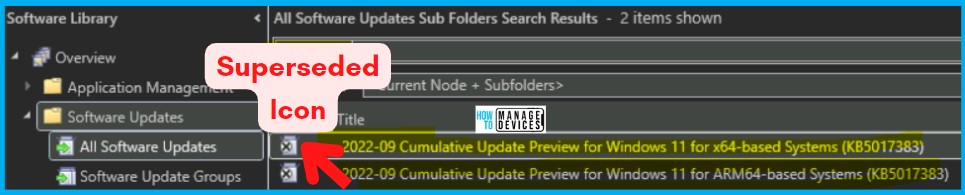
Windows 11 KB5017328 also got a superseded icon, as shown in the picture below!
NOTE! – This issue might also affect the September 2022 Cumulative Update Preview installation for .NET Framework, which is also generally available via Windows Update and Microsoft Update Catalog.
FIX Workaround Current Months CUs as Superseded in SCCM and WSUS Issue
There is no FIX that Microsoft shared for current Months CUs as Superseded in SCCM and WSUS Issue because of accidental listing of preview releases in WSUS.
NOTE! – Home users of Windows are unlikely to experience this issue. Technology administrators commonly utilize WSUS/SCCM to deploy Microsoft product updates in managed Windows environments.
One Workaround that Microsoft shared is the Windows September 2022 preview release was made available via Microsoft Update Catalog. So, the admins can use manual methods to import to WSUS. The preview release updates are already expired from the WSUS listing.
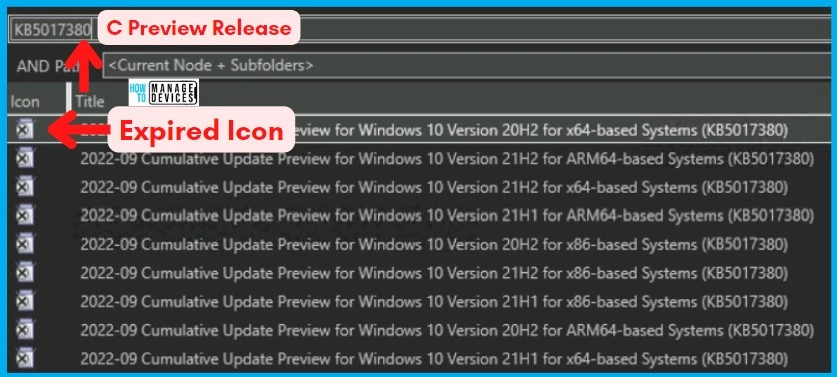
Recover Declined Updates from WSUS
In environments where WSUS is configured to auto-approve updates and auto-decline superseded content, the Windows September 2022 Security updates KB5017328 and KB5017308 may subsequently be auto-declined and auto-expired from the client view.
You can get back to reinstate or recover declined updates using Recover Expired Updates From the SCCM WSUS Console guide. After that, you can run an update synchronization within SCCM. The Environments configured only to take security updates should not reflect these symptoms.
Next steps: The Windows September 2022 preview release is being removed from WSUS, and Microsoft is working on a resolution to support customers who had imported updates via WSUS inadvertently. Microsoft estimates a solution will be available in the coming days.
Author
Anoop C Nair is Microsoft MVP! He is a Device Management Admin with more than 20 years of experience (calculation done in 2021) in IT. He is Blogger, Speaker, and Local User Group HTMD Community leader. His main focus is on Device Management technologies like SCCM 2012, Current Branch, and Intune. He writes about ConfigMgr, Windows 11, Windows 10, Azure AD, Microsoft Intune, Windows 365, AVD, etc.




Discussion