


Skip to content
Allow Unlicensed Admin to Access Intune

Allow Unlicensed Admin to Access Intune

Written By Jitesh Kumar
Last Updated May 20, 2022
Posted In Intune
SHARE

Let’s check the option to allow Unlicensed Admin to Access Intune. You can give administrators access to Microsoft Endpoint Manager without requiring an Intune license. This feature applies to any administrator, including Intune administrators, global administrators, Azure AD administrators, etc.

Users who sign in to the Microsoft Endpoint Manager admin center don’t require an Intune license. Their scope of access is defined by the roles assigned to them. Other features or services, such as those in Azure Active Directory (AD) Premium, may require a license for the administrator.

Intune supports up to 350 unlicensed admins per security group and only applies to direct members. Admins above this limit will experience unpredictable behavior. It can take up to 48 hours for access changes to take effect.

The Unlicensed admins option has been enabled by default on all accounts created after the Intune service release 2006. This is more useful when you have limited licenses available to you. Let’s see How Unlicensed Admin users can Perform Intune Admin Activities.

Patch My PC

Allow Unlicensed Admins to Access Intune

The following steps guide you to allow access to unlicensed admins using MEM Admin Center.

  • Sign in to the Endpoint Manager Intune portal https://endpoint.microsoft.com/
  • Navigate to Tenant administration > Roles.
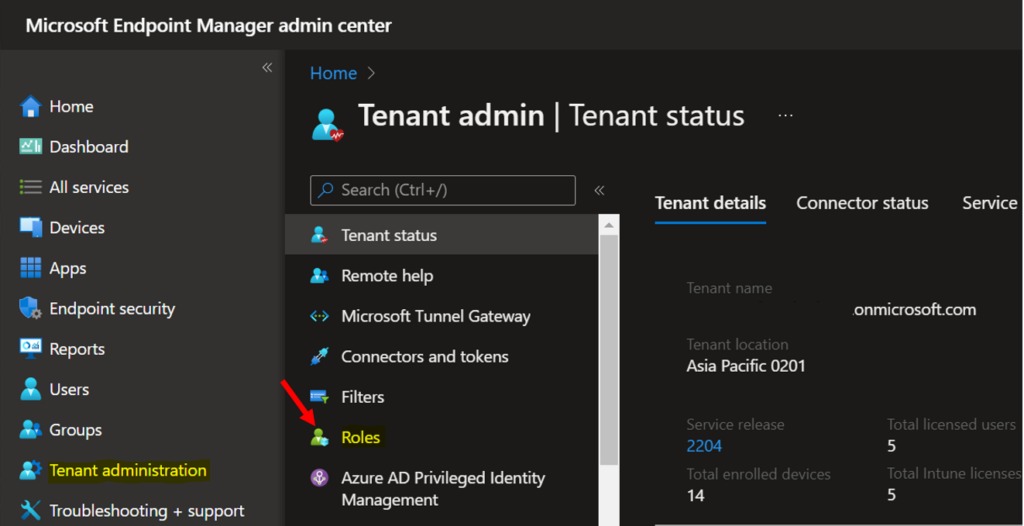
Click on Roles - Allow Unlicensed Admin to Access Intune
Click on Roles – Allow Access Intune

Under Administrator Licensing, Click on Allow access to unlicensed admins that allow admins without an Intune license to access Intune.
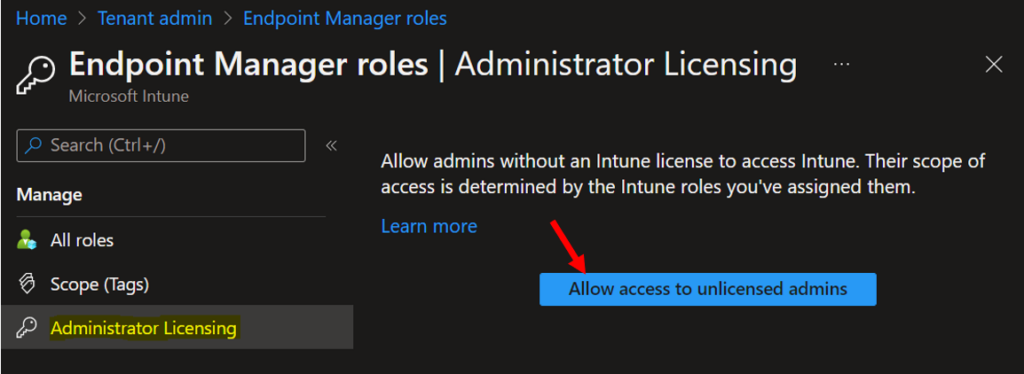
Administrator Licensing - Allow access
Administrator Licensing – Allow access

A Prompt will appear “Allow access to unlicensed admins”. Clicking on Yes allows admins without an Intune license to access Intune.

Important – Once you enable the unlicensed administrators option. You can’t undo this setting after clicking Yes.
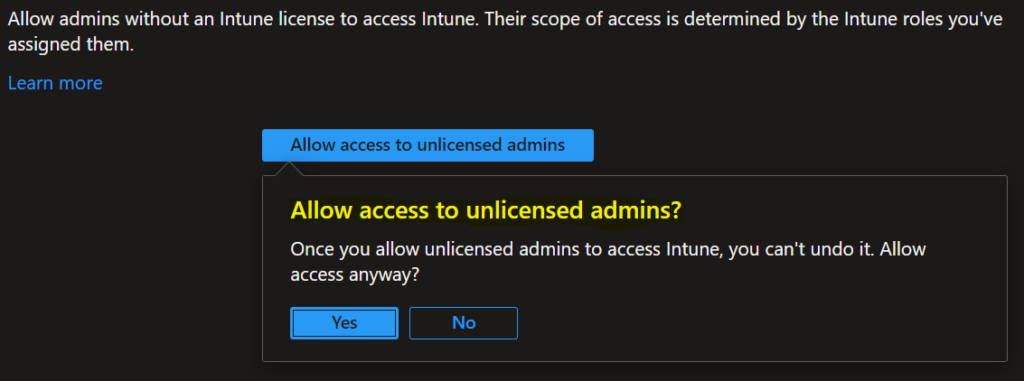
Click on Yes to allow access

Once you have enabled the access, you will see the message in Administrator Licensing –

All admins who do have licenses can access Intune. To revoke access from an unlicensed admin, remove them as a member from their Azure AD group assigned to Intune role.

Next, let’s review the assigned role for users of the admin group. For Example: Here, I moved to Users > Search for the user part of Intune Tenant > Selected User.

Navigate to the section “Assigned role”. Here you can validate the role of “Intune administrator”. If the user doesn’t have any role assigned, you can click on + Add assignments and assign the administrative role.
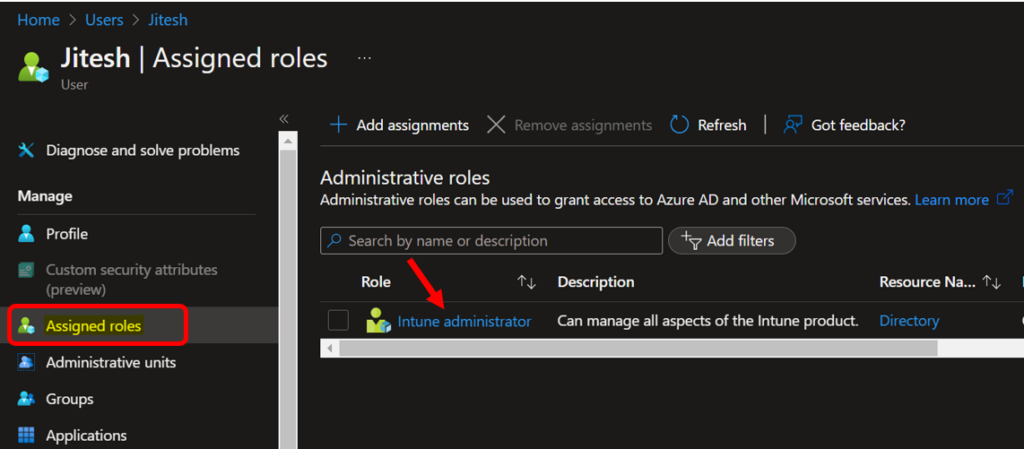
Intune Assigned Roles

Click on Licenses. Here, you can see User has no licenses assigned.
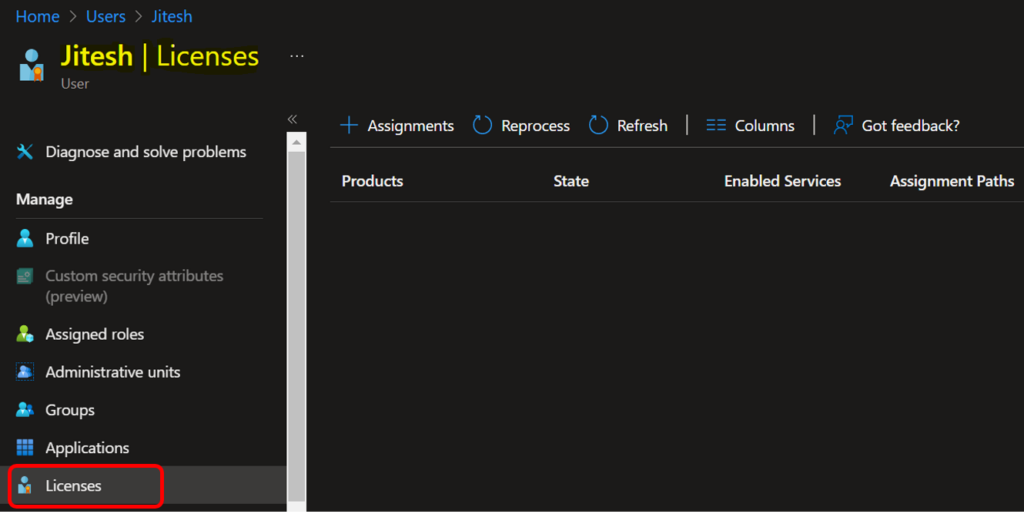
Assigned Licenses
Assigned Licenses

The unlicensed admins should have access to MEM Admin Center if you don’t want to allow admins not to access Intune. You can remove the administrative role for the user.

Author

Written by

Jitesh has over 5 years of working experience in the IT Industry. He writes and shares his experiences related to Microsoft device management technologies and IT Infrastructure management. His primary focus area is Windows 10 Deployment solution with Configuration Manager, Microsoft Deployment Toolkit (MDT), and Microsoft Intune.

Discussion

Join the discussion

Your email address will not be published. Required fields are marked *

Related guides

Intune

Simplify Windows Devices to Run Only the Required Applications using Intune

Key Takeaways Hey, let’s learn about Simplify Windows Devices to Run Only the Required Applications using Intune. This policy lets administrators replace the default windows shell with a custom or lightweight shell. it improves performance by using system resources and is useful for devices that run a dedicated application. If the policy is disabled or […]

AC Anoop C Nair 8 min read
Intune

Enhance macOS Compliance with Custom Security and Compliance Checks to Improve Device Security using Microsoft Intune

Key Takeaways In this post we are discussing about Enhance macOS Compliance with Custom Security and Compliance Checks to Improve Device Security using Microsoft Intune. Microsoft has announced the general availability of Custom Compliance Settings for macOS in Microsoft Intune. The feature helps organizations strengthen security controls while supporting many types of macOS management scenarios. […]

AC Anoop C Nair 4 min read
Intune

Manage Samsung Galaxy Firmware Versions to Improve Security and Compliance using Microsoft Intune

Key Takeaways In this post we are discussing Manage Samsung Galaxy Firmware Versions to Improve Security and Compliance using Microsoft Intune. Microsoft Intune has received a new update that expands firmware management capabilities for Samsung Galaxy devices through Firmware Versionsintegration. This enhancement gives IT administrators more control over firmware and operating system updates, helping them […]

AC Anoop C Nair 4 min read
Intune

MS Intune Adds Windows Registry Data Collection to Device Inventory for Single Values All Key Values and Subkeys

Key Takeaways Microsoft Intune 2607 introduces Windows Registry Data collection in Device Inventory, allowing IT admins to verify actual device configurations without relying on custom discovery or remediation scripts. Using the Properties Catalog, admins can collect registry information through Single Value, All Values Under a Key (Non-Recursive), or Same Value Across Subkeys. MS Intune Adds […]

AC Anoop C Nair 5 min read