






Identify Android Enterprise System Apps using Intune Explorer and Security Copilot
Let’s discuss how to Identify Android Enterprise System Apps using Intune Explorer and Security Copilot. Android Enterprise system apps are apps that already come with Android phones or tablets. These apps are important for the device to work properly and stay secure.
They are built into the system and cannot be removed easily. With Microsoft Intune, companies can control these apps. They can choose to turn them on or turn them off based on what they need for their employees. These settings work on different types of devices like company-owned phones or personal phones with work profiles.
Users cannot pick these apps to install by themselves. Only the IT team can manage them. For example, a company might want a security app to always be on every employee’s phone to make sure their work apps run smoothly and safely.
In this post, you will learn how to identify Android Enterprise system apps using Intune Explorer and Security Copilot. These tools help IT administrators easily find and manage the system apps that are built into Android devices and are essential for security, device management, and functionality.

Table of Contents
Identify Android Enterprise System Apps using Intune Explorer and Security Copilot
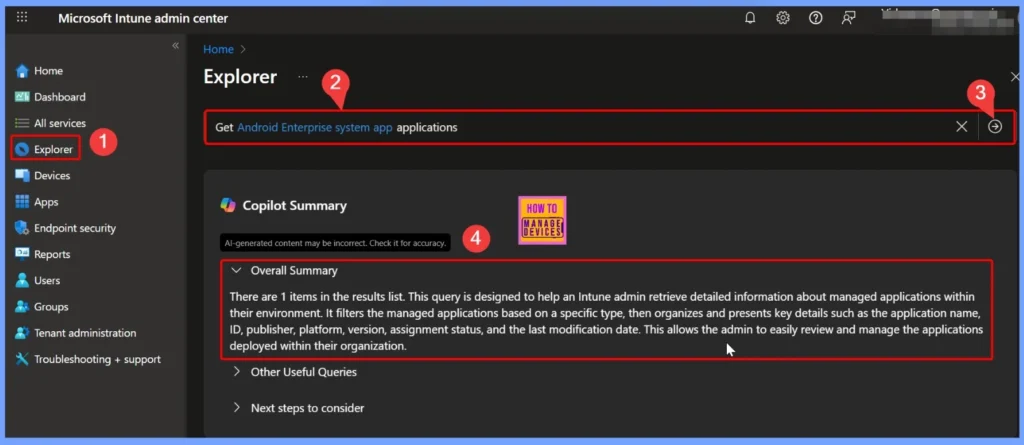
To identify Android Enterprise system apps using Intune Explorer and Security Copilot, first sign in to the Intune admin center and select the Explorer tab on the left side. Then, type the query Get Android Enterprise system app applications and click the arrow next to it.
- Security Copilot will process the query and show the results, such as “There are 1 items in the results list.”
- This query helps IT admins retrieve detailed information about the managed system apps in their environment.
- It filters apps based on type and presents important details like the app name, ID, publisher, platform, version, assignment status, and last modification date, making it easier to review and manage the apps deployed across the organization.
- How to Retrieve General Device Configuration Policies for Android Device Owner using Intune Copilot Explorer
- How to View Managed App Types Details with Intune Explorer and Security Copilot
- How to use Intune Explorer with Security Copilot to Access Devices Users Apps Compliance and Update Details
Identify Devices with a Specific Managed App Installed
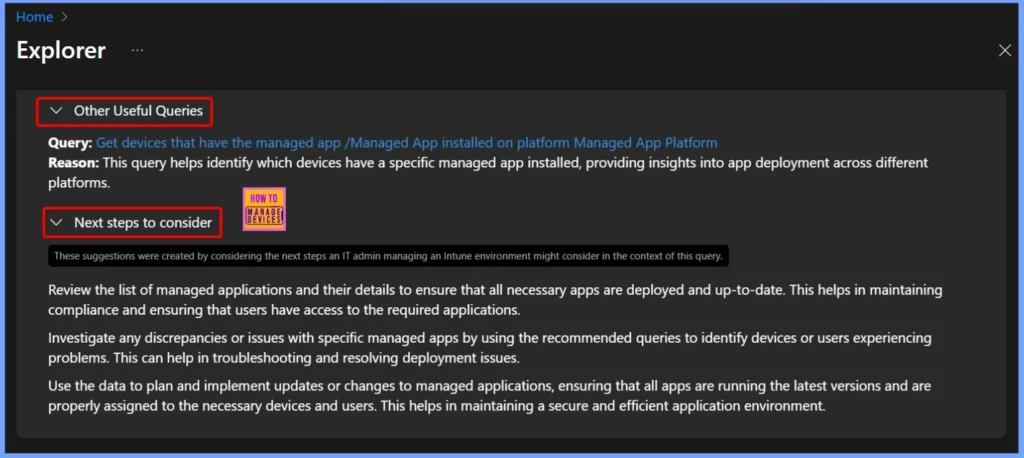
The query Get devices that have the managed app /Managed App installed on platform Managed App Platform helps IT administrators quickly identify which devices have a specific managed app installed. This enables them to track app usage, ensure compliance, and troubleshoot deployment issues across different devices and platforms within the organization.
| Next steps to consider |
|---|
| Review the list of managed applications and their details to ensure that all necessary apps are deployed and up-to-date. This helps in maintaining compliance and ensuring that users have access to the required applications. Investigate any discrepancies or issues with specific managed apps by using the recommended queries to identify devices or users experiencing problems. This can help in troubleshooting and resolving deployment issues. Use the data to plan and implement updates or changes to managed applications, ensuring that all apps are running the latest versions and are properly assigned to the necessary devices and users. This helps in maintaining a secure and efficient application environment. |
- How to View Managed App Types Details with Intune Explorer and Security Copilot
- How to Get All Managed App Installation Results for User using Intune Explorer with Security Copilot
- How to Get Device Enrollment Details by User in Intune Explorer with Security Copilot
End Results of Identifying Android Enterprise System Apps
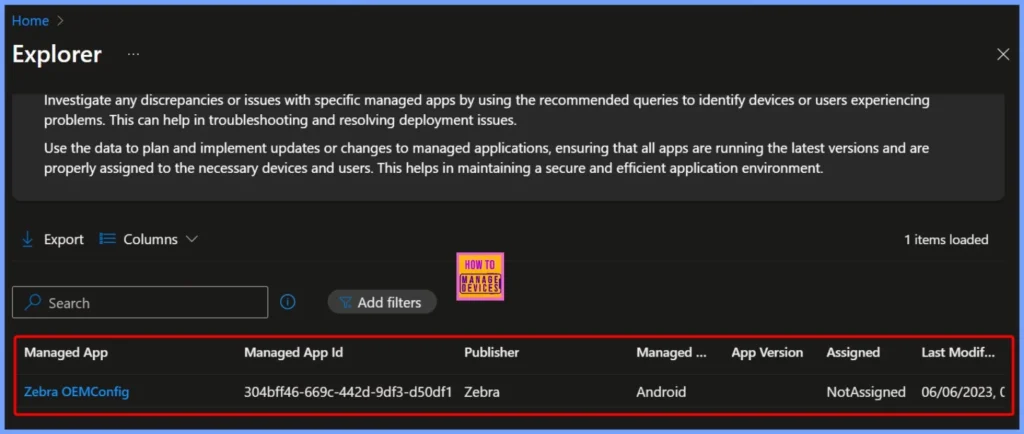
After running the query in Intune Explorer and Security Copilot, you can see details about the system apps on your devices. Here the result shows the Zebra OEMConfig app with information like the publisher, app ID, platform (Android), version, and assignment status. In this case, the app is assigned and was last modified on 06/06/2023.
- This makes it easy for IT admins to understand which system apps are active and how they are being used in the organization.
| Managed App | Publisher | Managed App Id | Managed App Platform |
|---|---|---|---|
| Zebra OEMConfig | Zebra | 304bff46-669c-442d-9df3-d50df1 | Android |
Need Further Assistance or Have Technical Questions?
Join the LinkedIn Page and Telegram group to get the latest step-by-step guides and news updates. Join our Meetup Page to participate in User group meetings. Also, join the WhatsApp Community to get the latest news on Microsoft Technologies. We are there on Reddit as well.
Author
Anoop C Nair has been Microsoft MVP for 10 consecutive years from 2015 onwards. He is a Workplace Solution Architect with more than 22+ years of experience in Workplace technologies. He is a Blogger, Speaker, and Local User Group Community leader. His primary focus is on Device Management technologies like SCCM and Intune. He writes about technologies like Intune, SCCM, Windows, Cloud PC, Windows, Entra, Microsoft Security, Career, etc.


Discussion