






How to Speed Up App Management in Intune using Apple VPP API Version 2.0
Let’s discuss How to Speed Up App Management in Intune using Apple VPP API Version 2.0. Microsoft Intune now connects to Apple’s updated Volume Purchase Program (VPP) API version 2.0, bringing major improvements for organizations and schools using Apple Business Manager or Apple School Manager.
Earlier, if you needed to install 25 apps on 10,000 devices, Intune had to send 25,000 separate requests. With the new VPP API v2.0, it only needs 10. This makes the process much faster, especially when deploying apps to a large number of devices.
Apple’s Volume Purchase Program (VPP) allows organizations to buy and distribute iOS, iPadOS, and macOS apps in bulk. These apps can be distributed through an MDM solution like Microsoft Intune or via redeemable codes.
In this post, you will get all the details of the latest Intune integration with Apple’s Volume Purchase Program (VPP) API version 2.0. Learn how this update improves app deployment speed, reduces the number of API requests for large-scale rollouts, and enables near real-time sync with Apple Business Manager and Apple School Manager.

Table of Contents
What’s New in the Latest Intune Update Regarding VPP?
Intune now supports Apple VPP API version 2.0, offering faster performance and near real-time synchronization with Apple Business Manager and Apple School Manager.
How Does VPP API v2.0 Improve Performance?
Previously, assigning 25 apps to 10,000 devices triggered 25,000 individual requests. With VPP API v2.0, only 10 requests are needed, drastically improving performance in large deployments.
Who Benefits the Most from this Update?
Organizations with high-volume app deployments, such as schools or enterprises managing thousands of devices, will see the most noticeable improvements.
How to Speed Up App Management in Intune using Apple VPP API Version 2.0
Many schools and organizations using Apple Business Manager or Apple School Manager have faced slowdowns when managing apps for a large number of devices. Apple has now identified this issue and is working to improve how apps are licensed and deployed in bulk, making it much faster and easier—especially for large environments like schools and companies.
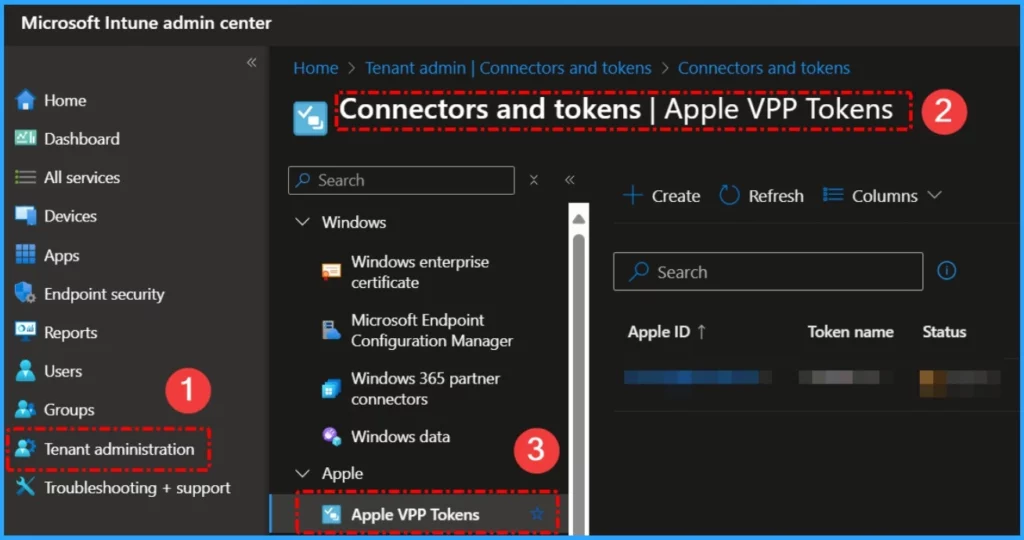
- Go to Microsoft Intune admin center.
- Navigate to Tenant administration > Connectors and tokens > Apple VPP tokens.
- Revoke App Licenses For Apple VPP App Using Intune
- How to Renew Apple VPP Tokens in Intune
- Delete Apple VPP Tokens from Intune
Take Action to Use VPP API v2.0 in Intune
If you’re already managing Apple VPP through Intune, there is no need for any manual action to start using the new VPP API v2.0. The update happens automatically behind the scenes. Just make sure your VPP token in Intune is valid and up to date to continue seamless app licensing and deployment without interruption.
Need Further Assistance or Have Technical Questions?
Join the LinkedIn Page and Telegram group to get the latest step-by-step guides and news updates. Join our Meetup Page to participate in User group meetings. Also, Join the WhatsApp Community to get the latest news on Microsoft Technologies. We are there on Reddit as well.
Resources
What’s new in Microsoft Intune: April 2025 – Microsoft Intune Blog
Author
Anoop C Nair has been Microsoft MVP from 2015 onwards for 10 consecutive years! He is a Workplace Solution Architect with more than 22+ years of experience in Workplace technologies. He is also a Blogger, Speaker, and Local User Group Community leader. His primary focus is on Device Management technologies like SCCM and Intune. He writes about technologies like Intune, SCCM, Windows, Cloud PC, Windows, Entra, Microsoft Security, Career, etc.


Discussion