






How to Deploy Articulate 360 using Intune Application Model
Let’s discuss how to Deploy Articulate 360 using the Intune Application Model. As we know, Microsoft Intune is a comprehensive cloud-based service. It manages user access to organizational resources and simplifies app and device management across many devices, including mobile devices, desktop computers, and virtual endpoints.
One of its key components is the Enterprise App Catalog, which serves as a centralized hub for users to access and install applications approved by their organization. The Enterprise App Catalog is a collection of prepared Microsoft and non-Microsoft applications.
Articulate 360 is a cloud-based software suite created by Articulate, a prominent provider of e-learning solutions. It features powerful authoring tools like Storyline 360 and Rise 360, which allow users to design interactive and visually engaging e-learning content without requiring extensive programming knowledge.
Articulate 360 is an e-learning platform for creating workplace training. It allows you to build engaging courses with AI-enhanced authoring, simplify collaboration, and quickly share content. We will see step-by-step guidance on establishing Articulate 360 Using the Enterprise App Catalog App via Intune.

Table of Contents
What Does Articulate 360 Includes?
Additionally, it offers a project review app to streamline the review process, a user-friendly learning management system (LMS) for easy course distribution, and live, on-demand online training sessions led by industry experts.
How to Deploy Articulate 360 using Intune Application Model
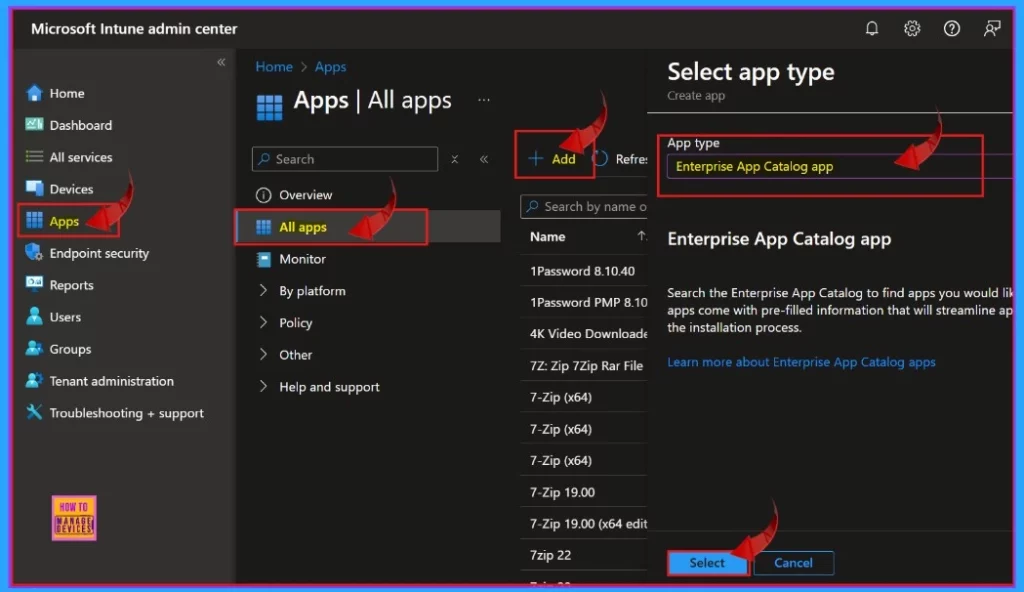
Explore the award-winning products in the Articulate 360 platform. Articulate streamlines the course authoring process. With one subscription, you can access Storyline, Rise, an AI Assistant, and more. To install an app, we must sign in to the Microsoft Admin Center, enter our credentials, and log in to the Microsoft Intune Admin Center.
- Apps > All Apps > +Add >Enterprise App Catalog app > Select.
- Easy Deployment of Install DAX Studio in Intune Using the Enterprise App Catalog App
- Easy Guide to Configure EPM Reusable Settings with Intune
- Deploying Defraggler App Through the Enterprise App Catalog App in Intune
App Information
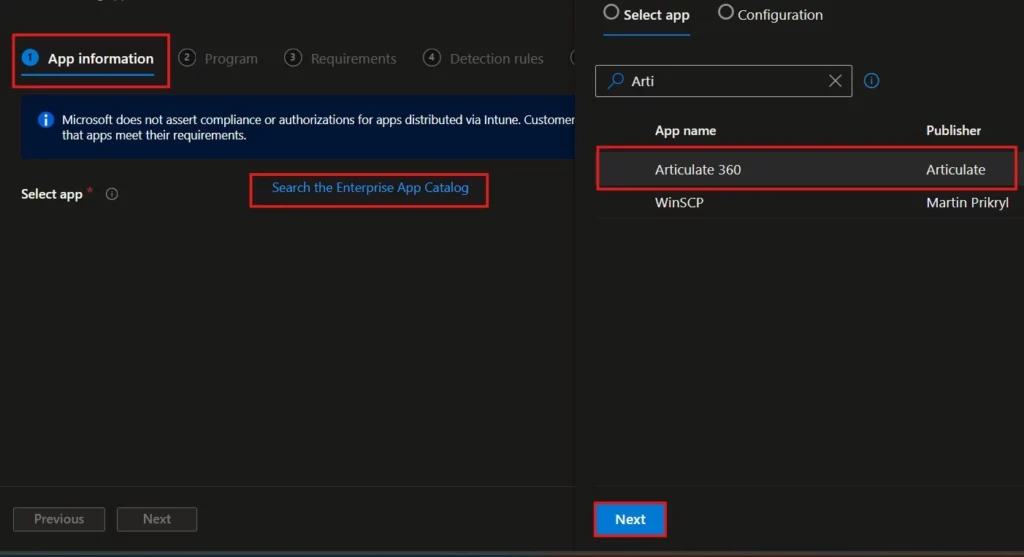
On the App information tab, you will find a hyperlink that directs you to the Enterprise app catalog. By clicking on this link, you can explore a diverse range of applications that are available for installation within your organization. This catalog is designed to provide easy access to tools and resources that can enhance productivity and streamline operations.
Configuration
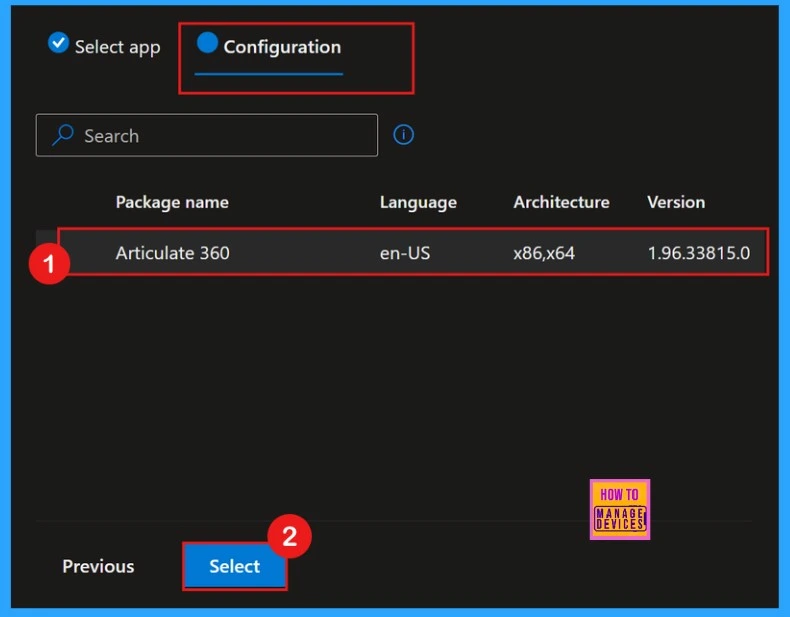
When we click on “Next,” we will be on to the Configurations tab. In this tab, we will see the available versions of Articulate 360. Here, only one version is displayed, so we can choose it and click “Select.”
Articulate 360
After clicking Next, we will be taken to the configuration tab page. Here, we will see the details of the app package name and the available languages and versions. We can select the desired app version. This tab will help us choose the appropriate app version. Click on that version and then click on the next to proceed.
| Name | Description | Publisher | App Version |
|---|---|---|---|
| Articulate 360 | Award-winning online training development tools Storyline 360, Studio 360, Rise 360 & more. | Articulate | 1.95.33670.0 |
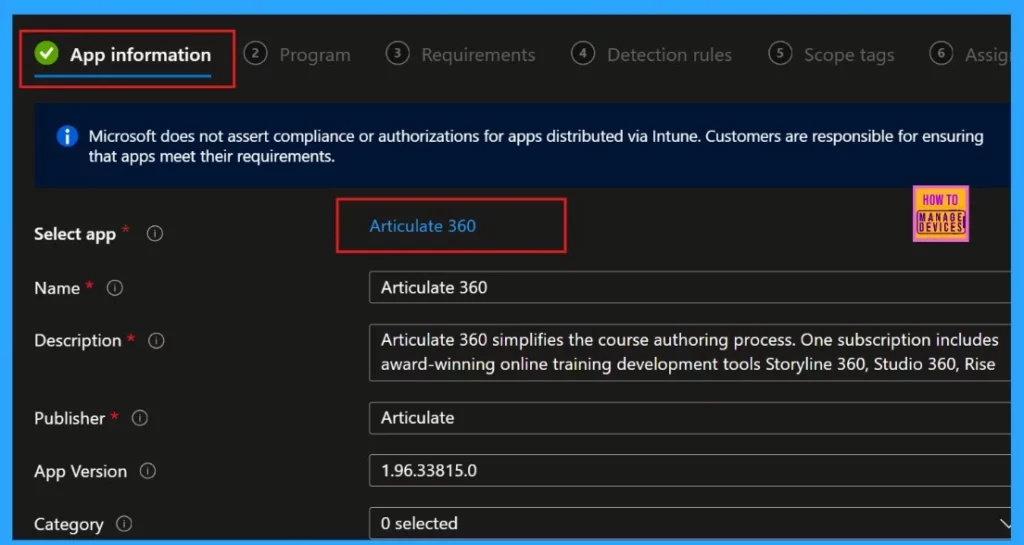
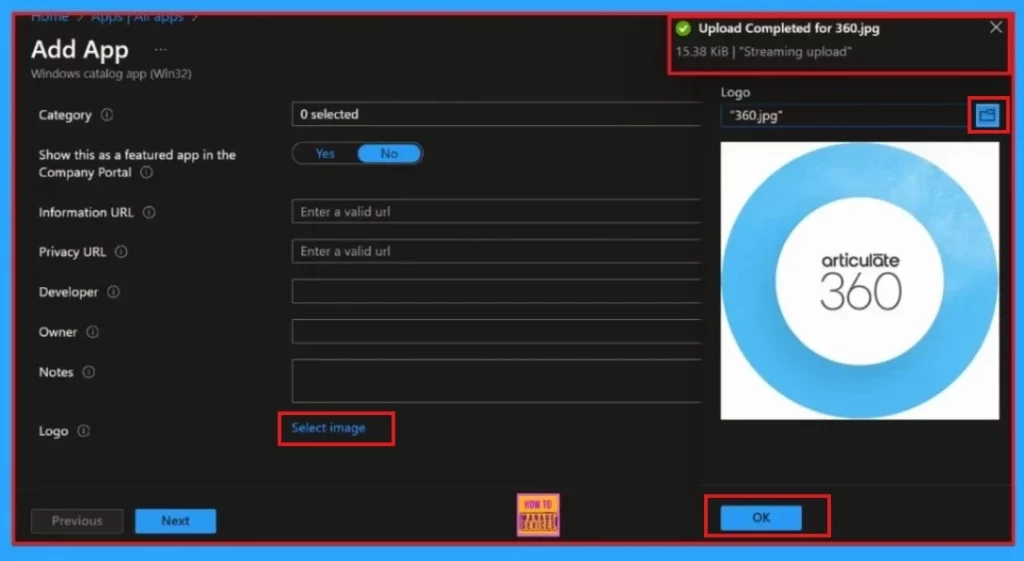
When we click “Next”, we will remain on the app information page. By scrolling down, we will find the option to “Select Image.” This option allows us to upload the app’s logo to the app information page, making it easier to identify the app at a glance. We will receive a notification once the upload is complete.
Program
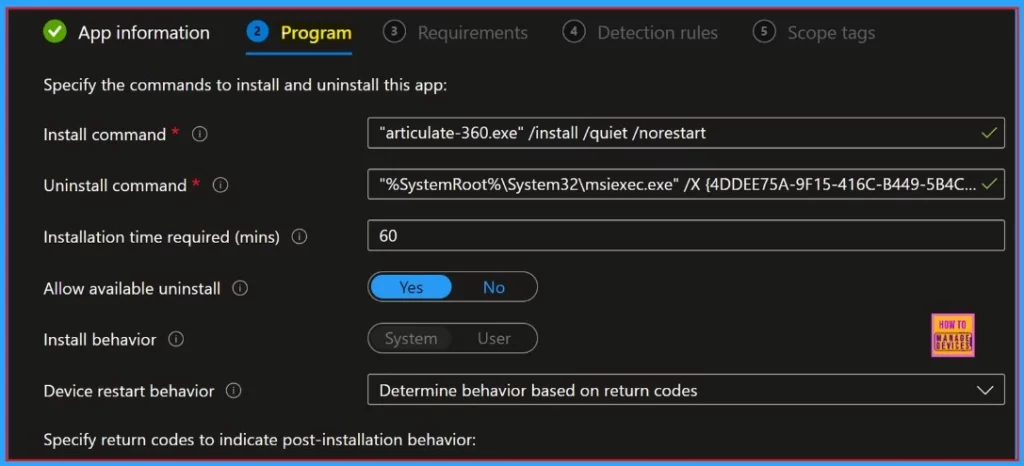
After the app information page, we will be directed to the program page. This page displays some basic details, such as the installation and uninstallation command, duration, etc. We can also observe the device restart behavior determining actions based on the return codes.
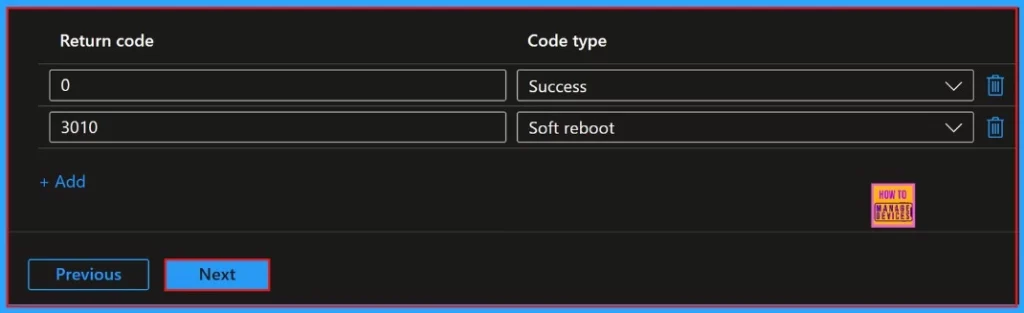
As we mentioned above, device restart behavior determines actions based on the return codes. Below, we will find a table that clearly outlines these return codes along with their respective types, providing a better understanding of how each code impacts the device’s functionality.
| Return Code | Code Type |
|---|---|
| 0 | Success |
| 3010 | Soft reboot |
Requirements
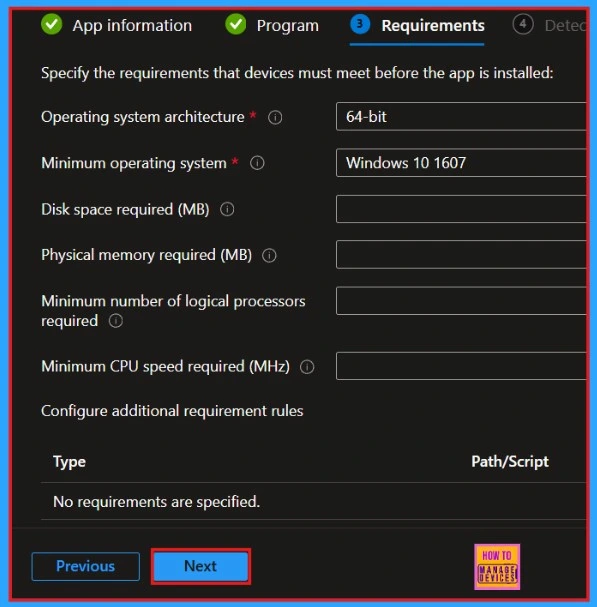
After that, we will see the requirements page. There is no need to enter the information manually. Here, we can see the operating system architecture is 64-bit, and the minimum operating system is Windows 10 1607.
Detection Rules
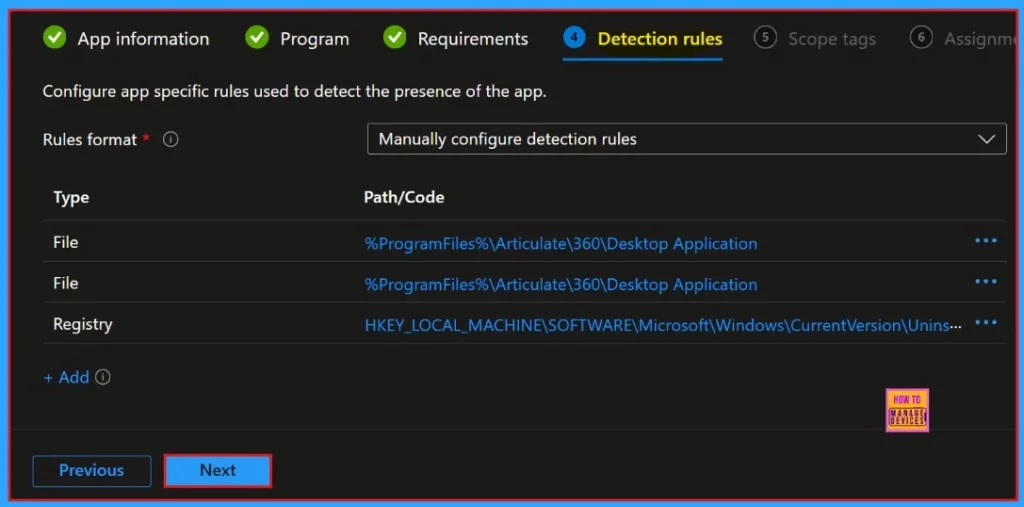
Next, we will focus on Detection rules. Here, we can find the Rules Format, which can be configured manually, the type of policy, and the Registry, among other details. Please check everything carefully and click Next.
Scope Tags and Assignments
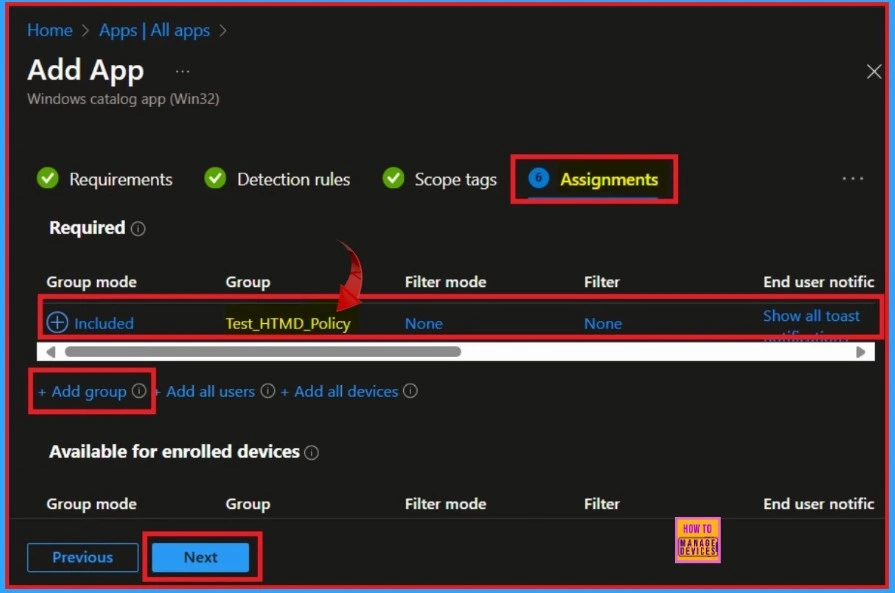
The next section is the scope tag section, but we can skip this section and move to the Assignments section. This is important because we need to assign our apps to specific groups. The assignment section lets us add groups to the policy. We need to click the “Add Group” button and select the desired group.
Review + Create
The “Review + Create” option serves as a summary page for our policy creation process. Here, we will find all the relevant information, including the name, description, and app version. Additionally, there is an option to add an app.
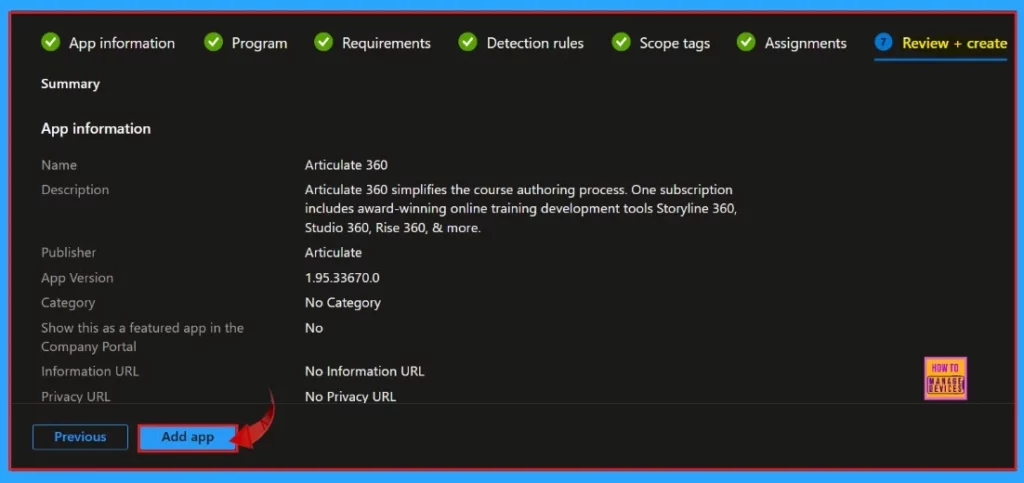
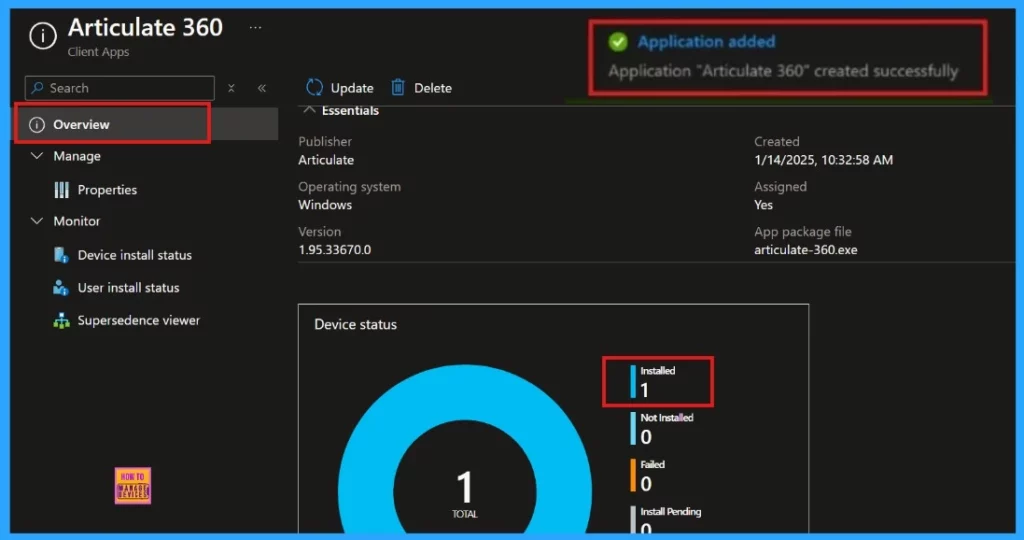
Once you have thoroughly reviewed all the information and verified that everything is correct, proceed by clicking the ‘Add App‘ button. Shortly after, you will receive a notification confirming that your application has been successfully added to the system.
End User Experience
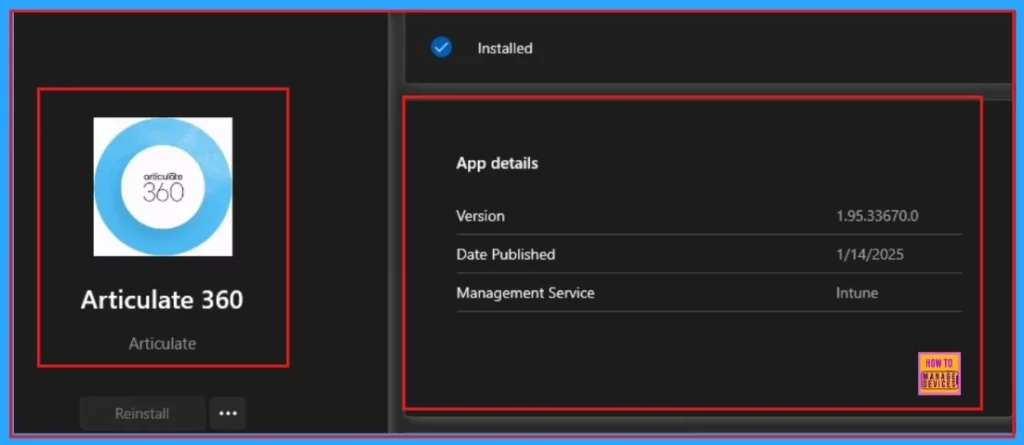
We can view the end-user experience results by checking it in the Company Portal. Go to the “Downloads and Updates” section, there we find a list of apps installed in our organization. We can search for our desired app and find it.
Need Further Assistance or Have Technical Questions?
Join the LinkedIn Page and Telegram group to get the latest step-by-step guides and news updates. Join our Meetup Page to participate in User group meetings. Also, Join the WhatsApp Community to get the latest news on Microsoft Technologies. We are there on Reddit as well.
Author
Anoop C Nair has been Microsoft MVP for 10 consecutive years from 2015 onwards. He is a Workplace Solution Architect with more than 22+ years of experience in Workplace technologies. He is a Blogger, Speaker, and Local User Group Community leader. His primary focus is on Device Management technologies like SCCM and Intune. He writes about technologies like Intune, SCCM, Windows, Cloud PC, Windows, Entra, Microsoft Security, Career, etc.


Discussion