





Microsoft Intune Adds Assignment Filters Support for Apple Declarative Device Management
Key Takeaways
- Microsoft Intune now supports assignment filters for Apple Declarative Device Management (DDM) configurations.
- Filters allow administrators to target policies to specific devices or apps using rules.
- Policies can be included or excluded based on device properties like OS version, manufacturer, or ownership type.
- Filters help organizations apply policies more accurately and automate device management.
In this post we are discussing Microsoft Intune Adds Assignment Filters Support for Apple Declarative Device Management. Microsoft Intune has introduced support for assignment filters for Apple Declarative Device Management (DDM) configurations. This new update allows IT administrators to apply policies, such as software update settings, to specific Apple devices instead of sending them to all devices.
Table of Contents
Microsoft Intune Adds Assignment Filters Support for Apple Declarative Device Management
The feature works with iOS/iPadOS and macOS devices that use Apple’s DDM management model. By using filters, administrators can choose which devices receive a policy based on details like device type, operating system version, or whether the device is personal or company device. This update helps organizations manage devices more easily. It ensures that the right policies are applied to the right devices, making device management more efficient.
- MEM Intune: Create Assignment Filters for Azure Virtual Desktop Single Session Windows 10 | AVD
- Check Associated Assignments for Intune Filters
- Intune Filters for Assigning Apps Policies and Profiles In Intune Portal | Endpoint Manager
What is New in the Update
Microsoft has recently added support for assignment filters in Apple Declarative Device Management (DDM) in Microsoft Intune. With this update, administrators can now use filters when assigning policies, such as Apple software update settings, to devices. Earlier, DDM policies did not support assignment filters. Because of this, policies were usually applied to all devices in the group, and administrators could not easily target specific devices based on conditions.
- This applied to iOS/iPadOS macOS
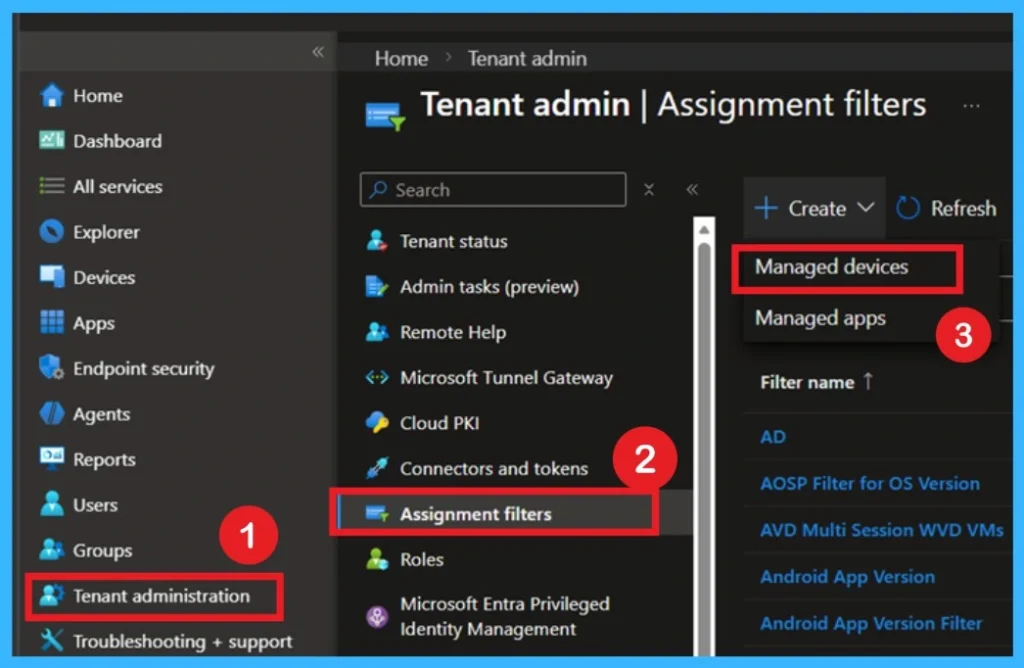
- To Create a filter, Sign in to the MS Intune admin center
- Select Tenant administration > Assignment filters > Create.
| General restrictions when creating assignment filters |
|---|
| You can have up to 200 assignment filters for each tenant. |
| Each assignment filter is limited to 3,072 characters. |
| For managed devices, the devices must be enrolled in Intune. |
| For managed apps, assignment filters apply to app protection policies and app configuration policies. They don’t apply to other policies, like compliance or device configuration profiles. |
What Are Assignment Filters in Intune and How its Woks
It can be used for managed devices and managed apps. In Microsoft Intune, assignment filters check device or app details before a policy is applied. First, administrators create a filter using conditions such as the device model or OS version. Then they assign the policy to a group and add the filter to that assignment.

- When a device enrolls or connects to the Intune service, the filter is checked. Based on these, Intune decides whether the policy or app should be applied to that device.

Need Further Assistance or Have Technical Questions?
Join the LinkedIn Page and Telegram group to get the latest step-by-step guides and news updates. Join our Meetup Page to participate in User group meetings. Also, Join the WhatsApp Community to get the latest news on Microsoft Technologies. We are there on Reddit as well.
Author
Anoop C Nair has been Microsoft MVP for 10 consecutive years from 2015 onwards. He is a Workplace Solution Architect with more than 22+ years of experience in Workplace technologies. He is a Blogger, Speaker, and Local User Group Community leader. His primary focus is on Device Management technologies like SCCM and Intune. He writes about technologies like Intune, SCCM, Windows, Cloud PC, Windows, Entra, Microsoft Security, Career, etc.


Discussion