






Basics of Windows Dynamic Update Explained Update Management
Let’s learn the Basics of Windows Dynamic Update Explained Update Management. This is the key takeaway from Windows Dynamic Update. I was not close to this topic until this point.
The session with Steve DiAcetis was very useful in helping me understand the basics of Windows 10 Dynamic Update (DU). Get updates, drivers, and optional Features—This is the Windows 10 dynamic updates screen for those who are wondering what DU is.
Let’s delve into the concept of Windows 10 Dynamic Update – what it is, how it functions, where the content comes from, and how to patch a Windows OS Image. We’ll explore this together.
Learn how to Enable Windows 11 Patching Using SCCM WSUS. Windows 11 Software Update End-User experience and Windows 11 Quality Updates, Feature Updates, Driver Updates, and Firmware Updates | CUs are 40% Smaller.

- Fix: Windows Update Issues For Windows 11 Errors Troubleshooting Tips
- Fix Windows 11 Upgrade Error 0xc11900130
Windows 10 Dynamic Updates Screen
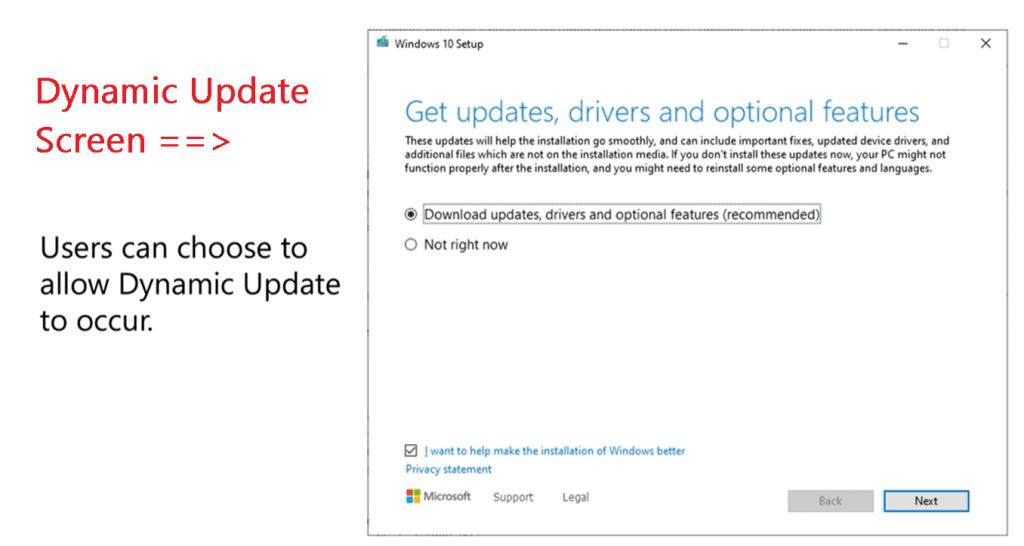
Quick Tips Dynamic Updates
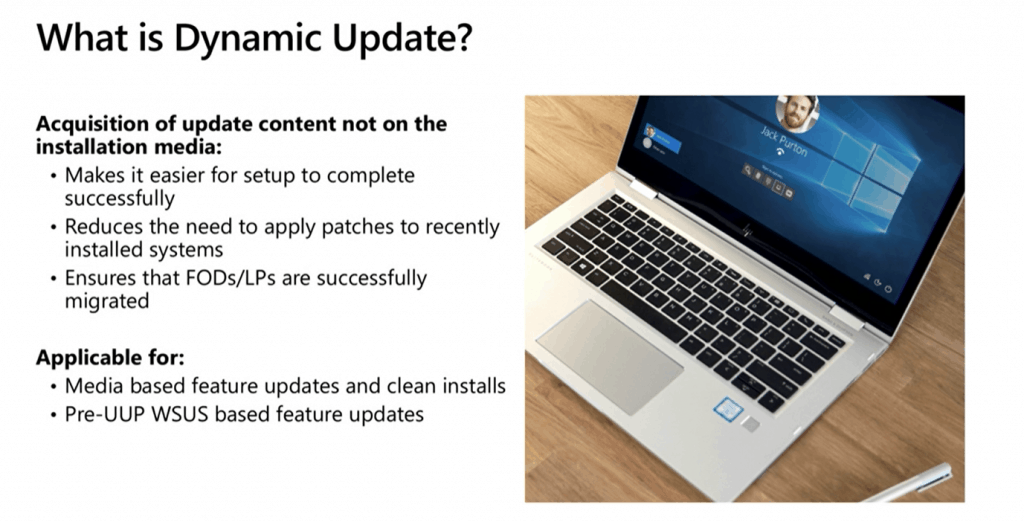
- Windows 10 Dynamic update is not there in the source media (Windows 10 ISO)
- It makes it easier to complete the Windows 10 setup.
- Reduce the need to apply patches to recently installed systems
- Ensure that the Features on Demand & Language pack successfully migrated during Windows 10 upgrades (1903 to 1909, for example)
- Is dynamic Update Applicable? ONLY when you launch SETUP.EXE from Windows 10 OS.
- Media-based feature updates and clean installs
- Pre-UUP WSUS-based updates (Unified Update platform-UUP)
Basics of Windows Dynamic Update
Components Get Updated with Dynamic Updates
- Dynamic Update will deliver the new version of Setup.exe (just in time fixes for the setup program)
- Download updates for the OS you are moving to…
- Updates for WinPE
- Updates for WinRE
- Updates Windows Servicing Components
- Driver Updates
- Latest Quality Update (LCU)
Acquisition of Supplemental media content
Features on Demand (FOD)
Language support (i.e., Language packs or LPs)
Windows 10 Dynamic Update won’t Perform?
Dynamics is NOT
Out-of-Box Experience Day Package (OOBE ZDP)
Device Setup Manager (DSM)
Windows 10 Dynamic Update is NOT available
WinPE
PXE BOOT
How Windows 10 Dynamic Update Works?
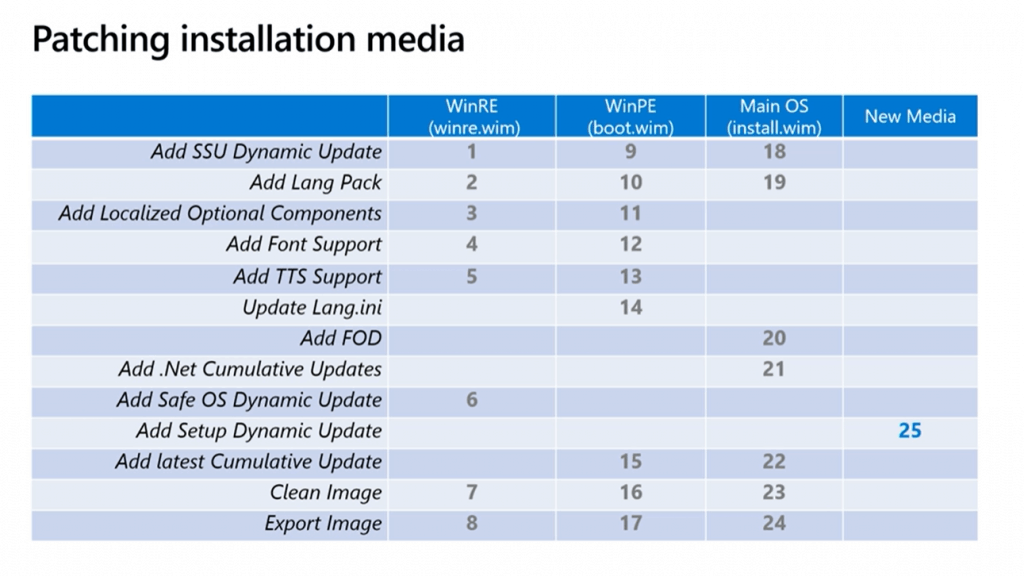
Windows Setup acquires Dynamic Update content during a feature update and applies multiple updates to WindowsOS installation media. The details are given below.
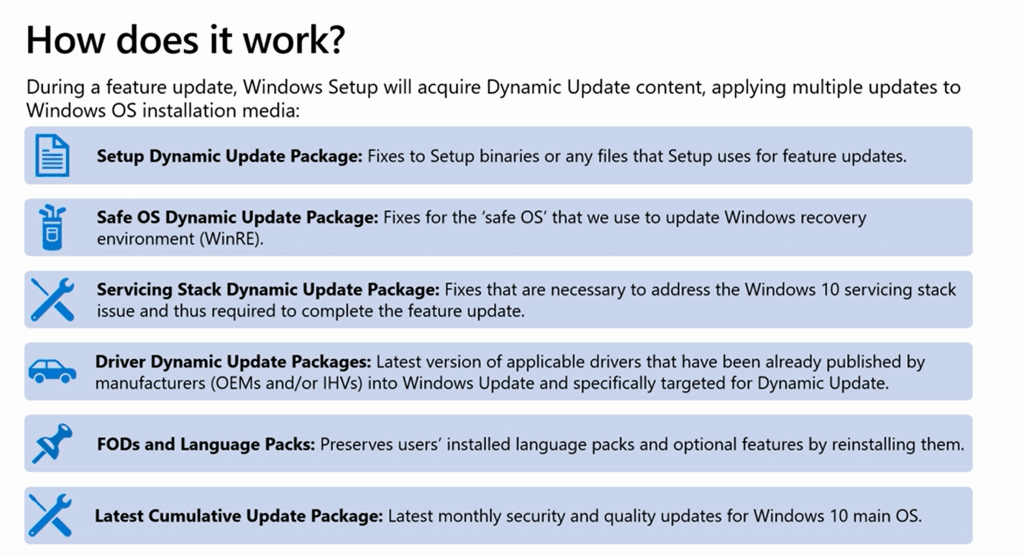
- Setup Dynamic Updates Package:
- Safe OS Dynamic Updates Package.
- Servicing Stack Updates (SSU): Updates to the Update Engine at the lowest level of OS
- Latest Cumulative Update:
- Driver Updates:
- Feature on Demand & Language Packs
Download Windows Dynamic Update?
Windows Dynamic Update is enabled?
- Automatically acquired from Windows Update. It won’t update the entire content of Windows 10 OS from the Internet.
- With UUP on-prem (private preview), automatically get the Windows 10 Dynamic updates from SCCM or WSUS
- Manually can be acquired from Microsoft Update Catalog
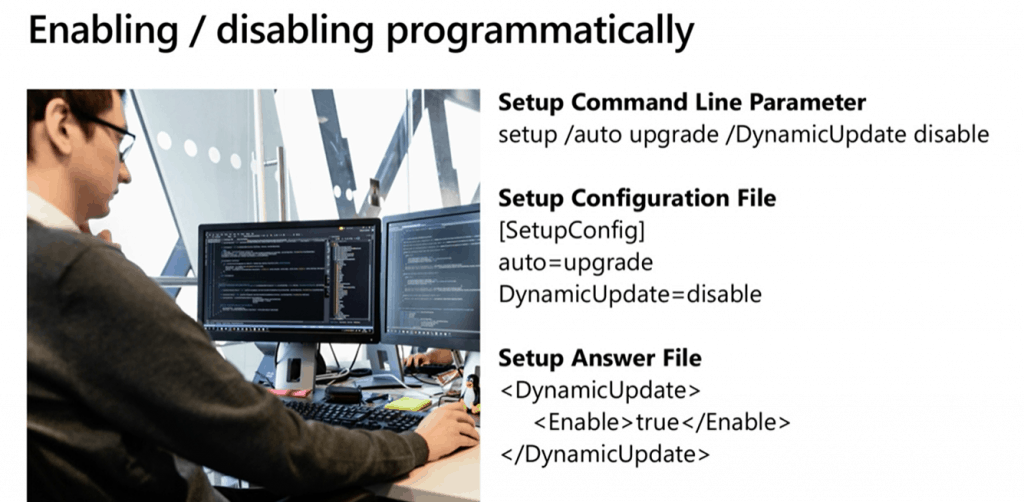
Enable/Disable Windows Dynamic Update?
Setup Command Line Parameter : Setup /Auto Upgrade /Dynamic Update Disable
Setup Configuration File
[SetupConfig]
auto=upgrade
DynamicUpdate=Disable
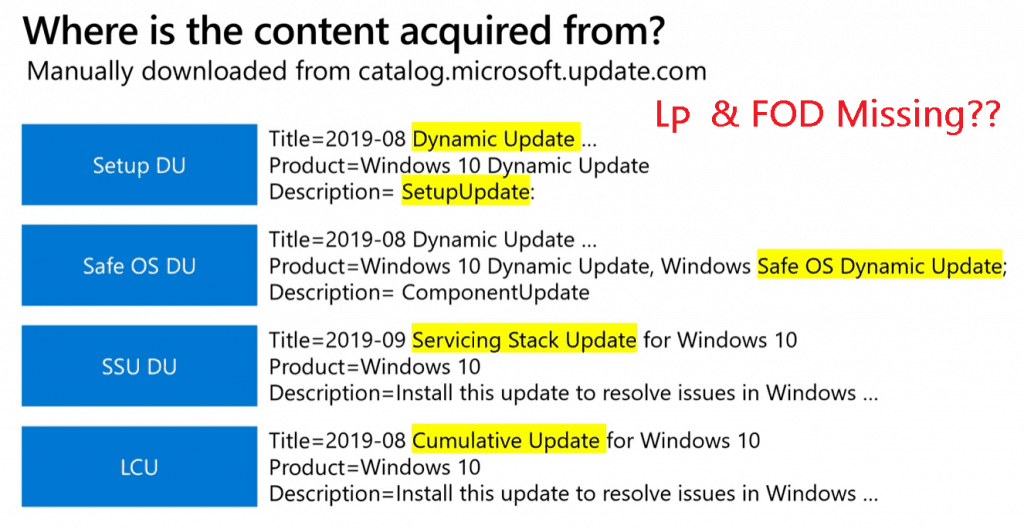
Manually Download Windows 10 Dynamic Update
You can download the Windows 10 Dynamic Update from the Microsoft update catalog: https://www.catalog.update.microsoft.com/Home.aspx.
- Setup DU
- Safe OS DU
- SSU DU
- LCU
NOTE: You must download the Language Pack and Features on Demand content (separate ISO) from the volume licensing site.
Windows Dynamic Update Flow
Ignite Session
Is it demystifying Windows 10 Dynamic Update – https://myignite.techcommunity.microsoft.com/sessions/81662?
Resources
- Updating Windows 10 media with Dynamic Update packages
- The Benefits of Windows 10 Dynamic Update
- DISM – Deployment Image Servicing and Management
- Add languages to Windows images
- Windows 10 Quality Vs. Feature Updates – which is More Critical?
We are on WhatsApp. To get the latest step-by-step guides and news updates, Join our Channel. Click here –HTMD WhatsApp.
Author
Anoop C Nair is Microsoft MVP! He is a Device Management Admin with more than 20 years of experience (calculation done in 2021) in IT. He is a Blogger, Speaker, and Local User Group HTMD Community leader. His main focus is on Device Management technologies like SCCM 2012, Current Branch, and Intune. He writes about ConfigMgr, Windows 11, Windows 10, Azure AD, Microsoft Intune, Windows 365, AVD, etc.



Discussion