






Enable Binary Differential Replication in SCCM | ConfigMgr
In this post, you will learn how Configuration Manager uses binary differential replication (BDR) to update content. BDR minimizes the network bandwidth used to send updates for distributing content that you previously distributed to other sites or remote distribution points.
Install the Remote Differential Compression feature on distribution points to support BDR’s reduction of bandwidth usage. According to Microsoft, BDR is used when files in the source content change. It resends only the new or changed content instead of sending the entire set of content source files each time you change those files.
If a file exists on the distribution point and there’s a change, the site uses BDR to replicate the block-level change instead of the entire file. A file is considered changed if you renamed, moved, or changed its contents.
Configuration Manager supports up to five incremental versions of a content set before it resends the entire content set. After the fifth update, the next change to the content set causes the site to create a new version of the content set.

Configuration Manager then distributes the new version of the content set to replace the previous set and any of its incremental versions. After the new content set is distributed, BDR replicates incremental changes to the source files later.
Applications always use binary differential replication. BDR is optional for packages and isn’t enabled by default.
Table of Contents
Supported Scenarios
In Configuration Manager, BDR is optional for legacy packages. To use BDR for packages, enable this functionality for each package. When creating or editing the following, you can check the option Enable binary differential replication.
- Applications (Always enabled)
- Packages
- OS images
- OS upgrade packages
- Boot images
- Software Update Patch Package
- Update SCCM Application Content on Distribution Points
- SCCM Create Custom Windows PE Boot Image Using MDT with ConfigMgr
Enable Binary Differential Replication for SCCM Packages
Let’s follow the steps below to configure the packages –
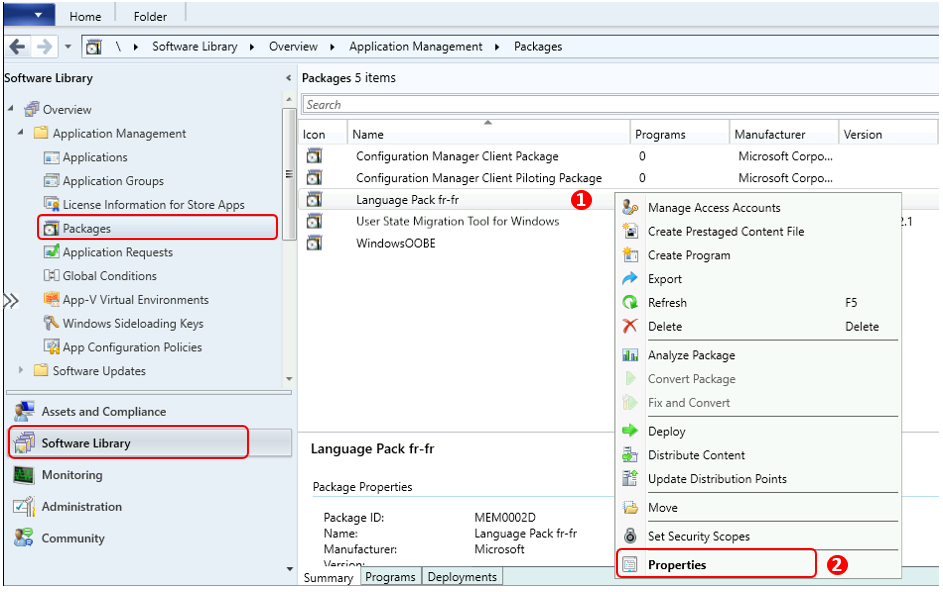
Go to the Software Library workspace in the Configuration Manager console, expand Application Management, and select the Packages node.
Select an existing package. Right-click on the package and select Properties. Options appear on the Data Source tab. For Example, here’s how to enable Binary Differential replication for existing packages.
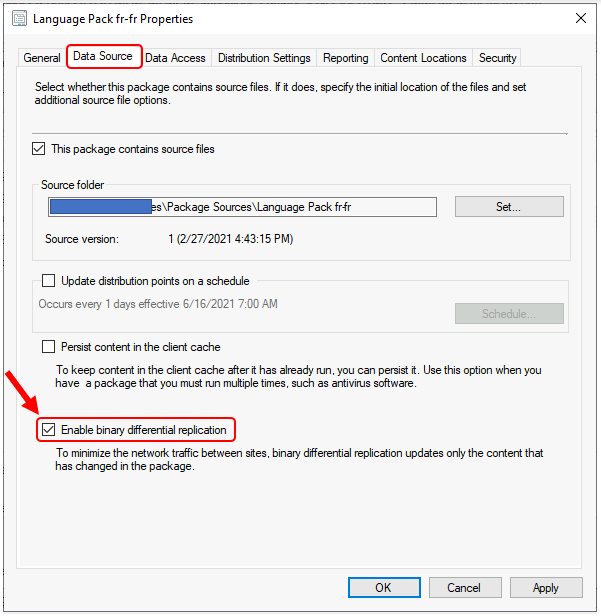
Under Package Properties In the Data Source tab, select Enable binary differential replication when you create or edit a package. Click Apply and OK.
I hope the above configuration helps SCCM Admin reduce the unwanted waiting time to replicate changes, specifically for packages to DPs. Enable Binary Differential Replication in SCCM | ConfigMgr | Endpoint Manager.
If you have any questions, please use the HTMD Community Forum, a one-stop shop for all your device management queries related to ConfigMgr (a.k.a. SCCM), Intune, and more! This is the community built by Device Management Admins for Device Management Admins.
Resources
Fundamental concepts for content management in Configuration Manager – https://docs.microsoft.com/en-us/mem/configmgr/core/plan-design/hierarchy/fundamental-concepts-for-content-management
We are on WhatsApp. To get the latest step-by-step guides and news updates, Join our Channel. Click here –HTMD WhatsApp.
Author
Jitesh Kumar, Microsoft MVP, has over six years of working experience in the IT Industry. He writes about and shares his experiences related to Microsoft device management technologies and IT infrastructure management. His primary focus is Windows 10/11 Deployment solution with Configuration Manager, Microsoft Deployment Toolkit (MDT), and Microsoft Intune.




Discussion