






Bitlocker Recovery key Screen Prompt Issues | Error 0x800f0922 after installing August Patch KB5012170
August 2022 patch KB5012170 is causing Bitlocker recovery key screen prompt issues Error 0x800f0922. Many admins reported this issue after installing security update KB5012170. This is impacting all Windows 10, 11, and Server Operating Systems.
This security update improves Secure Boot DBX for the supported Windows versions. This update adds additional security features to bypass the vulnerability that exists in secure boot. An attacker who exploits the vulnerability might bypass secure boot and load untrusted software.
As per Microsoft documentation, This security update, KB5012170, addresses the vulnerability by adding the signatures of the known vulnerable UEFI modules to the DBX.
The August 2022 patch Tuesday comes with 2 zero-day vulnerabilities CVE-2022-34713 – email attack scenario and CVE-2022-30134 – Exchange Server access a malicious server.

Bitlocker Recovery key Screen Prompt will create panic for end-users and increase the helpdesk call volume. Do you have to pause the security update deployment? Well, take a collective decision for your organization after reading the section below.
- BitLocker Recovery Key Management from Microsoft Intune
- Get SCCM BitLocker Recovery Key using Console Extension | PowerShell Script
Recommendations from Microsoft to Workaround Bitlocker Recovery Issue
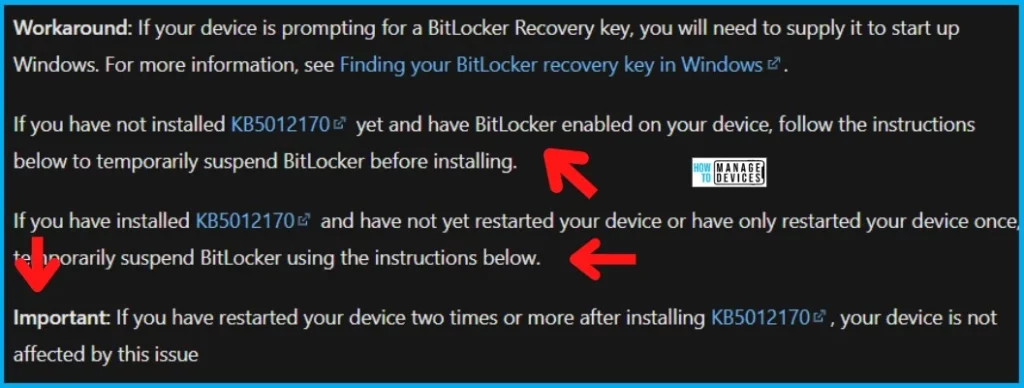
Microsoft Shared a few Recommendations from Microsoft to Workaround Bitlocker Recovery Issue. If your device is prompting for a BitLocker Recovery key, you will need to supply it to start up Windows.
- For more information, see Finding your BitLocker recovery key in Windows (check some of the options given in the above link and this -> Block Hide BitLocker Recovery Key from Users using MS Graph and PowerShell.
If you have not installed KB5012170 yet and have BitLocker enabled on your device, you can follow the instructions below to temporarily suspend BitLocker before installing.
- If you have installed KB5012170 and have not yet restarted your device or have only restarted your device once, temporarily suspend BitLocker using the instructions below.
Important: If you have restarted your device two times or more after installing KB5012170, your device is not affected by this issue. This is applicable for Windows 11 devices as per Microsoft.
| KB5012170 Installation Status on Device | Restarted? | Bitlocker Enabled | How to Workaround the issue? |
|---|---|---|---|
| NOT Installed | NA | Yes | Temporarily suspend BitLocker before installing KB5012170. |
| Installed | Not Restarted or Restarted only once? | Yes | Temporarily suspend BitLocker before installing KB5012170. |
| Installed | Restarted Twice or more | Yes | The device is not affected by this issue |
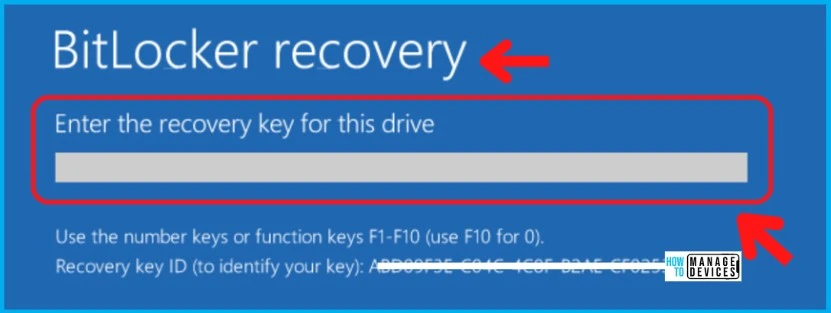
Bitlocker Recovery key Screen Prompt Issues and Error 0x800f0922
The Bitlocker Recovery key Screen prompt will cause a lot of panic for end users. Microsoft already confirmed Error 0x800f0922 as a known issue. You get this error when trying to install the KB5012170 update – the update might fail to install, and you might receive Error 0x800f0922.
Many System admins like Ulf Lundh shared on Twitter that they have issues with the August 2022 security patch Patch KB5012170. “Is anyone else suffering from Bitlocker trowing recovery key screen after installing this month’s KB5012170? Nice way to get back to work… massive user feedback on that.”
The latest update from Ulf (17th Aug 1:30 PM UTC) is “we only have issues on tenants where we allow drivers to update from WUfB. No issue whatsoever with other tenants. Same Bitlocker policy.”
The following is the note from Microsoft on Error 0x800f0922 but no public announcement from MS on the recovery key prompt- This issue only affects this security update for Secure Boot DBX (KB5012170) and does not affect the latest cumulative security updates, or monthly rollups released on August 9, 2022.
Fix to KB5012170 Known issue? Bitlocker Recovery key Screen Prompt Issues + Error 0x800f0922
Microsoft has not provided any workaround for Bitlocker Recovery key Screen prompt Issues after installing August security patch KB5012170. However, Microsoft shared some tips to get rid of Error 0x800f0922 during the installation of this update.
Many organizations have paused the deployment of security update KB5012170 for their Windows 10 and Windows 11 devices. Pausing this security update is also high risk because 3 known disclosed issues are getting fixed with this KB5012170.
- CVE-2022-34302 – An attacker who successfully exploited this vulnerability could bypass Secure Boot.
- CVE-2022-34303
- CVE-2022-34301
NOTE! – There is no public announcement from MS on the recovery key prompt while writing this post. However, the workaround for Bitlocker Recovery key Screen Prompt is given in the below table (as per Microsoft support team via Rajneesh Kaura) KB5012170: Security update for Secure Boot DBX: August 9, 2022 (microsoft.com).
- This issue can be mitigated on some devices by updating the UEFI bios to the latest version before installing this update.
- Microsoft is presently investigating and will provide an update in an upcoming release.
There are some other known issues with this update, as well as per Microsoft documentation. We tried to list some of them in the below list.
- Some original equipment manufacturer (OEM) firmware might not allow for the installation of this update. To fix need to check with the OEM vendor.
- If BitLocker Group Policy Configure TPM platform validation profile for native UEFI firmware configurations is enabled and PCR7 is selected by policy, it may result in the update failing to install.
The following table provides the workarounds for different KB5012170 hotfix installation failure scenarios if BitLocker Group Policy is configured as discussed above.
| Scenarios | Run the command – Restart to Resume Bitlocker Protection |
|---|---|
| Credential Gard is NOT enabled | Manage-bde –Protectors –Disable C: -RebootCount 1 |
| Credential Guard is enabled | Manage-bde –Protectors –Disable C: -RebootCount 3 |
Run the following command from the Administrator command prompt:
Manage-bde -protectors -disable %systemdrive% -rebootcount 2
- Install the update KB5012170, if not already installed
- Restart the device.
- Restart the device again.
- BitLocker should automatically be enabled after two boots. If you want to manually resume BitLocker to verify that it is enabled, use the following command:
Manage-bde -protectors -Enable %systemdrive%
Author
Anoop C Nair is Microsoft MVP! He is a Device Management Admin with more than 20 years of experience (calculation done in 2021) in IT. He is Blogger, Speaker, and Local User Group HTMD Community leader. His main focus is on Device Management technologies like SCCM 2012, Current Branch, and Intune. He writes about ConfigMgr, Windows 11, Windows 10, Azure AD, Microsoft Intune, Windows 365, AVD, etc.




I have a laptop which wasn’t sync with Intune for 2 months, now it has a Bitlocker which we cannot locate any where that includes AD AAD,
Is there any way to stop this happening in Future, I assume we won’t be able to fix that laptop