






Block Use of Copied or Impersonated System Tools using Defender ASR Rules
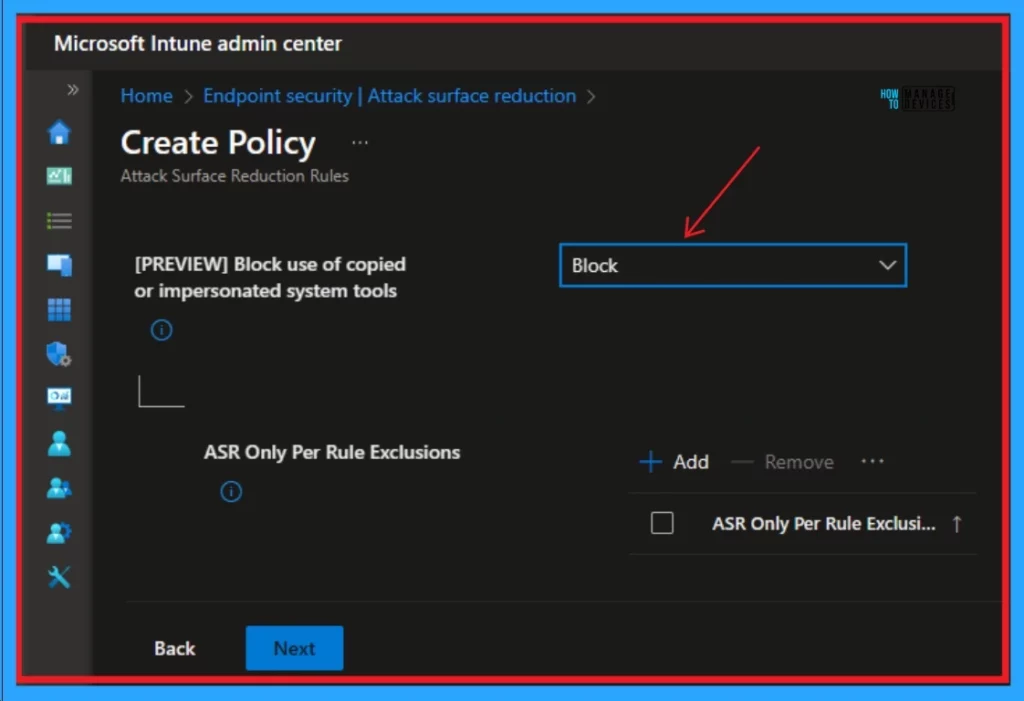
Let’s discuss the Block using Copied or Impersonated System Tools using MS Defender ASR Rules. Microsoft Introduces new block use of copied or Impersonated System tools, and This capability is now in Preview.
This new capability will be available on Windows 11 and Windows 10 versions. This feature brings many changes to Windows Tools. Windows Tools is a folder in the Windows 11 Control Panel. Windows Tool is also known as Administrative Tool in Windows 10 Control Panel.
The block use of copied or Impersonated system tools is based on ASR rules-supported Operating Systems. Microsoft designed this tool for general availability. Users can explore this capability very soon. This feature helps you to block the use of executable files that are identified as copies of Windows system tools.
The executable files are either duplicates or impostors of the original system tools. This is a very effective and user-friendly tool of Microsoft. This blog post helps you to understand more about the Block Use of Copied or Impersonated System Tools Using MS Defender ASR Rules.

Microsoft also released a new Block Rebooting Machine in Safe Mode. This is based on Microsoft Defender ASR Rules. This is a diagnostic mode that only loads the essential files and drivers needed for Windows to run.
- Configure Attack Surface Reduction ASR Rules in Intune
- Block Vulnerable Signed Drivers Using Intune ASR Rules
Block Use of Copied or Impersonated System Tools using MS Defender ASR Rules
Block Use of Copied or Impersonated System Tools Using MS Defender ASR Rules have many abilities. Some malicious programs may try to copy or impersonate Windows system tools to avoid detection or gain privileges.
Potential attacks may occur if such executable files are allowed. Propagation and execution of such duplicates and imposters of the system tools on Windows machines will be prevented by this rule.

Different Features of Block Use of Copied or Impersonated System Tools
The Intune name of this new feature is Block Use of Copied or Impersonated System Tools. The Configuration Manager name is not yet available. Its dependencies are Microsoft Defender Antivirus, and GUID is c0033c00-d16d-4114-a5a0-dc9b3a7d2ceb.
| Rule Name | Windows 11 and Windows 10 | Windows Server 2022 and Windows Server 2019 | Windows Server | Windows Server 2016 | Windows Server 2012 R2 |
|---|---|---|---|---|---|
| Y | Y | Y | Y | Y | Y |
- End of Defender Application Guard for Office
- 3 Ways to Configure Microsoft Defender Antivirus Policies for Windows 11 using Group Policy Intune Policy
We are on WhatsApp. To get the latest step-by-step guides and news updates, Join our Channel. Click here –HTMD WhatsApp.
Author
Gopika S Nair is a computer enthusiast. She loves writing on Windows 11 and related technologies. She is here to share quick tips and tricks with Windows 11 or Windows 10 users. She is Post Graduate Diploma Holder in Computer Science.



Discussion