






How Organizers and Presenters can Join a Microsoft Teams Town Hall as an Attendee
Hey there, Let’s discuss about the topic how Organizers and Presenters can Join a Microsoft Teams Town Hall as an Attendee. In Microsoft Teams Town Hall events, organizers, co-organizers, and presenters can enter into the event early to check it out from an attendee’s point of view.
This feature lets the organizers to see how everything is set up, just like the participants will see it, so they can ensure everything is good to go before the live session starts. Previewing the Town Hall as an attendee helps the organizers and speakers understand valuable insights into the attendee experience.
This feature will be available for people who can use the town hall in Teams for Windows or Mac desktop, Teams on the web, or Teams on iOS/Android. They check with the audio and video setup, give presentations a dry run, and make sure all the interactive features like Q&A and polls are working correctly.
This feature doesn’t make any change to the overall experience for attendees or how the organizers, co-organizers, and presenters in the green room operate. Let’s learn more about this new feature of Microsoft Teams through this blog post.

This message relates to Microsoft 365 Roadmap ID 484126.
Table of Contents
When is the Release of the Feature – Organizers can Preview Teams Town Hall as an Attendee?
This feature will be available on various Teams platforms starting mid-May 2025 for targeted release and mid-June 2025 for general availability. No admin action is required for the rollout.
How Organizers and Presenters can Join a Microsoft Teams Town Hall as an Attendee
Taking this proactive route cuts down on any last-minute troubleshooting, creating an effective and more confident presentation environment for all participants.
- Microsoft Teams Meeting Join Failure After Microsoft Edge Update Disrupts Users
- Microsoft Teams on Android to Support Third-Party Meetings with SIP Integration
- How to use New End Event Button in MS Teams to Enhance Town Halls Webinars and Meetings
- Best Guide to Setting Up Live Chat in Microsoft Teams for Small Businesses
- How to Enhance your Teams Experience with Snap Resizable Panes and Zoom Controls Features
- How to Manage Multiple Channels in Teams Phone Extensibility for Dynamics 365 Contact Center
How will this New Feature Affect the Organization
An organizer, co-organizer, or presenter can joined back into the event on another platform to check it out like an attendee, there’s a new option to see ‘Preview event as attendee‘ right under the ‘Add this device’ or ‘Transfer to this device‘ choices.
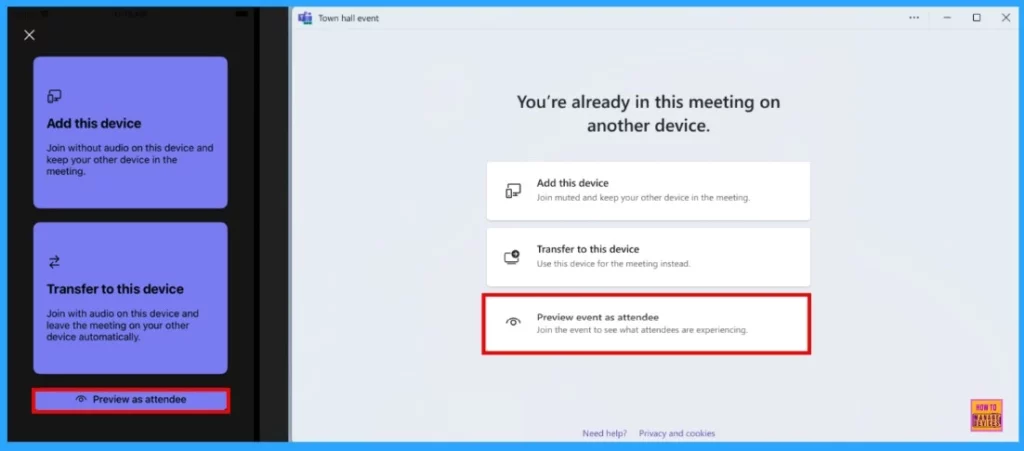
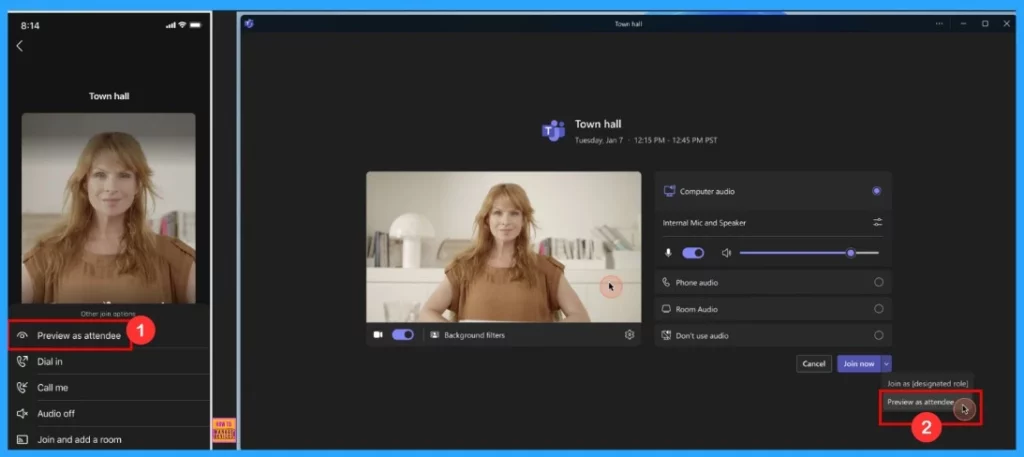
If the Organiser/Co-Organizer/Presenter hasn’t joined the event in their designated role yet, they can first join as an attendee. On desktop and web, they’ll see a pre-join screen with a new drop-down menu that lets them preview as an attendee. On mobile, they’ll find the Preview as an attendee option under More join options.
| Feature | Description |
|---|---|
| Purpose | Organisers can preview a Town Hall event from an attendee’s perspective before going live. |
| How to Access | Organizers can select “Preview as attendee” in the Town Hall setup options |
| Benefits | Identify and fix issues before the event, Improve attendee experience, Ensure smooth event execution. |
In the screenshot below, we can see how the screens look on mobile and desktop/web.
What We Need to Do
This feature will be available by default for town hall organizers, co-organizers, and presenters to configure with no admin action required. It’s a good idea to check your current setup to see how this might affect your organization. You might also want to notify users about this change and update any relevant documentation.
Need Further Assistance or Have Technical Questions?
Join the LinkedIn Page and Telegram group to get the latest step-by-step guides and news updates. Join our Meetup Page to participate in User group meetings. Also, Join the WhatsApp Community to get the latest news on Microsoft Technologies. We are there on Reddit as well.
Author
Anoop C Nair has been a Microsoft MVP for 10 consecutive years from 2015 onwards. He is a Workplace Solution Architect with more than 22+ years of experience in Workplace technologies. He is a Blogger, Speaker, and Local User Group Community leader. His primary focus is on Device Management technologies like SCCM and Intune. He writes about technologies like Intune, SCCM, Windows, Cloud PC, Windows, Entra, Microsoft Security, Career, etc.


Discussion