


Skip to content
Check Management Certificate Expiration Date in Intune

Check Management Certificate Expiration Date in Intune

Written By Jitesh Kumar
Last Updated September 28, 2023
Posted In Intune
SHARE

Let’s find out the easy way to Check Management certificate expiration date in Intune. Microsoft Intune added a new column that allows you to view the Management certificate expiration date in the Intune Admin Center.

You might often experience issues when the management certificate expires, knowing the details helps you to identify the date. Certificate management is an essential task for any business, and it runs the services smoothly, The advanced management practices that would allow you to stay on top of the management certificate status.

Starting with Microsoft Intune 2309 September Update, the Management certificate expiration date is available as a column in the Devices workload. You can access the status from All devices or filter by platform device OS.

You may use certificates with Intune to authenticate your users to applications and corporate resources through VPN, Wi-Fi, or email profiles, Certificates also help you to provide authenticated access for users. If a certificate for a device enrolled in MDM expires without being renewed, the end user will need to re-enroll in Intune.

Patch My PC

Check Management Certificate Expiration Date

Management certificate expiration date is available as a column in the Devices workload. You can filter on a range of expiration dates for the management certificate and also export a list of devices with an expiration date matching the filter.

  • Sign in to the Microsoft Intune admin center https://intune.microsoft.com.
  • Select Devices > All devices to get the details. You can also select the device by platform (Windows, iOS, Android, macOS).
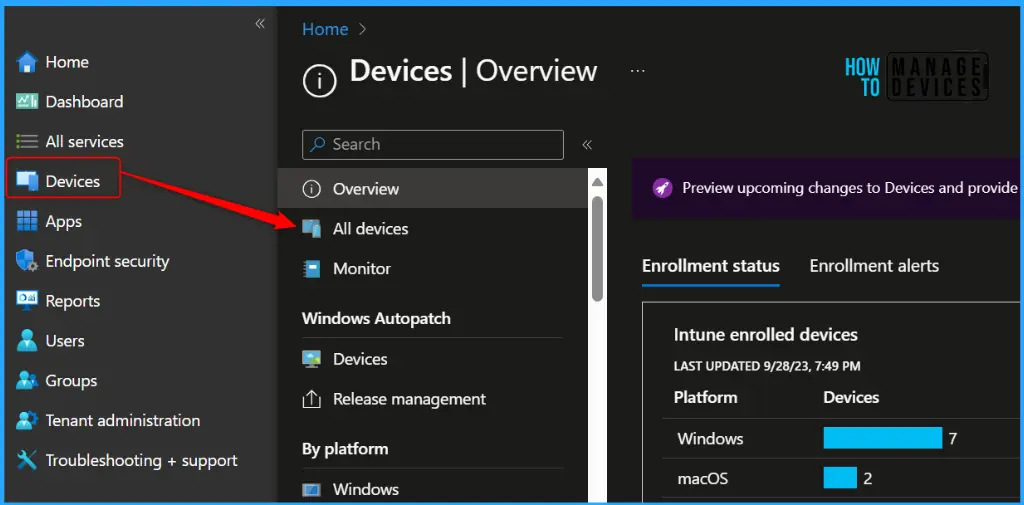
Check Management Certificate Expiration Date in Intune Fig.1

If you are not able to see the Management certificate expiration date column. To add the Management certificate expiration date column, click on a column detail name and Select column.
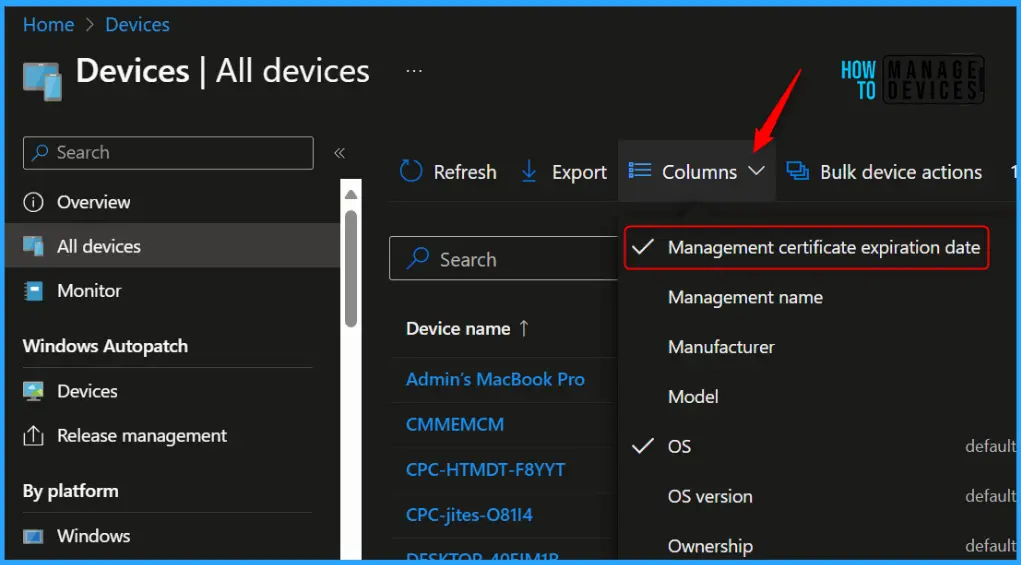
Check Management Certificate Expiration Date in Intune Fig.2

Here the Management certificate expiration date is visible to you with the date and timestamp, refer to the column against the device name to get the complete details.
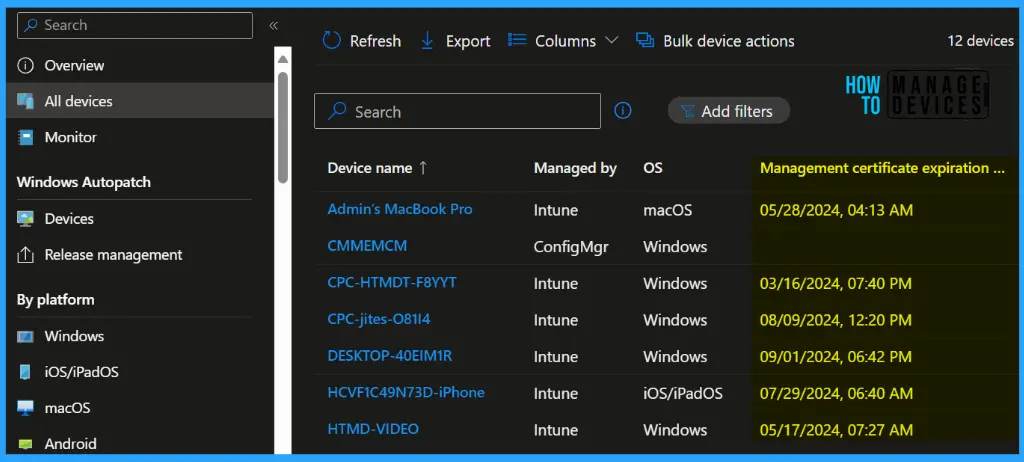
Check Management Certificate Expiration Date in Intune Fig.3

Filter Management Certificate Expiration Date

To filter the Management certificate expiration date, with date range. Click on the Add filters, and select the Start and End to specify the date and time. Click on Apply.
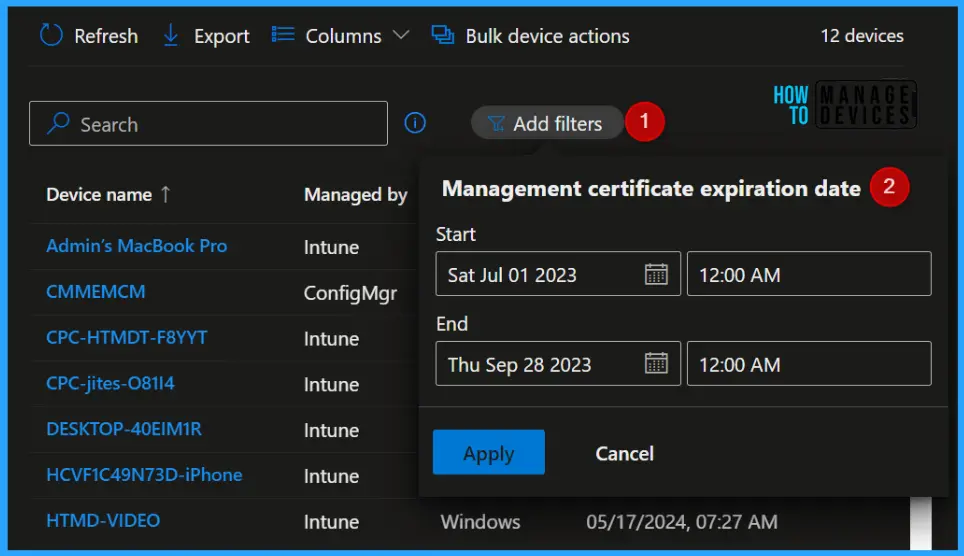
Check Management Certificate Expiration Date in Intune Fig.4

Once the filter is applied, you can easily export the list of devices with an expiration date matching the filter.
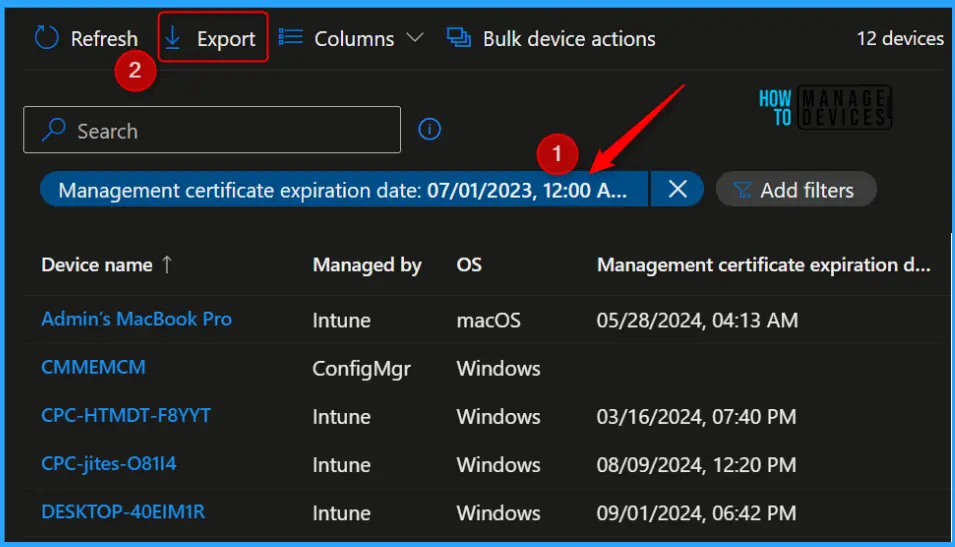
Check Management Certificate Expiration Date in Intune Fig.5

Author

About Author – JiteshMicrosoft MVP, has over six years of working experience in the IT Industry. He writes and shares his experiences related to Microsoft device management technologies and IT Infrastructure management. His primary focus is Windows 10/11 Deployment solution with Configuration Manager, Microsoft Deployment Toolkit (MDT), and Microsoft Intune.

Written by

Jitesh has over 5 years of working experience in the IT Industry. He writes and shares his experiences related to Microsoft device management technologies and IT Infrastructure management. His primary focus area is Windows 10 Deployment solution with Configuration Manager, Microsoft Deployment Toolkit (MDT), and Microsoft Intune.

Discussion

Join the discussion

Your email address will not be published. Required fields are marked *

Related guides

Intune

Simplify Windows Devices to Run Only the Required Applications using Intune

Key Takeaways Hey, let’s learn about Simplify Windows Devices to Run Only the Required Applications using Intune. This policy lets administrators replace the default windows shell with a custom or lightweight shell. it improves performance by using system resources and is useful for devices that run a dedicated application. If the policy is disabled or […]

AC Anoop C Nair 8 min read
Intune

Enhance macOS Compliance with Custom Security and Compliance Checks to Improve Device Security using Microsoft Intune

Key Takeaways In this post we are discussing about Enhance macOS Compliance with Custom Security and Compliance Checks to Improve Device Security using Microsoft Intune. Microsoft has announced the general availability of Custom Compliance Settings for macOS in Microsoft Intune. The feature helps organizations strengthen security controls while supporting many types of macOS management scenarios. […]

AC Anoop C Nair 4 min read
Intune

Manage Samsung Galaxy Firmware Versions to Improve Security and Compliance using Microsoft Intune

Key Takeaways In this post we are discussing Manage Samsung Galaxy Firmware Versions to Improve Security and Compliance using Microsoft Intune. Microsoft Intune has received a new update that expands firmware management capabilities for Samsung Galaxy devices through Firmware Versionsintegration. This enhancement gives IT administrators more control over firmware and operating system updates, helping them […]

AC Anoop C Nair 4 min read
Intune

MS Intune Adds Windows Registry Data Collection to Device Inventory for Single Values All Key Values and Subkeys

Key Takeaways Microsoft Intune 2607 introduces Windows Registry Data collection in Device Inventory, allowing IT admins to verify actual device configurations without relying on custom discovery or remediation scripts. Using the Properties Catalog, admins can collect registry information through Single Value, All Values Under a Key (Non-Recursive), or Same Value Across Subkeys. MS Intune Adds […]

AC Anoop C Nair 5 min read