






Check SCCM Secondary Server Hotfix Installation Status
Let’s quickly determine the SCCM secondary server hotfix installation status with an SQL query. It’s difficult to determine whether the ConfigMgr secondary server installed the latest hotfix.
Before discussing the details of the SQL query that can help you determine the status of the hotfix installation, let’s understand the real issue.
You can check the version of Configuration Manager sites from the console itself. However, the issue is that the hotfix installation never changes the build and Rev version numbers, so there is no option to find out whether the latest hotfix is installed on the secondary server.
Hotfixes for Configuration Manager functions similarly to updates for other Microsoft products, such as SQL Server. These hotfixes are designed to address specific issues and may include individual fixes or a comprehensive bundle that consolidates multiple fixes into a single update.

| Index |
|---|
| Check the Status of the Secondary Server Hotfix Installation |
- ConfigMgr Version Numbers | Major Minor Build Rev of SCCM.
- SCCM Secondary Site Server Upgrade To Latest Version | ConfigMgr HTMD
- SCCM: Recover Secondary Site To A Different Hardware
The site server build and rev version numbers change when you upgrade SCCM from 2006 to 2010. You can read more about ConfigMgr Version Numbers | Major Minor Build Rev of SCCM.

Check the Status of the Secondary Server Hotfix Installation
Now, let’s find out how to check the secondary server hotfix installation status using SQL query.
- Open the SQL Management Studio.
- Connect your Database Engine.
- Right-click on your database CM_XXX and click on ‘New Query.’
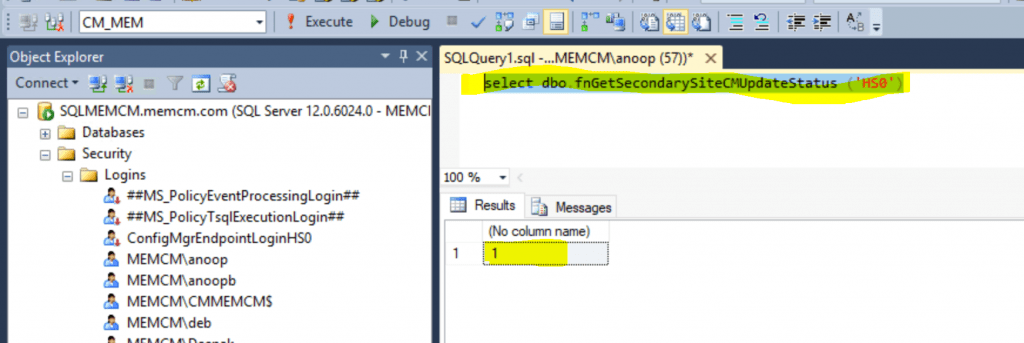
- Copy the following SQL query to find the SCCM secondary server hotfix installation status.
- Click on the Execute button.
NOTE! HS0 is a secondary site code. It would be best if you replaced it with your own.
select dbo.fnGetSecondarySiteCMUpdateStatus ('HS0')
If the return value is 1, that means hotfix is installed successfully.
Resources
- SCCM Secondary Server Installation Failed Error | ConfigMgr | Fix
- List of prerequisite checks for Configuration Manager
- Add SCCM Server Computer Account to SQL Login Sys Admin Access
We are on WhatsApp. To get the latest step-by-step guides and news updates, Join our Channel. Click here –HTMD WhatsApp.
Author
Anoop C Nair is Microsoft MVP! He is a Device Management Admin with more than 20 years of experience (calculation done in 2021) in IT. He is a Blogger, Speaker, and Local User Group HTMD Community leader. His primary focus is Device Management technologies like SCCM 2012, Current Branch, and Intune. He writes about ConfigMgr, Windows 11, Windows 10, Azure AD, Microsoft Intune, Windows 365, AVD, etc.




Hi Anoop, what about Update Status value=3 ?
It’s always 3 at my sites and i cannot find any information about it…
Thank you and best regards!