






Revoke and Delete Cloud PKI Certification Authorities in Intune
Let’s discuss Revoke and Delete Cloud PKI Certification Authorities in Intune. Microsoft Intune will soon introduce new Revoke and Delete Cloud PKI Certification Authorities. Microsoft announces this update on Microsoft 365 Roadmap.
Microsoft will start rolling out Revoke and Delete Cloud PKI Certification Authorities in Intune in July 2024, so users can explore this feature from now on. Do you know what Cloud PKI Certification Authorities are in Microsoft Intune?
Microsoft Cloud PKI (Public Key Infrastructure) is a cloud-based service that can be used for public key infrastructure. It simplifies and automates certificate lifecycle management for Intune-managed devices.
This blog post will explain how to Revoke and Delete Cloud PKI Certification Authorities in Intune. You can Revoke and Delete Cloud PKI Certification Authorities in Intune. It will enhance the abilities of End users.


| Index |
|---|
| Revoke and Delete Cloud PKI Certification Authorities in Intune |
| More Details of Revoke and Delete Cloud PKI Certification Authorities in Intune |
| Microsoft Cloud PKI Features |
What are the Advantages of Cloud PKI?
1. It provides a dedicated public key infrastructure (PKI) for your organization
2. It handles the certificate issuance, renewal, and revocation for all Intune-supported platforms.
3. It is easy to provision
4. Cloud PKI is a highly Available and Scalable Infrastructure
- Create Root and Issuing CA using Intune Cloud PKI Service
- Windows Device Configuration Policies Migrating to Unified Settings Platform in Intune
- MS Intune Stop Supporting User Enrollment with Company Portal for iOS iPadOS
Revoke and Delete Cloud PKI Certification Authorities in Intune
Microsoft’s new update regarding the revocation and deletion of Cloud PKI Certification Authorities in Intune will be one of its best features. As you know, Cloud PKI supports Android, iOS/iPadOS, macOS, and Windows platforms. Revoke and Delete Cloud PKI Certification is also available for these platforms.
More Details of Revoke and Delete Cloud PKI Certification Authorities
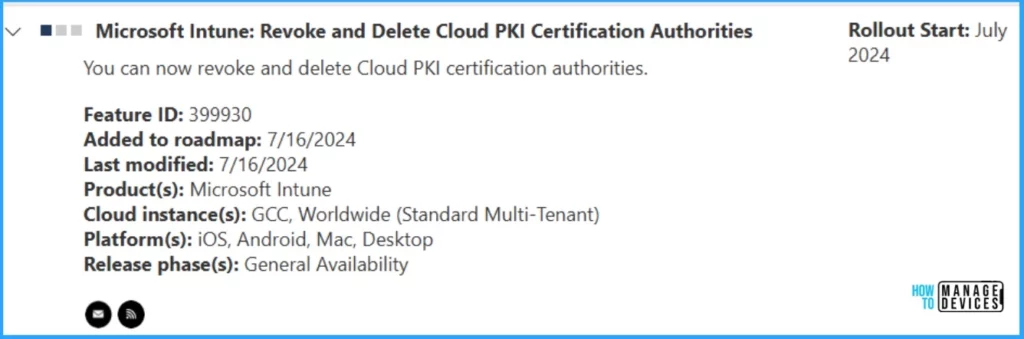
Microsoft announced this feature on the Microsoft 365 Roadmap and made it generally available. The following table details Revoke and Delete Cloud PKI certification Authorities.
| Information | Details |
|---|---|
| Feature ID | 399930 |
| Added to Roadmap | 7/16/2024 |
| Last modified | 7/16/2024 |
| Products | Microsoft Intune |
| Cloud Instance | GCC, Worldwide (Standard Multi-Tenant) |
| Platform | iOS, Android, Mac, Desktop |
| Release Phase | General Availability |
Microsoft Cloud PKI Features
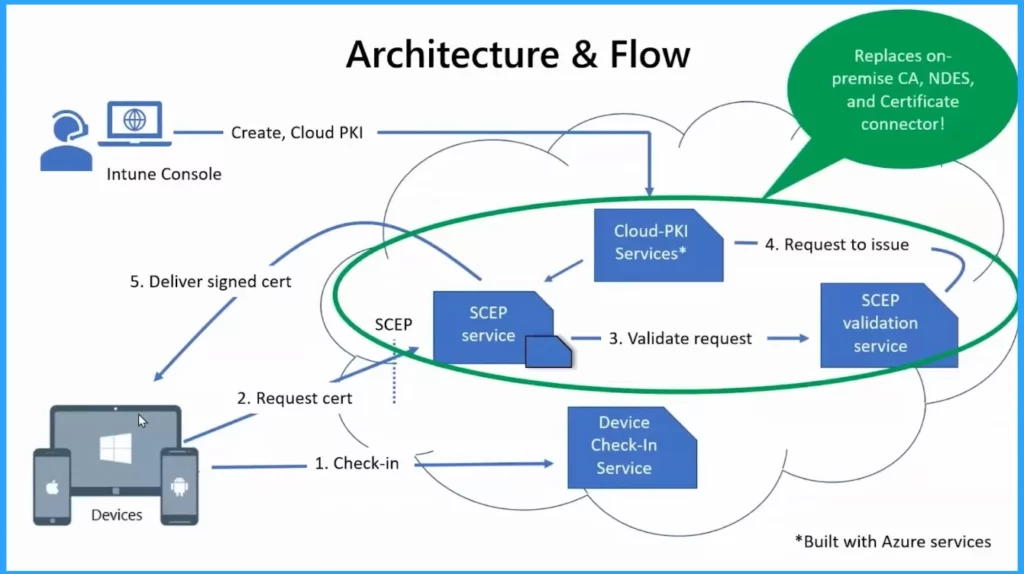
Cloud PKI can be easily managed on the Microsoft Intune admin center. Cloud PKI is the best option for managing certificates for your organization. The following are some features of Cloud PKI.
- It helps to issue certificates at high speed
- It helps to improve security
- It is very cost-efficient
- Cloud PKI is convenient and efficient
- How to Access MAC Address of an Android Device via the Managed Home Screen App in Intune
- Microsoft Intune 2407 New Features Early July Update
- Easy Guide to Set Feature Updates for Windows 11 as Optional with Intune
We are on WhatsApp. To get the latest step-by-step guides and news updates, Join our Channel. Click here for HTMD WhatsApp.
Author
Anoop C Nair is Microsoft MVP! He is a Device Management Admin with more than 20 years of experience (calculation done in 2021) in IT. He is a Blogger, Speaker, and Local User Group HTMD Community leader. His primary focus is on Device Management technologies like SCCM 2012, Current Branch, and Intune. He writes about ConfigMgr, Windows 11, Windows 10, Azure AD, Microsoft Intune, Windows 365, AVD, etc.


Discussion