






How to Collect Intune Error Details using SCCM CMPivot Best Option
Let’s learn how to collect Intune error details using SCCM (Configuration Manager). When your Windows PCs are co-managed devices, you might need to troubleshoot Intune-related issues.
Most Intune (MDM) logs are stored as part of event logs. You can create a dynamic device collection to discover Co-Managed devices from your environment.
Once you have the list of co-managed devices SCCM and Intune manage simultaneously, you can collect the Intune event logs from Windows devices.
The CMPivot query tool is part of ConfigMgr and allows you to assess the state of devices quickly. When you run a query against a co-managed device collection, the CMPivot tool will run a query in real-time on all currently connected (online) devices from the selected collection.

Table of Contents
Intune Event Logs
MDM client is part of modern Windows operating systems (Windows 10, Windows 11, etc.). Intune is Microsoft’s server-side technology for managing MDM clients. The events logs are the best place to start troubleshooting Windows MDM issues.
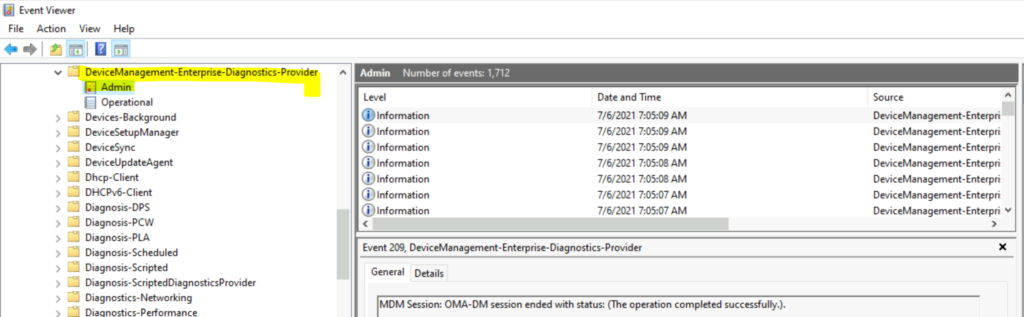
When you have a problem with the Intune application (MDM-based) or policy deployment, you must check two event logs.
- Microsoft-Windows-DeviceManagement-Enterprise-Diagnostics-Provider/Admin
- Microsoft-Windows-DeviceManagement-Enterprise-Diagnostics-Provider/Operational
- CMPivot Query to Find Windows 10 Devices
- How to Collect Intune Error Details using CMPivot
- How to Collect Windows Update Logs using CMPivot
- ConfigMgr CMPivot Favorite Query
How to Collect Intune Event Logs using SCCM
Let’s learn how to collect Intune event logs using SCCM CMPivot. The CMPivot tool is the best way to troubleshoot Intune issues and collect logs from Intune clients.
NOTE! – This method can be used only when you have co-managed Windows devices.
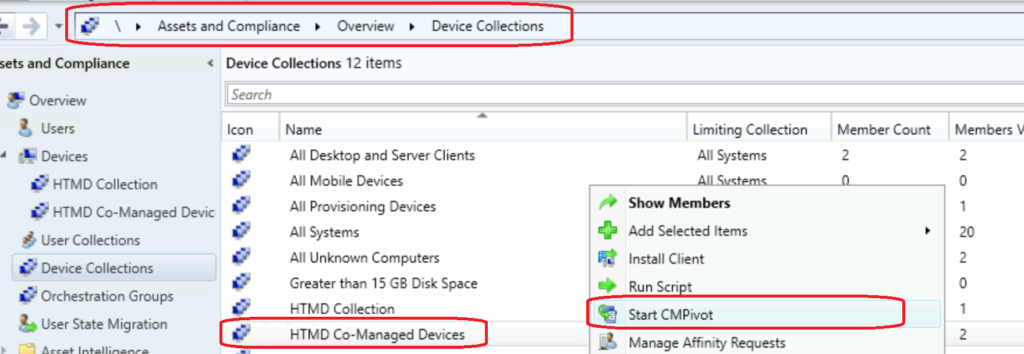
- Navigate to the device collection against which you want to run the CMPivot query.
- Select any device collection.
- Right-click on the Co-managed Devices collection.
- Select Start CMPivot.
CMPivot Query for Intune Event Logs
Let’s find the ConfigMgr CMPivot query for Intune event logs. It would be best to remember the log information you query through CMPivot.
It would help if you didn’t collect Intune event logs from 10,000 devices with a 5d (five-day) parameter. The above scenarios can impact the entire SCCM infra, so I recommend testing this in a staging environment first.
The following is the query to collect Intune event log details of the last 1 hour.
WinEvent('Microsoft-Windows-DeviceManagement-Enterprise-Diagnostics-Provider/Operational', 1h)WinEvent('Microsoft-Windows-DeviceManagement-Enterprise-Diagnostics-Provider/Admin', 1h)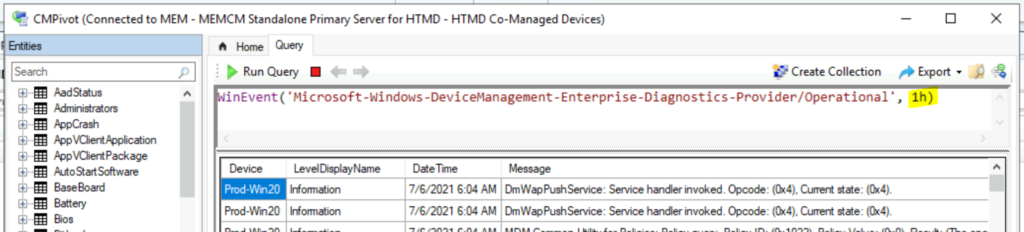
- CMPivot Query to Fetch WSUS Server Details
- ConfigMgr CMPivot Logs | Background Process Guide
- CMPivot Query to Find Clients not Part of Any Boundary Groups
- Run CMPivot Queries from Intune Portal
- Analyze SCCM Client Logs Using CMPivot
The following CMPivot query gives you the details of Microsoft-Windows-DeviceManagement-Enterprise-Diagnostics-Provider/Admin event logs for the last day.
WinEvent('Microsoft-Windows-DeviceManagement-Enterprise-Diagnostics-Provider/Admin', 1d)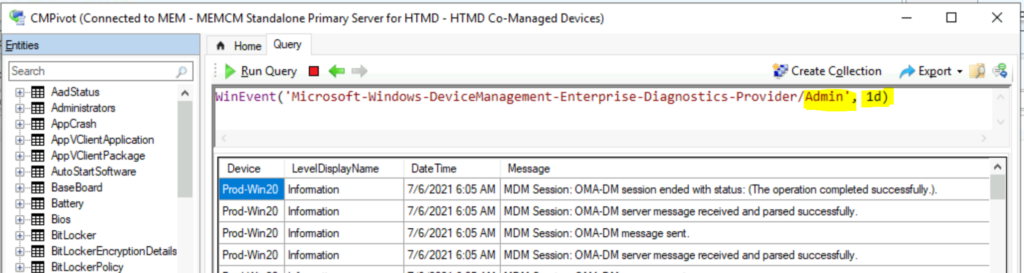
Collect Intune Error Details using SCCM
I think having details of Intune event log errors would be helpful. The following CMPivot query gives you a summary dashboard for MDM-related errors with the error and the number of devices. You can query the following event logs for the last day.
- Microsoft-Windows-DeviceManagement-Enterprise-Diagnostics-Provider/Admin
- Microsoft-Windows-DeviceManagement-Enterprise-Diagnostics-Provider/Operational
WinEvent('Microsoft-Windows-DeviceManagement-Enterprise-Diagnostics-Provider/Admin', 1d)
| where LevelDisplayName =='Error'
| summarize count() by DeviceWinEvent('Microsoft-Windows-DeviceManagement-Enterprise-Diagnostics-Provider/Operational', 1d)
| where LevelDisplayName =='Error'
| summarize count() by Device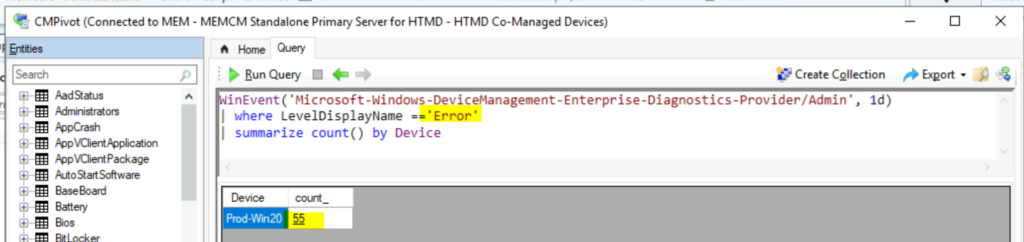
You can export the CMPivot query results using the EXPORT button in the CMPivot tool.
Resources
- SCCM CMPivot Query Devices with Greater than 15 GB Free Disk Space
- SCCM CMPivot Query for Windows 10 English Language Devices | ConfigMgr
- ConfigMgr Software Updates Troubleshooting Tips
- SCCM 1909 New Features Enhancements Extend Migrate SCCM To Azure
We are on WhatsApp. To get the latest step-by-step guides and news updates, Join our Channel. Click here –HTMD WhatsApp.
Author
Anoop C Nair has been Microsoft MVP for 10 consecutive years from 2015 onwards. He is a Workplace Solution Architect with more than 22+ years of experience in Workplace technologies. He is a Blogger, Speaker, and Local User Group Community leader. His primary focus is on Device Management technologies like SCCM and Intune. He writes about technologies like Intune, SCCM, Windows, Cloud PC, Windows, Entra, Microsoft Security, Career, etc.




Discussion