






ConfigMgr SCCM How to Find Out DDRs Processing Rate
In this post, I will explain the ConfigMgr SCCM How to Find Out DDRs Processing Rate. You must be familiar with backlog issues if you’ve worked with SCCM for years.
More details about ConfigMgr CB backlog troubleshooting are here. I’ve often seen backlog because of DDR files in the Auth/ddm.box.
Discovery methods create DDRs. We have asked how many DDRs are processed per minute and how to calculate this several times.
Administrative Tools—Performance Monitor is your best friend for calculating the processing speed of DDRs. I’m not going to explain DDR backlog troubleshooting in this post.

Table of Contents
ConfigMgr SCCM How to Find Out DDRs Processing Rate
When you’ve CAS in the ConfigMgr hierarchy, all the DDRs (DDRs for newly discovered resources not in the database) generated at primary sites are processed by CAS.
The unavailability of a CAS server can greatly impact the environment. More Details via the Technet article here. ConfigMgr SCCM How to Find Out DDRs Processing Rate.
More Details about the SMS DDM Counters: –
Total DDRs en-queued: Provides the number of DDRs waiting to get processed. When you’ve any backlog of DDRs in SCCM 2012 CAS, you can see loads of numbers against this counter.
Non-User DDRs processed/minute: This will give you the estimated number of non-User DDRs processed per minute. ConfigMgr SCCM How to Find Out DDRs Processing Rate.
User DDRs Processed/minute: Total User DDRs processed per Minute. ConfigMgr SCCM How to Find Out DDRs Processing Rate.
- ConfigMgr Performance Counter Template SCCM
- Easy Way to Measure Data Size Sent Between SCCM ConfigMgr Servers
- ConfigMgr SCCM Untrusted Forest AD System Discovery Issue
This method is to find out the Data Discovery Manager Real-time performance. More detailed performance can be analyzed via Data Collector Sets – User Defined – Create a new data collector set.
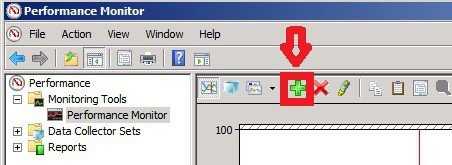
1. Launch Administrative Tools – Performance Monitor. Press Green “+” button to add SMS Discovery Data Manager counters.
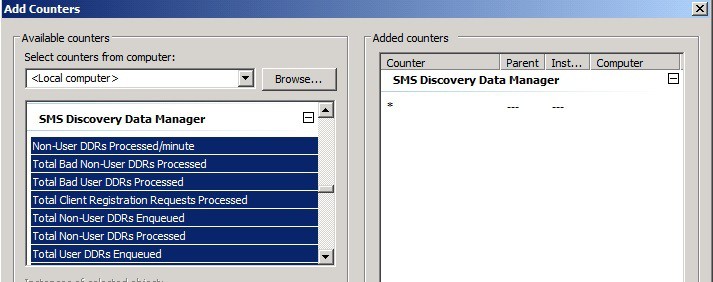
2. Add all the counters under SMS Discovery Data Manager.
Following are the counters which will help us to calculate the DDR processing rate: –
- Non-User DDRs processed/minute
- Total Bad Non-User DDRs Processed
- Total Bad User DDRs Processed
- Total Client Registration Requests Processed
- Total Non-User DDRs Enqueued
- Total Non-User DDRs Processed
- Total User DDRs Enqueued
- Total User DDRs processed
- User DDRs Processed/minute
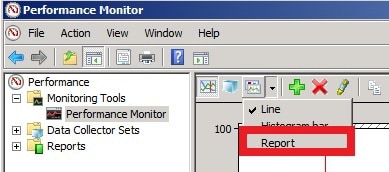
3. Change the settings to Report as shown in the screen capture below.
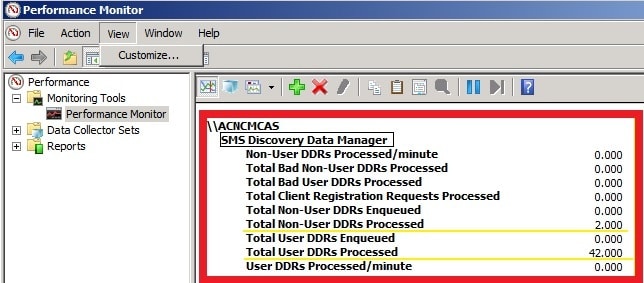
4. Result shown in the report below.
Unfortunately, I couldn’t capture DDRs processed per Minute in a lab environment as I have a very small number of systems and discovery methods running.
Total User DDRs processed = 42 is the total number of User DDRs already processed by CAS.
Total Non-User DDRs Processed = 2 is the total number of Non-User DDRs already processed by CAS.
Resources
We are on WhatsApp now. To get the latest step-by-step guides, news, and updates, Join our Channel. Click here – HTMD WhatsApp.
Author
Anoop C Nair is Microsoft MVP! He is a Device Management Admin with more than 20 years of experience (calculation done in 2021) in IT. He is a Blogger, Speaker, and Local User Group HTMD Community leader. His primary focus is Device Management technologies like SCCM 2012, Current Branch, and Intune. He writes about ConfigMgr, Windows 11, Windows 10, Azure AD, Microsoft Intune, Windows 365, AVD, etc.




this is truely awesome…. the best of all 🙂
StaffThank you Arvind 🙂 Glad this helped you.