






ConfigMgr Microsoft Edge SQL Query | Custom Report | SCCM
This post helps you get ConfigMgr Microsoft Edge SQL Query | Custom Report | SCCM. Let’s analyze the Edge browser installation using ConfigMgr Microsoft Edge SQL Query and try to find the legacy Microsoft Edge browser installation using SCCM.
Microsoft introduced a new version of Edge based on Chromium. You should use the Edge Chromium version instead of the legacy version. Let’s try to create a custom report for the Microsoft Edge Chromium browser.
In the following guide, I explain the process for installing the Edge version: Deploy Microsoft Edge Browser Using SCCM ConfigMgr. Thanks to my colleague Kalateet Vyas for helping with the following queries.
Learn how to create a device collection based on the MS Edge version -> Create MS Edge SCCM Device Collection Using WQL Query.

| Index |
|---|
| Manual or PowerShell Method to find Microsoft Edge Version |
| Custom Report for Legacy Edge Browser (NOT Supported version) |
| Custom Report for ConfigMgr Microsoft Edge SQL Query |
Manual or PowerShell Method to find Microsoft Edge Version
Let’s check the manual or automatic method to find the version of Microsoft Edge. You can use PowerShell or a normal command prompt to get details of the MS Edge version.
There are two different ways to identify the version of the Microsoft Edge Browser application without using SCCM/ ConfigMgr. You can use the Registry to confirm the version. There are two options, Command Prompt and PowerShell commands, to verify the details of the MS Edge version.
reg query HKCU\Software\Microsoft\Edge\BLBeacon /v version
(Get-ItemProperty -Path HKCU:\Software\Microsoft\Edge\BLBeacon -Name version).version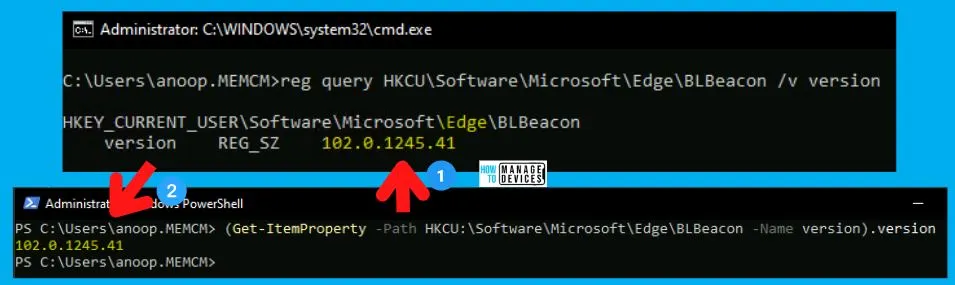
Custom Report for Legacy Edge Browser (NOT Supported version)
Let’s determine which legacy Edge browser is installed on Windows 10 devices. The following steps will help you create a custom report for legacy edge browsers.
NOTE! – Software Inventory should collect legacy edge file details and create the following report.
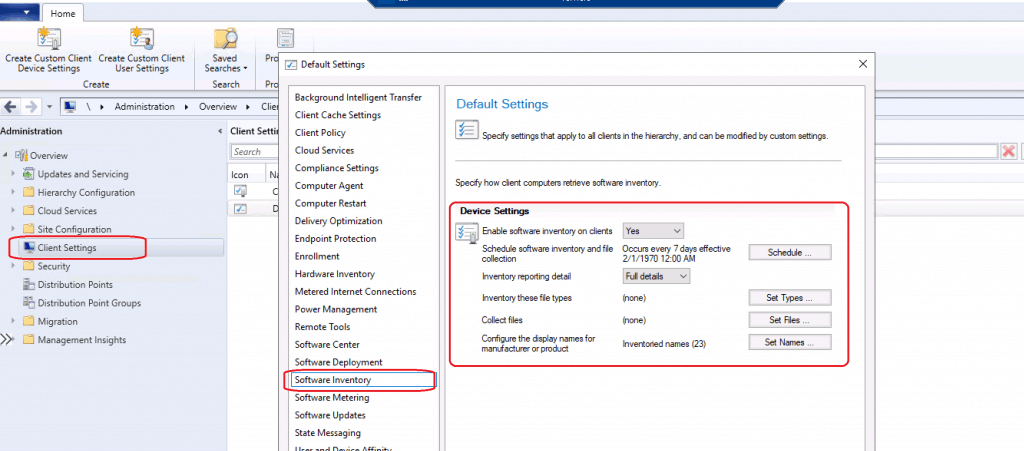
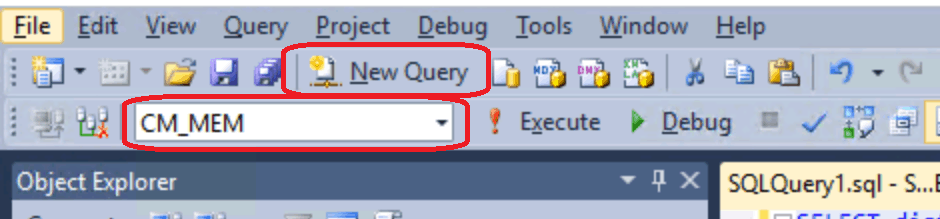
Open the SQL Management Studio and click on the New Query button.
- Select the CM_MEM database from the drop-down menu.
- MEM is the ConfigMgr site code.
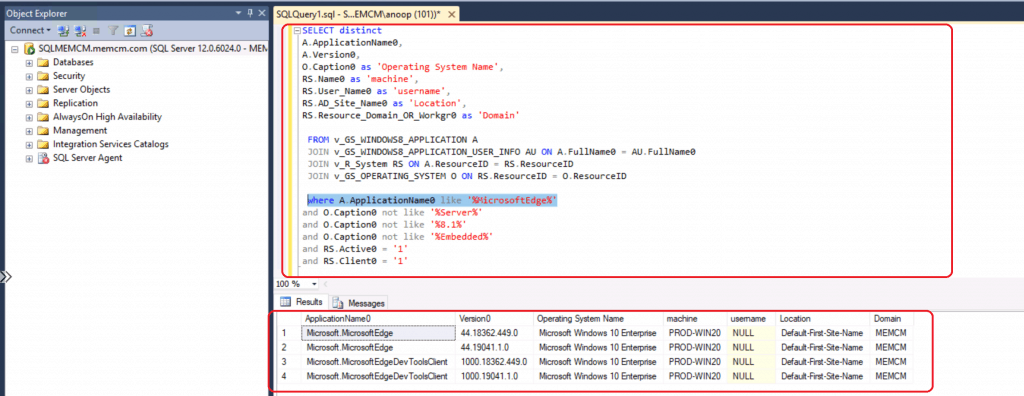
Copy the following SQL query to find the Legacy version of Edge.
- Click on the Execute button.
SELECT distinct
A.ApplicationName0,
A.Version0,
O.Caption0 as 'Operating System Name',
RS.Name0 as 'machine',
RS.User_Name0 as 'username',
RS.AD_Site_Name0 as 'Location',
RS.Resource_Domain_OR_Workgr0 as 'Domain'

 FROM v_GS_WINDOWS8_APPLICATION A
 JOIN v_GS_WINDOWS8_APPLICATION_USER_INFO AU ON A.FullName0 = AU.FullName0
 JOIN v_R_System RS ON A.ResourceID = RS.ResourceID
 JOIN v_GS_OPERATING_SYSTEM O ON RS.ResourceID = O.ResourceID

 where A.ApplicationName0 like '%MicrosoftEdge%'
and O.Caption0 not like '%Server%'
and O.Caption0 not like '%8.1%'
and O.Caption0 not like '%Embedded%'
and RS.Active0 = '1'
and RS.Client0 = '1'
Let’s find the results of the query.
Custom Report for ConfigMgr Microsoft Edge SQL Query
Now, let’s look at the edge version installation on Windows 10 devices. The MS Edge version of Microsoft Edge installation happens only via force deployment of the application.
- Open the SQL Management Studio.
- Click on the New Query button.
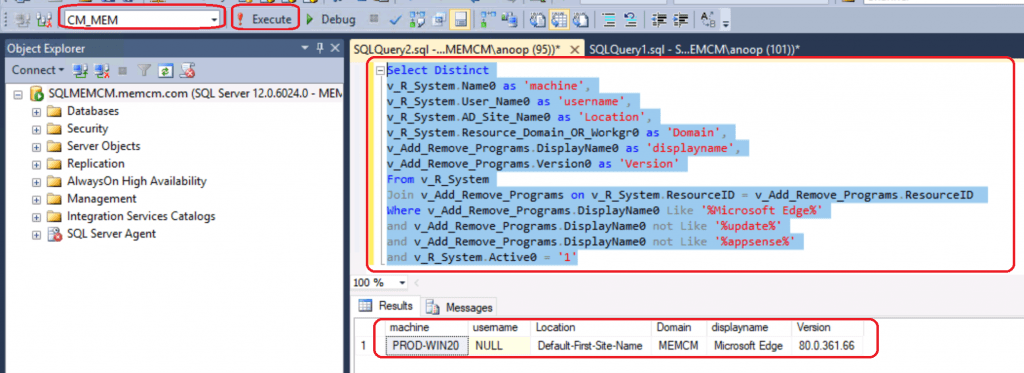
- Select the CM_MEM database from the drop-down menu.
- MEM is the ConfigMgr site code.
- Copy the following SQL query to find the Legacy version of Edge.
- Click on the Execute button.
Select Distinct
v_R_System.Name0 as 'machine',
v_R_System.User_Name0 as 'username',
v_R_System.AD_Site_Name0 as 'Location',
v_R_System.Resource_Domain_OR_Workgr0 as 'Domain',
v_Add_Remove_Programs.DisplayName0 as 'displayname',
v_Add_Remove_Programs.Version0 as 'Version'
From v_R_System
Join v_Add_Remove_Programs on v_R_System.ResourceID = v_Add_Remove_Programs.ResourceID
Where v_Add_Remove_Programs.DisplayName0 Like '%Microsoft Edge%'
and v_Add_Remove_Programs.DisplayName0 not Like '%update%'
and v_Add_Remove_Programs.DisplayName0 not Like '%appsense%'
and v_R_System.Active0 = '1'
Let’s find the results of the query. ConfigMgr | SCCM Microsoft Edge SQL Query.
Resources – ConfigMgr Microsoft Edge SQL Query
- Deploy Microsoft Edge Chromium Browser Using SCCM ConfigMgr
- Custom Report to check the Status of Predefined Site Maintenance Tasks
We are on WhatsApp. To get the latest step-by-step guides and news updates, Join our Channel. Click here –HTMD WhatsApp.
Author
Anoop C Nair is Microsoft MVP! He is a Device Management Admin with more than 20 years of experience (calculation done in 2021) in IT. He is a Blogger, Speaker, and Local User Group HTMD Community leader. His primary focus is Device Management technologies like SCCM 2012, Current Branch, and Intune. He writes about ConfigMgr, Windows 11, Windows 10, Azure AD, Microsoft Intune, Windows 365, AVD, etc.




How would you covert these queries to use them in a Device collection using a query?
Are you wanting a collection for all users with Chromium based Edge regardless of version? Or what specifically is the criteria for the collection you’re wanting?
Computers, not users……sorry