






ConfigMgr Performance Counter Template SCCM
Today, I will talk about ConfigMgr Performance Counter Template SCCM. Templates are always helpful. This post continues the previous one, How to Find Out DDRs Processing Rate.
Performance Counters allow you to collect system data such as CPU, memory, and disk usage. People who run computer systems often use these counters to monitor performance and behaviour.
When you want to perform a deep-level analysis of the SCCM server’s performance, you must include more performance counters and run the capture for at least an hour.
I’ve created a template and uploaded it to the TechNet Gallery. You can download the template from here.

Table of Contents
ConfigMgr Performance Counter Template SCCM
I’ve selected the following counters in this template as I’ve DDR backlog issues. When you want to analyze the performance of some other SCCM ConfigMgr or SQL components, you can add and remove them from the Data Collector file. I’ve explained this as the 6th point below.
Memory, Network Interface, Paging File, Physical Disk, Process, Processor, SMS Discovery Data Loader, SQLServer: Databases, SQLServer: General, Statistics, SQLServer: Locks, SQLServer: Memory Manager and System.
- Easy Way To Measure Data Size Sent Between SCCM ConfigMgr Servers
- ConfigMgr SCCM How To Find Out DDRs Processing Rate
1. Launch Administrative Tools – Performance Monitor.
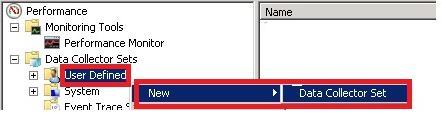
Navigate through Data Collector Sets – User Defined – New – Data Collector Set. As shown in the following picture.
2. Create a New Data Collector Set
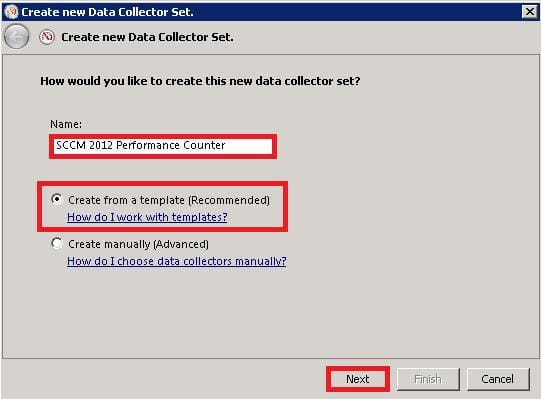
Enter the name of the capture you want to perform. Select the Create from a template (Recommended) option and click on Next. Download the template from the above-mentioned link.
3. Which Template would you like to use?
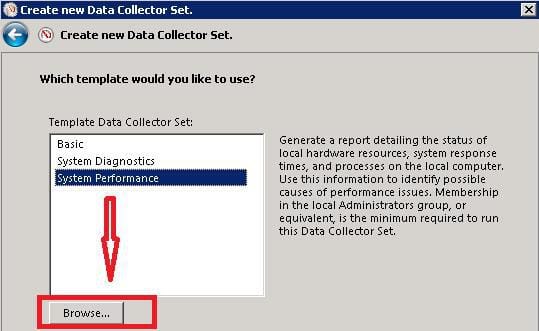
Click on the Browse button and select the template that has already been downloaded. Then Next :
4. Where would you like the data to be saved?
- Browse and select the patch where you want to save the performance capture file. The file’s extension is .blg
- The default location for my scenario was %systemdrive%\PerfLogs\Admin\SCCM 2012 Performance Counter.
- Ensure there is enough space on that drive to store the capture file.
5. Save and Close is the default option.
Always verify the performance counters selected in the template and check whether each counter is required in your scenario. In my case, I wanted to create a performance counter for DDR process issues.
6. When did you want to analyse the performance of Inventory instead of DDR?
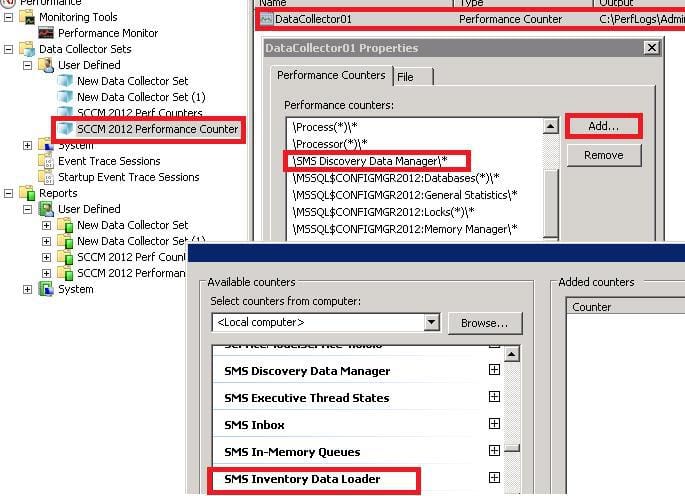
Open the properties of the .blg file as shown in the picture below, remove SMS Discovery Data Manager, and add SMS Inventory Data Loader.
Resources
We are on WhatsApp. To get the latest step-by-step guides and news updates, Join our Channel. Click here –HTMD WhatsApp.
Author
Anoop C Nair has been Microsoft MVP from 2015 onwards for 10 consecutive years! He is a Workplace Solution Architect with more than 22+ years of experience in Workplace technologies. He is also a Blogger, Speaker, and leader of the Local User Group Community. His main focus is on Device Management technologies like SCCM and Intune. He writes about technologies like Intune, SCCM, Windows, Cloud PC, Windows, Entra, Microsoft Security, Career, etc..




Any performance templates for ConfigMgr 1910 or later.
StaffI think the same performance counters work for current branch versions as well.
Did you see any issues with those versions?
Yes the XML is not working for current Branch of SCCM.