






How to Stop Accidental SCCM ConfigMgr Rollout Traffic over WAN Configuration Manager
How to Stop Accidental SCCM ConfigMgr Rollout Traffic over WAN Configuration Manager. Over the years, we (SCCM admins) have been waiting for the “Big Red Button” feature to help stop all accidental deployments and package replications over the WAN.
I even had a bad experience deploying office packages to remote DPs in Australia. During office hours, we deployed the office package to Australian DPs, and the WAN bandwidth was NOT very good. So, SCCM started using 80% of the bandwidth for business users.
All the business applications started experiencing performance issues, such as slowness, not responding, etc. SCCM / ConfigMgr has no mechanism to stop package replication or traffic over the WAN immediately. However, we can have some workarounds to prevent SCCM WAN traffic. I don’t think most of them are very effective.
The “big red button” is one of the most requested features in SCCM ConfigMgr. However, this feature or button is unavailable in native SCCM /ConfigMgr. Adaptiva OneSite is an Enterprise-class P2P technology that is a scalable, secure, and business-friendly product.
- How to Stop Accidental Deployments by SCCM Admins Configuration Manager
- End of Support Dates for SCCM CB Current Branch | ConfigMgr | SCCM End of Life
- SCCM Unsupported Deprecated or Removed Features
| Index |
|---|
| How to Stop Accidental SCCM ConfigMgr Rollout Traffic Over WAN Configuration Manager |
How to Stop Accidental SCCM ConfigMgr Rollout Traffic Over WAN Configuration Manager
Adaptiva OneSite 4.0 version has the most awaited featured “Big Red Button” available to PAUSE/RESUME SCCM traffic worldwide. Adaptiva OneSite helps SCCM/ConfigMgr administrators instantly pause/resume all SCCM WAN traffic by pushing this button.
| Content Management Task Navigator |
|---|
| Content Management |
| Pause/Resume WAN Downloads |
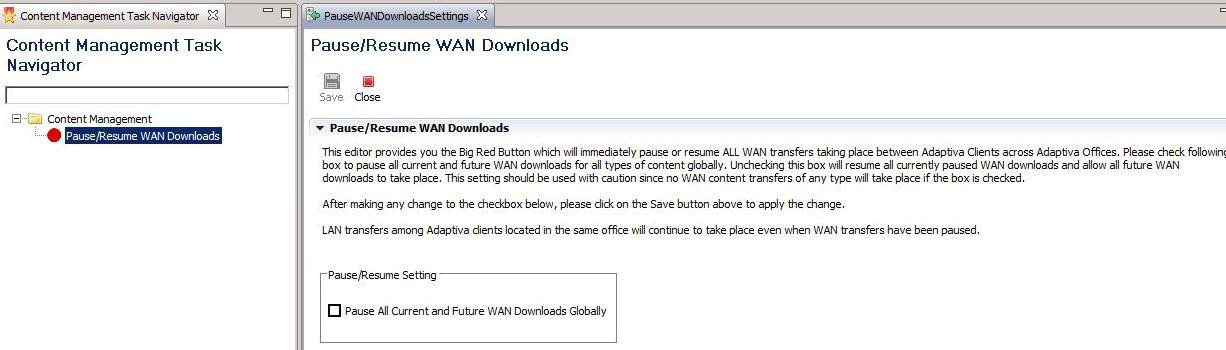
When an SCCM admin accidentally initiates a rollout that needs to be stopped before it is deployed on hundreds of thousands of systems, this “big red button” immediately halts all network activity worldwide.

If you’re attending TechEd Europe 2014 in Barcelona, Spain, visit Adaptiva booth #87 to learn more about the trade-in program with discounts of up to 80%!

Pictures Sources –> Adaptiva Onesite and be-rad
Resources
SCCM Related Posts Real World Experiences Of SCCM Admins
We are on WhatsApp now. To get the latest step-by-step guides, news, and updates, Join our Channel. Click here. HTMD WhatsApp.
Author
Anoop C Nair is Microsoft MVP from 2015 onwards for consecutive 10 years! He is a Workplace Solution Architect with more than 22+ years of experience in Workplace technologies. He is a Blogger, Speaker, and Local User Group Community leader. His main focus is on Device Management technologies like SCCM and Intune. He writes about technologies like Intune, SCCM, Windows, Cloud PC, Windows, Entra, Microsoft Security, Career etc…


Hi Anoop, Can you pls assit in deleting active directory discovery account created in sccm2012 for disovering untrusted domain from our internal infra. SCCM server. When i navigate to Admin->Overview->Security->Accounts and right click “delete” is greyed out.
StaffHi RBK ! – Probably you need to remove that account from other wherever you’ve used it and then try.
regards
Anoop
Hi Anoop,
The above post is really good news. As it is really difficult to stop a deployment. Can you please share a document exactly how can we use this tool. step by step process with an example in that document.
Regards,
Narayanan B
StaffHi Narayanan ! – That is great news. please visit http://www.adaptiva.com/ to get more details and let me know when you’ve more specific queries.
Regards
Anoop