






ConfigMgr Version Numbers | Major Minor Build Rev of SCCM
Let’s check the 2006 ConfigMgr Version Numbers. Also, check the versioning details like Major Minor Build Rev of SCCM. As you know, Windows 10 has very well-defined versioning controls.
Versioning configuration data involves assigning unique version numbers to configurations when changes such as improvements, upgrades, or customizations are made. These version numbers indicate the chronological order of modifications, allowing for easy tracking and restoration of previous configurations if needed. This process is automated by Network Configuration Manager.
The build numbers and version numbers for System Center Configuration Manager (SCCM), also known as ConfigMgr, are regularly updated with the release of new updates and builds. These updates may include new features, bug fixes, and security improvements to enhance the functionality and security of the platform. Keeping track of these updates is essential to ensure your environment runs the latest and most secure version of SCCM.
Before getting into SCCM version numbers, let’s understand the Windows 10 and Office 365 versioning details.

Windows 10
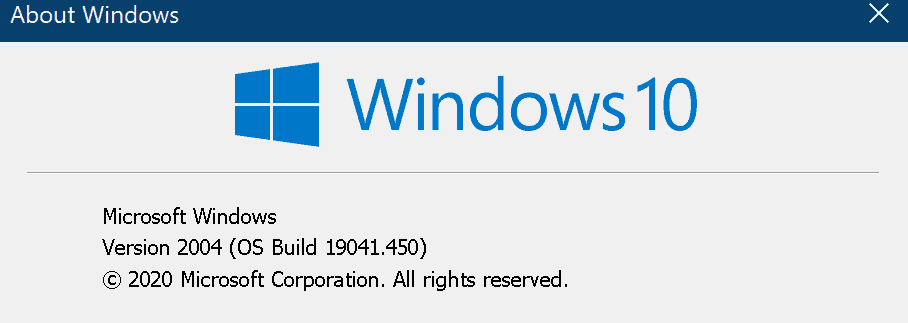
Windows 10 version details are in the following format major.minor.build.rev. Following is one of the examples of the Windows 10 version and build. Build version
This is one of the real-world examples of using Windows 10’s major and minor versions of Enrollment Restriction Policies, Device Type, and Device Limit policies.
- Major = 10
- Minor = 0
- Build = 19041 (Unique build number for version 2004)
- Rev = 450 (changes after every quality update)
Windows 10 Build numbers https://www.anoopcnair.com/windows-10-build-numbers-version-numbers/
Office 365 Apps
Microsoft 365 Apps (a.k.a Office 365 Apps) also use a similar versioning pattern. I have explained this in the previous post Office 365 Apps Version vs Build details.
Office 365 Apps major.minor.build.rev = 16.0.13127.20408
ConfigMgr Version Numbers
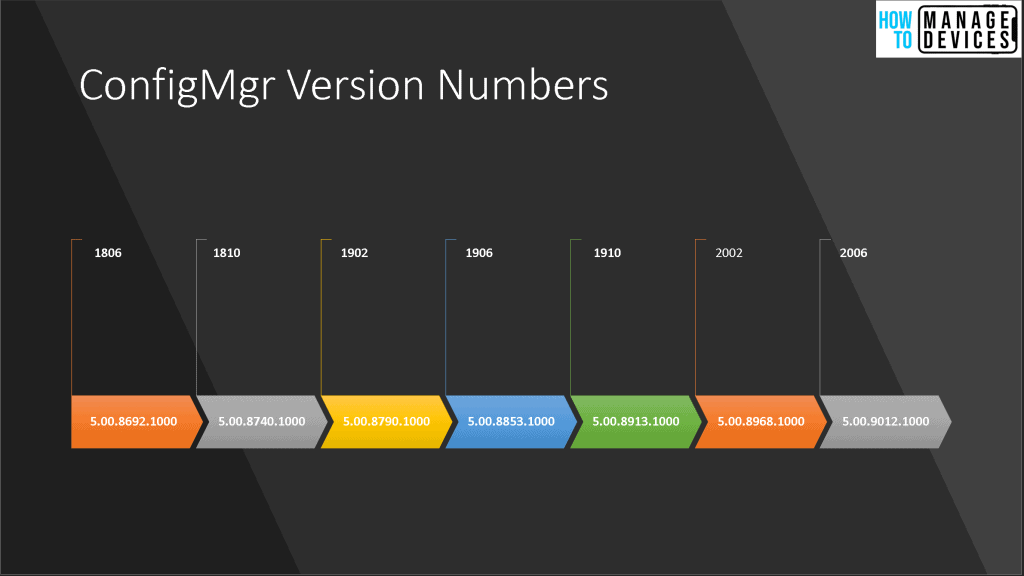
ConfigMgr versions numbers are explained below. I have taken an example of the ConfigMgr 2006 production version to explain different scenarios. More details about different versions of SCCM are already shared in the previous post.
| Releases | Build Number | Build Versions | Console Version |
|---|---|---|---|
| ConfigMgr 2006 | 9012 | 5.00.9012.1000 | 5.2006.1026.1800 |
| Releases | Client Version |
|---|---|
| MEMCM 2006 | 5.00.9012.1015 |
Major Minor Build Rev of SCCM
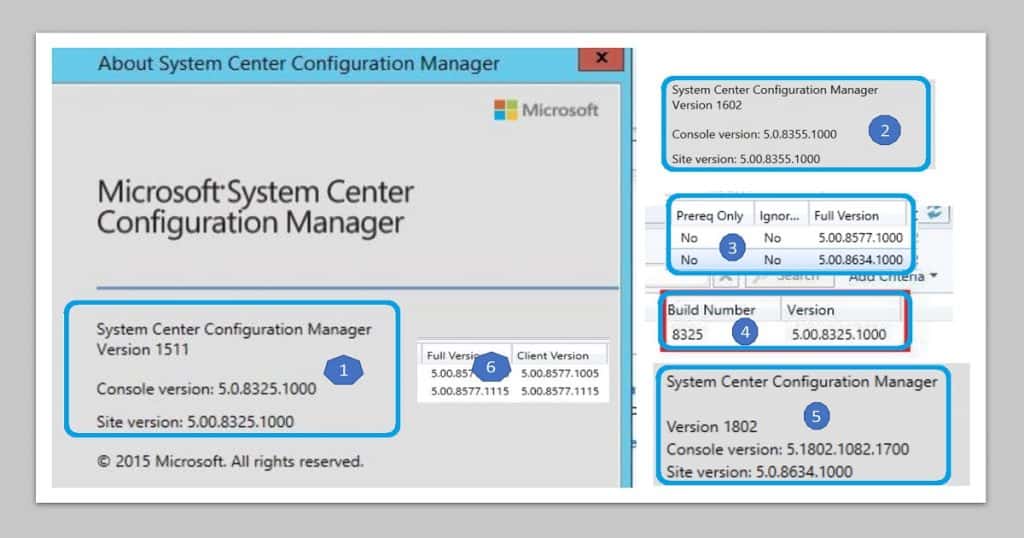
Let’s check the Major Minor Build Rev of SCCM. Let’s understand how this works for different components (or different places) in the ConfigMgr console.
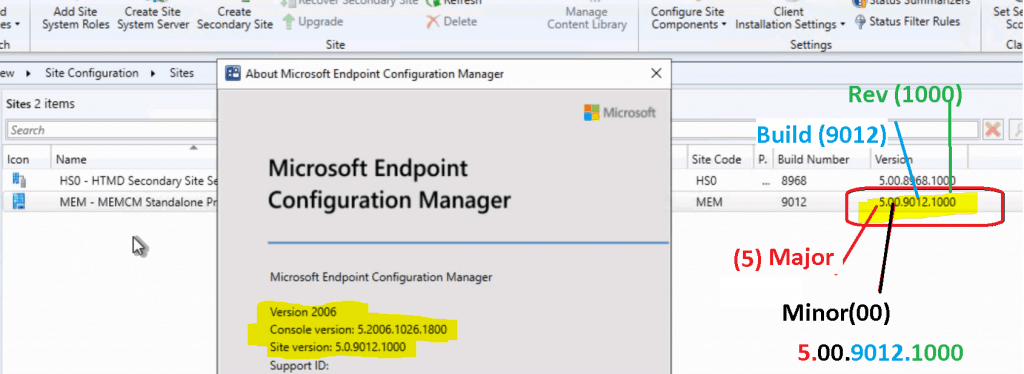
More about version details from \Administration\Overview\Site Configuration\Sites – Major.Minor.Build.Rev 5.00.9012.1000
- Major – 5
- Minor – 00
- Build – 9012 (Unique build number for version 2006)
- Rev – 1000 (This version will change with every hotfix of ConfigMgr)
Major Version History of ConfigMgr
- Major version
- SMS 1.0 builds start with 1.xxx
- SMS 2.0 builds start with 2.xxx
- SMS 2003 builds start with 3.xxx
- SCCM 2007 builds start with 4.xxx
- SCCM 2012 and Current Branch(CB) build start with 5.xxx
Console Version Details
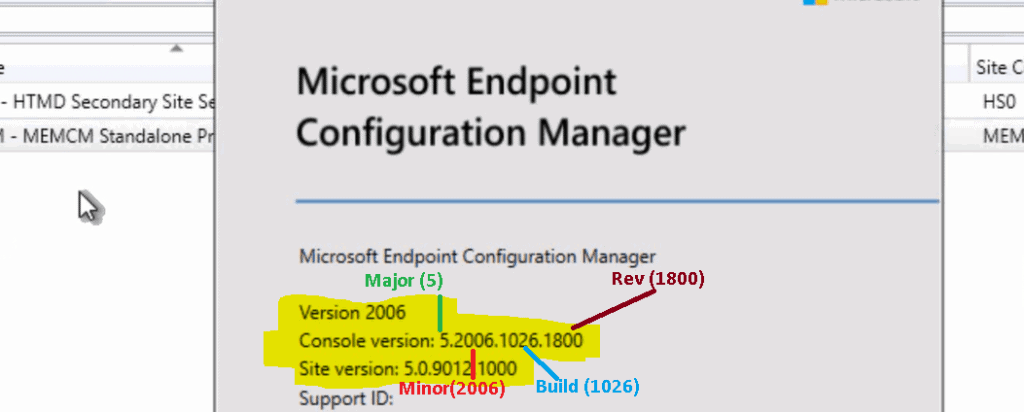
You can get the details of the SCCM console version, and SCCM site version numbers from the SCCM console -> click on the arrow button (Near Home) -> About Configuration Manager. Let’s check the console version details below:
- Major = 5
- Minor = 2006 (Unique build number for version 2006)
- Build = 1026
- Rev = 450
Client Version Details
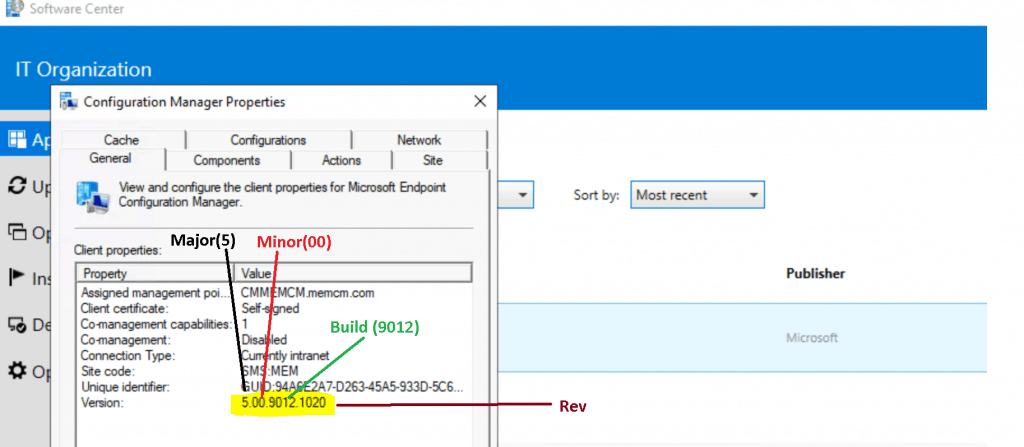
Let’s find the details of the client version details of ConfigMgr. We have an option to look at the SCCM Client Version Dashboard to get more details about the client version in your environment.
ConfigMgr client version follows the model of the site server version.
- Major – 5
- Minor – 00
- Build – 9012 (Unique build number for version 2006)
- Rev – 1000 (This version will change with every hotfix of ConfigMgr)
Resources
- SCCM History Details – https://en.wikipedia.org/wiki/Microsoft_System_Center_Configuration_Manager




Discussion