






Configuration Manager 2001 Technical Preview Version
Microsoft released the latest technical preview, version 2001 of Configuration Manager. Most of the features released in this version shall be part of the production version MEMCM 2001.
NOTE! If you have not installed the ConfigMgr preview version in the lab, I recommend installing the Baseline version Configuration Manager version 1911.
- MECM 2001 Version Numbers: (More Details about SCCM version details)
- Site Version – 5.00.8938.1000
- Client Version – 5.00.8938.1000
- Console – 5.2002.1026.1000
Microsoft is preparing for the next version of the Microsoft Endpoint Manager Configuration Manager (MECM – A.K.A. MEMCM) release.
The next two technical preview versions will include most of the following features, which will also be part of the 2002 product version of MEMCM.

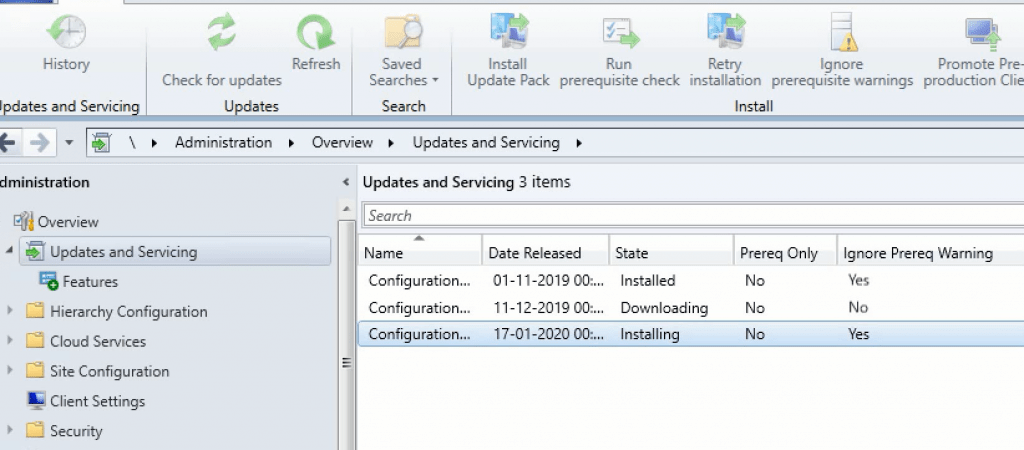
More details of the MECM 2001 technical preview version given below:
| Sl.No. | Topics |
|---|---|
| 1 | Task Sequence Check Readiness |
| 2 | Task Sequence Progress Bar |
| 3 | Improvements to Orchestration Groups |
| 4 | Improvements to administration service |
| 5 | Improvements to check readiness task sequence step |
| 6 | Microsoft Edge Management dashboard |
| 78 | OneTrace Log groups |
| 9 | Power B.I. Report Server Integration |
| 10 | Wake up a device from the central administration site |
Task Sequence Check Readiness
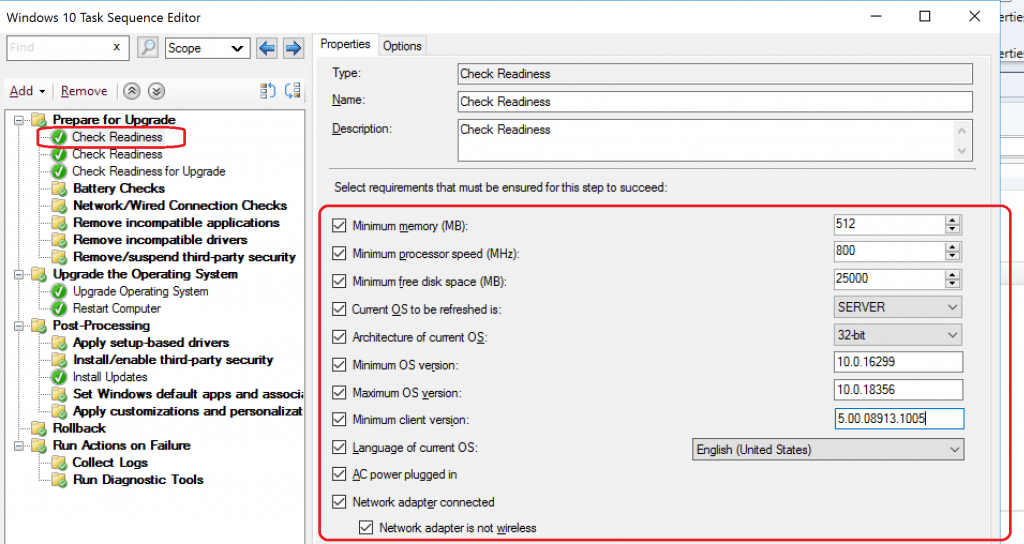
Task Sequence Check Readiness with Windows 10 Upgrade. The Configuration Manager 2001 Task Sequence has out-of-the-box checks to confirm the existing device configuration before the Windows 10 upgrade.
- The architecture of current O.S.: 32 Vs. 64
- Minimum O.S. version: for example, 10.0.16299
- Maximum O.S. version: for example, 10.0.18356
- Minimum client version: for example, 5.00.08913.1005
- Language of current O.S.: select the language name. The step compares the associated language code. This check compares the language you choose to the language property of the Win32_OperatingSystem class on the client.
- A.C. power plugged in
- Network adapter connected
- The network adapter is not wireless
Task Sequence Progress Bar
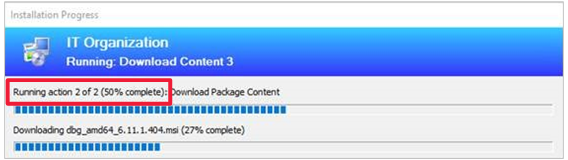
2001 version of Microsoft Endpoint Manager Configuration Manager (MECM) progress bar improvements on task sequence status bar.
Improvements to Orchestration Groups
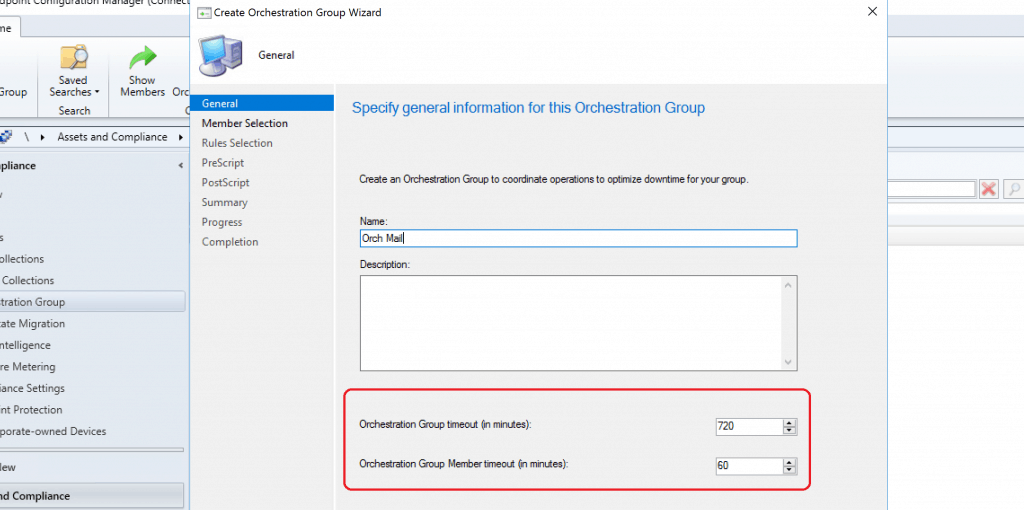
Orchestration groups are an evolution of server groups, and the 2001 version of the configuration manager comes with the following improvements.
My previous post was about the “SCCM Orchestration Group Setup Step-by-Step Guide for Server Patching.”
- We can now specify custom timeout values for The Orchestration Group and Group members.
- You now have a drop-down list to select the site code for group members.
- When selecting resources for the group, only valid clients are shown.
- You can set the value for the Number of machines, Script timeout in the PreScript and PostScript pages.
Improvements to administration service
Automatically use Configuration Manager-generated certificates for the administration service REST API unless there’s already a certificate bound to port 443.
Improvements to check readiness task sequence step
An administrator is now able to specify additional readiness verification in the check readiness task sequence step: New checks added include the architecture of the current O.S., minimum and maximum O.S. versions, the minimum client version, the language of the current O.S., whether A.C. power is plugged in and the network adapter state.
Microsoft Edge Management dashboard
The Microsoft Edge Management dashboard provides insights into using Microsoft Edge and other browsers. It shows how many of your devices have Microsoft Edge installed and how many devices have different versions of Microsoft Edge installed. You can view the installed browsers across devices.
OneTrace Log groups
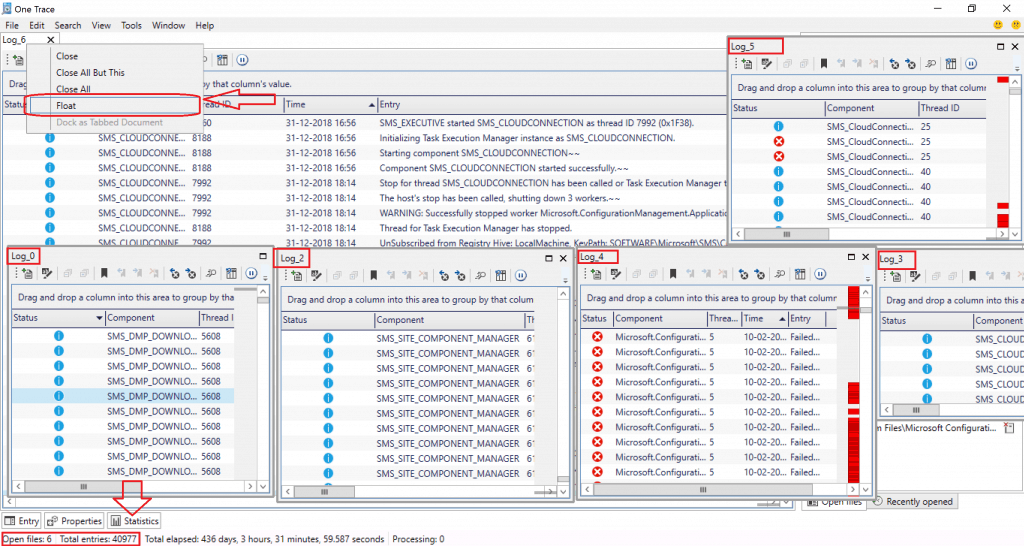
OneTrace now supports customizable log groups. Log groups allow you to open all log files associated with a single feature. You can customize these groupings using a template.
Power B.I. Report Server Integration
Configuration Manager now supports the integration of Power B.I. Report Server with Configuration Manager reporting.
You can now save Power B.I. Desktop report files and easily deploy them to the Power B.I. Report Server like SSRS RDL files. You can also launch the reports in the browser directly from the Configuration Manager console.
Wake up a device from the central administration site
You can now use the client notification action to wake up a device from the main administration site.
Resources
- Microsoft Documentation on 2001 version https://docs.microsoft.com/en-us/configmgr/core/get-started/2020/technical-preview-2001
We are on WhatsApp. To get the latest step-by-step guides and news updates, Join our Channel. Click here –HTMD WhatsApp.
Author
Anoop C Nair is Microsoft MVP! He is a Device Management Admin with more than 20 years of experience (calculation done in 2021) in IT. He is a Blogger, Speaker, and Local User Group HTMD Community leader. His main focus is on Device Management technologies like SCCM 2012, Current Branch, and Intune. He writes about ConfigMgr, Windows 11, Windows 10, Azure AD, Microsoft Intune, Windows 365, AVD, etc.




Discussion