






Configure Update Compliance Patch Management Reports using Intune and Log Analytics
Let’s configure Update Compliance patch management reports using Intune and Log Analytics. The latest news Update is Compliance Deprecated End Of Support. This is an additional service provided by Windows Team. This reporting solution helps to get patch compliance reports for Intune-managed devices.
The Update Compliance is a Windows service hosted in Azure that uses Windows diagnostic data. The Update Compliance service provides users a holistic view of Windows 10 or Windows 11 update compliance, update deployment, and failure troubleshooting.
Update Compliance helps to monitor security, quality, and feature updates for Intune-managed Windows 10 or Windows 11 PCs. This also helps to get the troubleshooting data from Windows PCs. The Delivery Optimization related data helps organizations to know more about bandwidth saving etc.
There are five (5) types of Update Compliance data types available. Those are five (5) different types of data collected as part of Windows as a Service (WaaS) and Windows Update (WU) services. You can also get more details from the List of Intune Devices With Patch Deployment Status and Country Details Using KQL Queries.

You can also get the details of Windows Update Delivery Optimization from Windows 10 and Windows 11 PCs. Sometimes you will see one additional data type, and that is WDAVStatus (Desktop Analytics).
WaaS Update Status
WaaS Insider Status
WaaS Deployment Status
WU DO Aggregated Status
WU DO Status
Video Windows Update for Business
In this video, you learn WUfB Reports Service Full Overview | Intune Patching Report | WUfB Deployment Service Microsoft Intune.
Read More -> KQL Queries (Update Compliance) to troubleshoot Intune WUfB Patch Deployment
Update Compliance Prerequisites
Let’s have a quick look at the prerequisites for the Update Compliance setup. You will need to have appropriate access to Azure Subscription to create a Log Analytics workspace and connect the Update compliance service with the log analytics workspace. Also, you should have appropriate access permissions for Intune policy creation and deployment.
- Windows 10 or Windows 11 Professional, Education, and Enterprise editions. It also supports Windows 10 or Windows 11 Multi-Session edition.
- Supports General Availability and LTSC channels. Windows Insider channels are not fully supported.
- Diagnostic data should be set to the Required level.
- Firewall and Proxy Communication should be opened to contact specific endpoints for Update Compliance.
- https://v10c.events.data.microsoft.com
- https://v10.vortex-win.data.microsoft.com
- https://settings-win.data.microsoft.com
- http://adl.windows.com
- https://watson.telemetry.microsoft.com
- https://oca.telemetry.microsoft.com
- https://login.live.com
Connect – Setup Configure Update Compliance with Azure Subscription and Log Analytics
It’s now time to set up and configure Update Compliance. You will need to follow the steps mentioned below to complete the Update Compliance reporting servicing for Windows as a Service solution. Log in to the Azure portal with appropriate permissions.
- Launch https://azuremarketplace.microsoft.com/en-US/marketplace/apps/microsoft.waasupdateinsights?tab=overview
- Click on the Get it Now and Click on the Continue button from the new page.
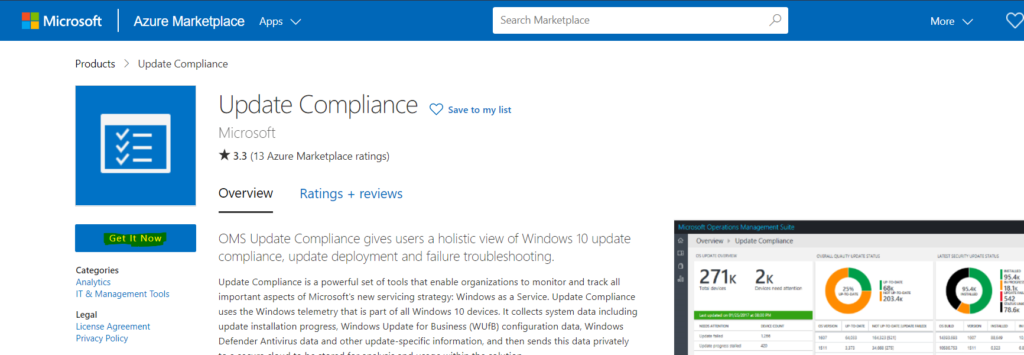
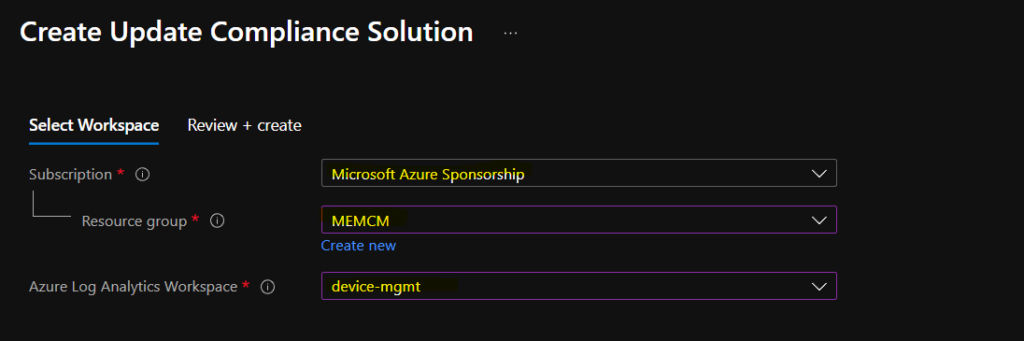
If you already have a Log Analytics workspace, you can select the following options to create the Update Compliance solution. Click on Review + Create now to complete the creation process of Update Compliance Solution.
NOTE! – To create a new log analytics workspace, go to Marketplace > Log Analytics Workspace > Create. See documentation at: https://aka.ms/AAbkhwa
Get the Commercial ID for WaaSUpdate Insights
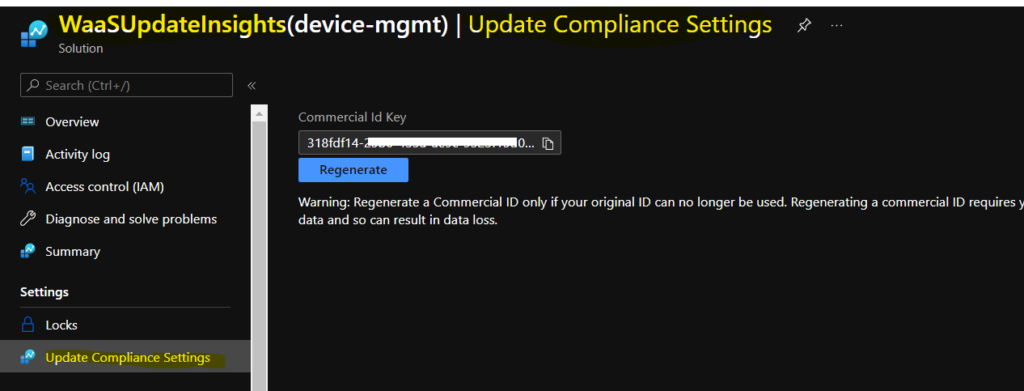
You can get a commercial ID key from the WaaSUpdate Insights -> Update Compliance Settings page. This ID is used when creating Intune policy to collect the data from Intune managed Windows 10 or Windows 11 PCs.
- Navigate to the Resource Group where you have created Log Analytics Workspace.
- Search with WaaSUpdateInsights and click on WaasUpdateInsight resource.
- Click on Update Compliance Settings to collect the Commercial ID.
- Copy the Commercial ID somewhere safe because you will need this at later stage.
Intune Update Compliance Data Collection Policy
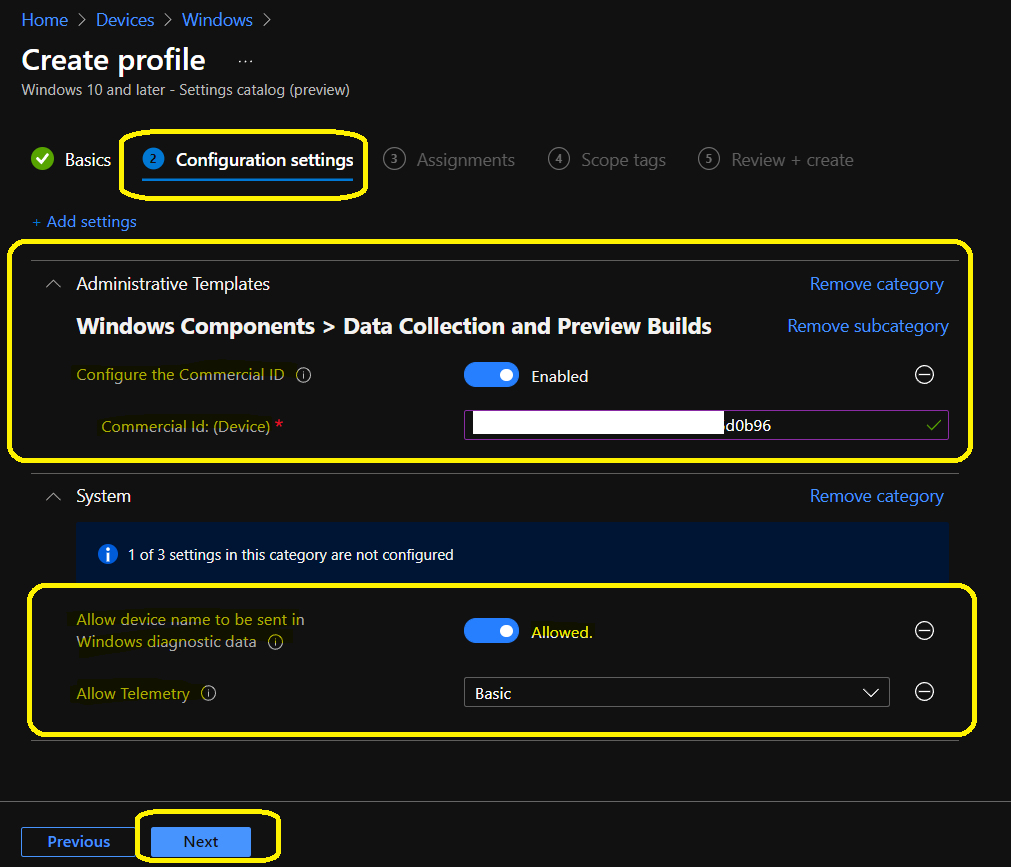
You will need to create a settings catalog Intune policy to deploy Update Compliance related policies to Windows 10 or Windows 11 devices. There are five policies that you will need to deploy. However, only three policies are available in Intune Settings catalog.
You will need to create a custom policy to cover the rest of the 2 policies. You can learn more about creating settings catalog policies from the below post.
- How to Create Intune Settings Catalog Policy
- You can use the following 3 keywords to find the appropriate policies from the Settings catalog.
AllowDeviceNameInDiagnosticData
AllowTelemetry
CommercialID
The following are the two custom policies that are created to collect the telemetry data from Windows 10 or Windows 11 PCs. You can refer to Customize Windows 11 Start Menu Layout Settings post to know more about the custom policy creation process.
Name: Configure Telemetry OptIn Settings Ux
Description: Disables the ability for end-users of devices can adjust diagnostic data to levels lower than defined by the Allow Telemetry setting.
OMA-URI: ./Vendor/MSFT/Policy/Config/System/ConfigureTelemetryOptInSettingsUx
Data type: Integer
Value: 1 (Disable)
Add a setting to Allow Update Compliance processing; this policy is required for Update Compliance:
Name: Allow Update Compliance Processing
Description: Opts device data into Update Compliance processing. Required to see data.
OMA-URI: ./Vendor/MSFT/Policy/Config/System/AllowUpdateComplianceProcessing
Data type: Integer
Value: 16
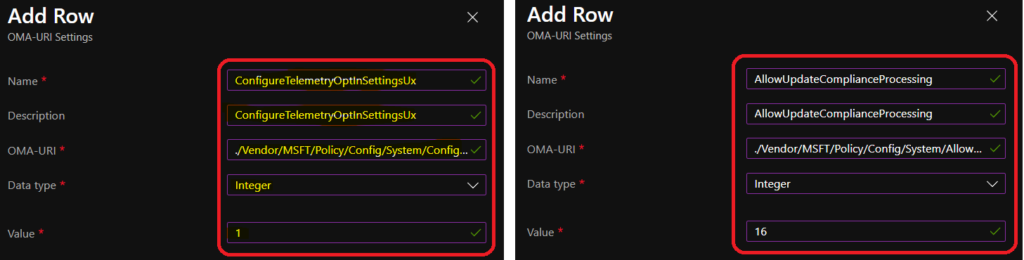
Deploy these policies to all Windows devices that you want to collect Update compliance data.
Update Compliance Reports Data Latency
You will have some time to relax now because the update compliance service will take around 48-72 hours to populate the data once collected from Windows 10 or Windows 11 devices. This 48-72 hour is the first time data appear after you added Update Compliance and appropriately configured it on your devices.
| Data Type | Data upload rate from the device | Data Latency |
|---|---|---|
| WaaSUpdateStatus | Once per day | 4 hours |
| WaaSInsiderStatus | Once per day | 4 hours |
| WDAVStatus | ? | ? |
| WaaSDeploymentStatus | Every update event (Download, install, etc.) | 24-36 hours |
| WUDOAggregatedStatus | On update event, aggregated over time | 24-36 hours |
| WUDOStatus | Once per day | 12 hours |
Update Compliance Reports
You can open up the Log Analytics workspace created in the above section and navigate to the Logs page to check the reports coming from Update Compliance. You can create different kinds of dashboards with the Update Compliance data.
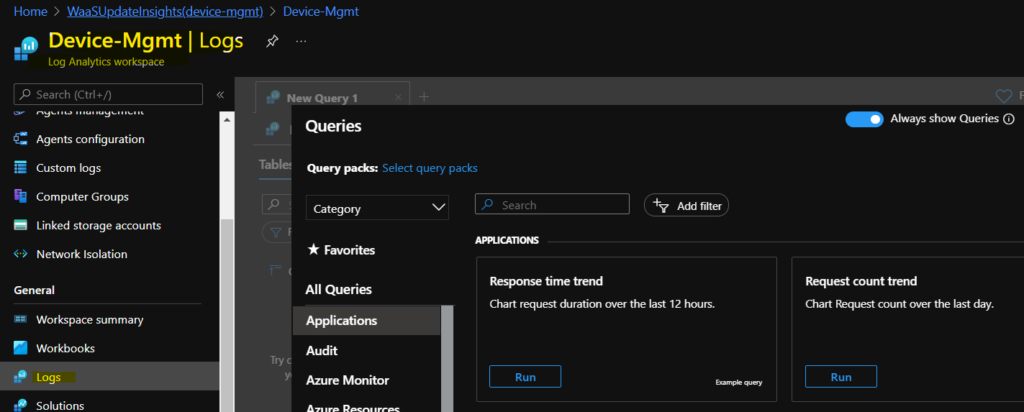
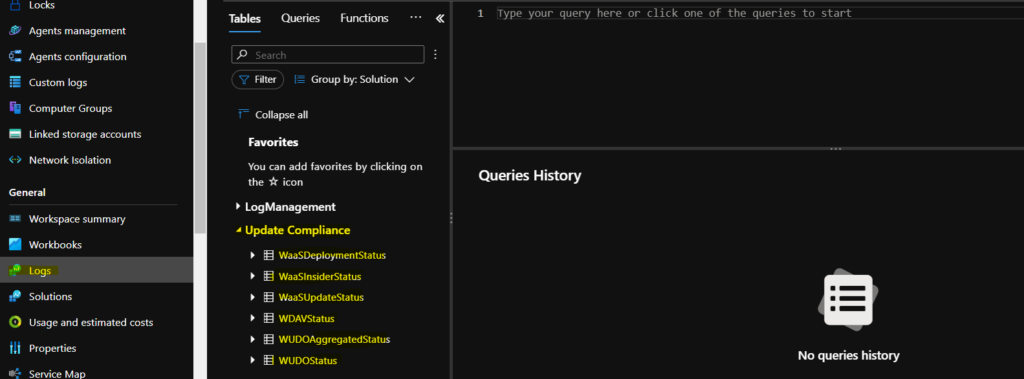
From the Tables list, you would be able to find the Update Compliance tables. It took time to create the Update Compliance table. So you will need to wait until Update Compliance data to get processed. Until that time, you might not see this table under the logs page.
There are 6 tables available for Update Compliance data. You can check the table details below.
WaaSDeploymentStatus
WaaSInsiderStatus
WaaSUpdateStatus
WDAVStatus
WUDOAggregatedStatus
WUDOStatus
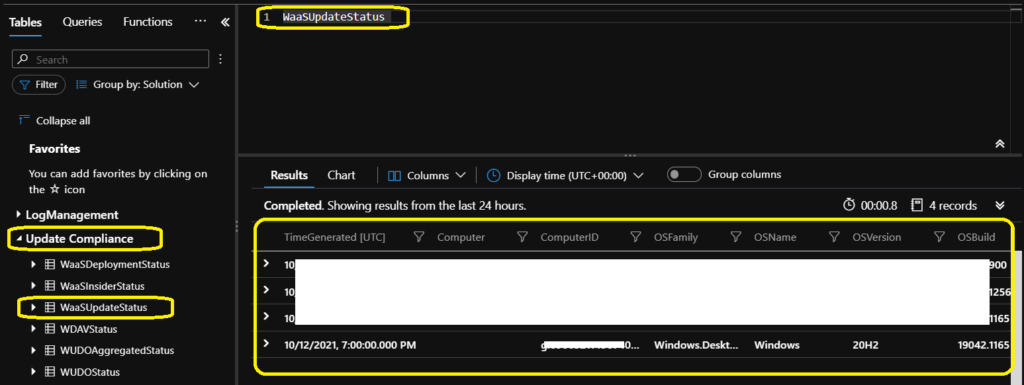
Once data is populated, you can query any of the tables to get more details about the update compliance or patching of Intune managed Windows devices.
Resources
- Intune Device Compliance Reports | Endpoint Manager
- Azure Active Directory sign-in activity reports – preview
- Antivirus Agent Status Intune Report | Endpoint Manager


Are there additional costs associated with all this? We already have E5 licenses and are heavily vested in Intune/MEM. We are already patching as well using the Update rings and am looking to make the case to set up additional detailed reporting. Some folks thought that there would be a cost. Others say no. Any input?
StaffYes, it has some additional cost. The Log Analytics workspace where your data is stored is not free.
Thanks for the reply! Is there a way/place to get rough estimates of these numbers based on endpoint count?
StaffWell, I’m not 100% on the cost. However, you can check below are some samples taken from the Azure pricing portal (US DC)
https://azure.microsoft.com/en-in/pricing/details/monitor/
Log Analytics and Application Insights charge for data they ingest, making the data available for powerful analytics queries.
Pricing Tier Price Effective Per GB Price1 Savings Over Pay-As-You-Go
Pay-As-You-Go $2.76 per GB
(5 GB per billing account per month included) $2.76 per GB N/A
100 GB per day $219.52 per day $2.20 per GB 20%
200 GB per day $412.16 per day $2.07 per GB 25%
300 GB per day $604.80 per day $2.02 per GB 27%
400 GB per day $788.48 per day $1.98 per GB 29%
500 GB per day $968.80 per day $1.94 per GB 30%
1,000 GB per day $1,904 per day $1.91 per GB 31%
2,000 GB per day $3,718.40 per day $1.86 per GB 33%
5,000 GB per day $9,016 per day $1.81 per GB 35%
Hi Anoop
Are you sure there are costs for log analytics?
Microsofts page seems to say this is free:
https://docs.microsoft.com/en-us/windows/deployment/update/update-compliance-get-started
“Although an Azure subscription is required, you won’t be charged for ingestion of Update Compliance data.”
StaffHi Justin – I was searching the document but couldn’t find the mention that it’s free. But If it’s mentioned in the docs I will go with that. Maybe this is free for Update Compliance. But I think other services using log analytics workspace are chargeable (for example – Azure Monitor).
Hi Anoop,
since I started to test with Update Compliance in Log Analytics, my Devices don´t report anymore to Endpoint Analytics, but just show up in the LogAnalytics Workspace.
Do you had same problems discovered?
I just found out I have know in “DeviceManagement-Enterprise-Diagnostics-Provider” the error “CSP URI: (./Vendor/MSFT/Policy/Config/DeviceHealthMonitoring/ConfigDeviceHealthMonitoringServiceInstance), Result: (The system cannot find the file specified.)”
And in the registry the value for “ConfigDeviceHealthMonitoringServiceInstance” is empty, on Devices without the Policy for Update Compliance every thing works like expected in Endpoint Analytics.
Best Regards
Daniel
I think it’s only data storage you end up paying for for most analytics services like Update Compliance.
Hi Anoop,
I really appreciate the efforts you’re putting on making videos and educating Intune aspirants like us. I would like to request you to make a video on to generate intune windows patching reports to Email through Power Automate. That way, we no need to use an Azure subscription. Can you please help us with that?
Regards,
Niranjan