






Intune Role-based Access Controls for Endpoint Privilege Management
This post helps you to set up Role-based Access Controls for Endpoint Privilege Management in Intune. With Endpoint Privilege Management, you will no longer need to make users local admins. Instead, end users can have standard account privileges and be dynamically elevated to admin privilege for specific admin-approved tasks.
Microsoft Intune Endpoint Privilege Management (EPM) allows your organization’s users to run as a standard user (without administrator rights) and complete tasks that require elevated privileges.
Microsoft enables IT admins to securely support their employees in this new hybrid world with reduced support costs. So they can securely perform tasks such as adding approved apps, printers, or other peripheral devices without needing to contact your IT helpdesk, saving you time and money.
Role-based access control (RBAC) enables Intune Administrators to manage and regulate the permissions granted to individuals for different Intune tasks within your organization. There is a set of twelve (12) built-in Intune roles available, known as RBAC roles including for accessing endpoint privilege management.

Endpoint Privilege Management uses two policy types that you configure to manage how a file elevation request is handled. Together, the policies configure the behavior for file elevations when standard users request to run with administrative privileges.
Intune Role-based Access Controls for Endpoint Privilege Management
To configure policies for Endpoint Privilege Management, and check the reports, your account must be assigned sufficient permissions from the Intune. Here’s how you can review and assign permissions, Controls for Endpoint Privilege Management.
- Sign in to the Microsoft Intune admin center https://intune.microsoft.com/.
- Navigate to Tenant administration > Roles.
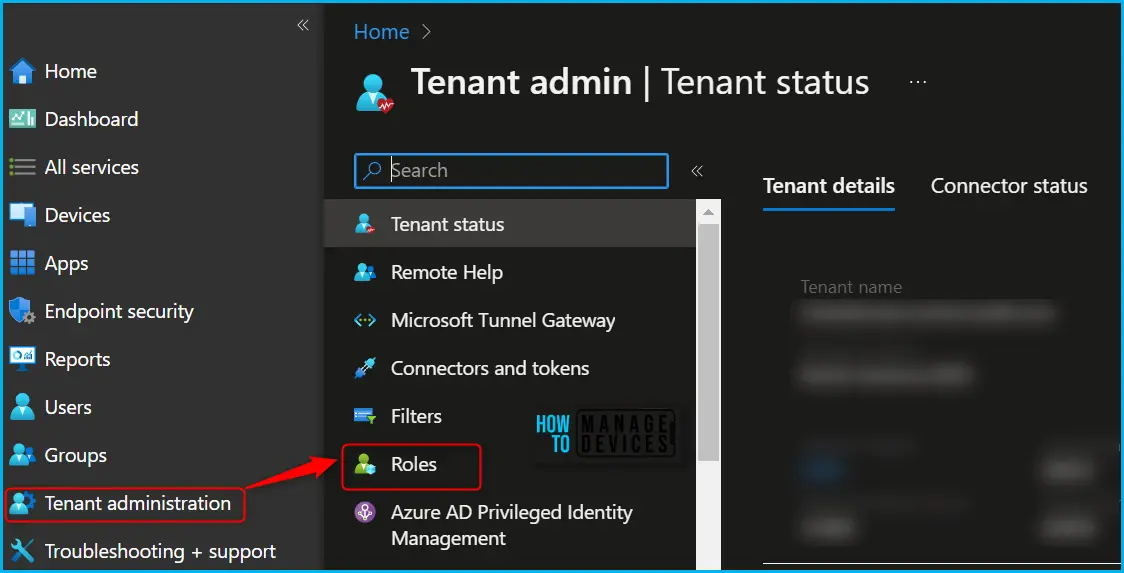
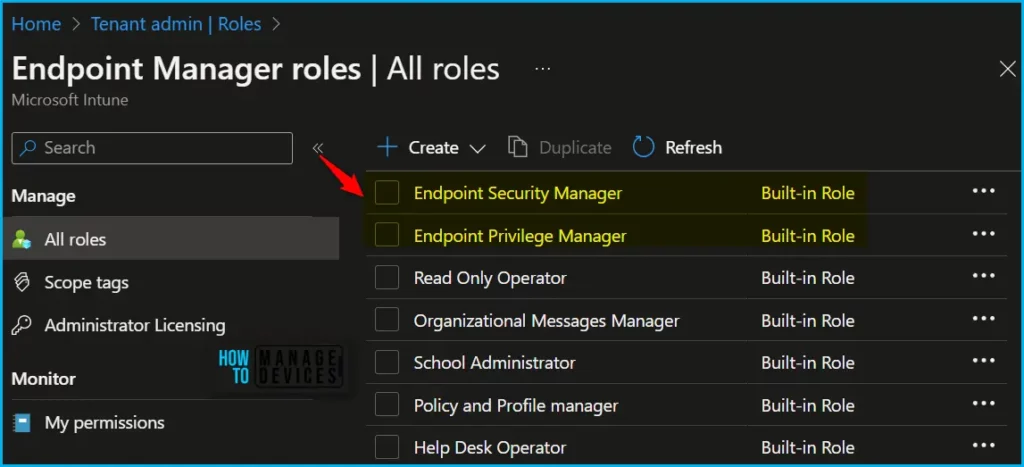
In the All roles, you will find all the built-in roles, and created custom roles available in the tenant. The Endpoint Security Manage and Endpoint Privilege Manager built-in role manage policies for users or devices.
- Endpoint Privilege Manager: Manages Endpoint Privilege Management policies in the Intune console.
- Endpoint Privilege Reader: Endpoint Privilege Readers can view Endpoint Privilege Management policies in the Intune console.
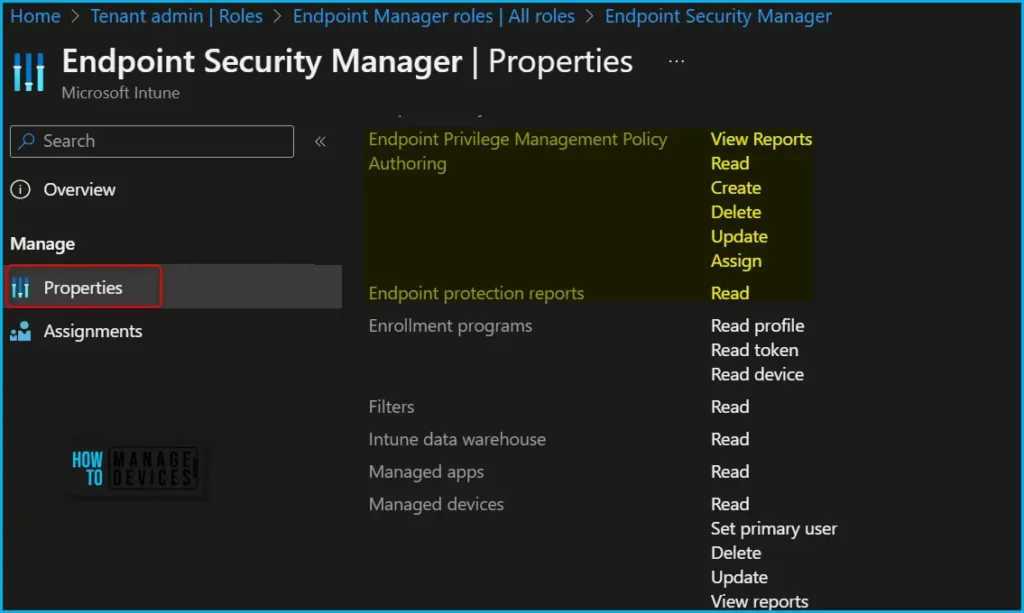
To manage Endpoint Privilege Management, your account must be assigned an Intune role-based access control (RBAC) role that includes the following permission with sufficient rights to complete the desired task:
- Endpoint Privilege Management Policy Authoring – This permission is required to work with policy or data and reports for Endpoint Privilege Management, and supports the following rights:
- View Reports
- Read
- Create
- Update
- Delete
- Assign
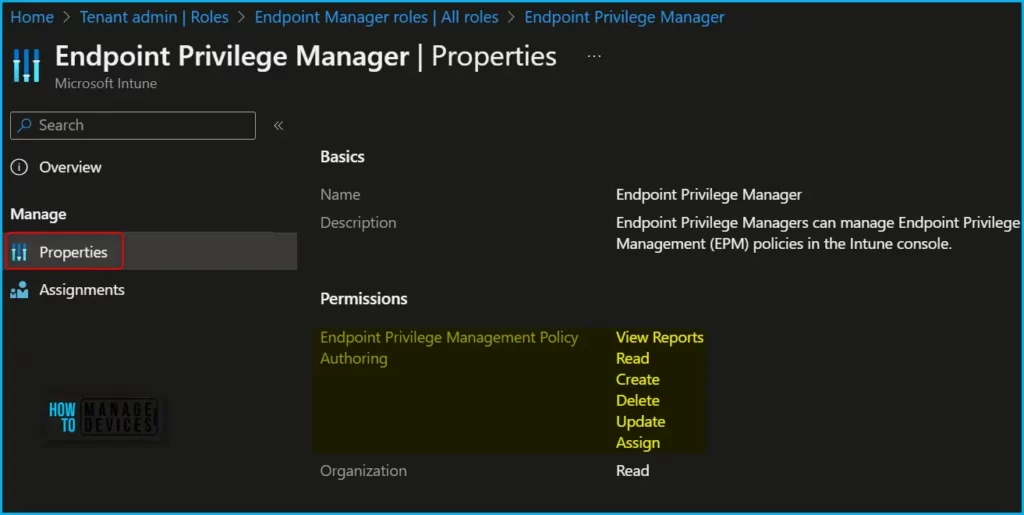
You can add this permission with one or more rights to your own custom RBAC roles, or use a built-in RBAC role dedicated to managing Endpoint Privilege Management:
- Endpoint Privilege Manager – This built-in role is dedicated to managing Endpoint Privilege Management in the Intune console. This role includes all rights for Endpoint Privilege Management Policy Authoring.
- Endpoint Privilege Reader – Use this built-in role to view Endpoint Privilege Management policies in the Intune console, including reports. This role includes the following rights for Endpoint Privilege Management Policy Authoring:
- View Reports
- Read
Note! You can assign built-in roles, Endpoint Privilege Manager or Reader, to groups without further configuration. You can’t delete or edit the name, description, type, or permissions of a built-in role.
In addition to the dedicated roles, the following built-in roles for Intune also include rights for Endpoint Privilege Management Policy Authoring:
- Endpoint Security Manager – Manages security and compliance features, such as security baselines, device compliance, conditional access, and Microsoft Defender for Endpoint. This role includes all rights for Endpoint Privilege Management Policy Authoring.
- Read Only Operator – This role includes the following rights for Endpoint Privilege Management Policy Authoring:
- View Reports
- Read
Author
About Author – Jitesh, Microsoft MVP, has over six years of working experience in the IT Industry. He writes and shares his experiences related to Microsoft device management technologies and IT Infrastructure management. His primary focus is Windows 10/11 Deployment solution with Configuration Manager, Microsoft Deployment Toolkit (MDT), and Microsoft Intune.


Discussion