






New Copilot + PC has Enhanced the Search Experience on Windows
Hey there, Let’s discuss about the New Copilot + PC has Enhanced the Search Experience on Windows. Recently MS released Windows 11 Insider Preview Build 26120.2992 (KB5050083) to the Dev Channel. With this update, they are previewing improved Windows Search with Windows Insiders with Snapdragon-powered Copilot+ PCs.
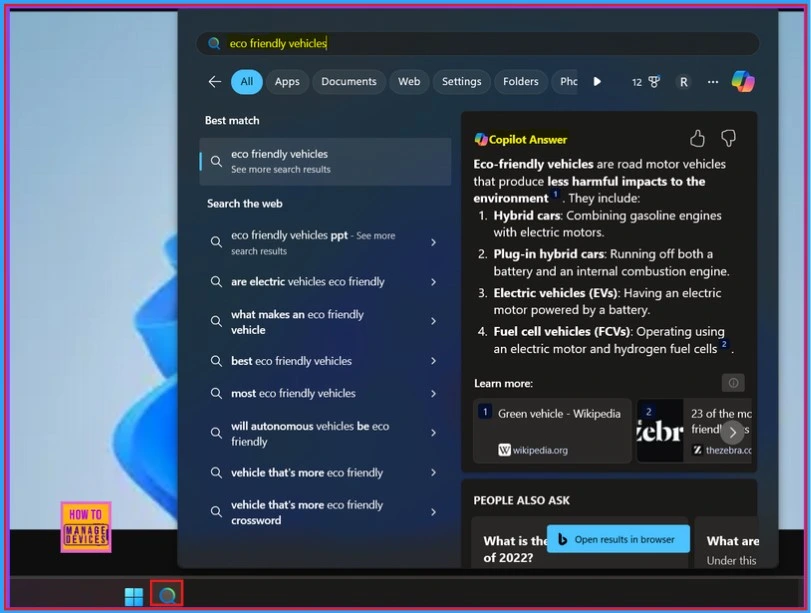
Now Windows introducing semantic and traditional indexing to make finding documents, photos, and settings across Windows 11 easier on Copilot+ PCs. Copilot is an exceptional tool crafted to Elevate writing experiences to new levels.
It offers a range of features that provide valuable suggestions, making it easier to refine our ideas and enhance our writing style. Whether we’re looking to summarise lengthy texts, edit our work for clarity and coherence, or create compelling content from scratch, Copilot is there to assist us.
Copilot+ PC is designed to deliver high AI performance while protecting sensitive information. With these PCs, we have control over safeguarding what matters most to us. The new Copilot+ PC experiences will be available on Windows 11 PCs from brands such as Acer, Asus, Dell, HP, Lenovo, Samsung, and Microsoft Surface.

Table of Contents

New Copilot + PC has Enhanced the Search Experience on Windows
Today, using the improved Windows Search feature on your Copilot+ PC will only allow us to search for files saved locally in indexed locations on our device. To adjust which locations are indexed or to enable full indexing of our PC, go to
- Settings > Privacy & Security > Searching Windows
Note! – In a future update, Microsoft will also support searching for documents and photos stored in cloud services like OneDrive.
- New Exciting Features in Copilot+ PCs and Windows 11
- Microsoft Introducing Copilot+ PCs
- Best Way to Set Copilot Hardware Key Using Microsoft Intune
Search Experience in Settings
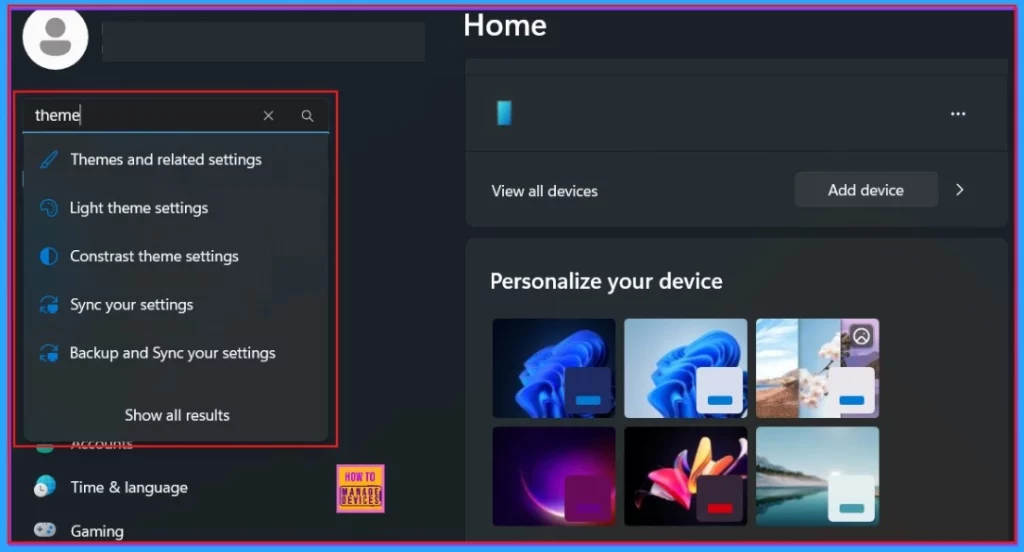
Searching for settings like “theme” will work within the Settings app for now. In a future flight, Microsoft will be able to do this within the Windows search box on the taskbar. Enhanced Windows Search features will gradually roll out to Windows Insiders on Snapdragon-powered Copilot+ PCs, with AMD and Intel support coming soon.
- These experiences are available in select languages, including Chinese, English, French, German, Japanese, and Spanish, as well as in various document formats.
- The supported file formats for documents are .txt, .pdf, .docx, .doc, .rtf, .pptx, .ppt, .xls .xlsx.
- For images, the supported formats include .jpg/.jpeg, .png, .gif, .bmp, and .ico.
| System | Preview Build |
|---|---|
| Windows 11 Insider | Preview Build 26120.2992 (KB5050083) |
Need Further Assistance or Have Technical Questions?
Join the LinkedIn Page and Telegram group to get the latest step-by-step guides and news updates. Join our Meetup Page to participate in User group meetings. Also, Join the WhatsApp Community to get the latest news on Microsoft Technologies. We are there on Reddit as well.
Resources
Previewing Improved Windows Search on Copilot+ PCs with Windows Insiders in the Dev Channel
Author
Anoop C Nair has been Microsoft MVP for 10 consecutive years from 2015 onwards. He is a Workplace Solution Architect with more than 22+ years of experience in Workplace technologies. He is a Blogger, Speaker, and Local User Group Community leader. His primary focus is on Device Management technologies like SCCM and Intune. He writes about technologies like Intune, SCCM, Windows, Cloud PC, Windows, Entra, Microsoft Security, Career, etc.


Discussion