






How to Create Boundary Groups in ConfigMgr | SCCM Boundaries
Let’s learn how to create boundary groups in ConfigMgr world. Boundary groups are network parameters of SCCM device management. You can manage any device if you don’t have any boundary groups (except the Default site boundary group) in Configuration Manager!
In the following post, Export Backup SCCM Boundaries and Boundary Groups., I explain the PowerShell options for Creating SCCM Boundaries and Boundary Groups.
The ConfigMgr Boundaries define network locations on your intranet. You can manage only devices within these network boundaries. The following are the supported boundary types:
- IP subnet
- Active Directory site name
- IPv6 prefix
- IP address range
- VPN (ConfigMgr 2006 onwards)
| Index |
|---|
| Boundary groups |
| Create Boundaries |
| Create Boundary Groups |
| Confirmation Boundary Groups |
| Logs |
| Results – How to Create Boundary Groups in ConfigMgr | SCCM Boundaries |
Boundary groups
The boundaries are useless if they are not part of a logical grouping called Boundary groups. ConfigMgr boundary groups are logical groups of boundaries that you configure.

Although each SCCM boundary group supports both site assignment and site system reference, create a separate set of boundary groups to use only for site assignment. Avoid overlapping boundaries for automatic site assignment.
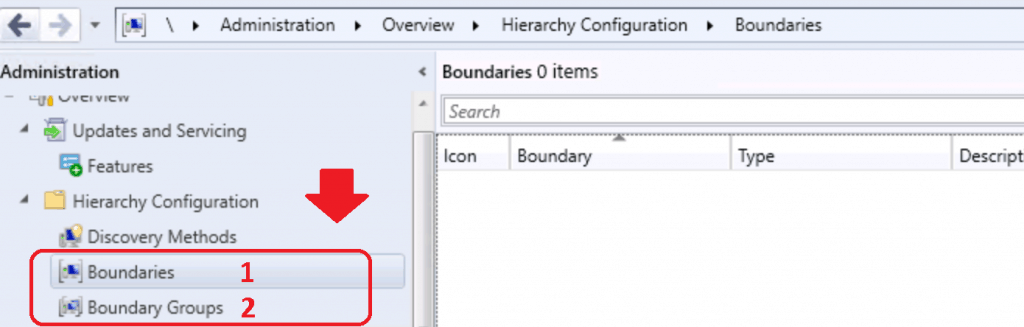
Create Boundaries
Let’s check how to create Boundaries in SCCM.
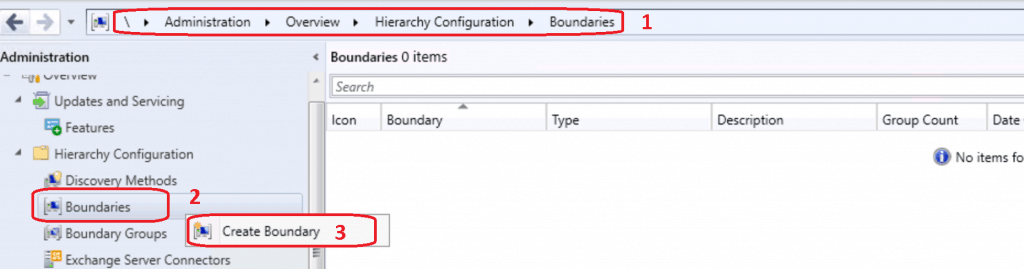
- Launch Configuration Manager Console
- Navigate \Administration\Overview\Hierarchy Configuration\Boundaries
- Right-click on the Boundaries node
- Select Create New Boundary
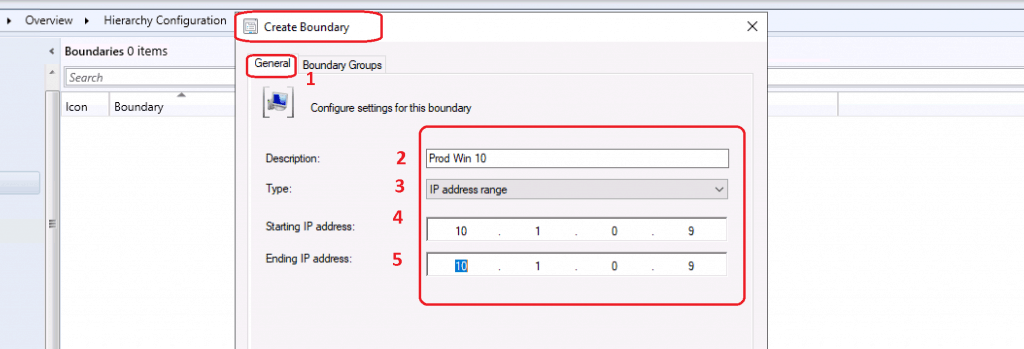
This is where you need to get the IP range or AD Site or IP Subnet details to create SCCM boundaries. There are different options to create boundaries.
- Select General tab
- Configure the setting for the boundary
- Enter Description– Name of the Boundary – Production Win 10
- Select Type of the boundary as IP address Range
- Starting IP address – 10.1.0.9
- Ending IP Range – 10.1.0.9
- Click OK to complete the ConfigMgr Boundary creation process
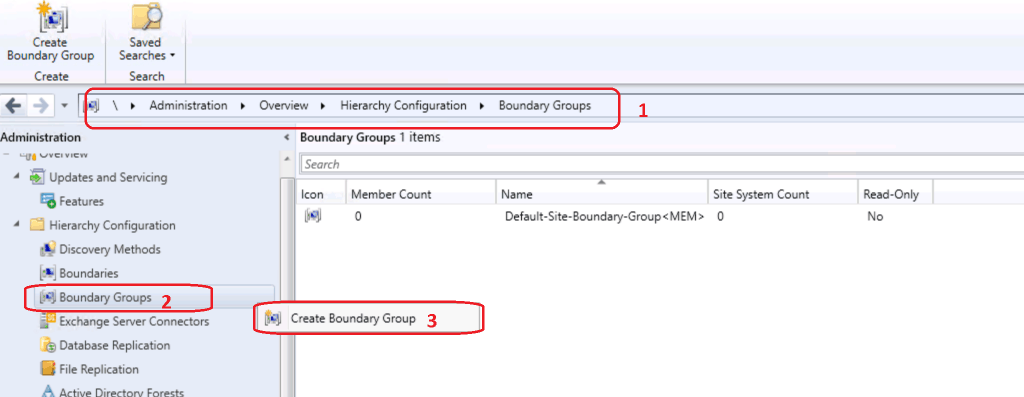
Create Boundary Groups
Let’s learn how to create boundary groups and how to configure the boundary groups.
- Navigate to \Administration\Overview\Hierarchy Configuration\Boundary Groups
- Right-click on the Boundary Groups node
- Select Create New Boundary Group to create a new group
NOTE! – Do not use the Default boundary group, which is already their Default Boundary Group.
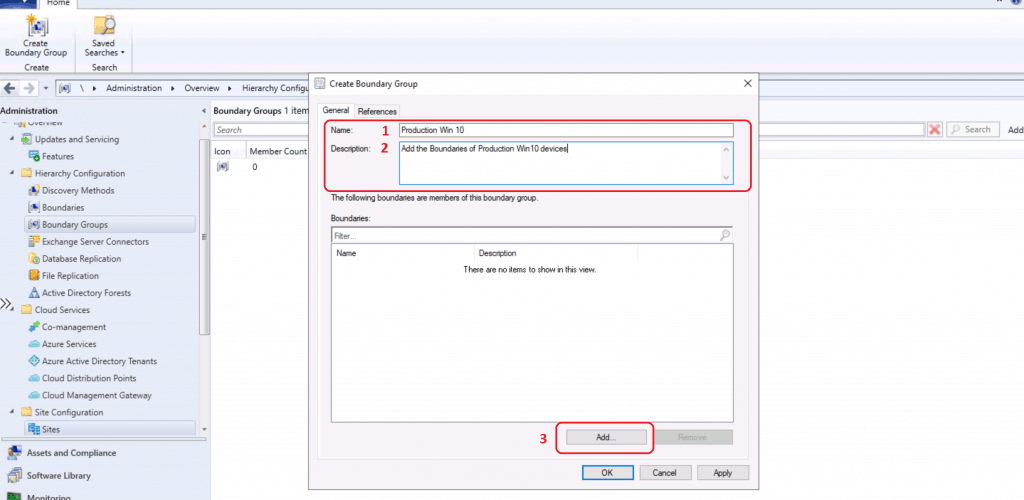
- Enter the Name of Boundary Group – Production Win 10
- Enter the Description of Boundary Group – “Add the Boundaries of Production Win10 devices”
- Click on ADD button to add the existing boundaries to this boundary group
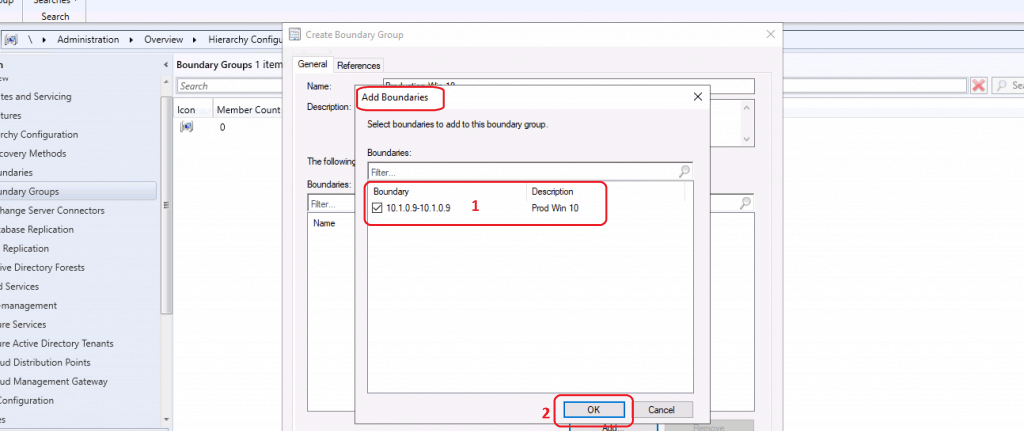
- Select Boundaries to add to this boundary group
- A search of Boundaries from the search box
- Select the boundary that is created above
- Boundary Type – IP Range 10.1.0.9- 10.1.0.9
- Click OK to continue
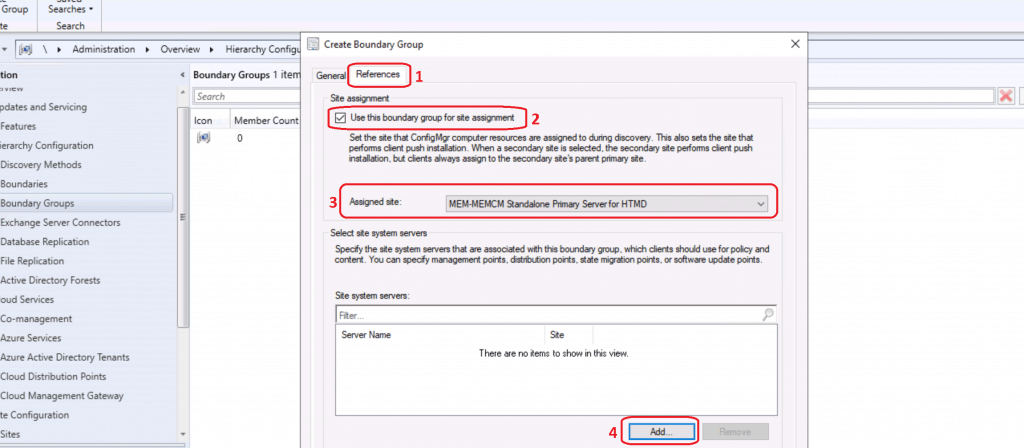
You can select the site assignment from this page, which is very important to define the SCCM client behavior and architecture of SCCM.
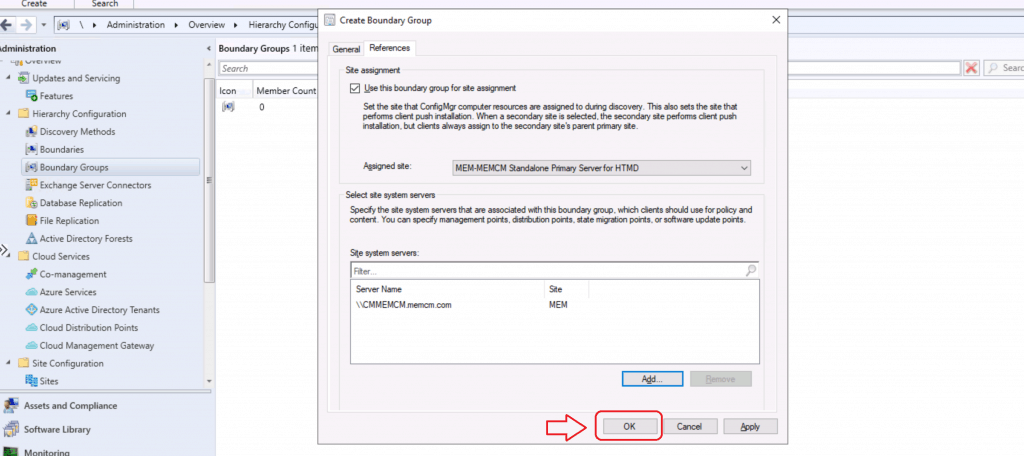
- Click the REFERENCES tab from Create Boundary Group
- Site Assignment
- Select Use this Boundary group for the site assignment option
- Assignment Site – Select the Primary Site from the drop-down list
- Click Add button. Select Site System Server
This is where you have to configure the SCCM site systems associated with this particular boundary group.
- Select the site systems to associate with this boundary group from Add Site Systems window
- Select Site Systems:
- Select Server Name – \CMMEMCM.memcm.com
- Click OK to continue
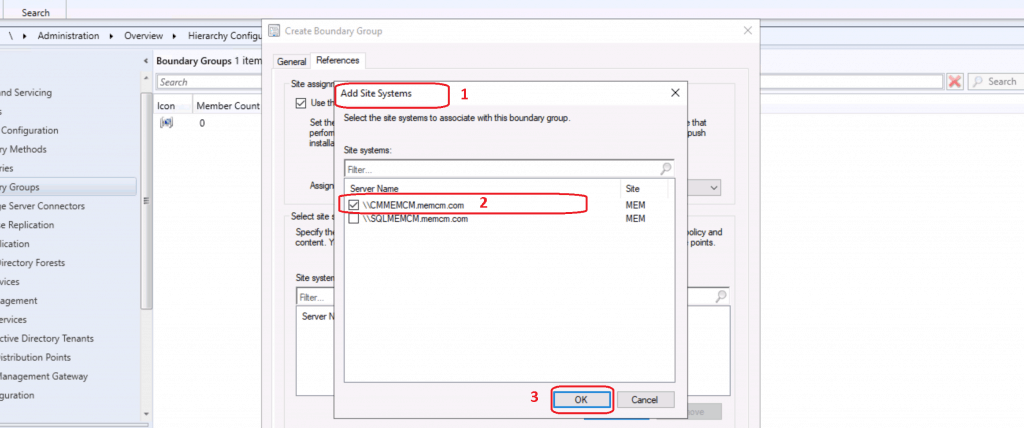
Click OK to complete the Boundary Groups creation
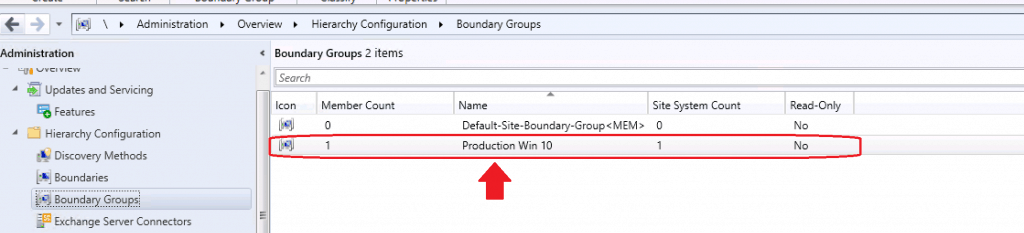
Confirmation Boundary Groups
Let’s check HMAN.log to see whether Boundary Group details are published in the Active Directory. This publishing is possible only if you have extended the Active Directory for SCCM.
Searching for SMS-MEM-167837705-167837705 Ranged Roaming Boundary Object.
SMS-MEM-167837705-167837705 doesn't exist, creating it.
SMS-MEM-167837705-167837705 successfully created.
STATMSG: ID=4911 SEV=I LEV=M SOURCE="SMS Server" COMP="SMS_HIERARCHY_MANAGER" SYS=CMMEMCM.MEMCM.COM SITE=MEM PID=3716 TID=4060
Let’s run some more checks with ADSI EDIT to get confirmation of Boundary Groups into your active directory (only if you extended the Active directory).

Logs
Hman.log to understand boundary group and boundary publishing details.
Update site server active directory information into DB
Detected Boundary change.
Publishing site objects in AD Forest htmd.com
Searching for SMS-HT1-167903236-167903242 Ranged Roaming Boundary Object.
SMS-HT1-167903236-167903242 doesn't exist, creating it.
SMS-HT1-167903236-167903242 successfully created.
STATMSG: ID=4911 SEV=I LEV=M SOURCE="SMS Server" COMP="SMS_HIERARCHY_MANAGER" SYS=HTMDSCCM.HTMD.COM SITE=HT1 PID=3668 TID=6052 GMTDATE=Sat Jun 20 13:08:57.754 2020 ISTR0="SMS-HT1-167903236-167903242" ISTR1="htmd.com" ISTR2="" ISTR3="" ISTR4="" ISTR5="" ISTR6="" ISTR7="" ISTR8="" ISTR9="" NUMATTRS=0
StateTable::CState::Handle - (4911:1 2020-06-20 13:08:57.754+00:00) >> (0:0 2020-06-06 15:13:47.695+00:00)
Results – How to Create Boundary Groups in ConfigMgr | SCCM Boundaries
So we have completed the SCCM boundary creation and SCCM boundary Group creation!. Now you are ready to Install SCCM clients to Windows 10 production computers. Install SCCM Client Manually Using Command-Line.
Resources
We are on WhatsApp. To get the latest step-by-step guides and news updates, Join our Channel. Click here –HTMD WhatsApp.
Author
Anoop C Nair is Microsoft MVP! He is a Device Management Admin with more than 20 years of experience (calculation done in 2021) in IT. He is a Blogger, Speaker, and Local User Group HTMD Community leader. His main focus is on Device Management technologies like SCCM 2012, Current Branch, and Intune. He writes about ConfigMgr, Windows 11, Windows 10, Azure AD, Microsoft Intune, Windows 365, AVD, etc.




Creating a Boundary Group for a DP…under the References tab at the bottom where it says Site System Servers. Do I had our Site System server or should I add the DP server since this boundary group is for that DP?
Thank you
StaffYes you have add the remote DP site system server … does that make sense ?
Thanks you. If we are reusing a DP server from our old SCCM server, should I renamed the SCCMContentLib directory on the DP server or will the new SCCM overwrite that directory?
StaffI have not tested this scenario. My recommendation is to rename to have a clean environment.
Thank you. Unrelated to the article, does the Site server need to be a Distribution Point? I’m not sure how the role got installed through the setup process. Under Monitoring – Distribution Status – Distribution Point Configuration Status, I see the Site server is listed.
StaffIt’s not mandatory to have DP on site system server
If a boundary group is created for clients present on a remote location and we want to distribute and deploy Defender update definitions, will the references tab only include the DP present in that location or should it also include the primary site server? In my case the primary server has MP, SUP and DP roles installed on it.