






Fix Windows Cumulative Updates are not Showing up in SCCM Issue for September Patches
Let’s try to fix Windows Cumulative Updates are not Showing up in SCCM Issue. SCCM is unable to sync Windows OS updates for the September month issue.
We have seen this question raised by Sudarshan Reddy in the HTMD forum. I thought of sharing the same in this post to get a better understanding of the solution.
I noticed many software updates sync error 400 when I initiated sync to test the September CU for Windows 10. The sync worked ok for the cumulative update for September. I was able to download and deploy Windows 10 KB5005565 September Cumulative Updates.
The issue Sudarshan was a bit different because he could not see any of the software updates KB articles after a couple of syncs. He tried to look into the WsyncMgr.log file to confirm whether there was an error during the WSUS sync or not.

- Sync issues with the WSUS 3.0 SP2 version of Windows Server Update Services
- Fixed – SCCM WSUS Sync Failed with UssInternalError SoapException Error 0x80131500
- Fix SCCM WSUS with HTTP Proxy Communication Issues
- FIX SCCM Management Point MP Rotation Issue Partial WSUS Sync Issue
WSUS Sync Issue with Cumulative Updates Patches
Windows OS’s latest cumulative updates (LCU) for September month are not getting synced in SCCM all other updates like O365, Edge, Defender, and third party updates are synced.
This issue was strange because the only problem is Cumulative Updates for Windows 10, but all the other updates are working fine.
WSUS Sync Issue with Cumulative Updates Patches could happen with any month’s latest cumulative updates (LCU), but I have not seen this issue before.
Probably, this is an environment-specific issue, but the solution is also interesting, as explained below. He tried to run the sync a couple of times without any success.
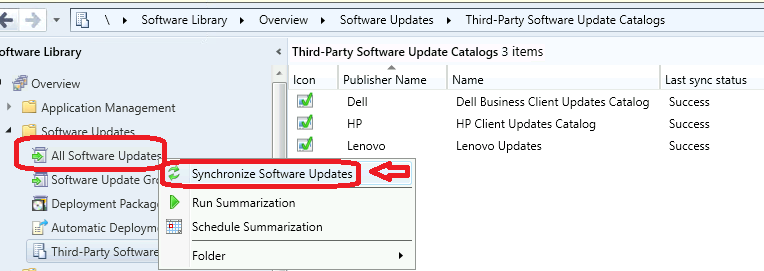
Fix to Windows Cumulative Updates are not Showing up in SCCM Issue
The fix to Windows cumulative updates are not showing up for Windows 10 and Windows Servers. Even there was a possibility that some classifications or production selection is missing from Software Update point Component properties.
Default WSUS product Selection option in SCCM was a bit messy until recently. However, it’s better now for the new installations of SCCM and SUP. The following solution the user tried helped to fix the issue.
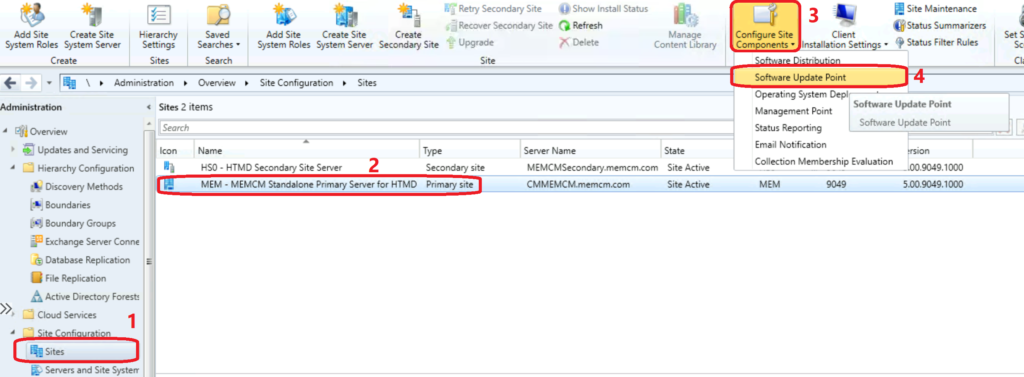
- Navigate to \Administration\Overview\Site Configuration\Sites
- Select the primary server/CAS and click on Configure Site Components option from the ribbon menu.
- Select Software Update Point from the drop-down list.
You can use Software Update Point component properties options to deselect all the software update classifications (as shown below screenshot) from the Classifications tab. Click OK to save it.
You can now go ahead and initiate a WSYNC explained above. I have not tried and tested this solution. My recommendation is to try this in a pre-production or staging environment before trying this in SCCM production infrastructure.
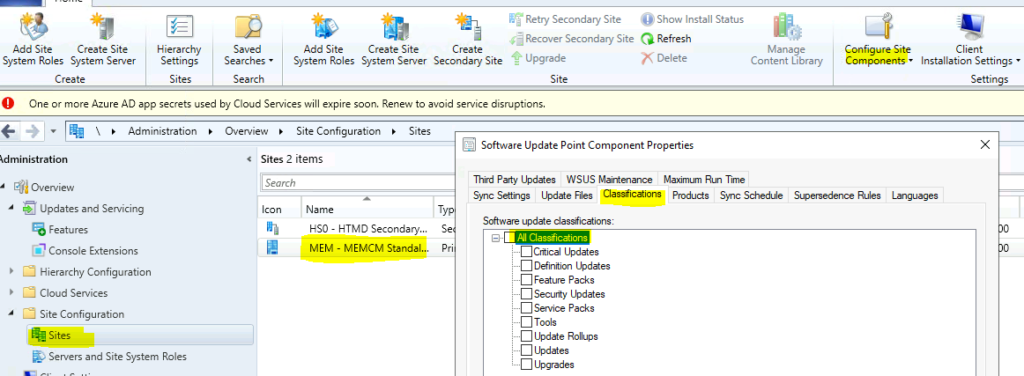
SCCM Software Update Classifications
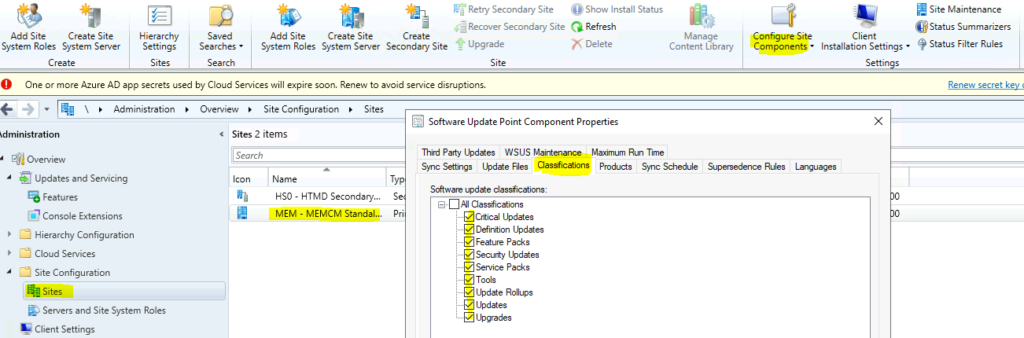
Once the sync is completed, you can add back the software update classifications you were configured before. I have added a screenshot from the lab environment to select all the classifications. But, it’s not recommended to enable the classifications that are not in use for your organization.
Click OK to continue and then initiate a manual WSUS sync to show up all the software updates required in SCCM. After the sync, the WSUS Sync Issue with Cumulative Updates Patches might get resolved. If not, it’s better to look at WSYNCMGR.LOG and start over the troubleshooting from the errors in the log file.




Quick question, so, if I have an ADR with with upgrades selected but under sites => Software update point, I do not. Would this prevent the feature updates from being created with the ADR that is created?