






Custom Naming Templates for Android Enterprise Devices in Intune
Let’s discuss Custom Naming Templates for Android Enterprise Devices in Intune. Microsoft Intune is introducing a new feature that will allow administrators to create custom naming templates for Android Enterprise corporate-owned devices during the enrollment process.
The custom naming templates allow for customizable device names, blending your text with dynamic variables such as serial numbers, device types, and associated usernames. This feature is part of Intune’s ongoing development, aimed at providing more granular control and improved efficiency for IT administrators.
Custom Naming Templates apply specifically to the enrollment of Android Enterprise corporate-owned devices within the Microsoft Intune management environment. The template will be available to configure in the enrollment profile.
This blog post provides an overview of the upcoming Custom Naming Templates feature for Android Enterprise devices in Microsoft Intune, covering its functionality, implementation, and location within the Intune interface.

Table of Contents
What is Device Enrollment in Intune?
Intune device enrollment is the process that connects devices to the management platform, allowing for policy implementation and work resource access.
Custom Naming Templates for Android
Microsoft Intune is enhancing its Android Enterprise management capabilities with the development of custom naming templates. This upcoming feature will allow administrators to define specific naming conventions for corporate-owned Android devices during enrollment.
Microsoft Intune manages devices through an enrollment process, granting users access to work resources while enabling IT to enforce policies. One of the available enrollment methods is Android Enterprise, which offers various management options, including work profiles specifically designed for Bring Your Own Device (BYOD) scenarios.
- Windows Update for Business Renamed to Windows Update Client Policies
- Step by Step Process of Remove or Uninstall App using Intune
- How to Simplify Shared Android Devices with Entra Shared Mode and Intune
- Enable Or Disable Find My Device Using Intune Security Policy
Template Configuration Location
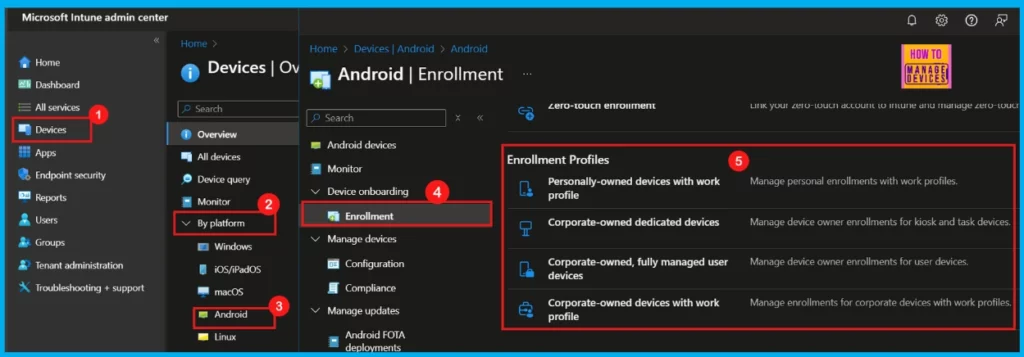
Administrators will find the configuration options for the custom device naming template within the Android Enterprise corporate-owned enrollment profile. Following are are the steps to configure custom device naming template.
- Log in to Microsoft Intune admin center with appropriate administrative credentials.
- Select Devices
- Click By Platforms and then select Android
- Click Enrollment under Device Onboarding
- Navigate to Enrollment Profiles
How it Works
Utilizing variables like serial numbers, usernames, and random characters, this enhancement automates device naming during enrollment, ensuring consistent and easily identifiable names. This streamlines management and inventory tracking, leading to increased operational efficiency.
| Supported Variables | Names |
|---|---|
| The device’s serial number | %SERIAL% |
| A random string of characters | %RAND% |
| The user’s username (for user-affiliated devices | %USERNAME% |
Resources
Need Further Assistance or Have Technical Questions?
Join the LinkedIn Page and Telegram group to get the latest step-by-step guides and news updates. Join our Meetup Page to participate in User group meetings. Also, Join the WhatsApp Community to get the latest news on Microsoft Technologies. We are there on Reddit as well.
Author
Anoop C Nair has been a Microsoft MVP for 10 consecutive years from 2015 onwards. He is a Workplace Solution Architect with more than 22+ years of experience in Workplace technologies. He is a Blogger, Speaker, and Local User Group Community leader. His primary focus is on Device Management technologies like SCCM and Intune. He writes about technologies like Intune, SCCM, Windows, Cloud PC, Windows, Entra, Microsoft Security, Career, etc.

This feature shows up in all Android Enterprise enrollment profiles now, I just noticed it the other day.
It seems to not function at all yet. I was wondering, why are you showing %SERIAL% etc as the variables? Intune enforces {{SERIAL}} or another possible variable and they are all enclosed in {{ }}.