






Native Data Protection for Unmanaged Devices and AI App Security with Microsoft Edge for Business
Let’s discuss New advanced data protection for BYOD and AI in Edge for Business. As you all know that Microsoft is always bring the efficient feature to the customers. As you all know that using personal devices to access company resources is common, so this is called Bring Your Own Device (BYOD).
Now New advanced data protection for BYOD and AI in Edge. While this boosts productivity and convenience, it also brings serious security risks. Nowadays Edge making a strong enchancement to the users beacause of releasing New advanced data protection for BYOD.
BYOD environments create security risks, as personal devices often lack the strong protections of corporate devices, making them vulnerable to malware, phishing, and data breaches. Also, we are using AI Nowadays, and this use of AI also introduces new risks, like data leaks from user inputs in consumer AI apps.
Data protection is very necessary,when it comes to a Personel PC its very important. Edge for Business is a secure browser optimized for AI, designed for your entire organization to use on both work and personal devices. In this post just look a small view on advanced data protection for BYOD and AI in Edge for Business.

Table of Contents
Native Data Protection for Unmanaged Devices and AI App Security
Above we can discuss an overview of New advanced data protection for BYOD and AI in Edge for Business. Our personal devices are not secured that’s why Microsoft introduced BYOD with Edge for Business, supported by Intune.
- How to Create Azure AD Dynamic Device Groups for Windows BYOD CYOD Devices Microsoft Intune
- Troubleshoot and Compare Devices with Intune Copilot Prompt
- How to Create Azure AD Dynamic Device Groups for Windows BYOD CYOD Devices Microsoft Intune
It applies advanced data security rules. Intune checks if your device is safe before letting you access work data. It also ensures you to use Edge for Business to open any corporate resources. This is done in real time to maintain both security and productivity. With the help of Intune Users can download non sensitive data But canot download the Sensitive data.
- Intune enables a BYOD environment by enforcing policies on personal devices, ensuring that corporate resources are secure while allowing employees to use their own devices for work.
- This feature will be available to Microsoft 365 E5 users, providing advanced security controls for managing corporate data across devices and applications.
| Purview |
|---|
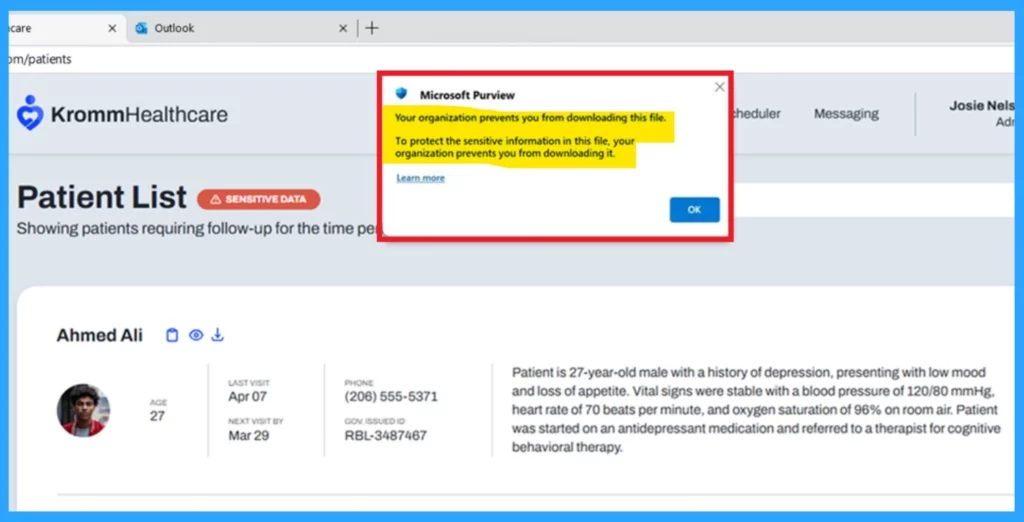
| Purview adds an extra layer of protection. It allows safe files, like general brochures, to be downloaded but blocks sensitive ones, like personal employee details, to keep data secure. |
| Purview data security controls helps to adjusting security based on the context and ensuring that data is protected in different scenarios as needed. |
Purview’s New Inline Protection
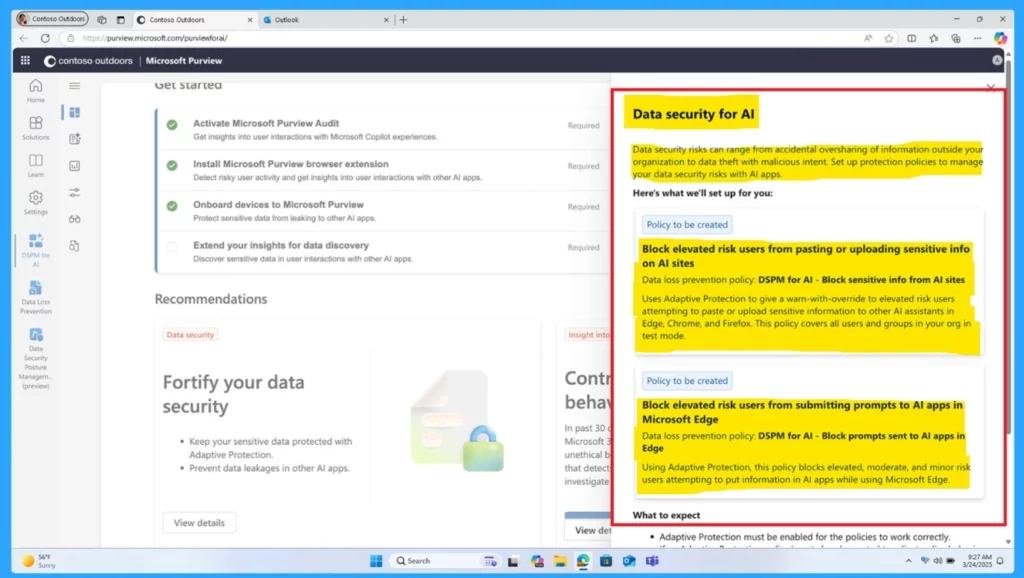
Purview’s new inline protection feature helps prevent users from sharing sensitive information with AI tools like ChatGPT, DeepSeek, Google Gemini, and Microsoft Copilot. In this case there is no problem to interact with AI applications. But it always prevent to share the sensitive data.
- Purview’s inline DLP policies are applied to audit and block sensitive content in typed prompts.
- It prevents users from submitting sensitive data, based on the risk-level of the user.
How Enrollment Time Grouping Work
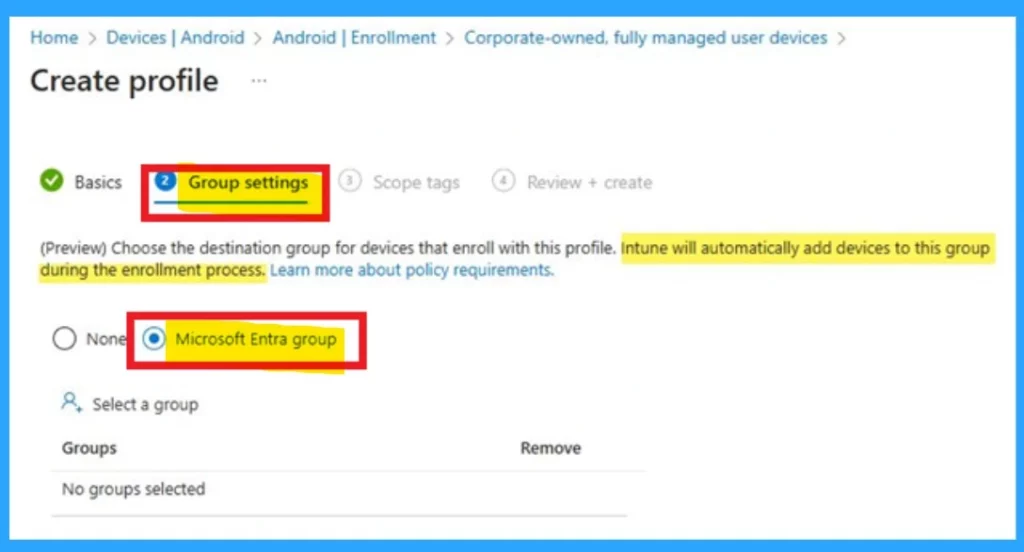
Enrollment Time Grouping is a new feature coming to Android Enterprise corporate-owned devices. It lets Intune admins assign a static Microsoft Entra group to devices at the time of enrollment. Once enrolled, the device automatically gets all assigned policies, apps, and settings, usually before the user sees the home screen. Admins can set this up under the Device Group tab in each enrollment profile.
- It is automatically added to a predefined static Entra group.
- The device will then receive all configurations assigned to that group.
Need Further Assistance or Have Technical Questions?
Join the LinkedIn Page and Telegram group to get the latest step-by-step guides and news updates. Join our Meetup Page to participate in User group meetings. Also, Join the WhatsApp Community to get the latest news on Microsoft Technologies. We are there on Reddit as well.
Author
Anoop C Nair has been a Microsoft MVP from 2015 onwards for 10 consecutive years! He is a Workplace Solution Architect with more than 22+ years of experience in Workplace technologies. He is also a Blogger, Speaker, and leader of the Local User Group Community. His primary focus is on Device Management technologies like SCCM and Intune. He writes about technologies like Intune, SCCM, Windows, Cloud PC, Windows, Entra, Microsoft Security, Career, etc.


Discussion