






Microsoft Defender ASR Rules to Block Rebooting Machine in Safe Mode
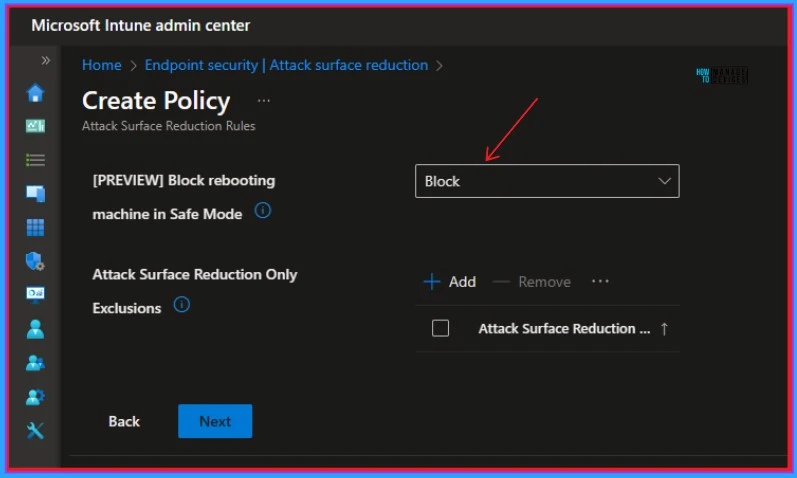
Let’s check the details of MS Defender to Block Rebooting Machine in Safe Mode Using ASR Rules. Microsoft Release new ASR rule to Block Machine in Safe Mode in Microsoft Defender. ASR stands for Attack Surface Reduction, which helps to reduce your attack surface by protecting your organization’s devices and network.
The rule prevents the execution of commands from restarting machines in Safe Mode, which is currently in preview. Many types of Attack Surface Reduction Rules are included in Microsoft Defender for Endpoint. The rules include Standard Protection Rules are the minimum set of rules that Microsoft recommends you always enable.
Other rules that require some measure of following the documented deployment steps such as Plan > Test (audit) > Enable (block/warn modes). The Block rebooting machine in Safe Mode is included in Other Rules. This feature is now available on Preview.
The execution of commands to restart machines in Safe Mode is prevented by this rule. Additional upgrades to improve efficacy are under development. This blog post helps you to understand more about MS Defender to Block Rebooting Machine in Safe Mode Using ASR Rules.

- Configure Attack Surface Reduction ASR Rules in Intune
- Block Vulnerable Signed Drivers Using Intune ASR Rules
Microsoft Defender ASR Rules to Block Rebooting Machine in Safe Mode
Block Rebooting Machine in Safe Mode Using ASR Rules is one of the best capabilities. Safe Mode is a diagnostic mode that only loads the essential files and drivers needed for Windows to run.
Security Products can be disabled or operate in a limited capacity in Safe Mode. It also allows attackers to further launch tampering commands, or execute and encrypt all files on the machine.
| Different Details of Block Rebooting Machine in Safe Mode Features | More Details |
|---|---|
| Intune Name | [PREVIEW] Block rebooting machine in Safe Mode] |
| Configuration Manager name | Not yet available |
| GUID | 33ddedf1-c6e0-47cb-833e-de6133960387 |
| Dependencies | Microsoft Defender Antivirus |
- Block Executables Impersonating Or Copying System Tools And Binaries Using Intune ASR Rules
- MDE Troubleshooting Tools Explained
- 3 Ways to Configure Microsoft Defender Antivirus Policies for Windows 11 using Group Policy Intune Policy
We are on WhatsApp. To get the latest step-by-step guides and news updates, Join our Channel. Click here –HTMD WhatsApp.
Author
Gopika S Nair is a computer enthusiast. She loves writing on Windows 11 and related technologies. She is here to share quick tips and tricks with Windows 11 or Windows 10 users. She is Post Graduate Diploma Holder in Computer Science.



Discussion