






Delete Apple VPP Tokens from Intune
Learn how you can delete Apple VPP Tokens from Intune. You use Intune to deploy and manage apps purchased through the Volume Purchase Program. You may need to remove tokens in some circumstances, it is important to know deleting the tokens would cause you to lose the ability to distribute apps through Intune.
The Volume Purchase Program VPP offers the capability to manage and distribute not only B2C apps but also business-to-business (B2B) apps. In the case of B2B apps, organizations can acquire custom iOS applications developed by third-party vendors privately through the VPP app store.
This allows for centralized procurement and streamlined distribution of these specialized apps within the organization’s ecosystem. With Intune, you can track and retain ownership of the purchased apps in a controlled manner, ensuring proper app management and compliance within your environment.
Suppose you want to go through the steps more focused on integrating VPP Tokens with Intune, purchasing and distributing apps, and more about Apple Volume Purchase Program, and Deploy Apps To IOS Devices Through VPP Using Intune.

When an Apple VPP token expires or needs to be updated, You do not need to delete the token. You can download a new token from Apple Business Manager or Apple School Manager and upload it to Intune.
Delete Apple VPP Tokens from Intune
Here’s how using the Intune console, you can delete Apple VPP tokens. This may be necessary when you have duplicate instances of a VPP token.
When a token is deleted, it’s important to note that any associated apps and assignments will also be removed. Deleting tokens results in the revocation of associated app licenses; however, the apps themselves are not uninstalled from the devices.
- Sign in to the Microsoft Intune admin center https://intune.microsoft.com/.
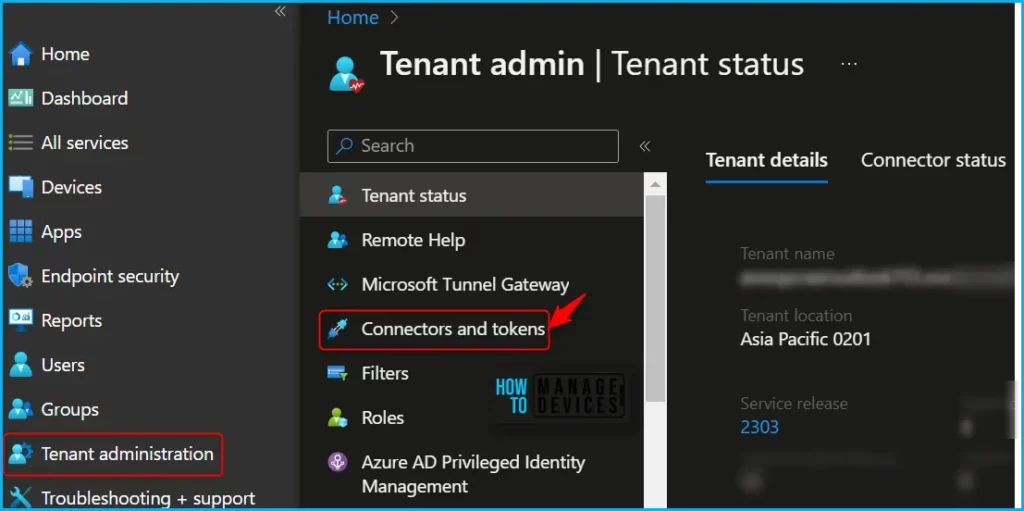
- Navigate to Tenant Administration > Connectors and tokens.
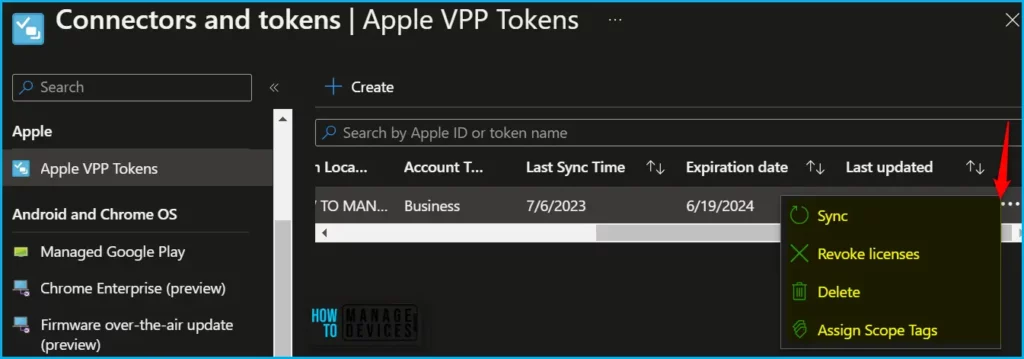
In the Apple VPP Tokens, You can see various details about the token, including the Expiration date for VPP tokens and all other information. Once you click on three dots (…), you can select Sync, Remove licenses, Delete, and Assign Scope Tags.
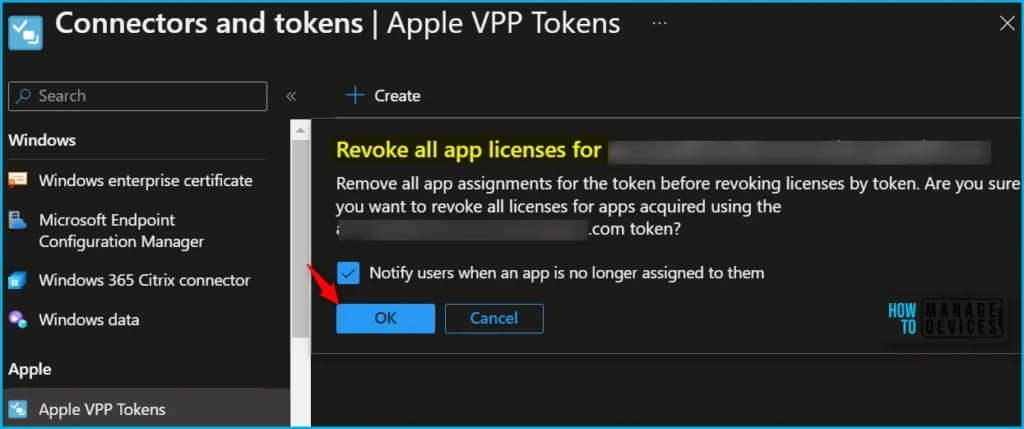
To Revoke all app licenses, Click the Revoke licenses button. A prompt message shows, Remove all app assignments for the token before revoking licenses by token. Are you sure you want to revoke all licenses for apps acquired using the <Your Account> token? And Click on OK.
Here, A step to check notify users when an app is no longer assigned to them. By checking the box, The end user will get the message.
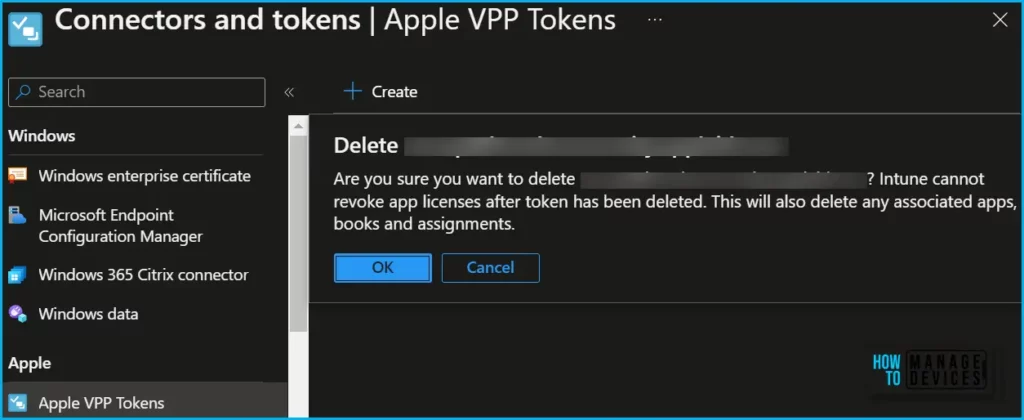
Once you click the Delete button, A prompt message will appear showing Are you sure you want to delete xyz.com? Intune cannot revoke licenses after the token has been deleted. This will also delete any associated apps, books, and assignments. You can click on OK to initiate the deletion.
Importantly, This is not recommended to delete the token directly if you plan to renew your existing or expired Apple VPP Tokens, tokens must be renewed annually before they expire in a year, 365 days.
You can use the option to update the existing token, as deleting a token will also delete any associated apps and assignments. You can check the best way to renew Apple VPP Tokens In Intune.
Author
About Author – Jitesh, Microsoft MVP, has over six years of working experience in the IT Industry. He writes and shares his experiences related to Microsoft device management technologies and IT Infrastructure management. His primary focus is Windows 10/11 Deployment solution with Configuration Manager, Microsoft Deployment Toolkit (MDT), and Microsoft Intune.


Discussion