






How to Restore Deleted Cloud Security Groups in Microsoft Entra ID
Let’s discuss how to Restore Deleted Cloud Security Groups in Microsoft Entra ID. Cloud Security Groups are security groups created and managed in a cloud directory service such as Microsoft Entra ID. These groups are used to control access to cloud resources.
When a Cloud Security Group is deleted in Microsoft Entra ID, it is not removed permanently right away. Instead, it is moved to the “Deleted Groups” section, similar to a recycle bin. This feature allows administrators to recover groups that were accidentally deleted, along with their memberships.
One of our posts explains how to restore a deleted Microsoft 365 Group using the Microsoft Graph API and PowerShell. Restoring groups is an essential task for administrators who manage Microsoft Intune or Microsoft Entra, especially since creating users and adding them to the correct groups is part of daily operations.
In this post, you will find all the essential details on how to restore deleted Cloud Security Groups in Microsoft Entra ID. It explains the complete recovery process, including where deleted groups are stored, how to access the Deleted Groups section, and the steps required to restore them along with their original properties and memberships.


Table of Contents
How to Restore Deleted Cloud Security Groups in Microsoft Entra ID
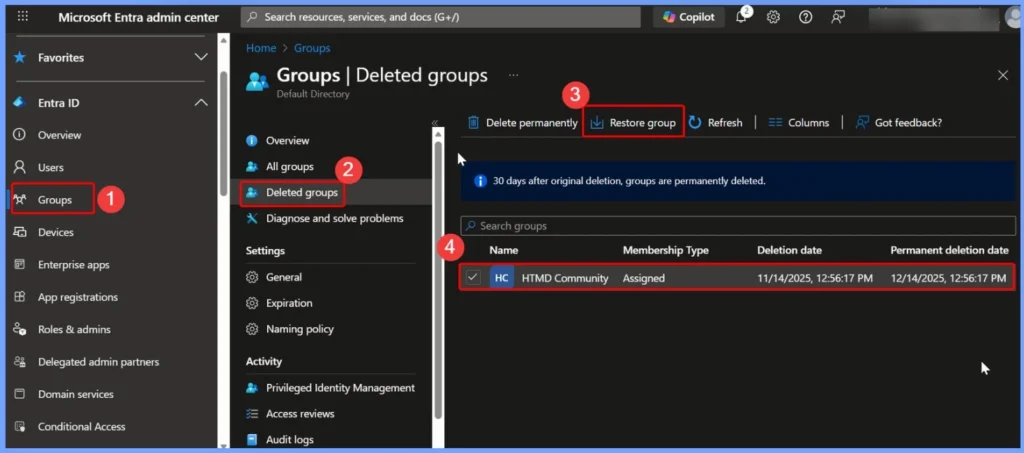
To restore a deleted Cloud Security Group in Microsoft Entra ID, first sign in to the Microsoft Entra admin center with at least Groups Administrator permissions. Once you’re in the portal, select Groups > All groups, and choose Deleted groups to view all groups that have been removed but are still within the recovery period.
In the Deleted groups pane, you will see a list of groups that are eligible for restoration. From here, you can choose to Restore group, which recovers the deleted group along with its settings and memberships. This option is helpful when a group has been accidentally removed and needs to be restored quickly to avoid access or policy disruptions.
| Steps |
|---|
| Microsoft Intune admin center |
| Groups |
| Deleted Groups |
| Select the Group that you want to Restore |
| Click the Restore Group tab option shown in the below screenshot |
NOTE! 30 days after original deletion, groups are permanently deleted.
- How to Assign Custom Intune Role Based Access to Azure AD Groups using Microsoft Entra PIM
- Track All Intune Policy and App Assignments for Users Devices and Entra ID Groups with Assignment Checker
- Create AAD Dynamic Groups based on Domain Join Type Hybrid Azure AD and Azure AD
- Best Practices for Creating Entra ID Dynamic Groups for Intune
- How to Assign Custom Intune Role Based Access to Azure AD Groups using Microsoft Entra PIM
Need Further Assistance or Have Technical Questions?
Join the LinkedIn Page and Telegram group to get the latest step-by-step guides and news updates. Join our Meetup Page to participate in User group meetings. Also, Join the WhatsApp Community to get the latest news on Microsoft Technologies. We are there on Reddit as well.
Author
Anoop C Nair has been Microsoft MVP from 2015 onwards for 10 consecutive years! He is a Workplace Solution Architect with more than 22+ years of experience in Workplace technologies. He is also a Blogger, Speaker, and Local User Group Community leader. His primary focus is on Device Management technologies like SCCM and Intune. He writes about technologies like Intune, SCCM, Windows, Cloud PC, Windows, Entra, Microsoft Security, Career, etc.


Discussion