






Dot Net Version Details using SCCM CMPivot Query
Let’s find the Dot Net Version Details using CMPivot Query. Let’s use the almost real-time reporting feature CMPilot to get the Dot Net version details of all the SCCM clients.
You will need to upgrade the .Net version installed on all the SCCM Site Servers (CAS and Primary) and Site System servers before upgrading the SCCM infra and Client to the newest version, 2111.
The .Net version requirement is for Windows 10 devices with Client and console. The Configuration Manager requires at least .NET version 4.6.2 but recommends the latest version, 4.8. The future versions of Configuration Manager will need .NET version 4.8.
In this post, let’s find check which is the quickest way to find out whether Dot Net version is 4.8 or not. You can also find the SCCM client devices that have less than 4.6. Once you have the details of those Windows 10 devices, it’s easy to plan for an upgrade.

Using the CMPivot query, it’s easy to find the details of the Dot Net version using the registry entries given in the Microsoft documentation. There is a client, and full version of Dot Net installed, and in the SCCM scenario, it’s better to look at the full version of .Net using CMPivot query.
There are other different methods to find out the Dot Net version installed on the Windows devices. The one option is to use the PowerShell Script, and the other option is to check the file system or any DLL file version.
I have also explained how ConfigMgr CMPivot works in the background. I hope this will help you to understand the fast channel architecture used in CMPivot scenarios within SCCM. The following are some of the CMPivot related posts.
- CMPivot Query to Find Windows 10 Devices
- How to Collect Intune Error Details using CMPivot
- How to Collect Windows Update Logs using CMPivot
- ConfigMgr CMPivot Favorite Query
- CMPivot Query to Fetch WSUS Server Details
- CMPivot Query to Find Clients not Part of Any Boundary Groups
- Run CMPivot Queries from Intune Portal
- Analyze SCCM Client Logs Using CMPivot
Launch CMPivot to check Dot Net Version
Let’s launch CMPivot to check the Dot Net version of Windows devices managed by SCCM (aka MEMCM). You have three ways to launch SCCM CMPivot and find out the details of the Dot Net version using registry entry.
- CMPivot in console option.
- CMPivot Standalone Tool.
- CMPivot query from Endpoint Manager portal (Intune portal)
In this post, we will see how to launch the CMPivot tool from the console. In an SCCM production environment with I don’t recommend using the All System collection to run the CMPivot query. It would help if you tried with small collections first and then proceed with bigger device collections.
- Navigate to device collection against that you want to run the CMPivot query.
- Select All Systems or any collection that you want to run the CMPivot.
- Right-Click on the All Systems collection.
- Select Start CMPivot.
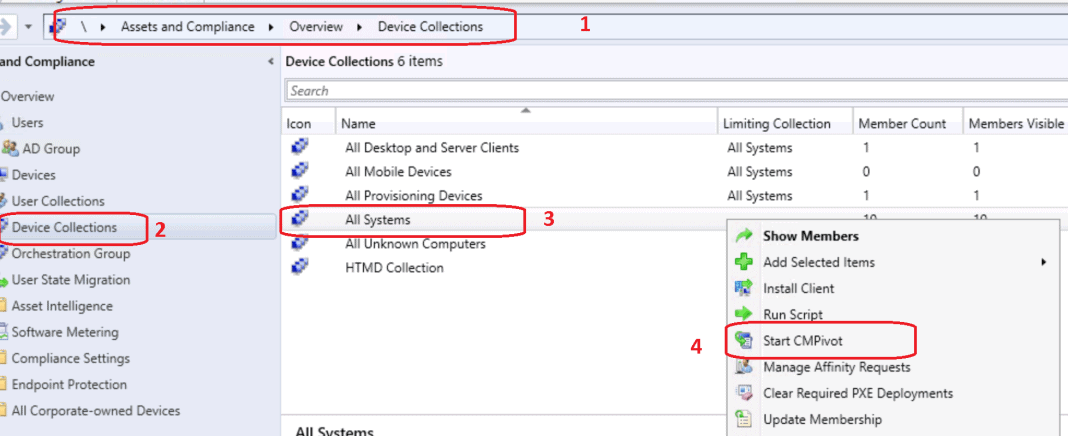
Dot Net Version Details using SCCM CMPivot Query
The CMPivot uses a subset of the Kusto Query Language (KQL), which is also used in Azure Log analytics services and all. Most of the Azure services use KQL for reporting and troubleshooting scenarios. I have used this for the troubleshooting scenarios of update compliance.
Over here, we are trying to find out the devices running with an unsupported version of Dot Net using the CMPivot query. Ensure the devices are online to get accurate results using the CMPivot query.
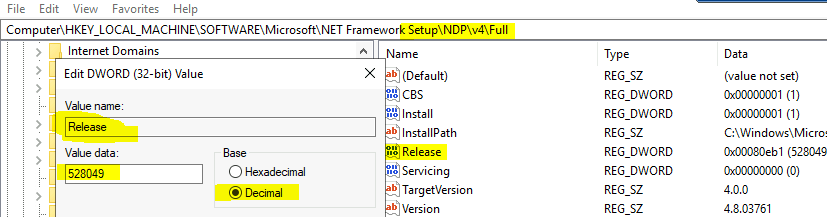
The following is the registry key that you will need to check and confirm whether you have the supported version of Dot Net. You will need to check the Release version of .NET using the following CMPivot query.
I have noticed that all the SCCM client devices have the full version of Dot NET installed. Hence I thought it’s worth checking the FULL version instead of the client version.
Let me know if you see only the client version of Dot NET is installed on SCCM client devices. You can use the following table to find the relevant details using SCCM CMPivot Dot Net Query.
| Dot Net Version | Release Number |
|---|---|
| NET Framework 4.6.2 | 394802 |
| .NET Framework 4.7 | 460798 |
| .NET Framework 4.7.1 | 461308 |
| .NET Framework 4.7.2 | 461808 |
| .NET Framework 4.8 | 528040 |
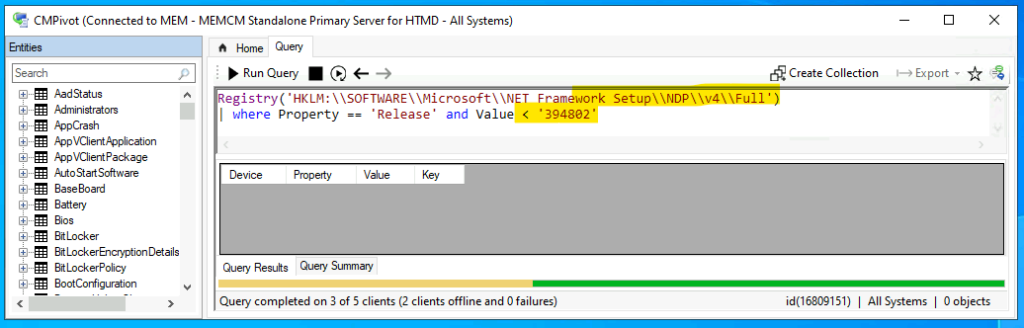
Devices with Dot Net 4.6.2 Version
Let’s find out the CMPivot query to check whether any client devices are running with an unsupported version of Dot Net. The minimum required version of Dot Net for SCCM 2111 is 4.6.2, but the recommended version is 4.8.
Devices with Dot Net 4.6.2 Version – Registry(‘HKLM:\SOFTWARE\Microsoft\NET Framework Setup\NDP\v4\Full’) | where Property == ‘Release’ and Value < ‘394802’
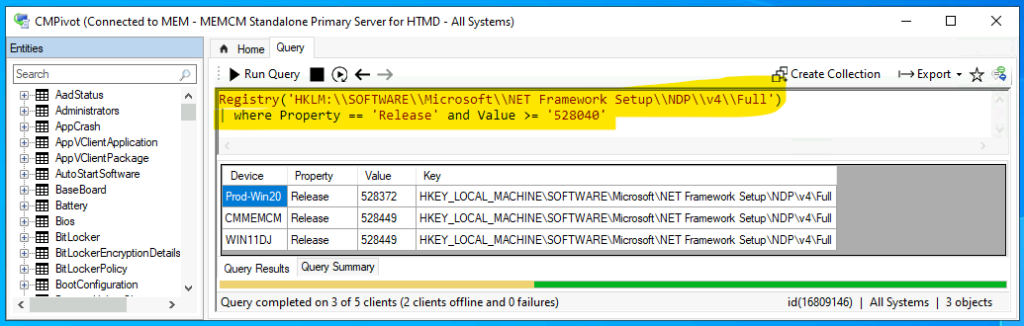
Devices with Dot Net 4.8 version and above
Now let’s check the CMPivot query to find out the Dot Net 4.8 version and above. The 4.8 version is the recommended version by Microsoft for all the SCCM clients and servers.
All the devices in my lab environment look good with Dot Net 4.8 version as per the below CMPivot query.
Dot Net 4.8 version and above – Registry(‘HKLM:\SOFTWARE\Microsoft\NET Framework Setup\NDP\v4\Full’) | where Property == ‘Release’ and Value >= ‘528040’
Author
Anoop is Microsoft MVP! He is a Solution Architect in enterprise client management with more than 20 years of experience (calculation done in 2021) in IT. He is Blogger, Speaker, and Local User Group HTMD Community leader. His main focus is on Device Management technologies like SCCM 2012, Current Branch, and Intune. He writes about ConfigMgr, Windows 11, Windows 10, Azure AD, Microsoft Intune, Windows 365, AVD, etc……………




Discussion