






How to Setup SCCM Cloud Management Gateway as Cloud DP
Let us learn how to Set up SCCM Cloud Management Gateway as Cloud DP. From SCCM 1806 onwards, you can eliminate Cloud DP from your SCCM infrastructure. I will explain the process of configuring SCCM CMG into Cloud DP.
Learn how to set up Cloud Management Gateway as cloud DP. You can learn how to download content using Cloud Management Gateway.
The cloud management gateway (CMG) makes managing Configuration Manager clients over the Internet straightforward. CMG can be deployed as a cloud service in Microsoft Azure to manage clients without further on-premises infrastructure.
I would recommend going through and configuring Azure services cloud management before proceeding with CMG configuration.

Table of Contents
Video Tutorial – Download Content Using Cloud Management Gateway
In the following video, you shall learn how to remove or delete cloud DP and download content using Cloud Management Gateway.
I won’t recommend removing Cloud DP from any of the production environments before configuring SCCM CMG for content download. Use cloud DP and CMG for testing purposes, and once you are comfortable with CMG, you can remove cloud DP.
Setup SCCM CMG to Serve Content to Clients
In this set, you will learn how to configure SCCM CMG to serve content to SCCM clients. There are two options for setting up SCCM CMG to serve content to clients.
- Configure SCCM Cloud Management Gateway(CMG) from CMG wizard
- Configure SCCM Cloud Management Gateway(CMG) from CMG properties
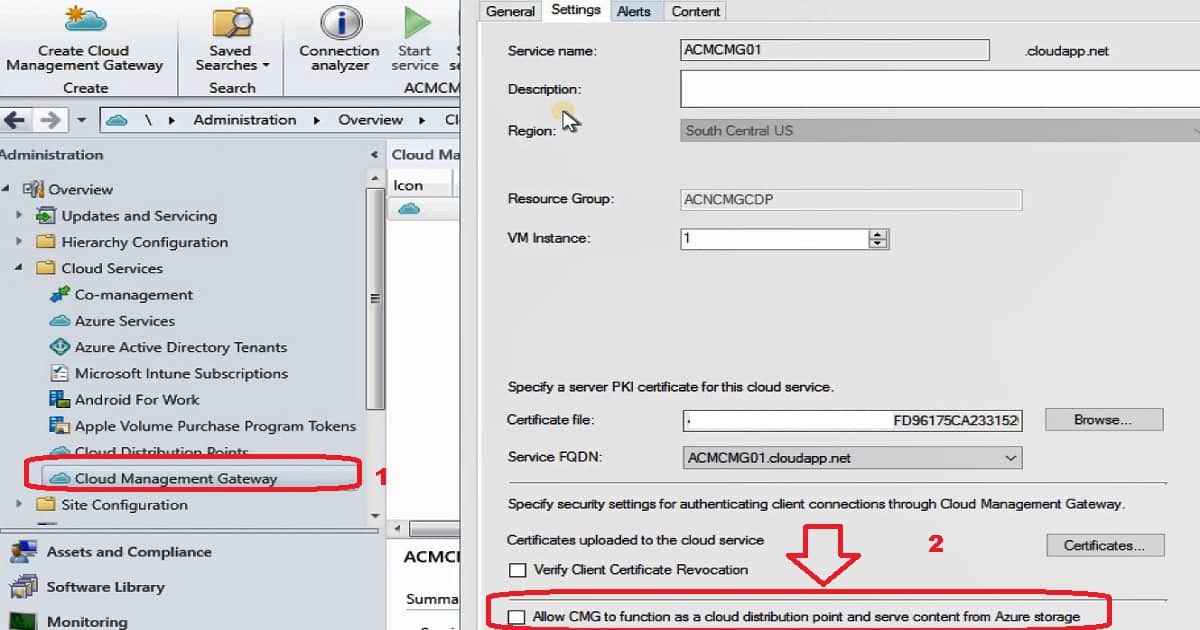
You can follow the steps to enable SCCM CMG (#2) to allow clients to download the content from CMG.
- Navigate to \Administration\Overview\Cloud Services\Cloud Management Gateway
- Go to properties of SCCM CMG – ACMCMG01.cloudapp.net
- Go to the settings tab of CMG properties
- Click on Checkbox – Allow CMG to Function as a Cloud Distribution Point and Serve content from Azure Storage
- Click OK to finish to close the SCCM CMG window, and now the client can download content using Cloud Management Gateway
How to Verify SCCM CMG Working as Cloud DP
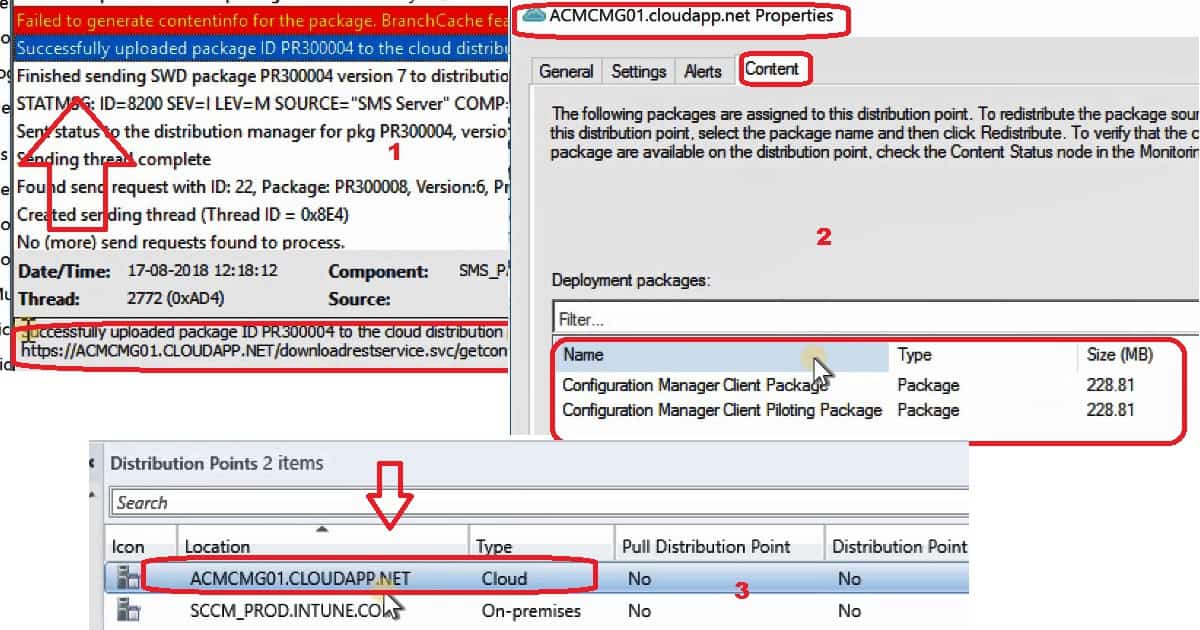
Four (4) approaches exist to verify SCCM CMGs working as a cloud DP. Use any of the following methods to ensure SCCM CMG is functional as a cloud DP.
- Verify pkgxfermgr.log
- SCCM CMG Properties
- Distribution Points status properties & Monitoring Workspace
- Deploy a package to Internet Internet-managed SCCM client device
Verify pkgxfermgr.log
Using pkgxfermgr.log, you can verify the replication of the default packages to SCCM CMG. Once we’ve enabled the functionality, the default packages are distributed automatically to SCCM CMG, and the client can download content using Cloud Management Gateway.
SCCM CMG properties
The second option is to check the properties of SCCM CMG to confirm whether CMG as cloud DP replication is working as expected.
- Navigate to \Administration\Overview\Cloud Services\Cloud Management Gateway
- Go to properties of SCCM CMG – ACMCMG01.cloudapp.net
- Go to the Content tab and verify whether the packages are listed there or not
Distribution Points status properties & Monitoring Workspace
The third option is to verify the SCCM CMG package replication from the Distribution Point status or Monitoring workspace.
Deploy a package to Internet Internet-managed SCCM client device
Deploy an application package to an internet-managed device to verify whether the client device can download the application content from the new SCCM CMG.
Resources
We are on WhatsApp. To get the latest step-by-step guides and news updates, Join our Channel. Click here –HTMD WhatsApp.
Author
Anoop C Nair is Microsoft MVP! He is a Device Management Admin with more than 20 years of experience (calculation done in 2021) in IT. He is a Blogger, Speaker, and Local User Group HTMD Community leader. His primary focus is Device Management technologies like SCCM 2012, Current Branch, and Intune. He writes about ConfigMgr, Windows 11, Windows 10, Azure AD, Microsoft Intune, Windows 365, AVD, etc.




Hello,
Thank you for you demonstration, i have a problem when i pass clients to internet when i want using software center to install application i have these error : The software change returned error code 0x87D00607(-2016410105).
StaffCan you please ensure you followed all the points mentioned in the post
https://www.anoopcnair.com/new-sccm-cmg-setup-guide-ehttp/
I dont use the E-HTTP i use PKI, i can distribute contents to my CMG and in azure portal on Storage account i can see the package of my application.
The problem is when i wan’t install application from software center i have these error.
Do you think that problem have relationship because i use PKI ??
Hello,
I dont use the E-HTTP i use PKI, i can distribute contents to my CMG and in azure portal on Storage account i can see the package of my application.
The problem is when i wan’t install application from software center i have these error.
Do you think that problem have relationship because i use PKI ??
StaffIn that case you might need to make sure you have Azure AD and PKI certs on the client side to communicate successfully with CDP and CMG.
Hello
In the wizard of CMG setup i have entred the root certificate and the CMG certificate. On the clients i have imported the root certificate.
The are onother certificates to added ??
StaffAzure AD based cert as I mentioned above … to communicate with CMG…
StaffAlso make sure the device is either Azure AD joined or hybrid azure ad joined to get that cert
Hello,
If i use PKI the Azure AD Joined or Hybrid Joined is not requirement for CMG ?
on locationservices.log i have :
Raising event:
instance of CCM_CcmHttp_Status
{
ClientID = “GUID:CB31E04E-03F0-4C12-AC7A-91C88B39D46E”;
DateTime = “20191017092146.726000+000”;
HostName = “CMGWAAZITCDP.CLOUDAPP.NET”;
HRESULT = “0x87d0027e”;
ProcessID = 6604;
StatusCode = 401;
ThreadID = 6740;
};
i have find a solution i have checked Verify Client Certificate Revocation checkbox in the CMG wizard so when i unchecked and restartd the CMG in SCCM thats working fine for me.
Firstly, this is the first time I have posted on your website and I wanted to thank you for all your documentation! It has saved me more times than I can count! I appreciate you!
I am encountering an issue where an upgrade OS package seemingly refuses to distribute to the CMG. It was distributed previously however my client was receiving ‘Empty DP list for content’ for this package even after updating and validating the package so I removed the content via DP content tab. (I can confirm the CMG is functioning because it successfully downloaded all of the other referenced Task Sequence content from the CMG). Now when I try to distribute the package the distmgr.log shows that the content was successfully removed from the CMG but then it never actually tries to distribute content. Not sure what I am missing. Any insight would be greatly appreciated!
Distmgr.log – This recurs every time I distribute the OS Package (CM100125) to CMG. I doesn’t actually begin distributing content.
Attempting to remove package CM100125 from distribution point [“Display=\\AmwinsCMG01.amwins.com\”]MSWNET:[“SMS_SITE=CM1”]\\AmwinsCMG01.amwins.com\
[“Display=\\AmwinsCMG01.amwins.com\”]MSWNET:[“SMS_SITE=CM1”]\\AmwinsCMG01.amwins.com\ doesn’t have the package installed yet as no pkgstatus entry found
Successfully removed the package CM100125 from server [“Display=\\AmwinsCMG01.amwins.com\”]MSWNET:[“SMS_SITE=CM1″]\\AmwinsCMG01.amwins.com\
STATMSG: ID=2331 SEV=I LEV=M SOURCE=”SMS Server” COMP=”SMS_DISTRIBUTION_MANAGER” SYS=P10SCCMPS01.AMWINS.LOCAL SITE=CM1 PID=5704 TID=12960 GMTDATE=Mon Mar 23 20:09:03.892 2020 ISTR0=”CM100125″ ISTR1=”[“Display=\\AmwinsCMG01.amwins.com\”]MSWNET:[“SMS_SITE=CM1″]\\AmwinsCMG01.amwins.com\” ISTR2=”” ISTR3=”” ISTR4=”” ISTR5=”” ISTR6=”” ISTR7=”” ISTR8=”” ISTR9=”” NUMATTRS=2 AID0=400 AVAL0=”CM100125″ AID1=404 AVAL1=”[“Display=\\AmwinsCMG01.amwins.com\”]MSWNET:[“SMS_SITE=CM1″]\\AmwinsCMG01.amwins.com\”
We have built some client automation that uses the packageID of the OS so I really really don’t want to have to create a new OS Upgrade Package. MS isn’t offering much help either.