






How to Download Install the Latest Version of SCCM ConfigMgr CB Current Branch Configuration Manager
Let’s discuss how to Download and Install the Latest Version of SCCM ConfigMgr CB Current Branch Configuration Manager.
If you download new SCCM/ConfigMgr CB (Current Branch) source files, you should download the latest “Baseline” version of SCCM ConfigMgr CB 1606. You can download the source files of SCCM CB from the following list.
This post provides all the details on downloading and installing the latest version of SCCM ConfigMgr CB’s current branch configuration manager.
Microsoft offers baseline versions as downloadable media via the Volume License Service Center for Configuration Manager (Current Branch). When establishing a new Configuration Manager site within a fresh hierarchy, several installation methods are available to deploy these baseline versions effectively.

Table of Contents
Latest Post Get SCCM Baseline Version Installation Media | ConfigMgr | VLSC | Download HTMD Blog
- Download Latest SCCM Installation Media | Baseline Version | ConfigMgr
- SCCM Secondary Site Server Upgrade to Latest Version | ConfigMgr
- How to Install Secondary server
- How to FIX SCCM secondary server installation failure
- How to Upgrade SCCM Configuration Manager to the latest version of ConfigMgr 1
- SCCM 2405 New Features
How Do You Download and Install the Latest Version of SCCM ConfigMgr CB?
Eval center here (for free – 180 days trial version). MSDN here (personal lab testing when you have an MSDN subscription etc..) and Volume Licensing site here (arguably, only for production, pre-prod, and lab for official purpose).
The title that you should look or search for is “System Center Configuration Manager and Endpoint Protection (version – 1606) (x86 and x64) – DVD (Multiple Languages)“.
| Latest Version of SCCM ConfigMgr CB |
|---|
| System Center Configuration Manager and Endpoint Protection (version – 1606) (x86 and x64) – DVD (Multiple Languages) |
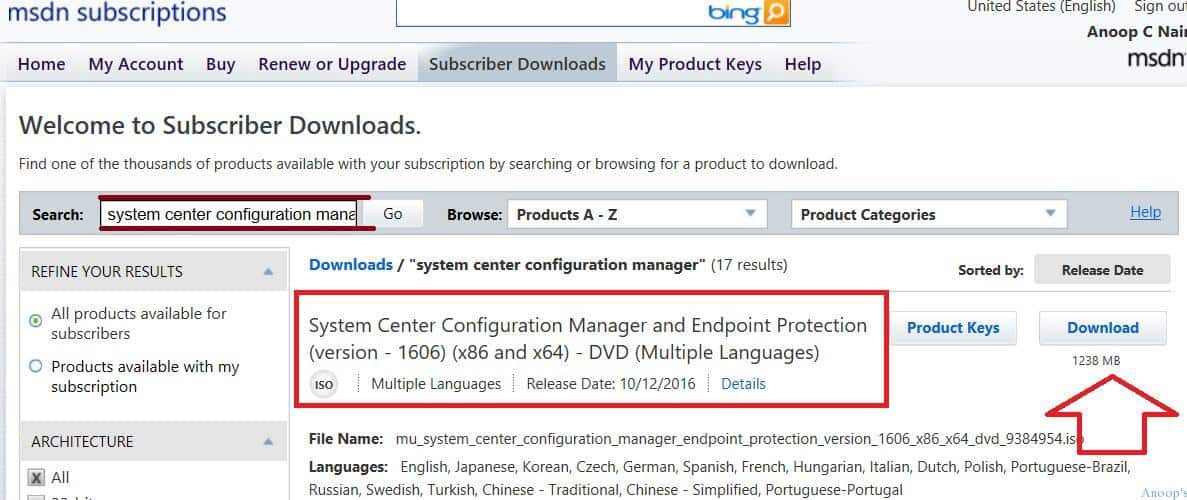
More Details: Do I Download and Install the Latest Versions of SCCM ConfigMgr?
Until now, we have been downloading the baseline version of SCCM CB 1511 from the MSDN or Volume Licensing site and upgrading the version of SCCM CB via “Updates and Servicing.” What has changed now?
Recently, Microsoft released a new baseline version of SCCM ConfigMgr CB: SCCM/ConfigMgr CB 1606. That means you don’t have to download and install SCCM CB 1511 and upgrade it via the Updates and Servicing node to 1606.
You should instead download the SCCM CB 1606 version directly and install it. While installing the new baseline version of SCCM CB 1606, you could see an option to select “Long Term Servicing Branch (LTSB).” Never choose that option (why ? – more details here).
- SCCM 2403 New Key Features and Improvements
- 2404 Microsoft Intune New Features April Update
- Microsoft Intune Extends Support To Android 10 And Later From October 2024
- Use Power Automate To Import Autopilot Devices Hash Via Email For Intune Engineers
- New Key Features of SCCM 2309 | Top Improvements
- Download SCCM 2309 Early Ring Version using PowerShell Script
- SCCM 2307 Technical Preview New Features
Video- SCCM 2309 for Beginners: A Step-by-Step Tutorial for Upgrade Process
We have a video based on SCCM 2309 for Beginners, and it will guide you as A Step-by-Step Tutorial for the Upgrade Process by Anoop C Nair -Microsoft MVP.
Resources
We are on WhatsApp now. To get the latest step-by-step guides, news, and updates, Join our Channel. Click here. HTMD WhatsApp.
Author
Anoop C Nair is Microsoft MVP! He is a Device Management Admin with more than 20 years of experience (calculation done in 2021) in IT. He is a Blogger, Speaker, and Local User Group HTMD Community leader. His main focus is on Device Management technologies like SCCM 2012, Current Branch, and Intune. He writes about ConfigMgr, Windows 11, Windows 10, Azure AD, Microsoft Intune, Windows 365, AVD, etc.




I was wondering if you’d be able to assist me. I’m attempting to install the baseline 1606 from scratch, but cannot contact the CAS in our hierarchy. Errors:
Setup was unable to retrieve the Software Assurance settings for the specified central administration site server. Verify that you have entered the correct FQDN for the CA site and that it is accessible from this server.
StaffThis could be because of several issues… I doubt Firewall if you check other things like name resolution, proper access rights on CAS and SQL boxes. Try checking out the following blog post https://www.anoopcnair.com/2013/08/09/configmgr-2012-child-primary-server-installation-error-attempted-to-perform-an-unauthorized-operation/
I have several CB 1511 servers in Offline, on-demand connection, service connection point mode. I want to update CB on these servers.
Instead of exporting the telemetry data, downloading then importing, etc. updates for each CB server, can I use the CB 1606 media instead?