






Download Mobile App Diagnostics in Intune Admin Portal
Let’s learn how to download Mobile App Diagnostics in Intune Admin Portal. The diagnostic capability will help the helpdesk team to troubleshoot mobile device Intune/Company Portal issues.
You can download mobile app diagnostics in the Intune admin center, available in public preview. Access user-submitted mobile app diagnostics in the admin center, including app logs sent through the Company Portal app for Android, AOSP, or Windows, with support for iOS, macOS, and Edge for iOS coming at a later date.
On managed devices, the Company Portal is a crucial client-side component. Enrolling devices into Intune requires a Company Portal application and is also necessary for collecting and viewing Intune logs from mobile devices.
If you experience unexpected behavior from Company Portal, you can collect logs or report the event to Microsoft by uploading the app logs. These logs contain information about any unforeseen events that may have occurred in Company Portal and are stored on your device.

The diagnostic logs contain MDM event logs, Intune Management Extension logs, registry values, etc. These are helpful logs for Intune admins to understand the exact issue with Windows devices. All the troubleshooting related to Intune and MDM can be done using these diagnostic logs.
- New Microsoft Intune Suite For Endpoint Management
- Explore New Intune Troubleshooting Dashboard For Intune Issues
Download Mobile App Diagnostics in Intune Admin Portal
By analyzing this data, IT admins, or helpdesk teams can gain insights into the root cause of problems and identify solutions to improve the performance and functionality of devices and applications. You can follow these steps to download Mobile App Diagnostics in Intune Admin Portal.
- Sign in to the Microsoft Intune admin center https://endpoint.microsoft.com.
- You can find the troubleshooting pane by selecting Troubleshooting + support > Troubleshoot.
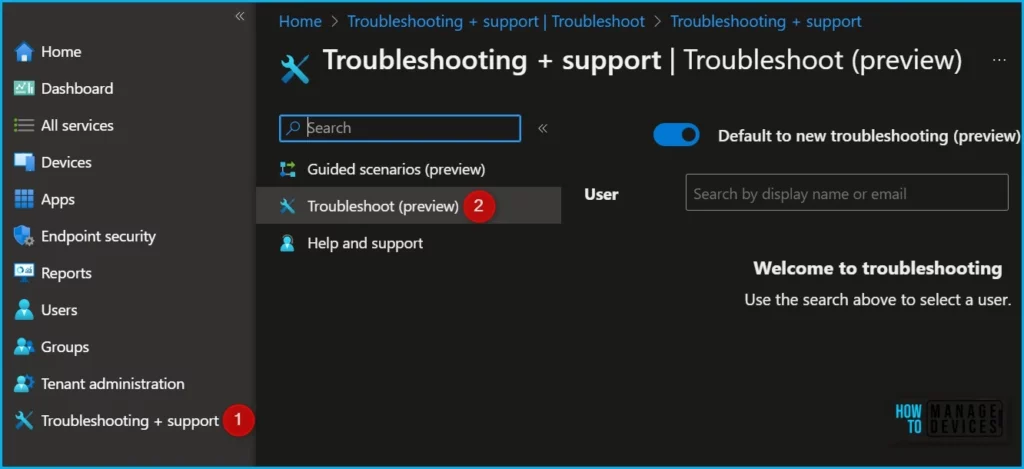
Note! Here’s how you can enable the new Preview Troubleshooting Pane by selecting the purple banner at the top, Explore New Intune Troubleshooting Dashboard.
To begin troubleshooting, select a user from the drop-down list or type in a display name or email. Once a user is selected, their information is loaded.
It also provides basic device information, such as how many apps the user has enrolled in, if any are disabled or offline, and recent enrollment failures.
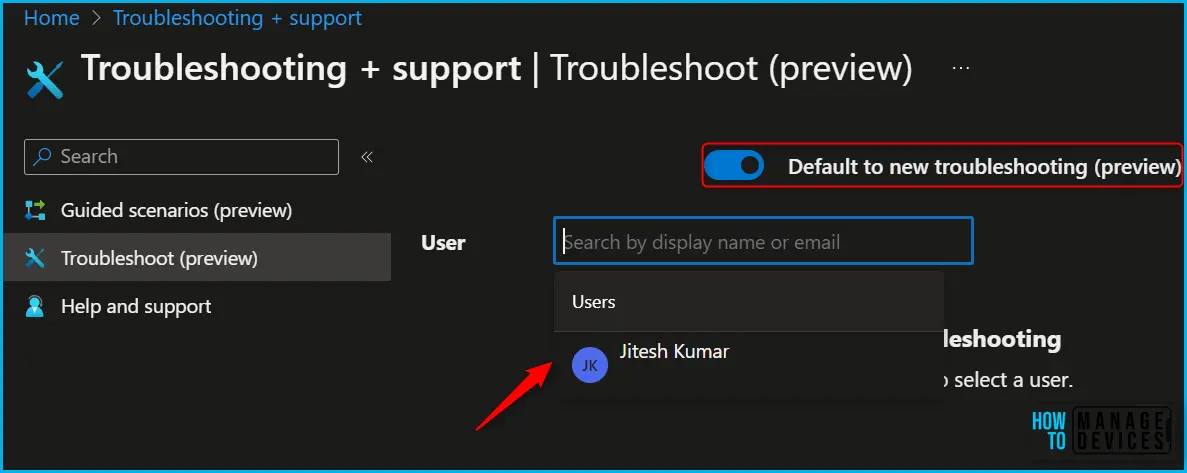
This helps collect Intune logs. All the troubleshooting related to Intune and MDM can be done using these diagnostic logs, you can check for Diagnostic Data for Windows and all different platforms.
Here, you can choose the diagnostics for the device for which you want to download diagnostics data. Click on the “Download” button to save the diagnostics data to your device.
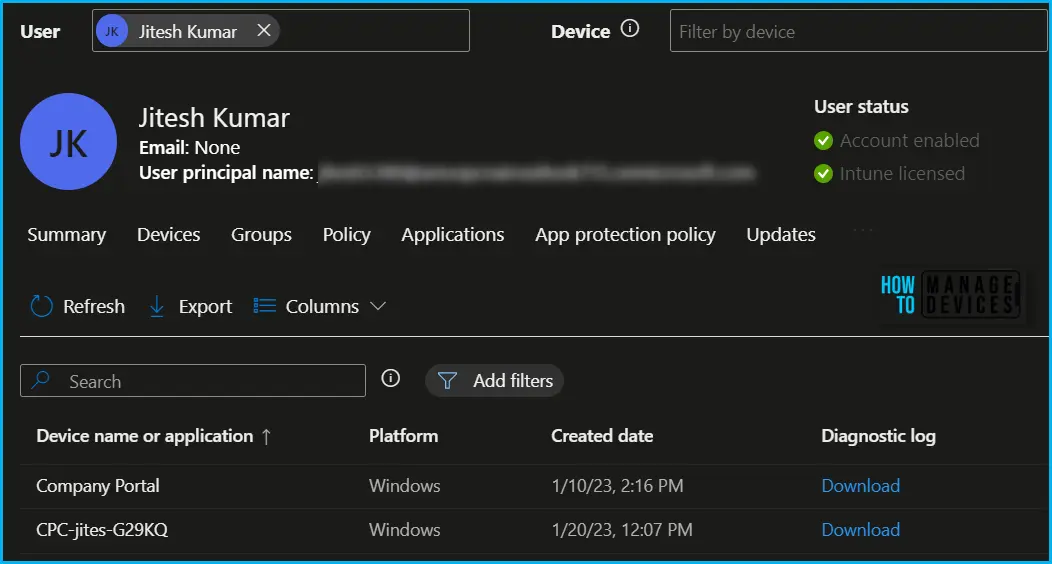
The diagnostic tab includes information about the device name or application, platform, created date, and diagnostic log.
| Device name or application | The name of the device or application. |
| Platform | The platform of the device. |
| Created date | The timestamp of when the event occurred. |
| Diagnostic log | The diagnostic log file. |
Author
About Author – Jitesh, Microsoft MVP, has over six years of working experience in the IT Industry. He writes and shares his experiences related to Microsoft device management technologies and IT Infrastructure management. His primary focus is Windows 10/11 Deployment solution with Configuration Manager, Microsoft Deployment Toolkit (MDT), and Microsoft Intune.


Discussion