






Download Prerequisite Files Offline ConfigMgr SCCM
This guide shall help you get more details about downloading the SCCM prerequisites (Download Prerequisite Files Offline) files to another computer.
This guide explains how to use the “Use Previously Downloaded Files” option during the primary server setup.
Introduction – There are loads of posts that help you to download the prerequisites well before SCCM current branch installation so that we can save loads of time.
Let’s check and learn how to Download SCCM Prerequisite Files offline. As the section below explains, the setup file (setupdl.exe) and some other DLL files help you download the SCCM CB prerequisites.

Table of Contents
NOTE! Subscribe to the YouTube channel here to view more SCCM / Intune / Windows 10-related videos!
Download Prerequisite Files to Another Computer
You must follow the following steps to download SCCM setup-related prerequisite files to another computer.
- In Windows Explorer, go to either one of the following locations:
- <SCCM installation media>\SMSSETUP\BIN\X64
- <SCCM installation path>\BIN\X64
- Copy the following files to the same destination folder on the other computer:
- setupdl.exe
- .\<language>\setupdlres.dll
- This file is in the subfolder for the install language. For instance, English is in the
00000409Subfolder.
- This file is in the subfolder for the install language. For instance, English is in the
Example: – As an example, the destination folders on your other computer should look like this:
- C:\ConfigManInstall\setupdl.exe
- C:\ConfigManInstall\00000409\setupdlres.dll
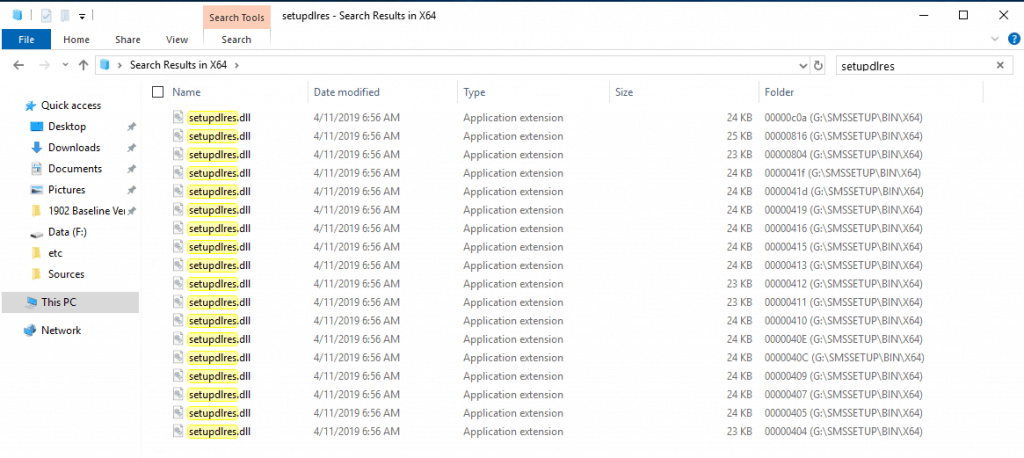
Let’s Start Download
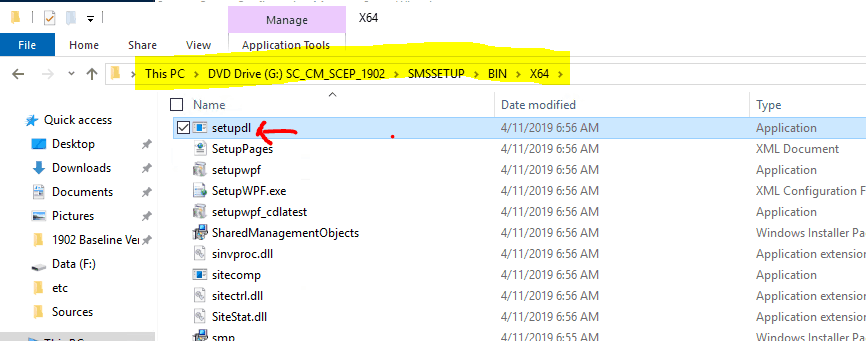
To open Configuration Manager Setup Down Loader tool called Setupdl.exe from SMSSETUP \BIN\X64\ folder.
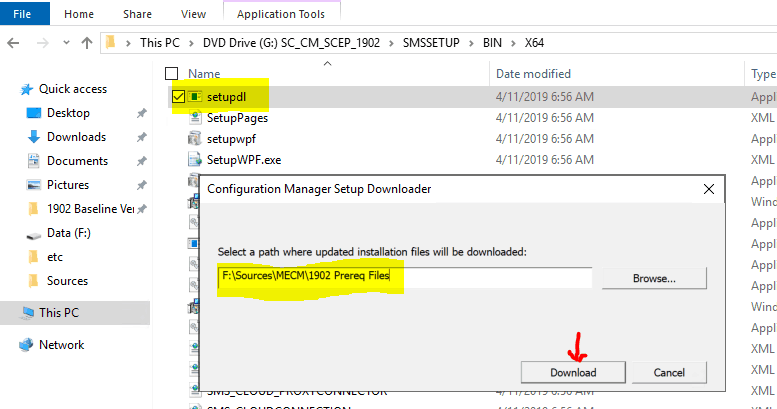
Select a path where updated Prerequisite files should be downloaded from the “Configuration Manager Setup Downloader tool.“
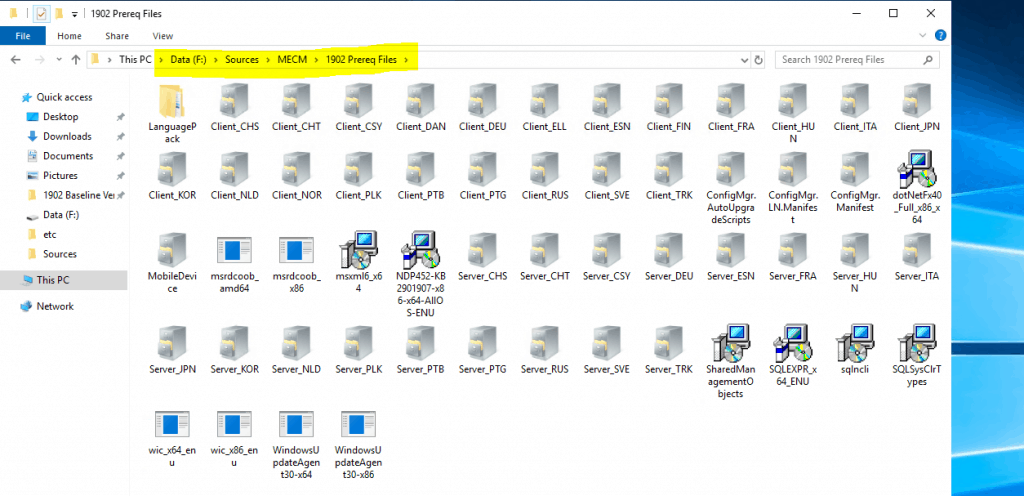
Result – Prerequisite Files Download
Completed the Download of prerequisite files.
Video Tutorial to Learn How to Download SCCM ConfigMgr CB Prerequisites
In this video, I will show you how to download prerequisites. An Internet connection is needed on the machine where you download the SCCM ConfigMgr Prerequisite files.
Resources
We are on WhatsApp now. To get the latest step-by-step guides, news, and updates, Join our Channel. Click here. HTMD WhatsApp.
Author
Anoop C Nair is Microsoft MVP! He is a Device Management Admin with more than 20 years of experience (calculation done in 2021) in IT. He is a Blogger, Speaker, and Local User Group HTMD Community leader. His main focus is on Device Management technologies like SCCM 2012, Current Branch, and Intune. He writes about ConfigMgr, Windows 11, Windows 10, Azure AD, Microsoft Intune, Windows 365, AVD, etc.




Dear Anoop !
Hope you are doing well.I am currently planning to deploy sccm current branch 1511 in pilot environment.when I was downloading sccm prerequisite it stuck suddenly after downloading 50 files what would be the cause I don’t knoe cox I didn’t research and troubleshoot.if you know the cause kindly share it.
Warm Regards,
Atif
StaffCheck the prerequisite log files and that will give you more details
Hi Anoop,
I have installed latest hotfix kb4490575 on my SCCM 1810 branch, the installation shows successful but when i checked in “Show Status” it shows post check installation still in progress.
I have checked all respective log files but nothing unusual found. Please let me know what we can do to fix this “Post Installation in progress issue”
Notes:
1) Hotfix shows installed successfully on both the level
A) Monitoring – update and servicing status – select update package name “…1810 hotfix kb4490575” – show status (update pack installation status)
B) Administration – update and servicing – Installed (status)
2) Done multiple reboot and also note the previous hotfix kb4490434 installed successfully
Regards
Fazal Shaikh
StaffAs I mentioned, the console upgrade should complete the post installation progress issue. But you don’t have to worry much about this in progress status.
I want to join
Hi sir,
Please guide step by step I didn’t understand. And I follow your step but still getting error occurs. Please solve me queries