






How to Track Download Restriction Configurations in Intune using Copilot Explorer
Let’s discuss how to Track Download Restriction Configurations in Intune using Copilot Explorer. In Intune Copilot Explorer, you can quickly review and track the policies that control download restrictions across devices.
This query results helps IT admins gain full informations into where and how restrictions are applied across devices. This ensures that sensitive data is not downloaded to unmanaged or non-compliant devices, reducing the risk of data leaks.
Intune Explorer with Security Copilot allows admins to quickly access details about devices, users, apps, compliance status, and update information. This helps easy monitoring, ensures security policies are applied, and provides a clear view of the overall health of the environment.
For IT teams, it simplifies troubleshooting by quickly identifying policy gaps or misconfigurations. For organisations, it strengthens compliance and enhances overall data security without disrupting end-user productivity.

Table of Contents
How to Track Download Restriction Configurations in Intune using Copilot Explorer
You can track download restriction configurations in Intune by signing in to the Intune admin center and navigating to Device configurations. From there, use the prompt “Get policies that have settings configured where the setting name contains [setting name]”. This query filters the policies to quickly identify those that include download restriction settings, giving administrators a clear view of where these controls are applied across the tenant.
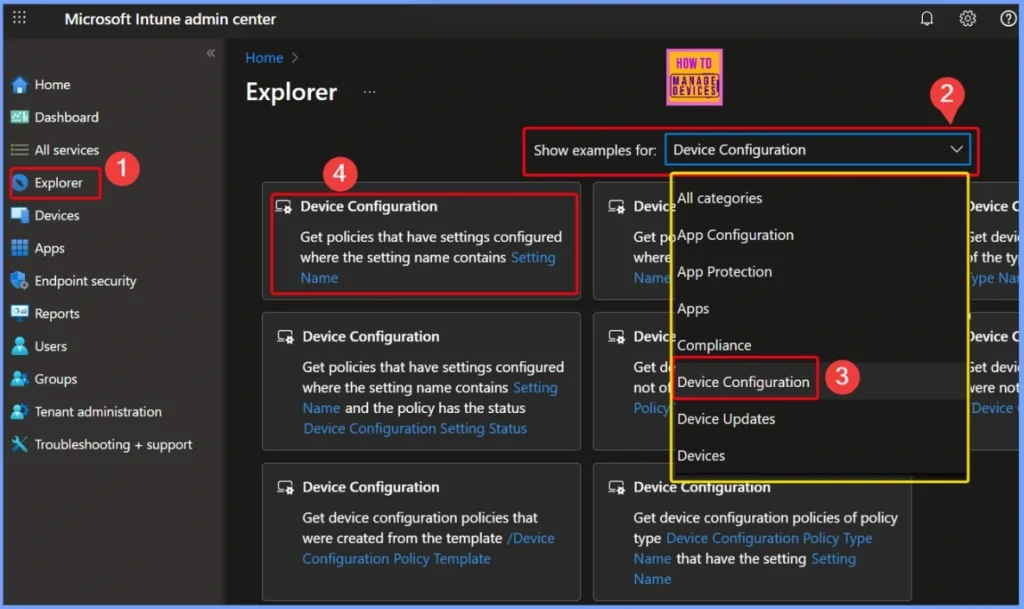
- How to use Intune Explorer with Security Copilot to Access Devices Users Apps Compliance and Update Details
- How to use Intune Explorer with Security Copilot to Find Windows and MacOS Device Data across your Tenant
- How to View Managed App Types Details with Intune Explorer and Security Copilot
- How to Get All Managed App Installation Results for User using Intune Explorer with Security Copilot
- How to Get Device Enrollment Details by User in Intune Explorer with Security Copilot
Mandatory Settings Name in Query Configuration
In this query, the Settings name field is mandatory and must be filled with the exact name of the setting you want to track. By entering the specific setting name, the query can accurately return all policies that include that configuration, helping administrators quickly locate and review download restriction policies applied in the environment.
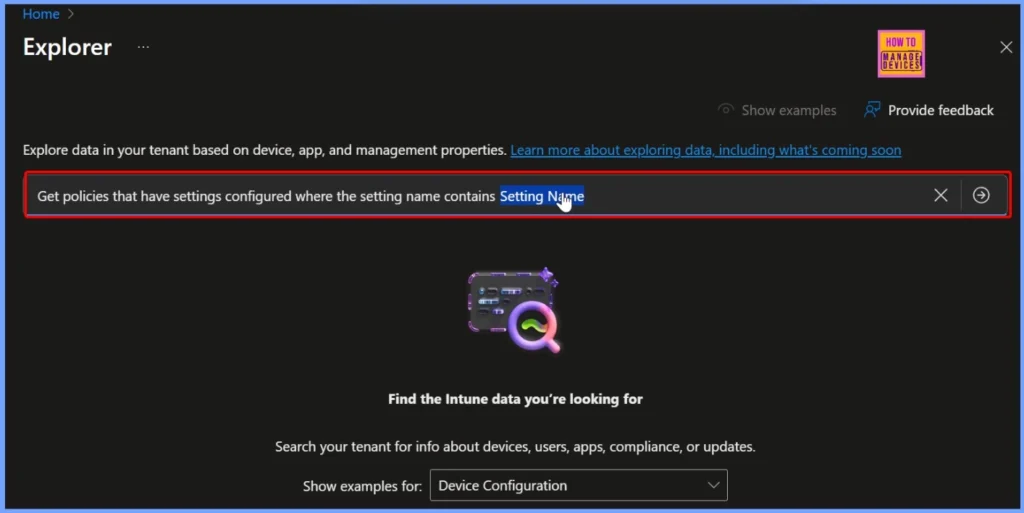
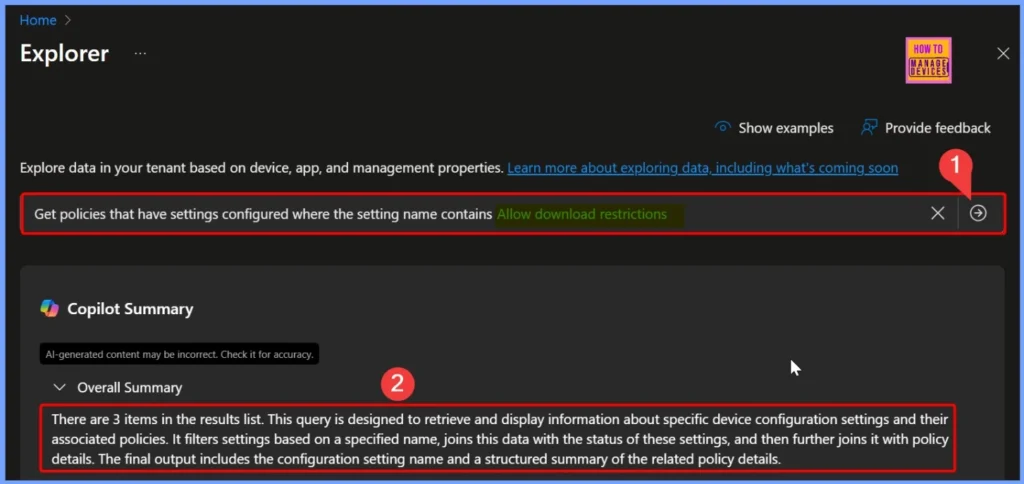
Allow Download Restrictions
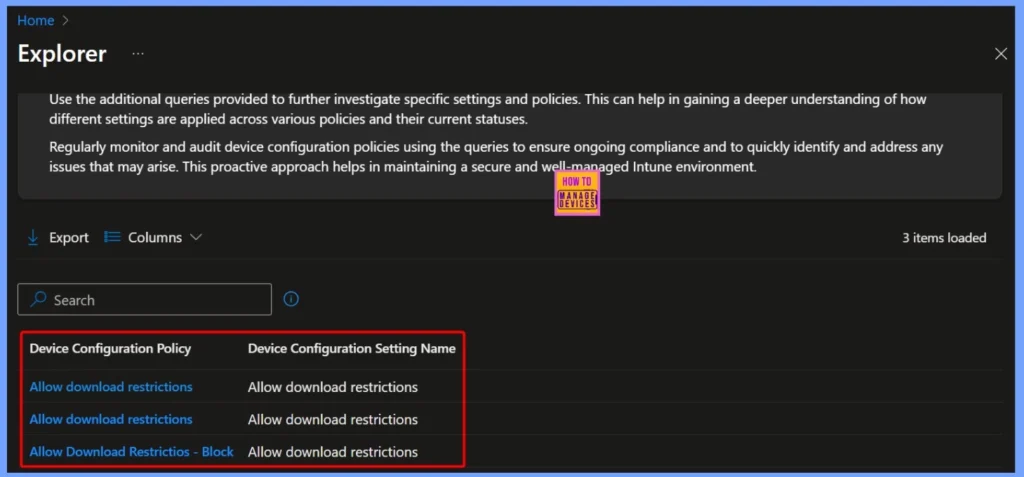
Here, the Settings name is selected as “Allow download restrictions”, and after clicking the arrow next to the query, Copilot processes the request and provides the results. In this case, the output shows 3 items in the results list. The query is designed to fetch and display details of specific device configuration settings along with their associated policies.
It works by filtering based on the chosen setting name, linking the results with the status of those settings, and then joining them with the corresponding policy details. The final output presents the configuration setting name along with a structured summary of the related policy information.
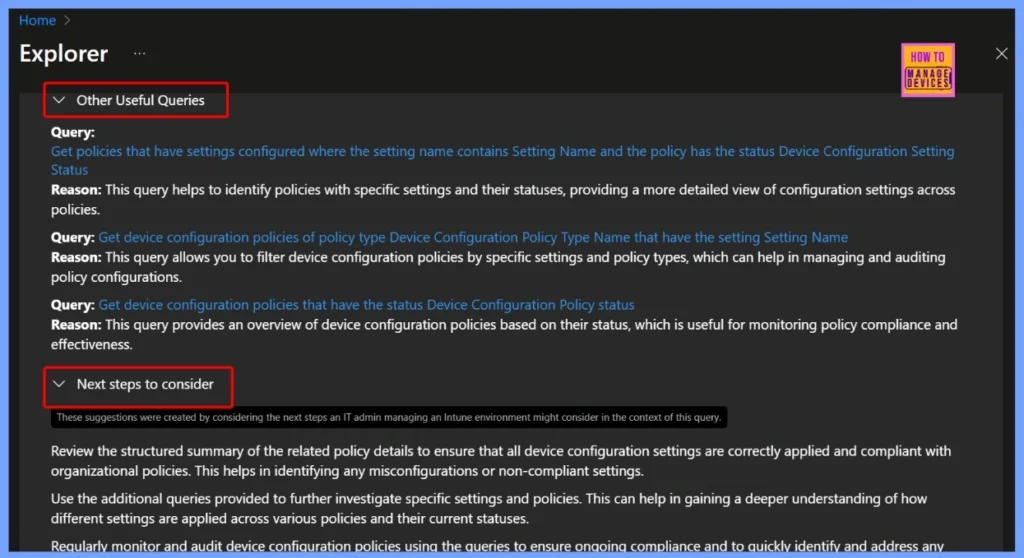
Other Useful Queries and Next Steps
These queries in Intune Copilot Explorer help administrators analyze and manage device configuration policies effectively. They allow you to identify policies with specific settings and their statuses, filter policies by both setting names and policy types for easier auditing, and review policies based on their overall status.
- Other Useful Queries
- Query: Get policies that have settings configured where the setting name contains Setting Name and the policy has the status Device Configuration Setting Status
- Reason: This query helps to identify policies with specific settings and their statuses, providing a more detailed view of configuration settings across policies.
- Query: Get device configuration policies of policy type Device Configuration Policy Type Name that have the setting Setting Name
- Reason: This query allows you to filter device configuration policies by specific settings and policy types, which can help in managing and auditing policy configurations.
- Query: Get device configuration policies that have the status Device Configuration Policy statusReason: This query provides an overview of device configuration policies based on their status, which is useful for monitoring policy compliance and effectiveness.
- Next Steps
- Review the structured summary of the related policy details to ensure that all device configuration settings are correctly applied and compliant with organizational policies. This helps in identifying any misconfigurations or non-compliant settings.
- Use the additional queries provided to further investigate specific settings and policies. This can help in gaining a deeper understanding of how different settings are applied across various policies and their current statuses.
- Regularly monitor and audit device configuration policies using the queries to ensure ongoing compliance and to quickly identify and address any issues that may arise. This proactive approach helps in maintaining a secure and well-managed Intune environment.
End Results – Download Restriction Policies
The query output shows multiple policies with the Allow download restrictions setting applied, including one configured as Allow Download Restrictions – Block. This provides a clear view of how download restriction settings are enforced across device configuration policies.
| Device Configuration Policy | Device Configuration Settings Name |
|---|---|
| Allow Download Restrictions | Allow Download Restrictions |
| Allow Download Restrictions | Allow Download Restrictions |
| Allow Download Restrictions – Block | Allow Download Restrictions |
Need Further Assistance or Have Technical Questions?
Join the LinkedIn Page and Telegram group to get the latest step-by-step guides and news updates. Join our Meetup Page to participate in User group meetings. Also, Join the WhatsApp Community to get the latest news on Microsoft Technologies. We are there on Reddit as well.
Author
Anoop C Nair has been Microsoft MVP from 2015 onwards for 10 consecutive years! He is a Workplace Solution Architect with more than 22+ years of experience in Workplace technologies. He is also a Blogger, Speaker, and Local User Group Community leader. His primary focus is on Device Management technologies like SCCM and Intune. He writes about technologies like Intune, SCCM, Windows, Cloud PC, Windows, Entra, Microsoft Security, Career, etc.


Discussion