





Enable Audit Logs for SMB Servers without Signing Support using Intune
Key Takeaways
- This policy helps to identify servers that lack SMB signing support.
- Improves monitoring of insecure SMB communications.
- Assists in strengthening network security compliance.
- Useful for detecting outdated or misconfigured servers.
- Generates audit logs for better security visibility.
Hey, let’s discuss about ‘Enable Audit Logs for SMB Servers without Signing Support using Intune‘. This policy controls whether the SMB client will enable the audit event when the SMB server doesn’t support signing. If you enable this policy setting, the SMB client will log the event when the SMB server doesn’t support signing. If you disable this policy setting or do not configure it, the SMB client will not log the event.
Table of Contents
What are the Advantages of this Policy?
1. Enhances SMB security monitoring.
2. Helps detect insecure servers.
3. Improves audit and compliance tracking.
Enable Audit Logs for SMB Servers without Signing Support using Intune
This policy audits servers that do not support SMB signing during network communication. It helps administrators identify insecure SMB connections and improve security monitoring.
- Supporting Secure Login Practices Through NTLM Auditing using Intune Policy
- How to Create Intune Audit Credential Validation Policy
- Securing SMB Communication with Intune using Digitally Sign Communications Policy
How to Create a Policy
To create a policy, go to Microsoft Intune Admin center. Click on the Devices, then Configuration and choose New Policy from down arrow of the Create option.

Creating the Profile
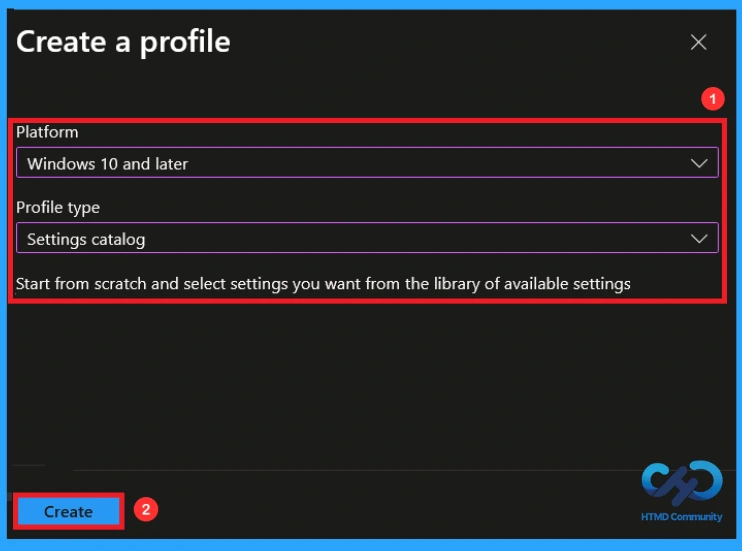
This is the next step you need to take for Policy Creation. When creating a profile, you must select the platform and profile type. Here, I would like to configure the policy for Windows 10 and later Platforms and the Settings catalog profile. Then click on the Create button.

Give Name and Description for Policy
Naming the policy is the primary step that help admins to identify the policy later. This is important and necessary step that allows you to know the purpose of the policy. Here is Name is mandatory and description is optional. After adding this click on the Next button.

Configuration Settings in this Policy
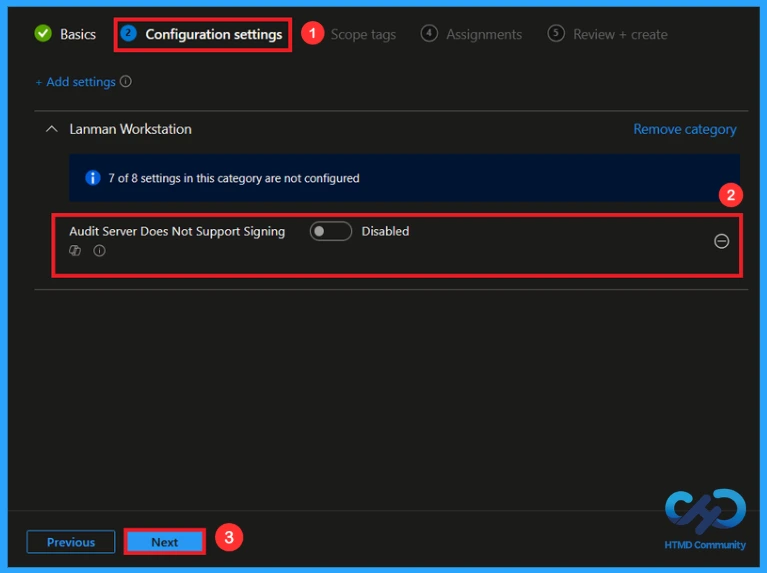
With Settings Picker, you can use the Configuration Settings Tab. On this tab, you can click on the Add Settings to get the Settings Picker. The settings picker shows huge number of settings. I choose Lanman workstation as category and audit server does not support signing policy. Then enable the setting name.

Disable this Policy
By default, this policy will be disabled. If you disable or don’t configure this policy setting, the SMB(server message block) client won’t log the event. If you like continue by disabling this policy click next.
Enabling this Policy
If you enable this policy setting, the SMB client will log the event when the SMB server doesn’t support signing. Here i would like to create the policy by enabling it, so I clicked next to continue.

Add Scope Tag
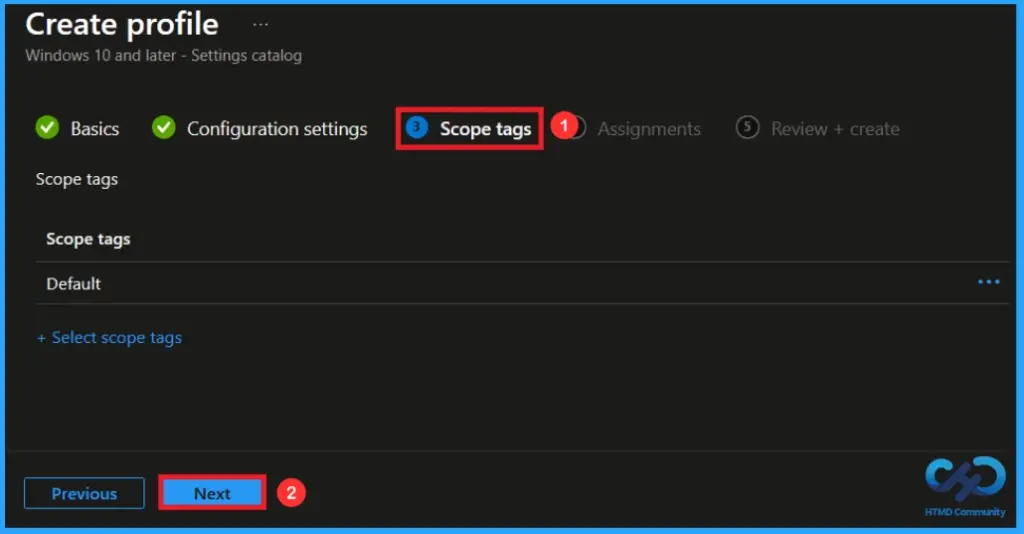
A scope tag in Intune is used to control visibility and access to Intune resources based on administrative roles. Scope tags are not mandatory. You can add the scope tag using the select scope tags button. Click Next to continue.
Assignments Tab to Add Group
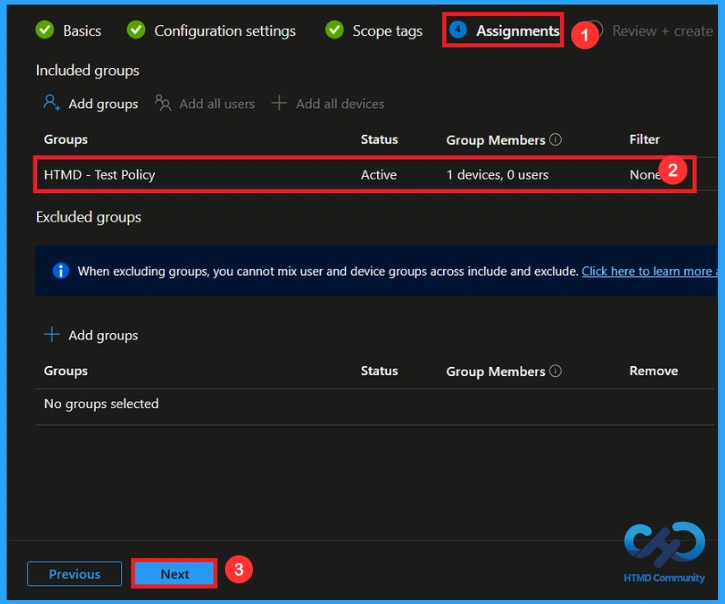
To assign the policy to specific groups, you can use the Assignment Tab. Here I click, +Add groups option under Included groups. I choose a group from the list of groups and click on the Select button. Again, I click on the Select button to continue.
Finalising this Policy
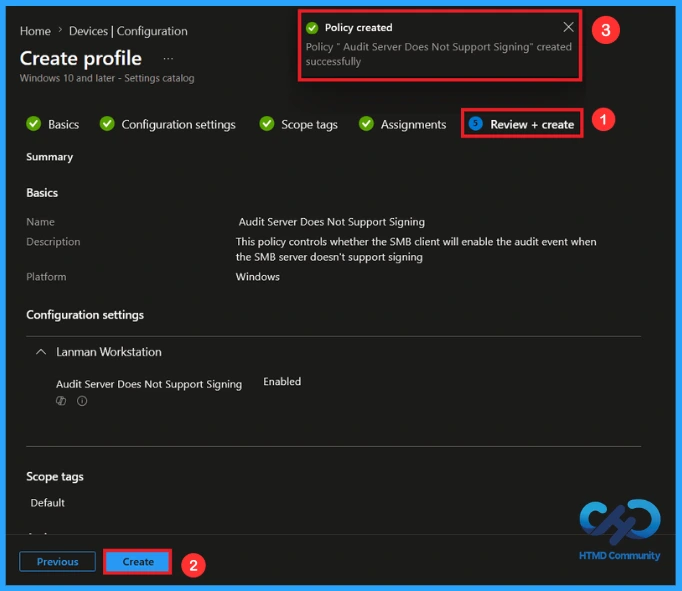
At the review + create step, you can review each tab to avoid misconfiguration or policy failure. After reviewing the details and making any necessary changes by clicking Previous. We click Create to finish, and a notification confirms that the audit server does not support signing policy has been created successfully.
Monitoring Status
The Monitoring Status page shows whether the policy has succeeded or not. To quickly configure the policy and take advantage of the policy sync the assigned device on Company Portal. Open the Intune Portal. Go to Devices > Configuration > Search for the Policy. Here, the policy shows as successful.

Event Viewer Details
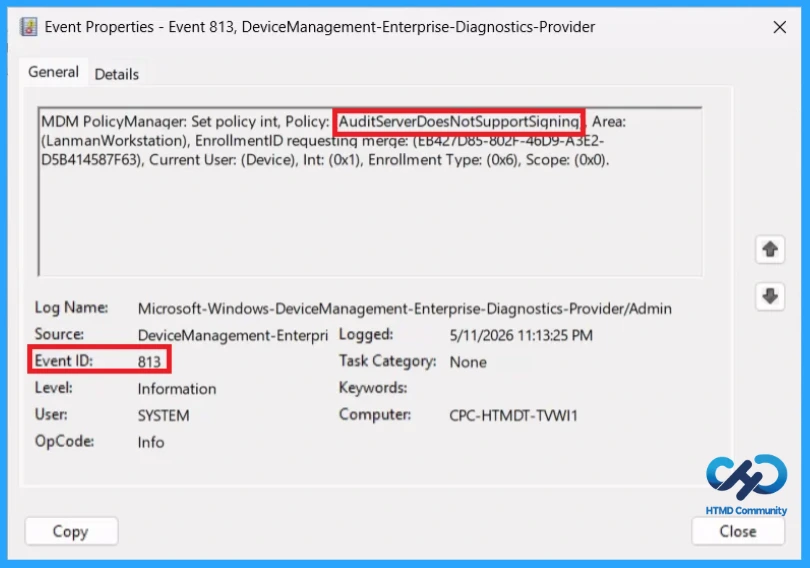
Event Viewer helps you check the client side and verify the policy status. Open the Client device and open the Event Viewer. Go to Start > Event Viewer. Navigate to Logs: In the left pane, go to Application and Services Logs > Microsoft > Windows > DeviceManagement-Enterprise-Diagnostics-Provider.
MDM PolicyManager: Set policy int, Policy: (AuditServerDoesNotSupportSigning), Area:
(LanmanWorkstation), EnrollmentID requesting merge: (EB427D85-802F-46D9-A3E2-
D5B414587F63), Current User: (Device), Int: (0x1), Enrollment Type: (0x6), Scope: (0x0).
Configuration Service Provider (CSP)
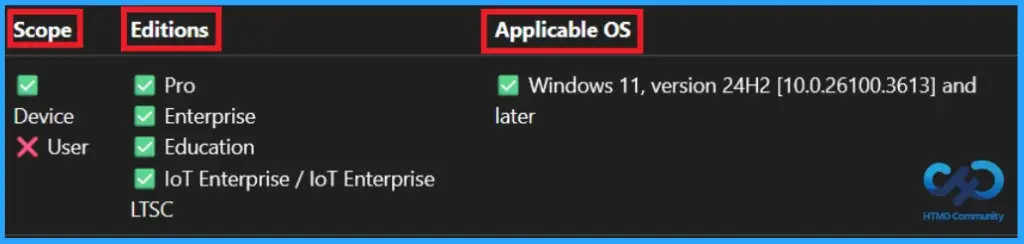
The Policy Configuration Service Provider (CSP) is a feature used by organisations to manage and control settings on Windows 10 and 11 devices. It explains what each policy does, what settings or values can be used, and how it connects to older Group Policy settings (Group Policy Mapping details).
Description Framework Properties:
| Property name | Property Value |
|---|---|
| Format | int |
| Access Type | Add, Delete, Get, Replace |
| Default Value | 0 |
Allowed values:
- 0(default) – Disabled
- 1– Enabled
Group policy mapping:
| Name | Vlaue |
|---|---|
| Name | Pol_AuditServerDoesNotSupportSigning |
| Friendly Name | Audit server does not support signing |
| Location | Computer Configuration |
| Path | Network > Lanman Workstation |
| Registry Key Name | Software\Policies\Microsoft\Windows\LanmanWorkstation |
| Registry Value Name | AuditServerDoesNotSupportSigning |
| ADMX File Name | LanmanWorkstation.admx |
Removing the Assigned Group this Policy
If you need to remove a group from a policy assignment for security updates. Open the policy from the configuration tab and click on the edit button. Then, click on the Remove button. Click Review + Save after making the changes.
For detailed information, you can refer to our previous post – Learn How to Delete or Remove App Assignment from Intune using by Step-by-Step Guide.

How to Delete this Policy
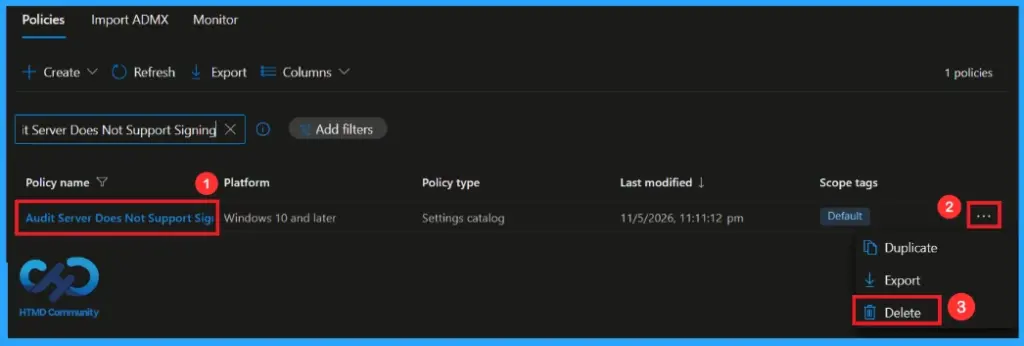
You can easily delete the Policy from the Intune Portal. From the Configuration section, you can delete the policy. It will completely remove it from the client devices.
For detailed information, you can refer to our previous post – How to Delete Allow Clipboard History Policy in Intune Step by Step Guide.
Need Further Assistance or Have Technical Questions?
Join the LinkedIn Page and Telegram group to get the latest step-by-step guides and news updates. Join our Meetup Page to participate in User group meetings. Also, Join the WhatsApp Community and WhatsApp Channel to get the latest news on Microsoft Technologies. We are there on Reddit as well.
Author
Anoop C Nair has been Microsoft MVP from 2015 onwards for 10 consecutive years! He is a Workplace Solution Architect with more than 22+ years of experience in Workplace technologies. He is also a Blogger, Speaker, and Local User Group Community leader. His primary focus is on Device Management technologies like SCCM and Intune. He writes about technologies like Intune, SCCM, Windows, Cloud PC, Windows, Entra, Microsoft Security, Career, etc


Discussion