Skip to content
How to Enable or Disable Compact OS with Windows 11 using Compact Compactos Query Always Never

How to Enable or Disable Compact OS with Windows 11 using Compact Compactos Query Always Never

Written By Anoop C Nair
Last Updated October 11, 2024
Posted In Windows 10
SHARE

Today, I will show you how to Enable or Disable Compact OS with Windows 11 using Compact Compactos Query Always Never commands. Compact OS installs compressed operating system files. It supports UEFI-based and BIOS-based devices.

You can run the operating system from the compressed files to save disk space. Compressing the operating system drive is a method of preserving space on a computer’s hard drive. By decreasing the size of files, more storage space becomes available.

Single instancing allows running pre-loaded Windows desktop applications from compressed files. Compact OS helps Windows update, replace, or remove individual files as needed to maintain the drive footprint size over time.

The Compact OS compresses all operating system binaries and sets the system state to Compact. This state remains unless the administrator changes it. In this post, I will explain how to Enable or Disable Compact OS with Windows 10 and Windows 11.

Patch My PC
How to Enable or Disable Compact OS with Windows 11 using Compact Compactos Query Always Never - Fig.1
How to Enable or Disable Compact OS with Windows 11 using Compact Compactos Query Always Never – Fig.1

How to Enable or Disable Compact OS with Windows 11 using Compact Compactos Query Always Never

The Compact OS feature can be enabled during Windows deployment or after Windows is installed. There are several ways to allow the OS Compact feature.

If Windows IoT Enterprise is installed on your device, you can apply compact.exe to check or change the Compact OS configuration.

Note: You must be signed in as an administrator to enable or disable Compact OS.

To Check whether Compact OS is Currently Enabled or Disabled

To Check whether Compact OS is Currently Enabled or Disabled, first Open Windows Terminal. Then select either Windows PowerShell or Command Prompt.
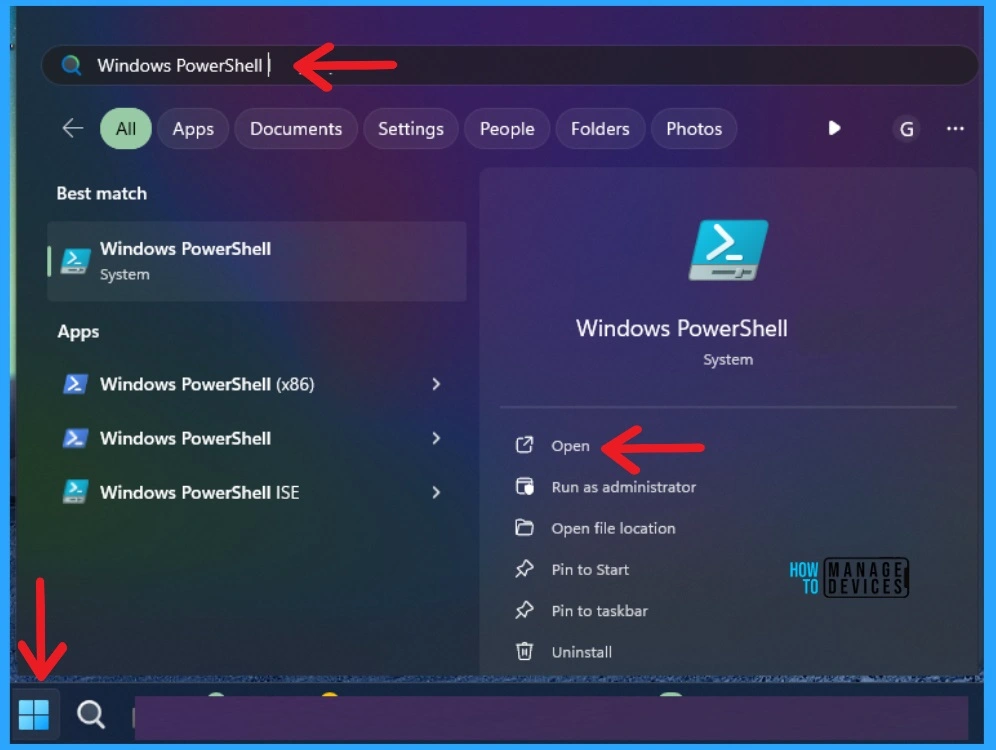
How to Enable or Disable Compact OS with Windows 11 using Compact Compactos Query Always Never - Fig 2
How to Enable or Disable Compact OS with Windows 11 using Compact Compactos Query Always Never – Fig 2

Copy and paste the command given below into Windows Terminal (Admin), and press Enter. (The screenshots are below for your reference)

  • Verify whether the system is currently in the Compact state.

compact /compactos:query
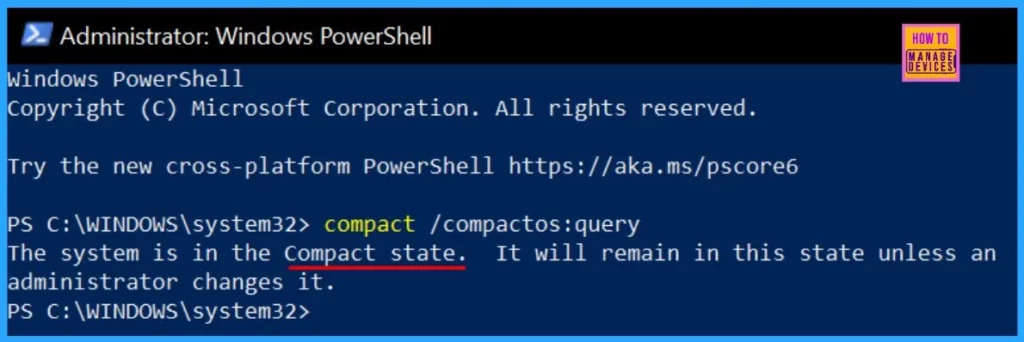
How to Enable or Disable Compact OS with Windows 11 using Compact Compactos Query Always Never - Fig.3
How to Enable or Disable Compact OS with Windows 11 using Compact Compactos Query Always Never – Fig.3

Enable Compact OS

To Enable Compact OS, Open Windows Terminal. Then select Windows PowerShell or Command Prompt.

  • Copy and Paste the command given below into Windows Terminal (Admin), and hit Enter.
  • It takes some time to complete the compression process.
  • You can close Windows Terminal (Admin) when it is finished.

 compact /compactos:always
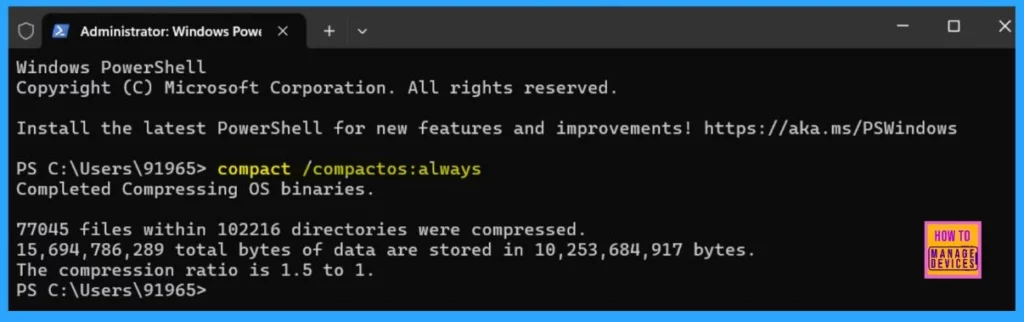
How to Enable or Disable Compact OS with Windows 11 using Compact Compactos Query Always Never - Fig.4
How to Enable or Disable Compact OS with Windows 11 using Compact Compactos Query Always Never – Fig.4

Disable Compact OS

Open Windows Terminal (Admin) and select Windows PowerShell or Command Prompt to Disable Compact OS.

  • Copy and Paste the command into Windows Terminal (Admin), and press Enter.
  • It can take a while to finish uncompressing.

compact /compactos:never
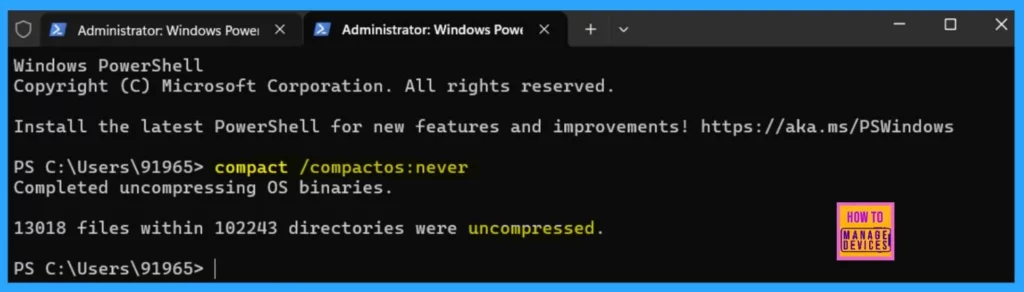
How to Enable or Disable Compact OS with Windows 11 using Compact Compactos Query Always Never - Fig.5
How to Enable or Disable Compact OS with Windows 11 using Compact Compactos Query Always Never – Fig.5

Join the LinkedIn Page and Telegram group to get the latest step-by-step guides and news updates. Join our Meetup Page to participate in User group meetings. Also, Join the WhatsApp Community to get the latest news on Microsoft Technologies. We are there on Reddit as well.

Anoop C Nair has been Microsoft MVP for 10 consecutive years from 2015 onwards. He is a Workplace Solution Architect with more than 22+ years of experience in Workplace technologies. He is a Blogger, Speaker, and Local User Group Community leader. His primary focus is on Device Management technologies like SCCM and Intune. He writes about technologies like Intune, SCCM, Windows, Cloud PC, Windows, Entra, Microsoft Security, Career, etc.

Written by

Anoop C Nair is Workplace Technology solution architect with 25+ years of experience in global enterprise organizations such as JP Morgan, Capgemini, etc. Microsoft Certified Trainer. Microsoft MVP from 2015 onwards for consecutive 11+ years! He also conducts Intune and modern workplace tech training for enterprise organizations. He is Blogger, Speaker, and Founder of HTMD Community and HTMD Conference. His main focus is on Device Management technologies like Intune, Windows, Cloud PC. He writes about technologies like Intune, SCCM, Windows, Cloud PC, Windows, Entra, Microsoft Security.

Discussion

Join the discussion

Your email address will not be published. Required fields are marked *

Related guides

Windows 10

New Snipping Tool Vulnerability in Windows can Leak NTLMv2 Hashes over Network

Key Takeaways Hey, let’s discuss about New Snipping Tool Vulnerability in Windows can Leak NTLMv2 Hashes over Network. Microsoft Windows Snipping Tool has a newly disclosed spoofing vulnerability, tracked as CVE-2026-33829, which could allow an unauthenticated attacker to capture a user’s NTLMv2 hash over a network. The issue was made public on April 14, 2026, […]

AC Anoop C Nair 4 min read
Windows 10

Unsupported Windows 10 Devices in Intune may Experience Limited or Unreliable Functionality

Let’s discuss Unsupported Windows 10 Devices in Intune may Experience Limited or Unreliable Functionality. Microsoft Announce the Official end of support announcement of Windows 10 free support on October 14, 2025. There is no more free security updates or non-security fixes via Windows Update for Windows 10 Home and Pro editions. Microsoft announced that, Windows 10 […]

AC Anoop C Nair 4 min read
Intune

Last Patch for Windows 10 with KB5066791 and 5 Zero Day Vulnerabilities and 118 Flaws

Let’s discuss Last Patch for Windows 10 with KB5066791 and 5 Zero Day Vulnerabilities and 118 Flaws. Microsoft Released last Patch Tuesday Updates for Windows 10 on October 2025. After October 14 2025, Microsoft will no longer provide free software updates from Windows Update, technical assistance, or security fixes for Windows 10. As you know […]

AC Anoop C Nair 6 min read
Intune

2025 September KB5065429 Windows 10 Patch | 2 Zero Day Vulnerabilities and 81 Flaws

Let’s discuss 2025 September KB5065429 Windows 10 Patch | 2 Zero Day Vulnerability and 81 Flaws. Microsoft addressed various security fixes and improvements on September 2025 Patch Tuesday of Windows 10 KB5065429. There are many security benefits can be accessed with parch tuesday update. Microsoft dedicated to provides patch Tuesday updates on Windows 11. Mainly […]

AC Anoop C Nair 7 min read