






Enable the Save Page As an option in IE Mode for Edge Browser
Let’s check how to enable the Save page as an option in IE mode for the Edge browser. The Save Page As is one of the features enabled by default with Internet Explorer. Microsoft retired Internet Explorer standalone browser for most of the operating systems.
The Interner Explorer Mode in the Edge browser is the way for legacy web apps and sites. Once you enable IE mode in the Edge browser, the user will lose the “Save Page As” option from the More Tools menu. This post helps you to enable this option for IE mode websites as well.
There are different methods to enable Save Page As an option for IE mode. I will cover most of the options in this post, such as Registry(?), Local Group Policy, Domain Group Policy, and MEM Intune. These policies are applicable to Windows 10/11 operating system.
You need to download and configure the Microsoft Edge ADMX template to enable the “Save Page As” feature for IE Mode websites. More Details -> Download Microsoft Edge ADMX Group Policy Templates.

This Save As Page issue with InternetExplorerModeEnableSavePageAs Group Policy when you use IE Mode in Edge is fixed in July 2022 Cumulative Update -> Windows 10 KB5015807 Windows 11 KB5015814 July 2022 Patch Tuesday | 1 Zero-Day Vulnerability
Microsoft Edge Save Page As Option
Users can use the ‘Save page as‘ functionality option to save the current page in the browser. When a user re-opens a saved page, it will be loaded in the default browser.
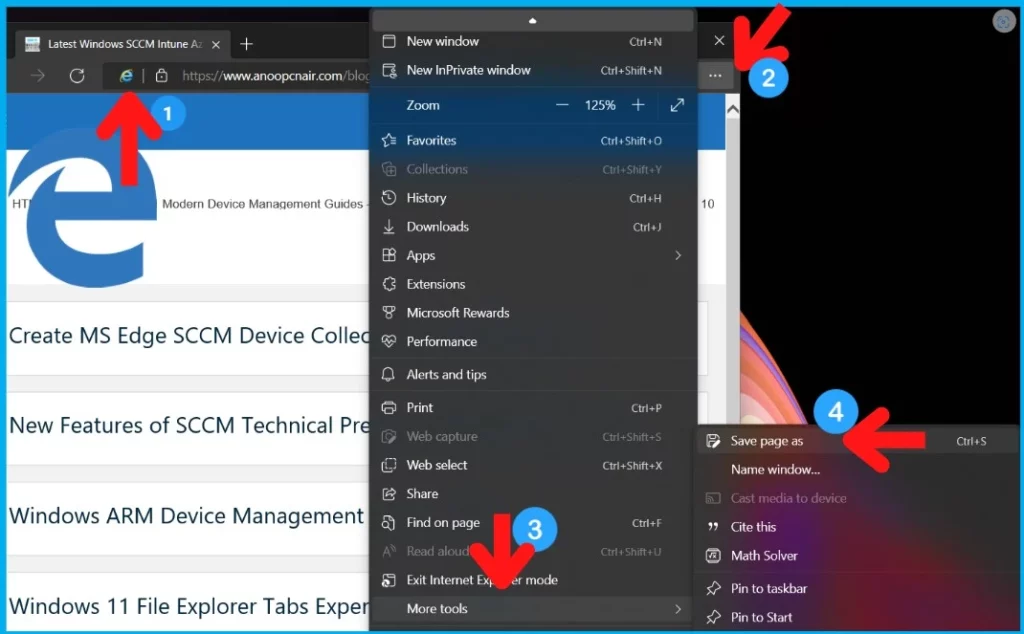
Let’s check Microsoft Edge “Save Page As” option for normal websites that are not reloaded in Internet Explorer mode. This option is available in the Edge browser Settings menu (… ) -> More Tools -> Save Page As (CTRL + S), as you see in the below screenshot.

Default Save Page As – Experience in Internet Explorer Mode for Edge Browser
Let’s now check the default experience of the “Save Page As” option in the Internet Explorer Mode for the Edge Browser application. Check Edge browser Settings menu (… ) -> More Tools -> Save Page As (CTRL + S) as you see in the below screenshot to confirm Save Page As option is disabled by default.
NOTE! – There is an IE icon on the browser that indicates that the website is loaded in IE mode.

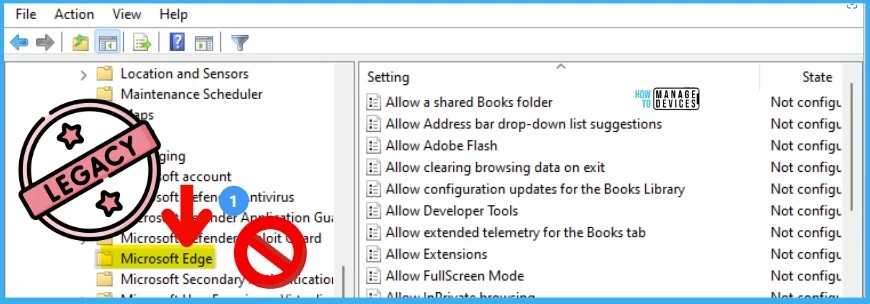
Careful – Legacy Microsoft Edge Group Policies
You need to be careful with the Microsoft Edge Group Policy settings. All the Windows 10/11 devices will have a default set of policies for Microsoft Edge, but those policies are for the legacy Edge browser (NON-Chromium) version.
The support for Microsoft Edge Legacy ended on March 9, 2021. Don’t use these group policies! These would be located at Computer Configuration -> Administrative Templates -> Windows Components.
How to Enable Save Page As Feature using Group Policy
Let’s check how to enable Save Page As a feature using Group Policy. You must install Microsoft Edge ADMX settings into Windows 10 or Windows 11 devices if you are using Local Policies. I’m assuming that you have already deployed Edge ADMX settings.
- If you enable this policy, the “Save page as” option will be clickable in “More tools.”
- If you disable or don’t configure this policy, users can’t select the “Save page as” option in “More tools.”
Note: To make the “Ctrl+S” shortcut work, users must enable the Internet Explorer policy, ‘Enable extended hotkey in Internet Explorer mode.’
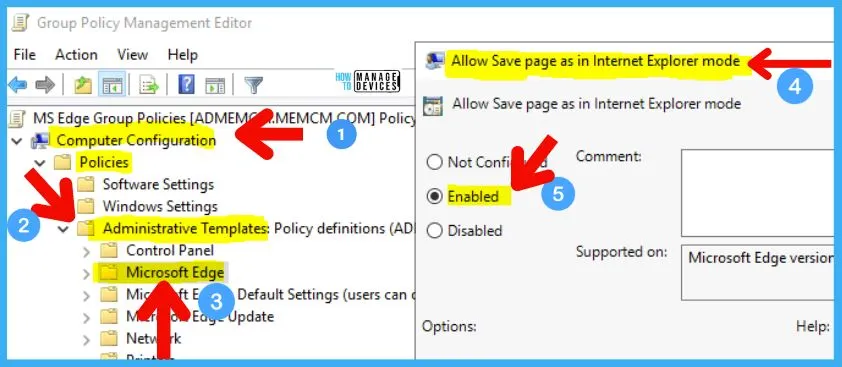
In this scenario, we will enable the policy called “Allow Save page as in Internet Explorer mode.” This policy is under the path: Computer Configuration -> Policies -> Administrative Templates -> Microsoft Edge.
- GP unique name: InternetExplorerModeEnableSavePageAs
- GP name: Allow Save page as in Internet Explorer mode
- GP path (Mandatory): Administrative Templates/Microsoft Edge/
For the local policy, you can use GPEDIT.MSC and configure this on Windows 11 devices. If you are configuring and deploying the group policy from the AD Domain, you must use the following steps.
- Launch Group Policy Management (gpmc.msc) from the start menu (from Domain controller or any other remote management server).
- More Details -> MS Edge Policy ADMX settings and Configurations.
- Or check out the example of Intune AutoEnrollment Group Policy Setup.
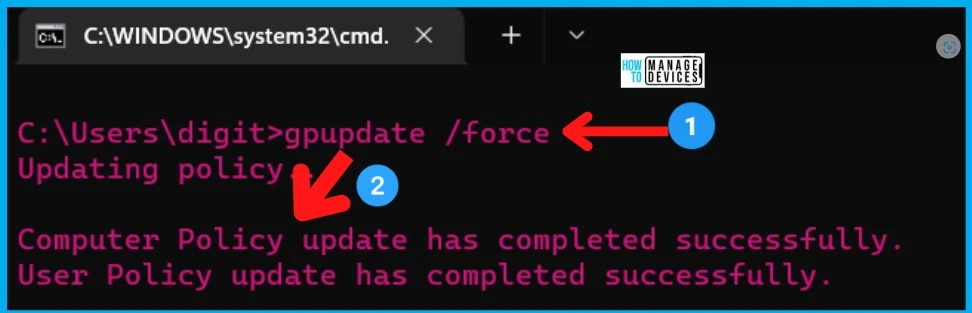
After deploying the MS Edge Group Policy to Windows devices, you need to log off or login back to the Windows 10/11 device to get the policy applied. Another option is to run the following command from Windows Terminal to apply the group policy on the Windows device immediately.
- gpupdate /force
MEM Intune Policy to Enable the Save page as Feature in IE Mode
Let’s check whether there is any MEM Intune Policy (settings catalog) to Enable the Save page as Feature in IE Mode. I don’t think there is any while writing this post. I believe this is yet to get implemented in Intune Settings Catalog.
I have checked under the Microsoft Edge category and compared it with Edge ADMX policy settings. This particular policy is missing from MEM Intune. The following screenshot will give you more details.
NOTE! – Intune custom policy creation for Edge is difficult using the ADMX injection method. But you can go through Microsoft documentation to test this as a workaround. Don’t look at Edge CSP policies because that was for the LEGACY Edge browser not for the chromium one.
./Device/Vendor/MSFT/Policy/Config/<ADMXIngestName>~Policy~<ADMXNamespace>~<ADMXCategory>/<PolicyName>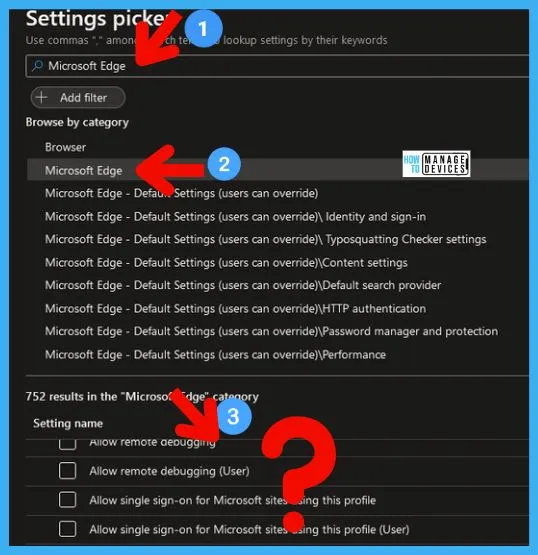
Results – Enable the Save page as an option in IE Mode for Edge Browser
Let’s check the end-user experience when you enable the Save page as a feature in IE Mode for Edge Browser. You can also confirm whether the Group Policy is applied from the following registry location on Windows 11 devices.
- Path (Mandatory): SOFTWARE\Policies\Microsoft\Edge
- Path (Recommended): N/A
- Value Name: InternetExplorerModeEnableSavePageAs
- Value Type: REG_DWORD
Resource -> Microsoft Edge Browser Policy Documentation | Microsoft Docs
Author
Anoop is Microsoft MVP! He is a Solution Architect in enterprise client management with more than 20 years of IT experience (calculation done in 2021). He is a blogger, Speaker, and Local User Group HTMD Community leader. His main focus is on Device Management technologies like SCCM 2012, Current Branch, and Intune. E writes about ConfigMgr, Windows 11, Windows 10, Azure AD, Microsoft Intune, Windows 365, AVD, etc.




I have installed the msedge.admx template and placed it in policy definitions but the policy Allow Save page as in Internet Explorer mode is not there
StaffAre you looking Computer Configuration -> Policies -> Administrative Templates -> Microsoft Edge ?
Are you doing it from Group Policy Management (gpmc.msc) or GPEDIT.MSC?
More details on the file placement and installation issues are available https://www.anoopcnair.com/download-microsoft-edge-admx-group-policy-templates/
For testing purposes I have created the value manually in my registry user hive and restarted Edge.
While the menu item is now enabled, nothing happens when I click on it.
Is there any dependency on the latest Windows update (as this is mentioned in the June 28, 2022—KB5014666 release notes)? I don’t believe so, but right now I have no idea what else could be the reason.
According to this thread on Reddit, this might actually be the reason.
https://www.reddit.com/r/edge/comments/virowx/bug_save_page_as_not_working_an_option_in_ie_mode/idxdi26/
Confirming that it works after installing the July update.
Is there a group policy that allows a page to be printed using Edge’s print dialog, regardless of whether or not it is opened in IE Mode? I can only get the System Print dialog to open.
Dear Anoop,
I am just a normal user and save page as option in most imp for me and i go through your guide blog and found it very helpful but the option you are saying to find is not available or I’m unable to find kind you please share elaborated steps of image you have pasted. And I am using local group policy editor in win 10 is it same as group policy management editor mentioned in your guide image. Your help will be very great full for me.
continue to last comment does it required after enabling the option to restart the machine