






New Granular Permissions for Endpoint Security Workloads in Intune
Exciting News! Microsoft is Introducing new granular permissions for endpoint security workloads. In today’s world, security is critical because of Increasing Cybersecurity, so we have to control endpoint security. You all know about Microsoft Intune, a top solution for managing devices.
Microsoft Intune has launched a June (2406) update; new permissions will be added for each specific area of endpoint security, called Granular RBAC permissions for endpoint security workloads. Endpoint security is essential to cybersecurity, protecting devices and keeping a computer network safe.
Role-based access control (RBAC) is very important, especially for protecting network parts where data comes in and out. In other words, RBAC is a way to ensure that only the right people can access the system.
Granular permissions for endpoint security mean giving people very specific access to parts of a company’s computer systems. Granular permissions are not just about restricting access; they’re also about enabling the right level of access for the right people, which can enhance security and productivity.

- Intune RBAC Roles Permissions in the Intune Admin Center Portal
- Create Custom Roles RBAC in Intune
- RBAC Permission to Run Remote Actions in Intune
- Intune RBAC Role for Windows Drivers Update Management
What is RBAC?
New Granular Permissions for Endpoint Security Workloads in Intune
As I mentioned above, In June 2406, an update for Microsoft Intune introduced new features allowing such granular control. These include new permissions for specific security workloads like Endpoint detection and response, App Control for Business, and Attack surface reduction.
- Now, they can give people access to only the parts they need to find and stop cyber threats.
- Mainly this update introduces new detailed permissions for security tasks.
| New granular permissions | Info |
|---|---|
| Endpoint detection and response | This permission finds and deals with cyber threats. |
| App Control for Business | This permission will control which apps can be used on company devices. |
| Attack surface reduction | This permission makes devices less vulnerable to attacks. |
The screenshot below is from our Intune RBAC Roles Permissions in the Intune Admin Center Portal post, one of the main screenshots from that post. The post also explains the purpose of RBAC by providing limited access to resources based on roles and scops for the organization team.
- Go to the Microsoft Intune Admin Center
- Go to the Tenant admin
- Select the roles, and from that, select all roles
See More: Intune RBAC Roles Permissions in the Intune Admin Center Portal
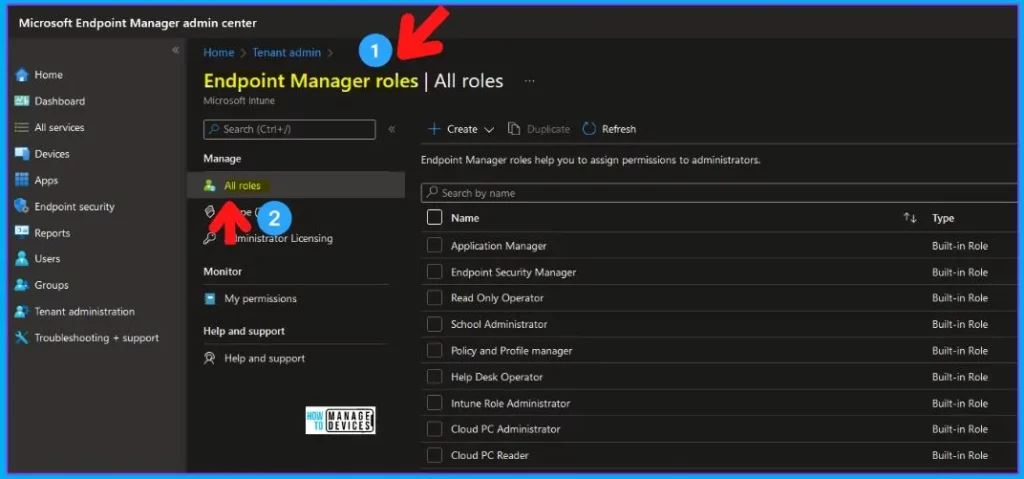
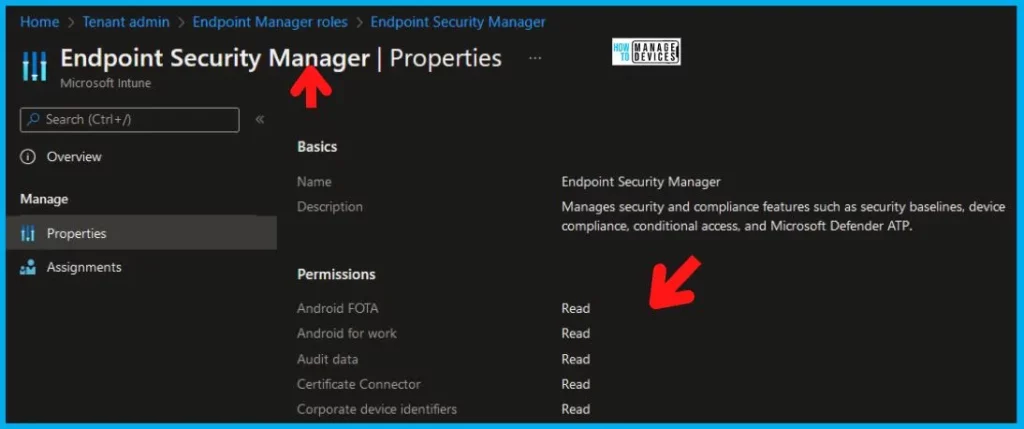
Previously, the built-in role of ‘Endpoint Security Manager’ allowed management of all security policies within the Microsoft Intune admin centre’s endpoint security. With the new permission, you can control all the specific security Wokloads more effectively.
- The below screenshot is an example of Attack surface reduction. Now the admin can create New Intune roles via Tenant Administration with the rights.
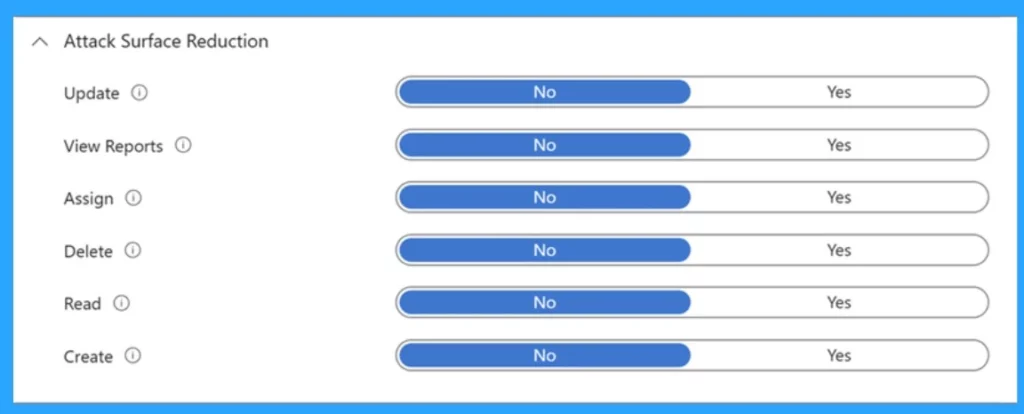
Granular Permissions Considerations
The granular permissions for security workloads will function similarly to the existing ‘Security baselines’ permission. So, admins can control the security policies within those workloads even if they overlap with other policies. The following security templates fall under the existing ‘Security baselines’ permission.
- Windows App and browser isolation
- Windows Web protection
- Windows Exploit protection
- Windows Application control
- Intune RBAC Role for Windows Drivers Update Management
- Configure Intune RBAC for Windows Autopilot Role
- Intune RBAC Roles Permissions in the Intune Admin Center Portal
Video– Intune RBAC Strategic Options | Role Based Access Controls | Scope Groups | Intune Objects | Roles
We have a Video on the topic of Intune RBAC Strategic Options | Role-Based Access Controls | Scope Groups | Intune Objects | Roles by Anoop C Nair. In this video, you can get information regarding Intune RBAC’s Strategic options and Role-Based Access Controls.
Reference
Granular RBAC permissions for endpoint security workloads
We are on WhatsApp now. To get the latest step-by-step guides, news, and updates, Join our Channel. Click here – HTMD WhatsApp.
Author
Anoop C Nair is Microsoft MVP! He is a Device Management Admin with more than 20 years of experience (calculation done in 2021) in IT. He is a Blogger, Speaker, and Local User Group HTMD Community leader. His main focus is on Device Management technologies like SCCM 2012, Current Branch, and Intune. He writes about ConfigMgr, Windows 11, Windows 10, Azure AD, Microsoft Intune, Windows 365, AVD, etc.


Discussion