






Easy way to Enable Energy Saver Battery Threshold On Battery in Intune Settings Catalog
Let’s discuss an Easy way to Enable Energy Saver Battery Threshold on Battery in Intune Settings Catalog. The Energy Saver Battery Threshold on Battery settings is available in the Intune Settings Catalog. In this blog post, I will share my experience enabling this policy.
Have you ever heard about this policy? If the answer is no, enable it to extend battery life. Energy Saver Battery Threshold on Battery is a feature related to Efficiency Mode, which is designed to optimize the system’s performance.
The Efficiency Mode feature is available on Windows 11 PCs. Using Microsoft Intune, you can specify the battery life charge level at which the Energy Saver mode is activated on a device. By Enabling this policy, you can extend the battery life of the devices in your organization.
Enabling the Energy Saver Battery Threshold on Battery in the Intune Settings Catalog has many benefits. This blog post will share more about this feature and provide step-by-step guidance for enabling it using the Intune Settings Catalog.

Table of Contents
What is Battery Threshold?
How Energy Saver Battery Threshold on Battery Settings Work?
Easy way to Enable Energy Saver Battery Threshold On Battery in Intune Settings Catalog
As mentioned above, the Settings Catalog lets you turn on the Energy Saver Battery Threshold On Battery. Energy Saver mode reduces background activity and adjusts system settings to optimize power usage. It also helps to maintain device performance even when the battery is low.
- How to Enable or Disable Battery Saver in Windows 11 | Energy Saver Battery Threshold Policies
- How to Deploy Allow Device Name to be Sent in Windows Diagnostic Data in Intune Via Setting Catalog
- How to Allow Clipboard History using Intune Settings Catalog
Energy Saver Battery Threshold On Battery – CSP Details
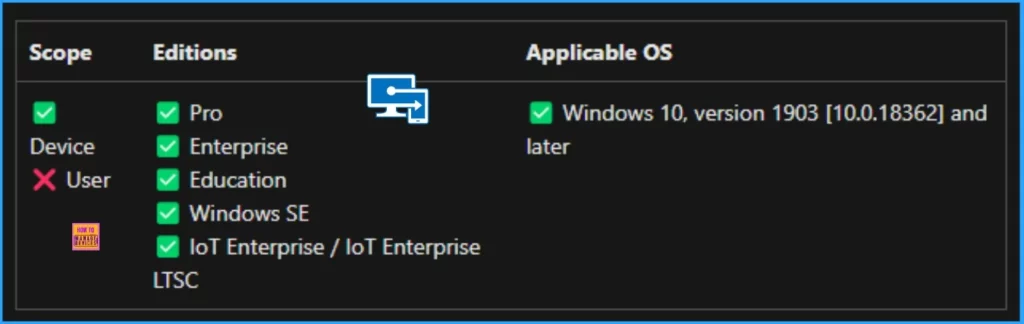
This policy lets you specify the battery charge level at which Energy Saver is turned on. This feature applies to Pro, Enterprise, Education, Windows SE, and IoT Enterprise / IoT Enterprise LTSC. Look at the screenshot and table below.
| Enable | Disable |
|---|---|
| If you enable this policy setting, you must provide a percent value indicating the battery charge level. Energy Saver will be automatically turned on at (and below) the specified level. | If you disable or don’t configure this policy setting, users control this setting. |
Step by Step for Enable Energy Saver Battery Threshold On Battery
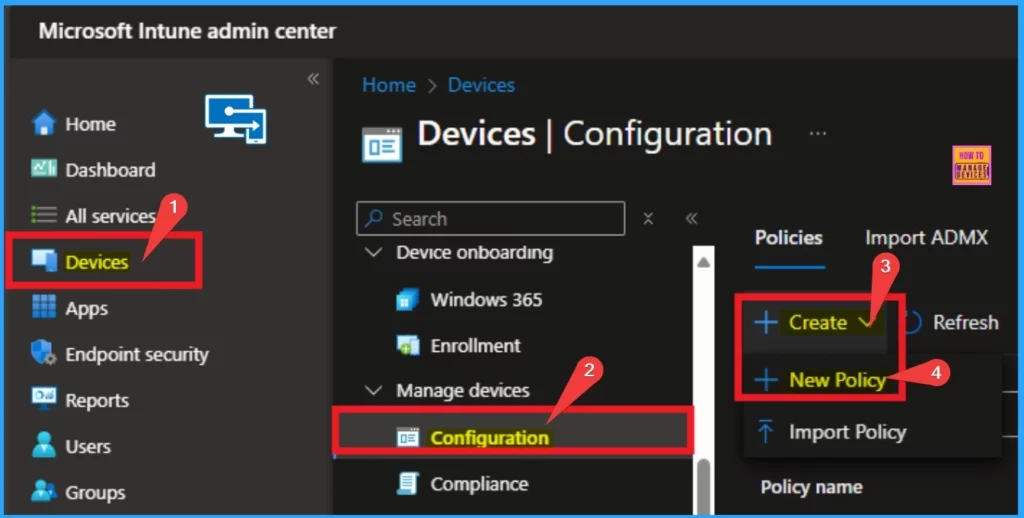
To enable Energy Saver Battery Threshold On Battery, you must log in to the Microsoft Intune Portal. Then go to Devices > Configuration > Create > New Policy.
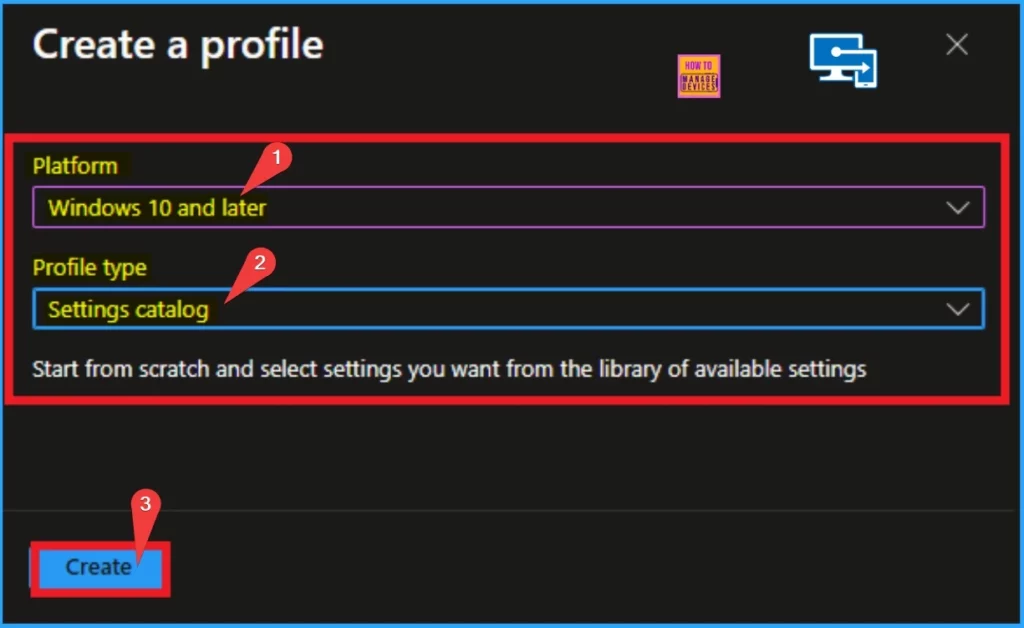
To create a policy in Intune, specify the Platform and Profile Type. Here, I choose Windows 10 and later as the Platform and Settings Catalog as the Profile type. Then, I click on the Select button.
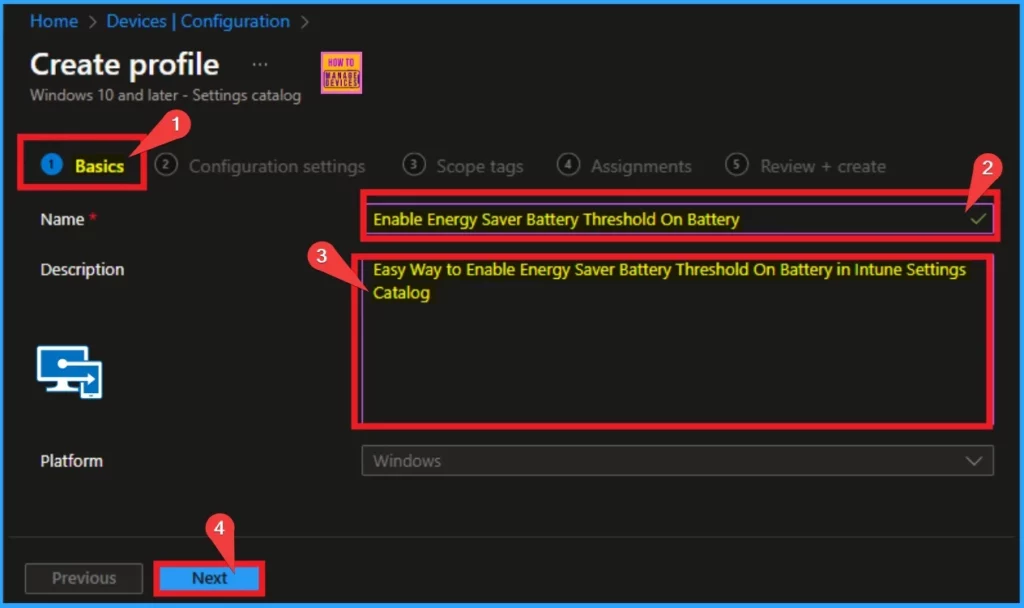
You can enter the Policy name and Description on the Basic Tab to identify the policy later. You should try to give a simple name for the policy for easy recognition. The Basic Tab is a necessary tab where you must enter the Name and Description.
Configuration Settings
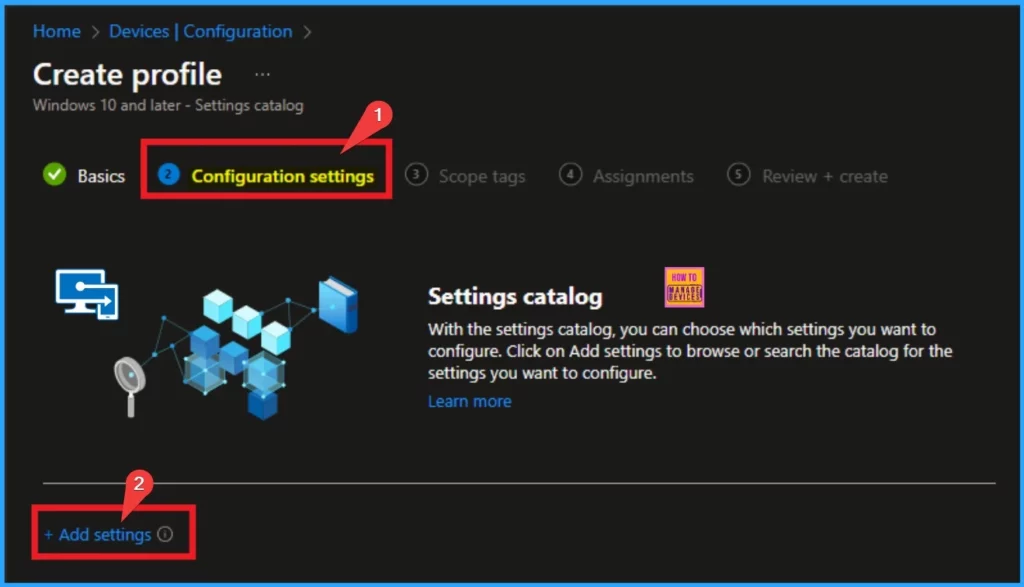
On the Configuration Settings, you can choose the settings to deploy for your device. This window has a +Add settings hyperlink. You can use this hyperlink to select settings. By clicking on this hyperlink, you will get the Settings Picker.
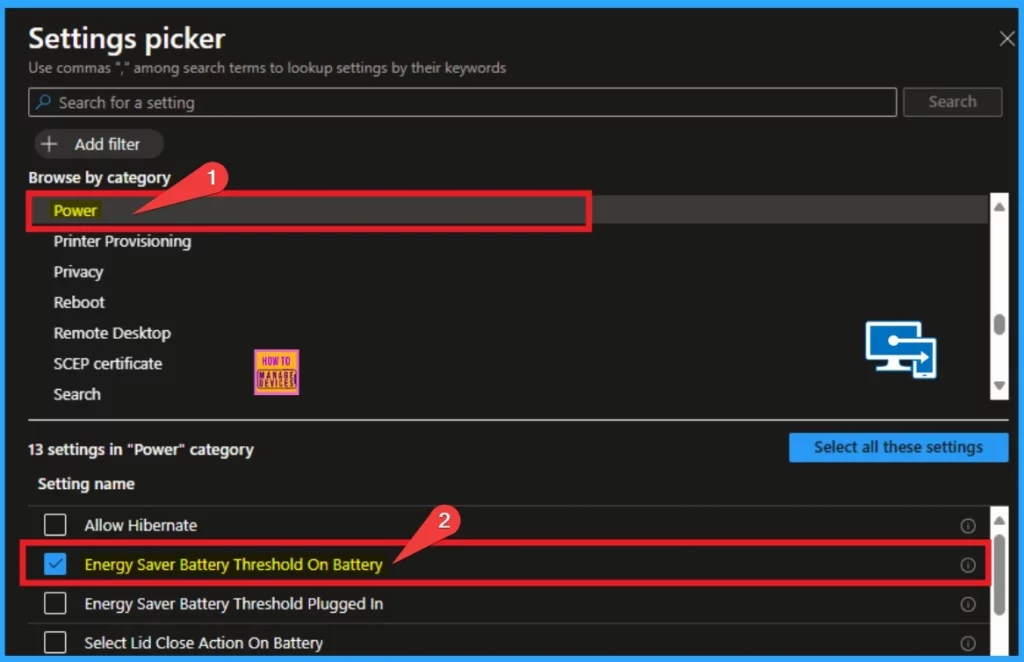
You can search for settings using the search bar on the Settings Picker. You can also choose settings by browsing by Category. Here, I am going to select the settings by browsing by category. Select the Power Category and choose Energy Saver Battery Threshold on Battery.
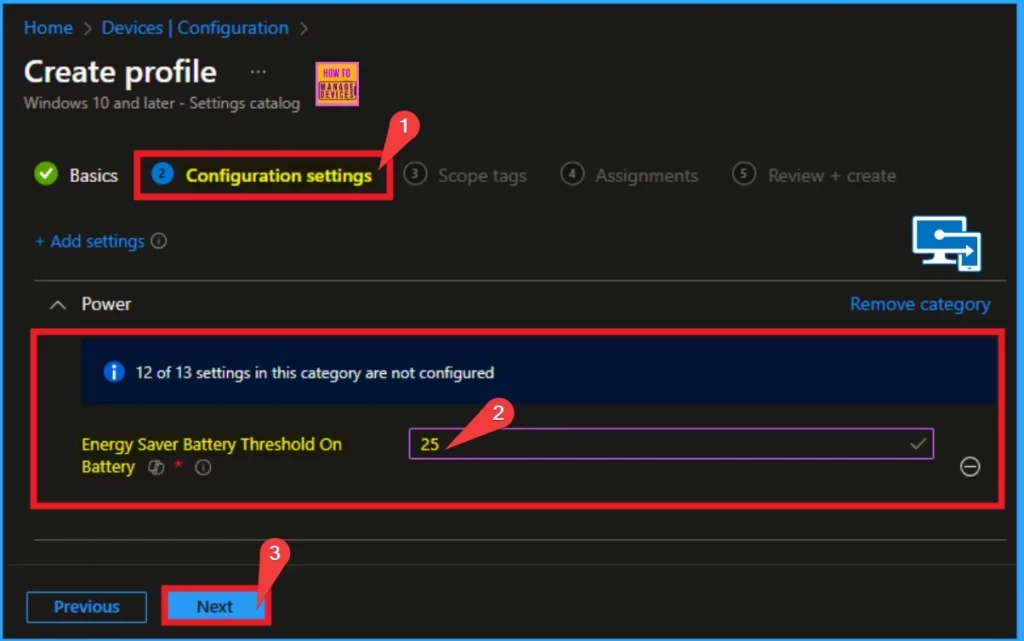
After choosing the settings it will shows on the Configuration Settings. Here you can specify battery charge level at which Energy Saver is turned on. On the text box i enter 25 percent to turn on energy saver automatically when the device battery level at 25%.
- Click on the Next button
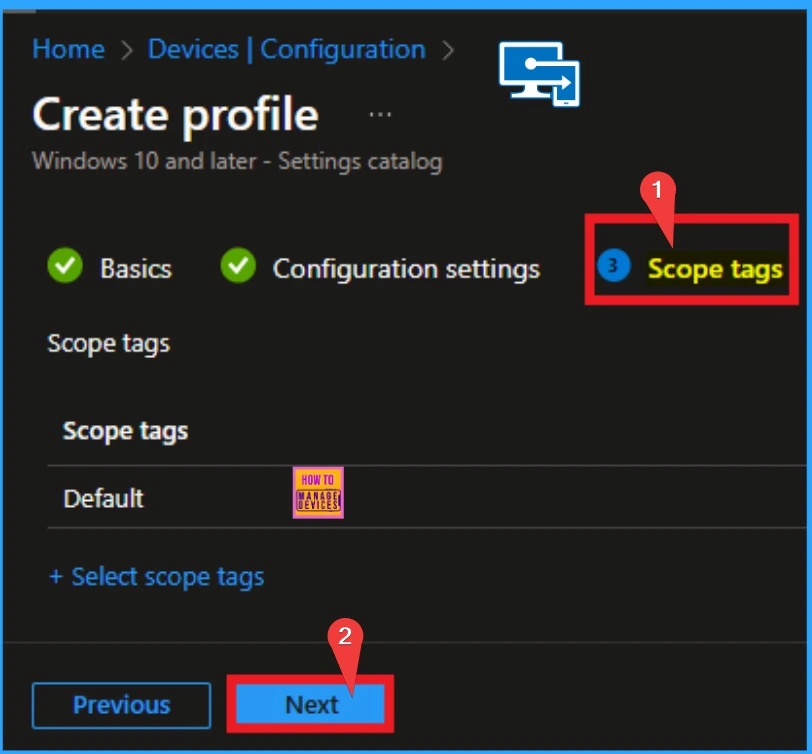
Scope Tag
Also, the Scope tag is not compulsory to configure this policy for these settings. So you can skip this step and continue your Policy creation. If you want to add a scope tag, click on the +select scope tags hyperlink. Or you can click on the Select button to continue.
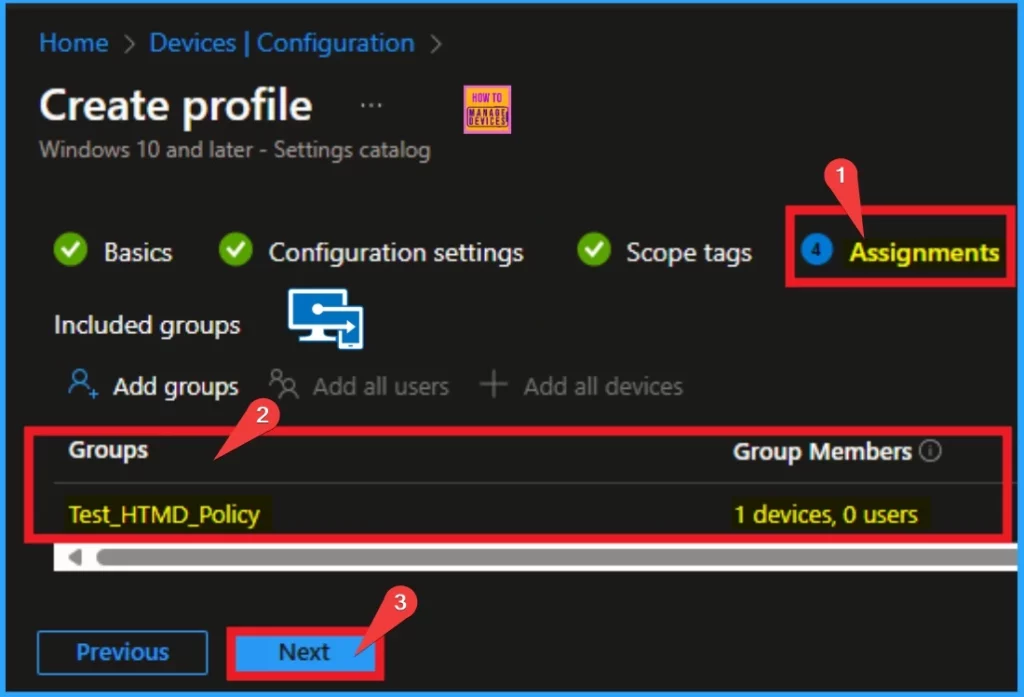
Assignments Tab
On the Assignment Tab, you can specify the groups to which the policy will be assigned. Here, I choose the Included Groups option to select groups. I choose a group and click on the Select button. The selected group is then shown on the Assignment page. I click on the Next button.
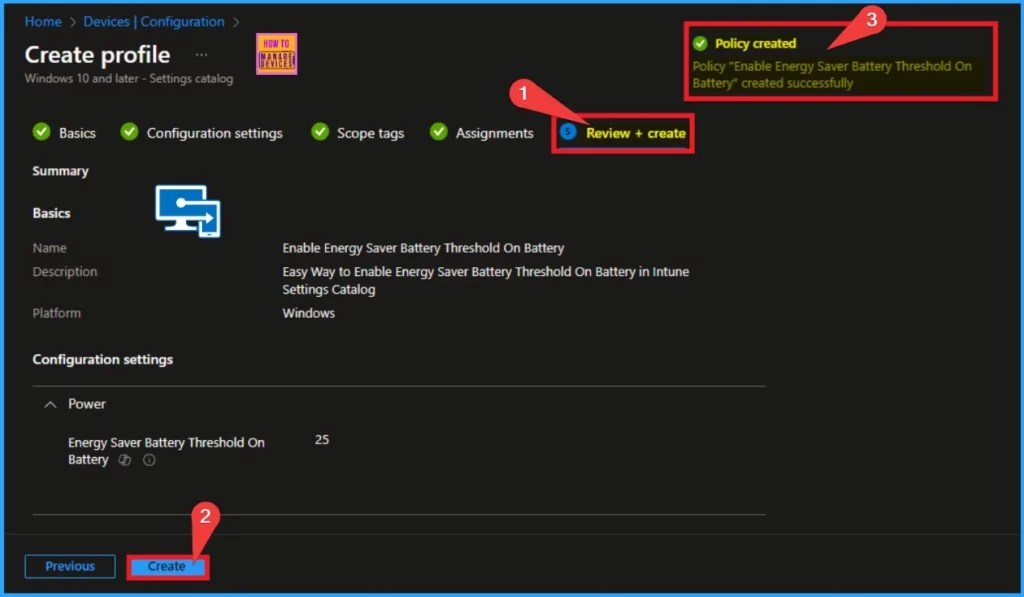
Review + Create
This tab is assigned to Review the details of the previous tab. If you want to give any change you can click on the Previous button. After checking the details you can continue by Click on the Create button. After creating the policy and you will get a success notification on the portal.
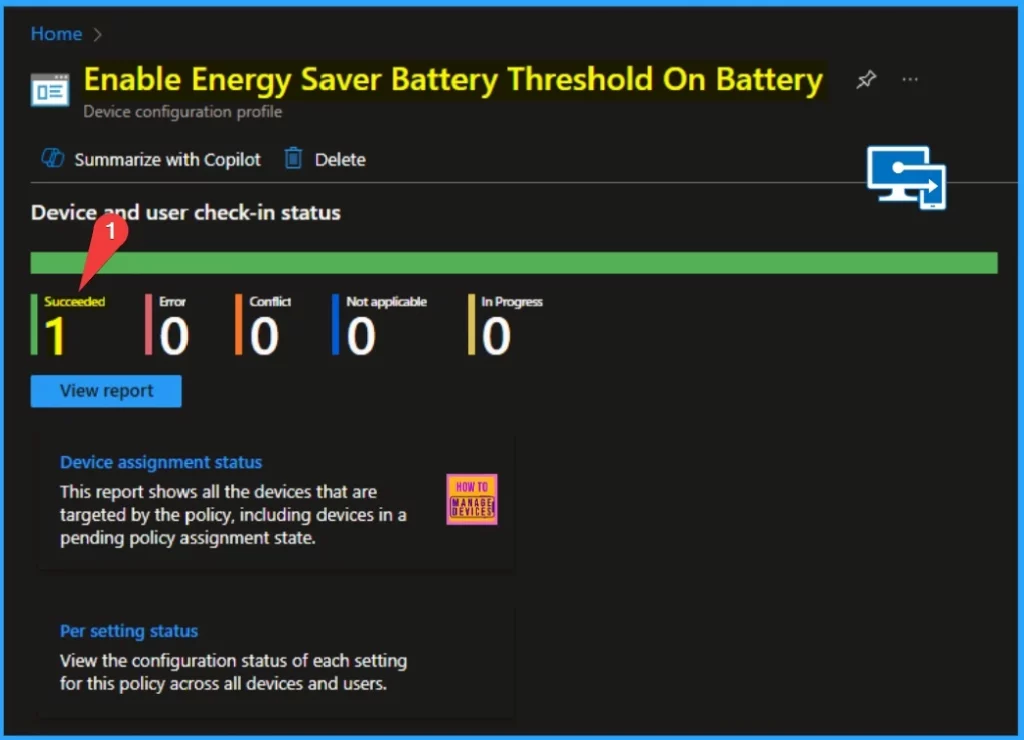
Device and User Check-in Status
Device and User Check-in Status helps you view whether the policy is configured on the targeted device. Before checking the status, you must sync your device from the Company Portal for fast deployment. Here, the Succeeded result is 1.
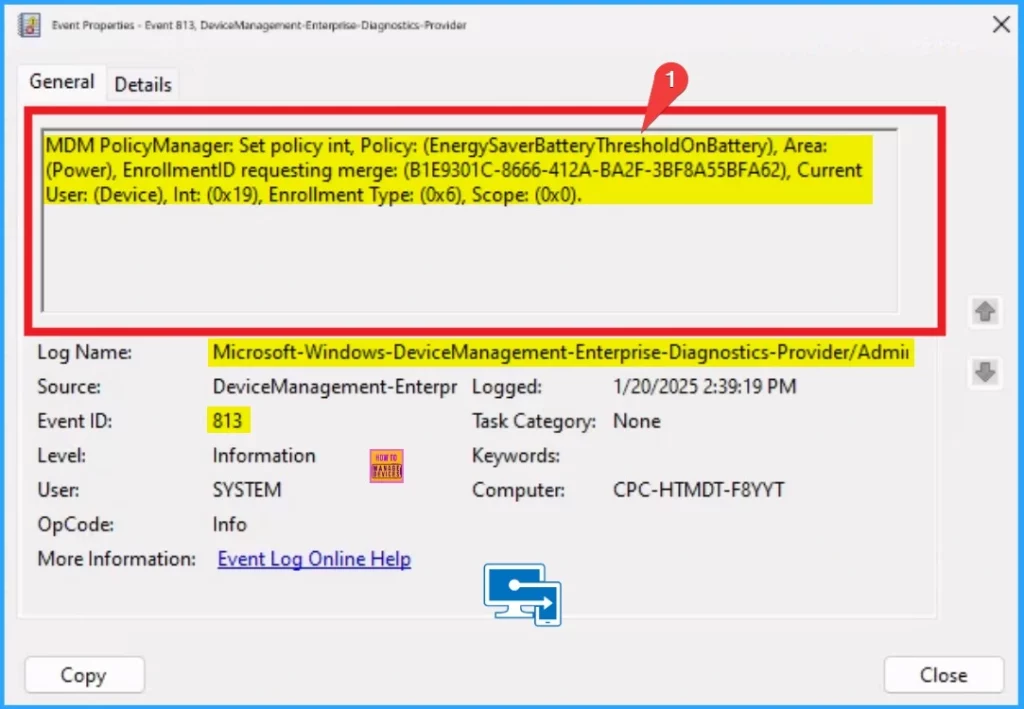
Client Side Verification – Event Viewer
To check the Client Side Verification, you can check on the Event Viewer. To Access the Event Viewer go to Applications and Services Logs > Microsoft > Windows > Devicemanagement-Enterprise-Diagnostics-Provider > Admin. Here the Event ID of success Result is 813.
MDM PolicyManager: Set policy int, Policy: (EnergySaverBatteryThresholdOnBattery), Area:
(Power), EnrollmentlD requesting merge: (B1E9301C-8666-412A-BA2F-3BF8A55BFA62), Current
User: (Device), Int: (0x19), Enrollment Type: (0x6), Scope: (0x0).
Need Further Assistance or Have Technical Questions?
Join the LinkedIn Page and Telegram group to get the latest step-by-step guides and news updates. Join our Meetup Page to participate in User group meetings. Also, Join the WhatsApp Community to get the latest news on Microsoft Technologies. We are there on Reddit as well.
Author
Anoop C Nair has been Microsoft MVP for 10 consecutive years from 2015 onwards. He is a Workplace Solution Architect with more than 22+ years of experience in Workplace technologies. He is a Blogger, Speaker, and Local User Group Community leader. His primary focus is on Device Management technologies like SCCM and Intune. He writes about technologies like Intune, SCCM, Windows, Cloud PC, Windows, Entra, Microsoft Security, Career, etc.


Discussion