






Fix macOS Error 100001 SSO Error while using Intune
Today we are discussing Fix macOS Error 100001 SSO Error while using Intune. As we know that now all users need a secure sign in so that’s why Microsoft introduced Platform single sign on Platform SSO for macOS. This works with Microsoft Intune and Entra ID to help users log into their Macs using their work accounts, just like they do on Windows devices.
Recently many admins are point out that there are some issue that macOS Platform SSO Error Code 100001 in Intune. In the roll out of Platform Single Sign-On for macOS,microsoft confirms that easier way for users to sign in using their Entra ID accounts, with password syncing and better security.
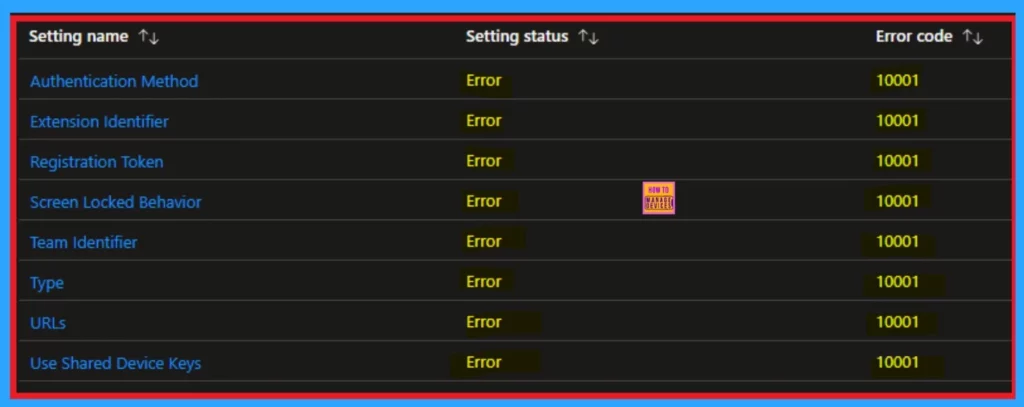
Recently some admins raise cncers that they get some issiues on different environments and tenants, admins are seeing the some issues such as: the Platform SSO profile in Intune shows error code 100001, and the important “Registration Required” popup never appears.
This popup is what links the Mac account to Entra ID, and without it, SSO cannot work. Even when devices are enrolled correctly using Apple Business Manager and Automated Device Enrollment (ADE), the issue stays like this. So in this post let’s discuss why this happns and how to overcome this issue.


Table of Contents
Fix macOS Error 100001 SSO Error while using Intune
Above we discussed about some issues happening in the Platform SSO for macOS. Many IT admins have shared their experiences and Even though Intune shows the device as “registered” and everything looks good with the Secure Enclave settings, users still can’t sign in with their Entra ID.
| Issue |
|---|
| Platform SSO profile assigned to macOS devices consistently fails with error code 100001 in Microsoft Intune. Additionally, the expected “Registration Required” popup essential for completing the Entra ID login never appears. Instead, after launching the Company Portal app, users are get a error: “Unable to register the device.” |
- How to Troubleshoot Microsoft Enterprise SSO Plug-in on macOS using Intune
- macOS Devices Migration Framework to Intune from Jamf Kandji JumpCloud Platforms
- Configure Device Restriction Settings for macOS Devices using Intune
What are the Causes of this Issue
There are many causes for this issue happens one of them is the missing SSO extension profile ( now depreciated). The next cause is Too Many App Bundle IDs for Company Portal. FileVault Not Turning On Properly is the next cause this issue. Device Not Properly Registered After ADE Enrollment may be the anothor reason.

Workaround for the Issue
Caused by multiple bundle IDs being assigned in Intune. macOS version expects only one valid ID for PSSO. To fix the Platform SSO issue on macOS, make sure the Company Portal app is installed correctly. Use Apple Business Manager and assign the app using only the main bundle ID:
- After logging into the Mac, turn on FileVault manually because the auto enable setting usually does not work.
- You do not need to create a separate SSO extension profile since those are not used anymore. But now this is depreciated.
- Restarting the Mac might help in some cases but it is not guaranteed.
- These steps should help until Microsoft releases a better update.
Need Further Assistance or Have Technical Questions?
Join the LinkedIn Page and Telegram group to get the latest step-by-step guides and news updates. Join our Meetup Page to participate in User group meetings. Also, join the WhatsApp Community to get the latest news on Microsoft Technologies. We are there on Reddit as well.
Author
Anoop C Nair has been Microsoft MVP for 10 consecutive years from 2015 onwards. He is a Workplace Solution Architect with more than 22+ years of experience in Workplace technologies. He is a Blogger, Speaker, and Local User Group Community leader. His primary focus is on Device Management technologies like SCCM and Intune. He writes about technologies like Intune, SCCM, Windows, Cloud PC, Windows, Entra, Microsoft Security, Career, etc.


Discussion