





How to Find and FIX Overlapping SCCM Site Boundaries Issues ConfigMgr
How to Find and FIX Overlapping SCCM Site Boundaries Issues ConfigMgr. More discussions about ConfigMgr Boundaries happened recently.
Overlapping Site Boundaries is a big headache for SCCM admins (most of you agree with me ). I prefer IP ranges instead of IP subnets and AD sites as SCCM boundaries.
- ConfigMgr SCCM Boundaries Which Is Better IP Ranges Or Subnet Endpoint Manager HTMD Blog (anoopcnair.com)
- ConfigMgr Reports Power Management | Default | SCCM
- SCCM IP Check Script To Remove All Of The Stale Systems From AD
| Index |
|---|
| How to Resolve Overlapping Boundary Issues in SCCM ConfigMgr Environment |
How to Resolve Overlapping Boundary Issues in SCCM ConfigMgr Environment
Here are some tips for finding overlapping site boundaries through the Active Directory (AD) custom LDAP query. I know there are a lot of blogs around, and the scripts to find out overlapping boundaries (some of them are noted down in the reference section at the end of this blog).
1. Open Active Directory console.

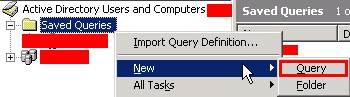
2. Goto “Saved Queries” – “New” – “Query”. This will open up the “New Query” window.
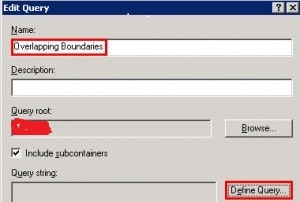
3. On “New Query” – Enter the new query name as “Overlapping Boundaries” (or whatever you prefer). and click on “Define Query”.
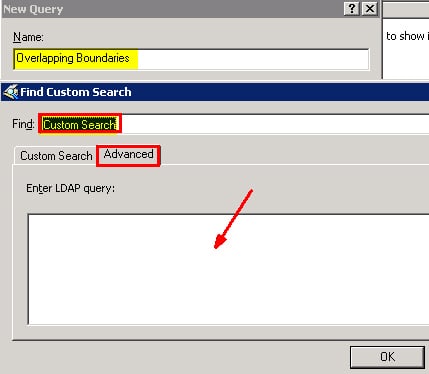
4. Select “CUSTOM Search” in the “Find Custom Search” window. Then, go to the “Advanced” tab.
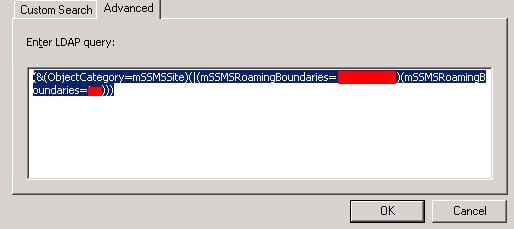
5. Use the LDAP query (to find the IP subnets associated with SCCM sites in the hierarchy). Replace the variable values of “Enter The IP Subnet” with the actual IP Subnet (e.g. 10.163.24.0) and “AD Site” with the actual AD site name (e.g. KPS – don’t use quotes ) and click OK.
(&(ObjectCategory=mSSMSSite)(|(mSSMSRoamingBoundaries=ENTER IP SUBNET)(mSSMSRoamingBoundaries=ENTER AD SITE Name)))
6. Click on the “Overlapping Boundaries” query to see the result in the right-hand panel.

7. If your query result has only one ‘scam site’ – AD object (“SMS-Site-567” where “567” is your SCCM site code), then you don’t have any overlapping boundary issue for that particular IP subnet concerning the AD site.
If you see more than one SCCM site AD Object in the result, then yes, you have overlapping boundaries and need to do some work to remove this overlapping.
Note: This method would be helpful if you use the AD Site as the boundary.
References
- 11 Days Of Free Intune Training Course By HTMD Community – HTMD Blog #2 (howtomanagedevices.com)
- Planning Configuration Manager Boundaries
We are on WhatsApp. To get the latest step-by-step guides and news updates, Join our Channel. Click here –HTMD WhatsApp.
Author
Anoop C Nair has been Microsoft MVP from 2015 onwards for 10 consecutive years! He is a Workplace Solution Architect with more than 22+ years of experience in Workplace technologies. He is also a Blogger, Speaker, and leader of the Local User Group Community. His main focus is on Device Management technologies like SCCM and Intune. He writes about technologies like Intune, SCCM, Windows, Cloud PC, Windows, Entra, Microsoft Security, Career, etc..




what if the boundary is a IP range, can u help me find the overlapping boundary in IP ranges
Excellent query… already find a conflicts between sites !!! Do I have to input each IP subnets one by one for the 350 subnets I have ?
Which “with actual IP Subnet ” I should input? I have more than 1,200 boundary ranges already in SCCM?
Thanks,
Dom
StaffIf you IP ranges are covered with all the added IP ranges then no need to add IP subsets.