






Best Place to Find Package IDs for SCCM Application
Let’s learn where to find the Best Place to Find Package IDs for SCCM Application in the Admin Console. It isn’t easy to find Package IDs for applications and software update packages from one place.
However, this post provides more details about where to find the package IDs of applications and other deployment packages.
Let me share one example here. I tried running the ConfigMgr Content Library Cleanup Tool and got an error with a package ID.
In Configuration Manager, you can have package IDs for several workloads (deployment packages). These include applications, Task Sequences, Boot Images, or Software Update Packages.

I don’t want to go to each node under the Software Library workspace in the admin console to find the package ID. The best place to find all these package IDs should be in the SCCM console. Read on to learn more.
Table of Contents
Application – Package ID – Best Place to Find Package IDs for SCCM Application
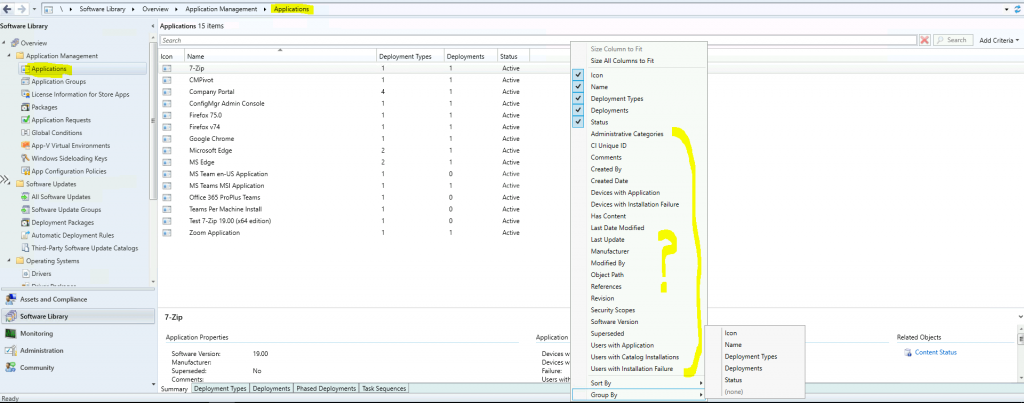
Where can I find the package ID for applications? I also checked the addition column details available for applications but couldn’t find the package ID entry.
Some PowerShell commands (Get-CMApplication) help show applications’ package IDs. I don’t know why the Package ID column is not an option for the applications node in the ConfigMgr Admin console.
Also, someone had already raised a UserVoice item to add the package ID column in the admin console. If you want this option in the console, vote for the UserVoice item – SCCM Console: Add PackageID column in the applications item view.
Please read the following sections to learn where to find the package IDs for all those workloads in Configuration Manager.
- Differences between SCCM Applications and Packages Workloads
- ConfigMgr Reports Application Package Distribution | Default | SCCM | Configuration Manager
Distribution Point Properties
I know you can get the package ID details from distribution point properties, but I don’t recommend using this method. Finding the correct DP where this particular application is distributed is difficult.
NOTE! There is an easier way to find the package IDs for applications (discussed in the section below).
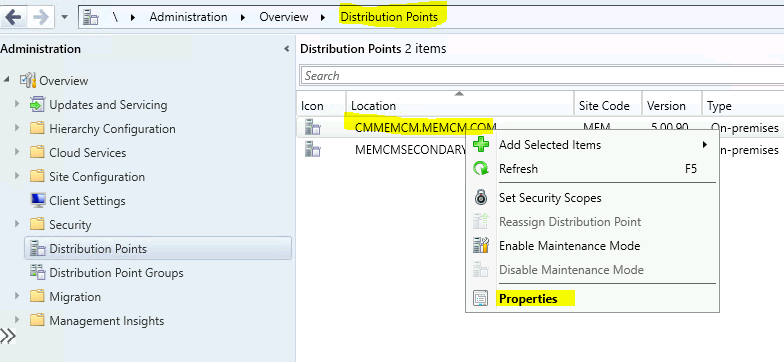
- Navigate to: \Administration\Overview\Distribution Points.
- Select the Distribution Point from the list.
- Right-click and go to the properties of the Distribution Point
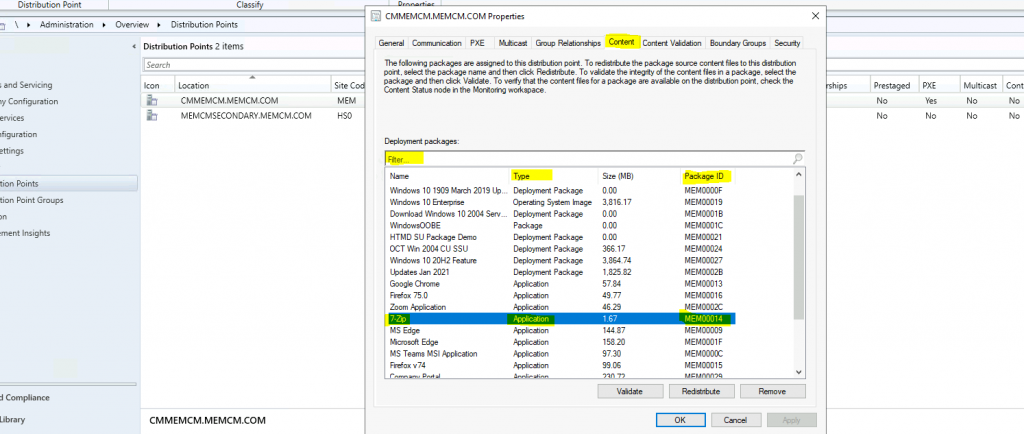
Click on the Content tab and check the package ID for applications from the tab.
- Search/Filter option
- Type of the Deployment package
- Package ID for the deployment package (application)
Find ConfigMgr Package IDs in the Admin Console
Here you go! In my experience, the following is the best method for finding the package ID for different workloads or deployment packages in SCCM.
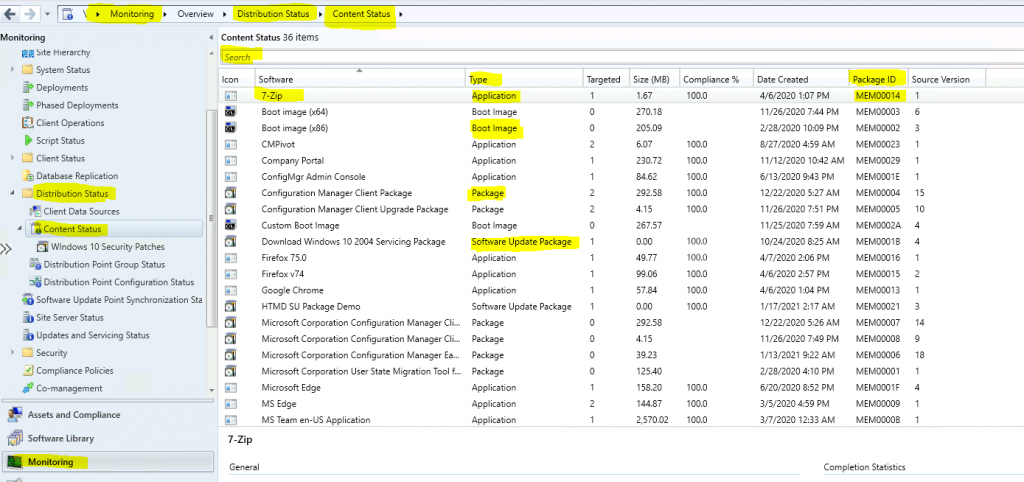
- Navigate to \Monitoring\Overview\Distribution Status\Content Status
- Use the search bar to find the package ID of any deployment package, such as an Application, Task Sequence, Boot Image, or Software Update.
- Check the Package ID column to get the package ID details of applications or any other workload.
Resources
- Fix ConfigMgr DP Issue RPC server is Unavailable Error Code 0x800706ba
- Fix SCCM SendFiles Failed 0x80070003 Error
- SCCM Install New Distribution Point Role | ConfigMgr
We are on WhatsApp now. To get the latest step-by-step guides, news, and updates, Join our Channel. Click here – HTMD WhatsApp.
Author
Anoop C Nair has been Microsoft MVP for 10 consecutive years from 2015 onwards. He is a Workplace Solution Architect with more than 22+ years of experience in Workplace technologies. He is a Blogger, Speaker, and Local User Group Community leader. His primary focus is on Device Management technologies like SCCM and Intune. He writes about technologies like Intune, SCCM, Windows, Cloud PC, Windows, Entra, Microsoft Security, Career, etc.




Discussion