






FIX Error 0x87d20002 SCCM Secondary Server Upgrade
Let’s fix error 0x87d20002 SCCM Secondary Server Upgrade. I was trying to upgrade the secondary server with the newest version 2207 of SCCM, and the upgrade failed with many different errors explained in this post.
The secondary server upgrade failed with the following error message “ConfigMgr Setup Failed to Upgrade site.” It couldn’t even complete the Prerequisite checks. Prerequisite checks completed with failure.
The SCCM Secondary server supports a maximum number of 15,000 Windows devices. I would try to avoid installing secondary servers in SCCM architecture (a.k.a) design mainly because it increases the complexity of SCCM infra.
I have already explained my experience with the SCCM Secondary Server Installation Failed Error and fix in the previous post. The upgrade failures are not rare for SCCM secondary servers, but this one was a bit different from other SCCM upgrade issues.

Issue: SCCM Secondary Server Failed to Upgrade
I got an error while upgrading SCCM secondary server to the latest version. I noticed the error when I checked the following path -> \Administration\Overview\Site Configuration\Sites. I saw the error Failed to upgrade.

The next step was to get more details on the error from the console itself. You can right-click on the secondary site and select the Show Install Status option. The following are the 3 (three) errors that I have noticed. And all of them are very weird SCCM secondary server upgrade errors.
[Failed]: Either the user account running Configuration Manager Setup or NT AUTHORITY\SYSTEM does not have sysadmin SQL Server role permissions on the SQL Server instance selected for site database installation, or the SQL Server instance could not be contacted to verify permissions. Setup cannot continue.
- [Failed]: Current SUM configuration uses virtual locations for some active SUPs. Please remove any virtual locations from the existing SUM configuration.
[Failed]: The collation of the site database does not match the collation of the parent site’s database. All sites in a hierarchy must use the same database collation.
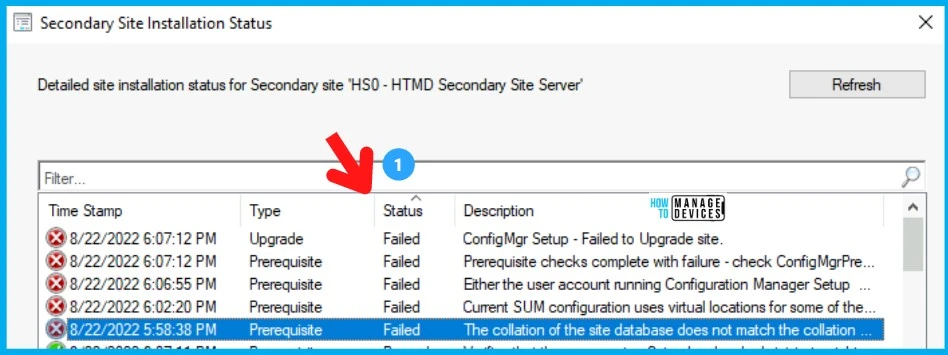
Troubleshooting on collation of the site database does not match Issue | 0x87d20002
Let’s troubleshoot further using the SCCM log files on the primary and secondary servers. The log files are the best friend of admins in the SCCM world. You can use the free log reading tools that are available with SCCM. The following list gives you an idea of the log files to check:
- ConfigMgrPreReq.log log file on the primary server C:\.
- smstvc.log log file on secondary server C:\.
I didn’t get any further information from ConfigMgrPreReq.log on the primary server. The same information was available in the console Show Install Status option. So it was not very useful.
The next step was to check the smstvc.log log file on the secondary server C drive (root drive). I noticed the following are the 3 important errors on the smstvc.log file.
ERROR: NONLBSUPS: Failed to get local SQL Server connection for DB: CM_HS0
Failed to get the database information (0x87d20002)
ERROR: Failed to connect SQL Server MEMCMSecondary.memcm.com, Database master.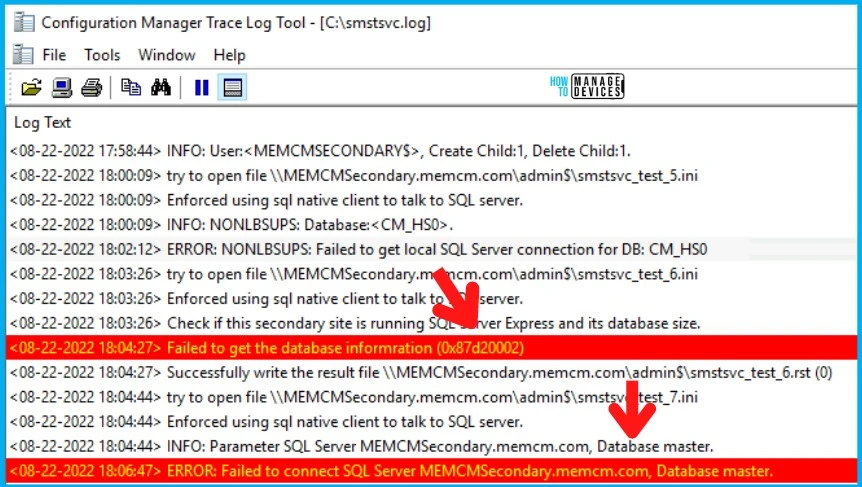
Failed to Connect to Database Error for SCCM Secondary Server
Failed to Connect to Database Error had given me some thoughts on SQL-related issues. The secondary server upgrade failed with error 0x87d20002 because of SCCM Secondary Server SQL database issues. Let’s see more details below.
The next troubleshooting step was to try launching SQL Server Management Studio (SSMS) and connect to the secondary server Database CM_HS0. The SSMS couldn’t connect to the secondary server database. This was also giving some weird errors, as shown below.
Cannot connect to MEMCMSECONDARY.
A network-related or instance-specific error occurred while establishing a connection to SQL Server.
The server was not found or was not accessible. Verify that the instance name is correct and that SQL Server is configured to allow remote connections.
provider: Named Pipes Provider, error: 40 - Could not open a connection to SQL Server
Error Number: 2
Severity: 20
State: 0
The system cannot find the file specified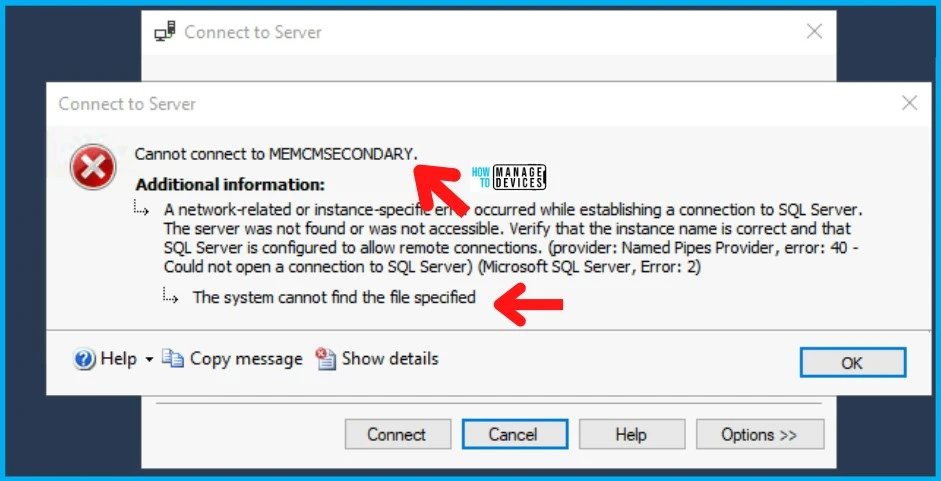
Troubleshooting with SQL Server Configuration Manager
The next step was to understand the reason for the DB connectivity failures. There were some odd errors during the SSMS connection test above. I launched the SQL Server Configuration Manager from the secondary site server, where the SQL DB is also hosted.
I learned from the SQL Server Services node that SQL Server (MSSQLSERVER) service is stopped. I don’t know what the reason is for this issue.
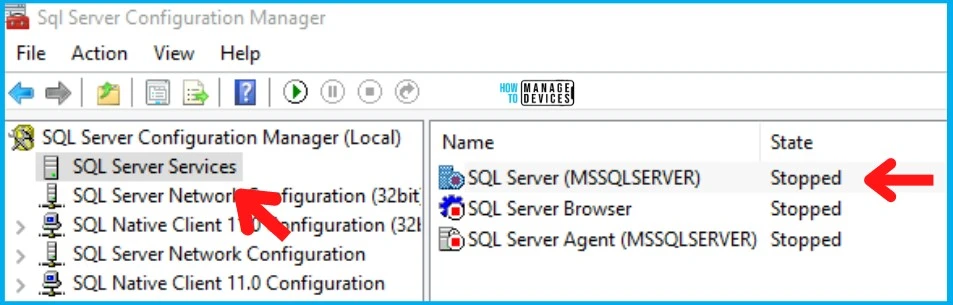
FIX Error 0x87d20002 SCCM Secondary Server Upgrade Issue
Let’s check the fix for the Error 0x87d20002 and SCCM Secondary Server Upgrade Issue. From the SQL Server Configuration Manager testing, it was clear to me that the issue is related to SQL Service service.
Started the SQL Server Service from the SQL Server Configuration Manager tool. The next was to launch SSMS to connect to the secondary server DB. It worked like a champ this time.

Read more on SCCM secondary server upgrade from the following post – the Configuration Manager Secondary Server Hotfix Installation Guide. Follow the step to re-initiate the secondary site upgrade process. Once the process is started, it’s just the same as the hotfix installation process.
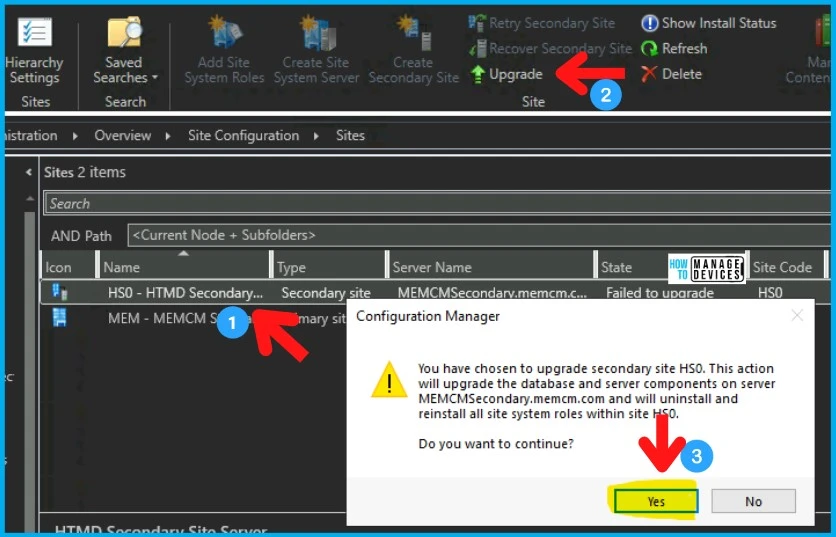
- Click on the Secondary site from \Administration\Overview\Site Configuration\Sites.
- Click on the Upgrade option from the ribbon menu.
- Click on the Yes button to continue with the SCCM secondary site upgrade process.
Results – SCCM Secondary Server Upgrade Completed Successfully
Suppose you have implemented proper monitoring using either SCCM Server Infrastructure Monitoring Script or SCOM. In that case, you can find out these issues quickly without going through all these troubleshooting steps.
You can check and confirm whether the upgrade process of the SCCM secondary server is successful or not. Navigate to \Administration\Overview\Site Configuration\Sites.
The Upgrade is completed as per the below screenshot, and the secondary site is active. The version details are also given in the following table.
| Secondary Server Version | Build Number | Client Version |
|---|---|---|
| 5.00.9088.1000 | 9088 | 5.00.9088.1007 |

Resource -> Secondary server Size and scale – Configuration Manager | Microsoft Docs
Author
Anoop C Nair is Microsoft MVP! He is a Device Management Admin with more than 20 years of experience (calculation done in 2021) in IT. He is Blogger, Speaker, and Local User Group HTMD Community leader. His main focus is on Device Management technologies like SCCM 2012, Current Branch, and Intune. He writes about ConfigMgr, Windows 11, Windows 10, Azure AD, Microsoft Intune, Windows 365, AVD, etc.




Discussion