






FIX SCCM Console Install Upgrade Error 1638
SCCM Console Install Upgrade Error 1638 is another version program already installed. Many users report console install errors after the latest Hotfix Rollup Update.
After the installation of the Rollup update, the console update starts downloading the latest console Installer, and it errors out with exit code 1638. The error 1638 means another version program is already installed on the server or Windows 11 or 10 devices.
Administrators use the SCCM admin console to manage the Configuration Manager environment. If you don’t update the console version, there could be a chance of an SCCM admin console compatibility issue.
Fix SCCM Console Access Error 0x80070005 0x800706ba RPC Server is unavailable. I started getting comments on How to Verify WMI Permissions Required for SCCM Console Access post back in June 2022.

- Latest Fixes For SCCM 2207 KB15152495 Hotfix Update Rollup
- How To Enable Dark Theme for SCCM Console | Easy Method
SCCM Console Install Upgrade Error 1638
Many users reported (in the comments section) that they cannot upgrade the SCCM console after the latest rollup update. The log under C:\ConfigMgrAdminUISetupVerbose.log gives the following error:
Product: Microsoft Endpoint Configuration Manager-Console – Update “ALP1031” couldn’t be installed. Error code 1638.
Error code 1638 means that it’s already installed. The File “C:\Program Files (x86)\Microsoft Configuration Manager\AdminConsole\bin\AdminUI.ExtensionInstaller.exe” that’s executed for this update is from August this year.
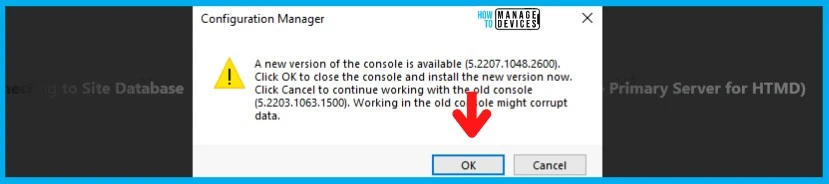
A New version of the console is available. Click OK to close the console and install the new version now. Click Cancel to continue working with the old console. Working in the console might corrupt data. Let’s find out the FIX for this issue in the below section.
- Click OK to install a new version of the console.
- Ended up with SCCM Console Upgrade Error 1638.
SCCM Console Version Compatibility
You can connect an SCCM admin console to a site that runs a newer version and view information about other sites in that hierarchy during the upgrade process. Unless and until you are in the latest version of the SCCM console, you might be missing some exciting new features of the latest Current Branch version.
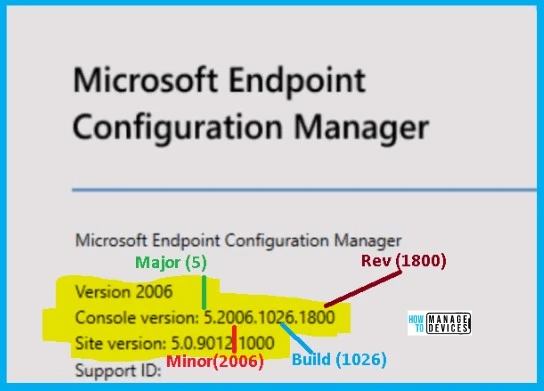
As mentioned above N-1 support is available for the console version where N is the site server version. It’s possible that differences between the console version and the SCCM site version can result in data issues. Let’s check the console version in detail:
| Major | Minor | Build | Revision |
|---|---|---|---|
| 5 | 2006 | 1026 | 1800 |
SCCM Console Install Source Files
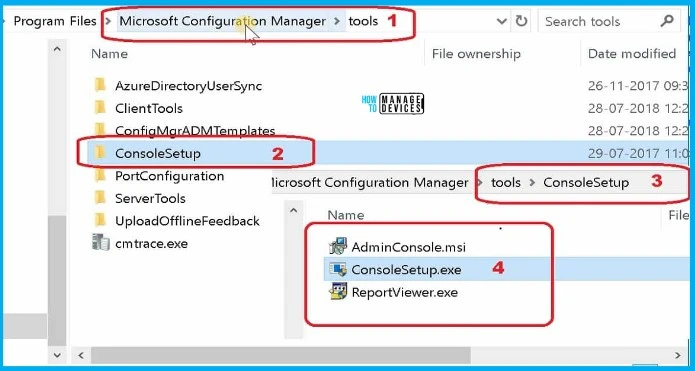
Let’s check the SCCM console install source files. You must not install the console from CD.Latest folder on the site system. This is not a supported source location for the SCCM admin console. You can also install the console from SCCM installation media: \SMSSETUP\BIN\I386.
SCCM console installation files and supported language packs for the site are available under the folder Tools -> ConsoleSetup subfolder. The following path is where you can find the source files for the SCCM admin console installation.
<SCCM site server installation path>\Tools\ConsoleSetup
FIX SCCM Console Install Upgrade Error 1638
The error 1638 is common for some other Microsoft applications and SCCM client upgrade scenarios as well. I think this is mainly to do with some issues with the Adminconsole.MSI packaging issues. Big thanks to Jose Luis Mesones Albitres to give this clue in the rollup update post comments.
SCCM console installs or upgrades error 1638 means another version program is already installed. Of course, we all know there will be another version of the console installed on the Windows device and we want to upgrade the version to the latest one.
So if you see this error 1638, you can try to uninstall the admin console using the appwiz.cpl (add/remove program) or you can use the silent command mentioned below to uninstall the admin console.
Let’s get the SCCM admin console installer source files from (Remember to change Drive Letter) F:\Program Files\Microsoft Configuration Manager\tools\ConsoleSetup.
- ConsoleSetup.exe /uninstall /q
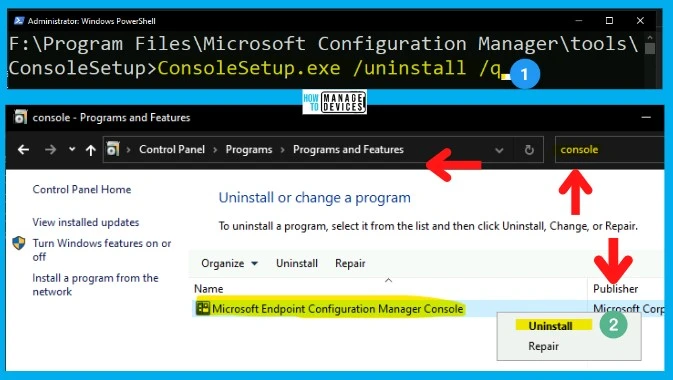
Once the SCCM console is uninstalled successfully, you can use the same source location and ConsoleSetup.exe to install the admin console again. It’s better to restart the server or Windows 11 device after the uninstall process.
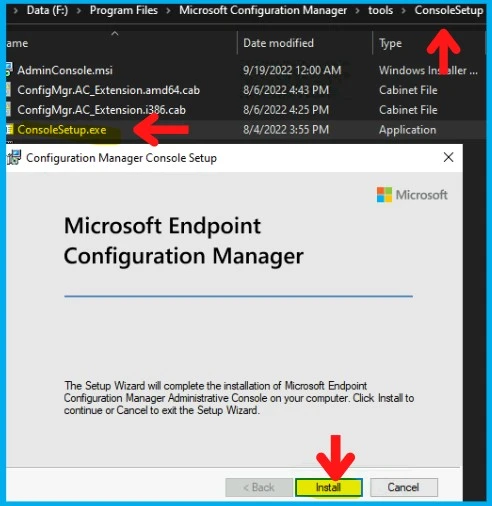
You can also use the following command line options to install the SCCM console. Select any of the following command-line options:
English Version of Console Installation Option #1 - ConsoleSetup.exe /q TargetDir="%ProgramFiles%\ConfigMgr Console" DefaultSiteServerName=My Server FQDN

Language Pack Option #2 - ConsoleSetup.exe /q TargetDir="%ProgramFiles%\ConfigMgr Console" DefaultSiteServerName=My Server FQDN LangPackDir=C:\Downloads\ConfigMgr

Author
Anoop C Nair is Microsoft MVP! He is a Device Management Admin with more than 20 years of IT experience (calculation done in 2021). He is Blogger, Speaker, and Local User Group HTMD Community leader. His main focus is on Device Management technologies like SCCM 2012, Current Branch, and Intune. He writes about ConfigMgr, Windows 11, Windows 10, Azure AD, Microsoft Intune, Windows 365, AVD, etc.




Discussion